Apple Pay Integration
Apple Pay Integration enables customers to push their debit and credit cards from the Infinity mobile banking application into Apple Wallet on their iOS devices in a secure manner to make payments via Apple Pay using the debit and credit cards.
This section explains the process of integrating the credit or debit cards to Apple Pay wallet. The following are covered:
- Scope
- Prerequisites
- Enable NFI for Apple Pay
- Issuer Host Methods and APIs
- Common Wallets Utility File
- API for Creating Tokenized Data for Wallets (VISA)
- Limitations
- Functional Flow Video
Scope
The Issuer APIs are used to add the cards to Apple Pay wallet for In-app provisioning. These APIs encrypt the card data and generate a unique card ID. The generated unique card ID is saved in the native wallet for secure payment.
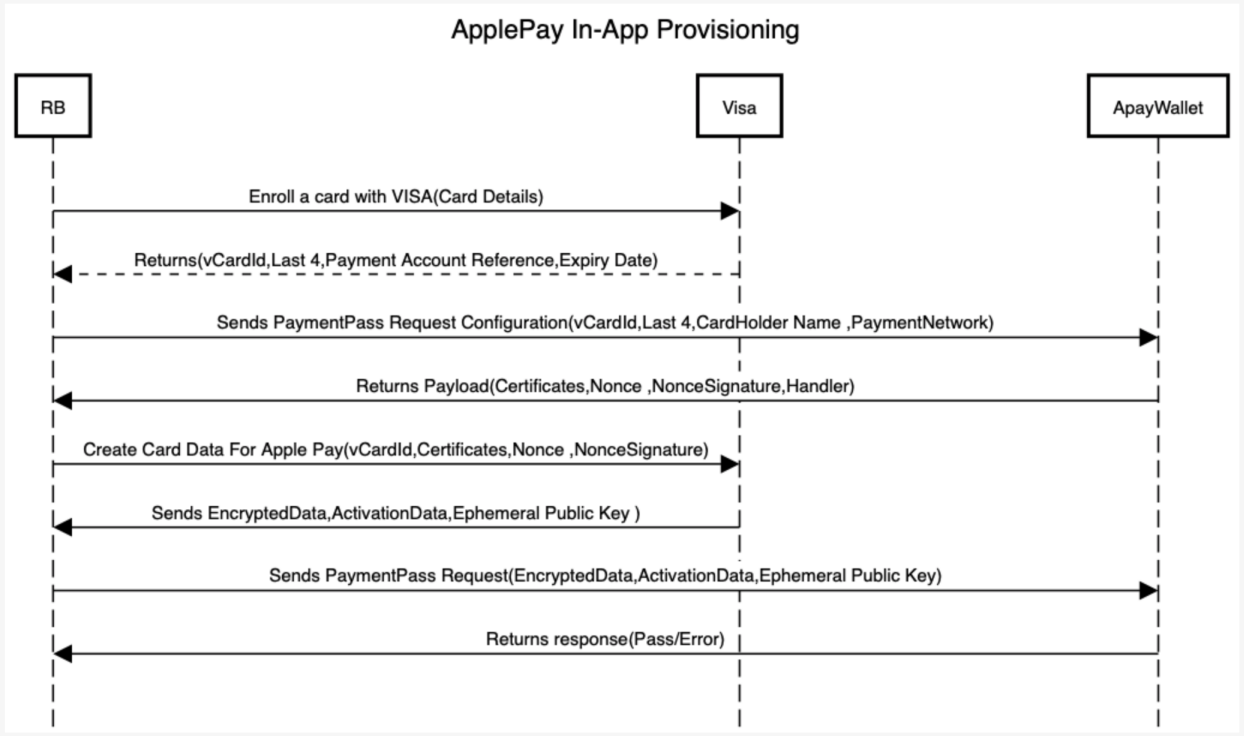
Functional Sequence Diagram
The following sequence diagram depicts the functional flow of integrating credit or debit cards to Apple Pay.
Technical Sequence Diagram
The following sequence diagram depicts the technical flow of integrating the credit or debit cards to Apple Pay.
Prerequisites
Following are the prerequisites to integrate the credit or debit card to Apple Pay wallet.
- Create a developer Apple account.
- Request for com.apple.developer.payment-pass-provisioning from apple through mail.
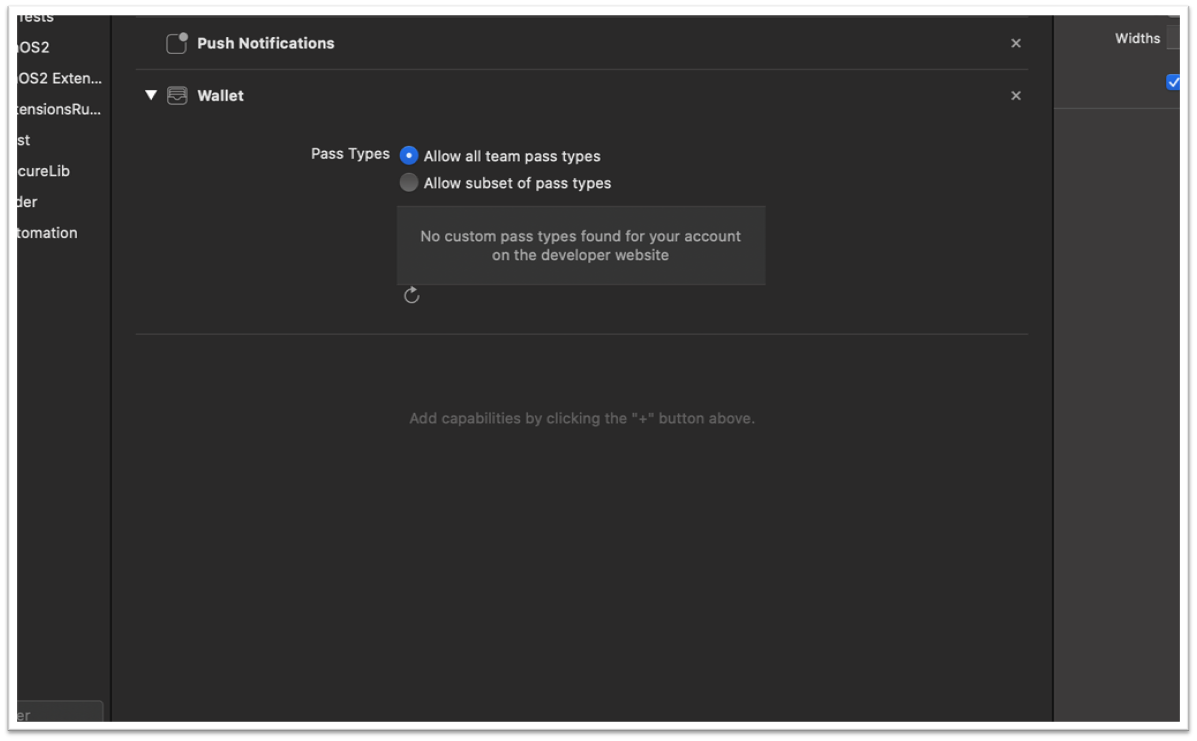
- Add wallet capability to the provisioning profile.
- Access to card provisioning APIs from the Card Provider.
- Banks or Card Issuers must already have the capability where the cards issued by them can be manually added to Apple Wallet. The Infinity banking application provides a mechanism to push the cards into Apple Wallet and then it follows the business as-usual flow that is followed while adding cards manually.
Enable Native Function Interface (NFI) for Apple Pay
This section explains the procedure to integrate Apple Pay SDK with Infinity mobile banking.
- The NFIs and Utility files are provided as part of Retail Banking code base and disabled by default. If wallets functionality is required, the implementation team must generate the build by enabling NFIs and wallet specific dependencies.
- A customer can chose to remove the NFIs and wallet integration files and only WalletsUtility.js file is required. The methods in WalletsUtility.js file will handle the APIs unavailability.
Enabling NFI involves the following steps:
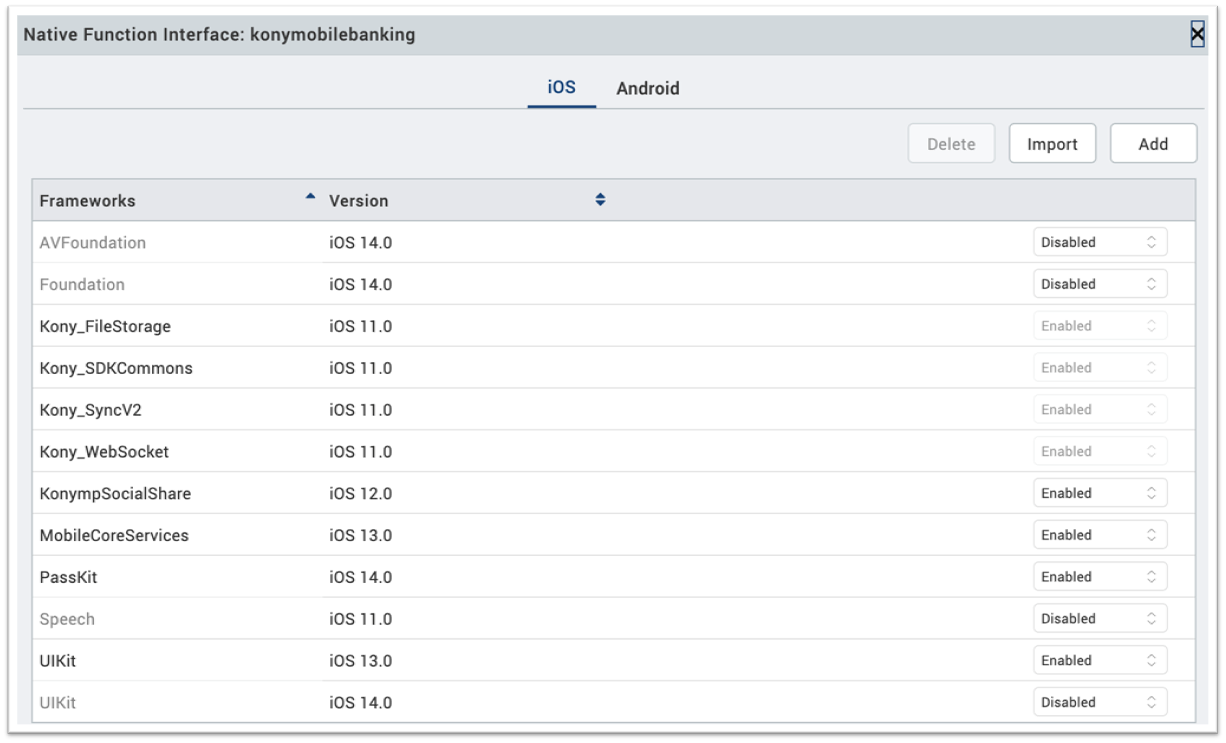
- Import PassKit, UIKit Frameworks in Visualizer to the following path: Visualizer > Edit > Manage Native Function APIs. Add latest versions of Passkit and UIKit Frameworks.

- Use the available native function APIs in Passkit and UIKIt to build the Visualizer project.
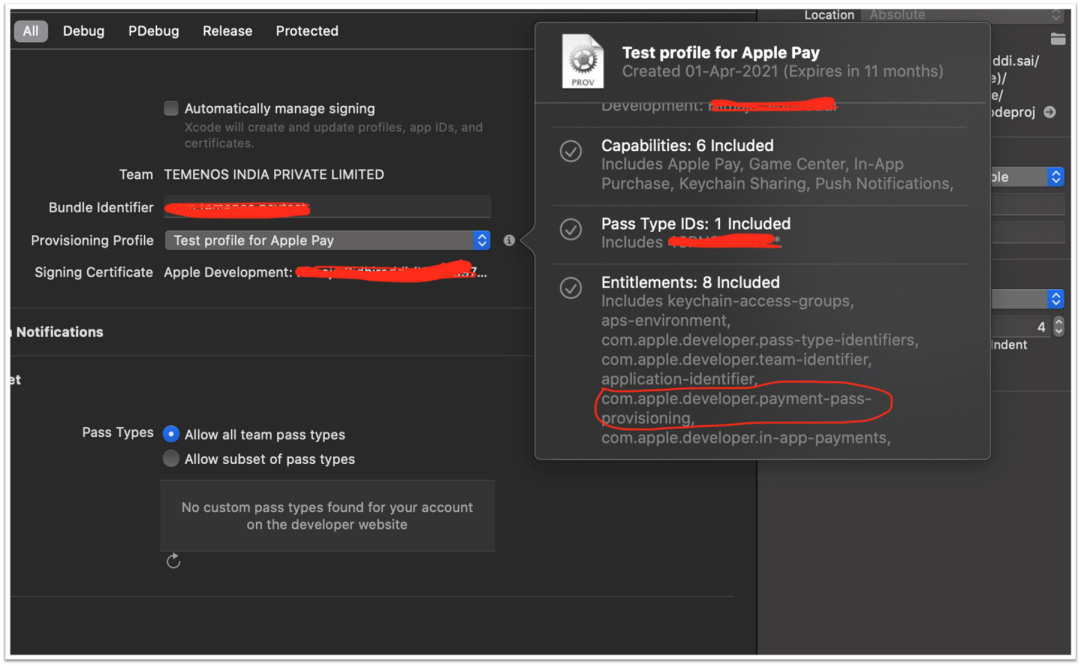
- After extracting the KAR file, add wallet capability to the required target in the XCode project.

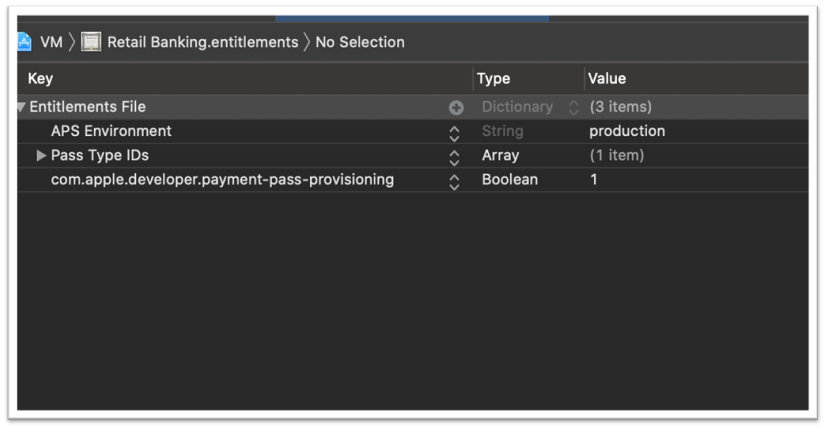
- Once wallet capability is added, $projectname.entitlements file is generated.
- Add a new entry as com.apple.developer.payment-pass-provisioning in the entitlements file as a Boolean entity with the value 1 (YES).

- Use the provisioning profile with wallet capability and com.apple.developer.payment-pass-provisioning entitlements (this must be obtained by contacting Apple).

Issuer Host Classes and API Methods
This section explains the Apply Pay supported methods and APIs.
The following classes must be imported:
- PKPassLibrary
- PKAddPaymentPassViewController
- UIApplication
- NSData
- PKAddPaymentPassRequest
- PKAddPaymentPassRequestConfiguration
Methods
The following API methods must be implemented:
- Initialize(): To initialize and instantiate the required classes.
- IsApplePaySupported(). To check if Apple Pay is supported by a device.
- AddCardToApplePay(). To add a card to Apple Pay to send a request to apple wallet to initiate In-App Provisioning. A PKAddPaymentPassRequestConfiguration is sent with required details through PKAddPaymentPassViewController. It has a controller and has got two delegate methods.
- GenerateRequestWithCertificateChainNonceNonceSignatureCompletionHandler(): Certificates, nonce, nonceSignature received from apple are to be constructed into a payload depending on be requirement to Issuer server API to encrypt the data.
- DidFinishAddingPaymentPassError(). The final callback invoked after either a pass is added, or an error has occurred.
- IsCardAlreadyAdded(). Checks if a payment pass is already added to the wallet.
Common Wallets Utility File and APIs
This section explains the common utility files and APIs.
NOTE: If a customer chooses to remove the NFIs, the methods in WalletsUtility.js file handles the APIs unavailability.
The WalletsUtility.js file is a common utility file that communicates between the integration layer and Retail Banking code. The utility file has the following methods:
API to check whether wallets are supported in specific device
isApplePaySupported () - Returns true if Apay is supported or else false. Returns false for Android.
API to check whether card is already added to wallet
- isCardAlreadyAdded_Apay (cardIdentifier) - Method to check if card is already added to the wallet or not.
- isCardSupported_Apay() - Method to check if wallet supports the card.
API to add cards to wallet
addCardtoAPayWallet(cardsData, succCallback, errCallback) - API to add card to Apay wallet.
NOTE: CardsData in params is tokenized cardData which differs from wallet to wallet. In-app provisioning data obtained from issuer APIs (VISA) is used in Retail Banking code base.
API for Creating Tokenized Data for Wallets (VISA)
This section explains the in-app provisioning process and related APIs.
NOTE: In the current release, Visa provider is used for in-app provisioning. Refer to Visa in-app provisioning for more information.
Visa In-App Provisioning currently supports Universal Card Enrollment and In-App Provisioning for Apple Pay, Google Pay, or Samsung Pay.
Universal Card Enrollment API enables Visa clients to digitally register accounts with Visa in real time. Once registered, client developers receive back a universal card identifier, that can be used inter-operably for accessing certain other Visa services like Visa In-App Provisioning without directly having to handle sensitive PAN data or without having to re-register and maintain card data repetitively across multiple Visa products in the future.
In-App Provisioning API enables clients to request encrypted card data using the universal card identifier from Universal Card Enrollment API. Clients can pass this encrypted card data payload to Apple Pay, Google Pay or Samsung Pay wallet for tokenization. This token then becomes active on the Pay Wallet and is pushed to the consumer's device.
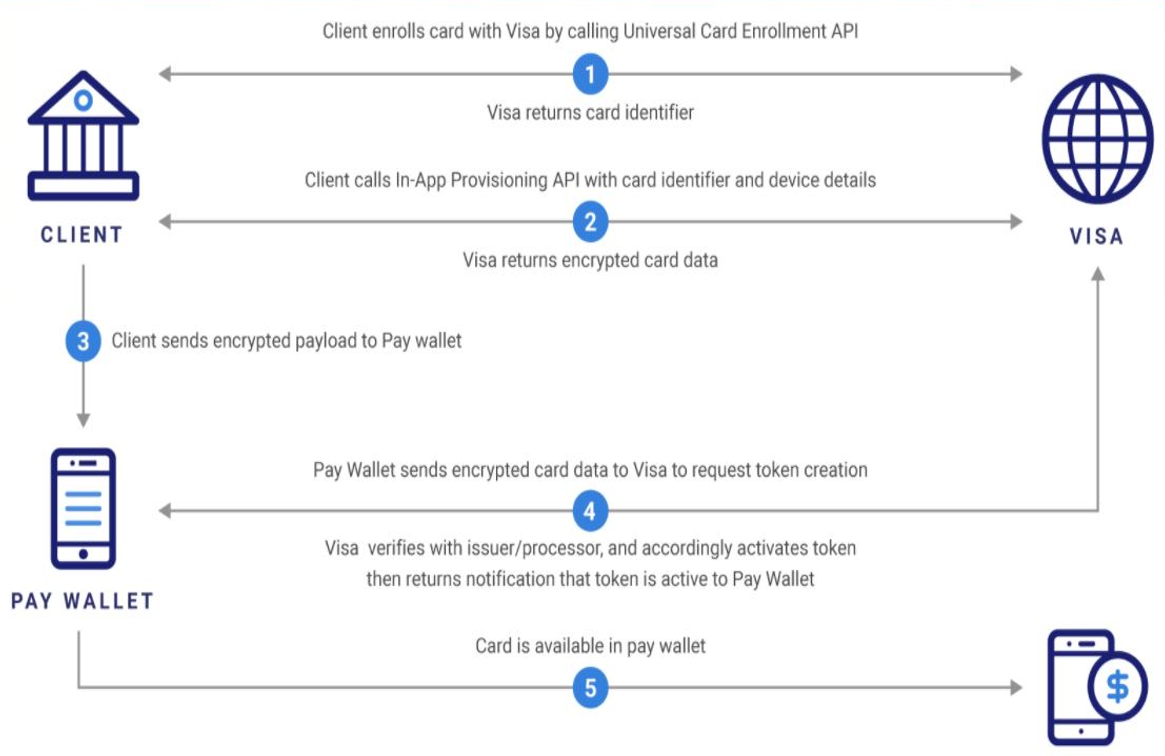
The following APIs are used in the Retail Banking application for Apple Pay:
| API | Description | API Reference |
|---|---|---|
| enrollCardForVisa | Create a card object (if it doesn’t exist) and link it to an existing customer record. | Reference Link |
| createCardDataForApplePay | Generate encrypted card data to perform in-app token provisioning for Apple Pay. | Reference Link |
enrollCardForVisa
{{URL}}/services/data/v1/RBObjects/operations/Cards/enrollCardForVisa
Sample Request
{

    "paymentService": "applePay",
    "cardID": "115",
    "nameOnCard": "Digital Issuance",
    "cvv2": "123",
    "billingAddress": "[{'name': 'Digital Issuance',
'line1': '12301 Research Boulevard',
'line2': 'Research Boulevard',
'line3': 'Visa USA','city': 'Austin',
'state': 'TX','countryCode': 'US','postalCode': '78759'}]"

}
Sample Response
{

    "vCardID": "v-123-ba75fedc-cd55-40ef-8187-77fabab34501",
    "paymentAccountReference": "V1234567890124514236833852412",
    "last4": "2412",
    "expiryMonth": "01",
    "expiryYear": "2021",
    "opstatus": 0,
    "httpStatusCode": 0

}
createCardDataForApplePay
{{URL}}/services/data/v1/RBObjects/operations/Cards/createCardDataForApplePay
Sample Request
{

"deviceCert": "adevicecert",
"nonceSignature": "jD4Aphu+93N2wbBn",
"nonce": "vXWJaBidcTLaJJCF",
"paymentService": "applePay",
"cardID":"v-123-ba75fedc-cd55-40ef-8187-77fabab34501"

}
Sample Response
{

    "vCardID": "v-123-ba75fedc-cd55-40ef-8187-77fabab34501",
    "encryptedPassData": "V3bICnkm37BmBKEF9FAKK2zh2SvLhe6Pqjv
JaHS2t0eJaKVL/SfQ8mXOkDN7o4h7ayFmSuBy7A4R9uYWqWdZbo7fc0xOcsQL
CgwQdVkW90JHAgL6j9axg26+OxrWyo7T9qm6NBlZzQFAy1oqYmw1tq6QMAEfbv7W
6omlZMojl7aJjvzETINq/YXY8Xp76hoMQFsNDpnNfFuAONmCaCm5Vd6a1zW4ULI
0SC1OPo8SdiEULTtZQO1XwiMtbD31JkSUhvHAEP2uo9bEeytPQwr82u6lxzzjLh
BP30JByQeOJ2y2o/k83XNGanZhlR1yojp9gObw6m/wyj/rfGxMFVhZtzDVFDblgp
1NzvCkPx0iyMRTURGLLmzyrLpzwVGIqv39GorEesOL1KtHb15KuwCtawdej3QiL
95rPRTW58stEr/PxLh3Bp9AjlV07tJTXdrKNz357j8hLo1AmRv2p8prnZDF0A0j
3jn71P68kvwvWhvZ3F+R0sNuC+E16IV1sJrWIlChU4NvcmsLBsv+ewsFqqGquDlpb
Fc3LuCQhE9PUu6wEGa7Im4e+Cbk79tcg+ZYFS1X4W7sAWLlxM0JzTMWdzSkqydLjiV
c9FvoM3gBFrm/1rs7I5CACNg0vyHpXDhPFTM3a9eysWef7qRdTxLIA7CUKDx59r4V
TWtGijz1Pwb5uZCnYvZd3i/+T7ra4xZ+9Z6u/nCqfWkZxNTfEfc3NOXte8s=",
    "activationData": "TUJQQUMtMS1GSy00MDEyMDAuMS0tVERFQS1CMEQwQj
cxNDNFN0M1QTc3M0I5MTc1OTA3RENCMUEzRUNCRENCQjJEMzI2MDBEOEY4RTU5OEI5
QzE4OTlGNzA3RjFCMDQ2RDY3RDNDREUwMg==",
    "ephemeralPublicKey": "BBSV6JzHhqoS0pLO6xMV6Z5yRhoOnpxaLtdjHxb
7pPXpmNGra65K3kvUnlwfRTkWjA7v2+rp+/sK/RhLqLdEGok=",
    "opstatus": 0,
    "httpStatusCode": 0

}
Limitations
- VISA Sandbox environment is used for card provisioning that has certain limitations. To test the flow end-to-end, it is a must to get a license for VISA Certification environment and go through the certification process. The process is the same for any other Card Provider.
- The end-to-end feature is not available in the demonstration system and therefore, refer to the functional flow video for a quick preview of the feature.
Functional Flow Video
 Apple Wallet functional flow video
In this topic
