Footer Menu Utility
Overview
The Footer Menu Utility file helps a developer configure the dynamic App Menu items of the Footer Menu component. It centralizes the methods that configure the widget properties of the Container of the Footer Menu component. The Footer Menu Utility file is available under the modules/require folder of the Infinity application.
NOTE: The Footer Menu Utility file is used inside the Mobile Banking application.
Footer Menu Utility File
The Footer Menu Utility file contains the following constants and methods.
- Constants
- getFooterMenuUtilityInstance Method
- updateMenuData Method
- setNotificationDot Method
- setFooterMenuItems Method
- handleFooterMenuError Method
- handleFooterMenuNavigation Method
Constants
The Footer Menu Utility file configures the constants used by the Footer Menu component. These constants configure the menu name.
Here is a sample of the Constant declaration provided in the Footer Menu Utility file.
    /**@member {Object} Maintains user permissions and features*/
    this.entitlements = {
    	"features": '[]',
    	"permissions": '[]'
    };
    /**@member {Object}  Contains all footer menu constants*/
    this.footerMenuConstants = {
    	OVERVIEW: kony.i18n.getLocalizedString('i18n.common.overView'),
    	BILLPAY: kony.i18n.getLocalizedString('i18n.common.billPay'),
    	CARDS: kony.i18n.getLocalizedString('i18n.common.myCards'),
    	MENU: kony.i18n.getLocalizedString('i18n.common.menu'),
    	ACCOUNTS: kony.i18n.getLocalizedString('i18n.common.accounts'),
    	APPROVALS: kony.i18n.getLocalizedString('i18n.common.approvals'),
    	WATCHLIST: kony.i18n.getLocalizedString('i18n.common.watchlist'),
    	TRANSFER: kony.i18n.getLocalizedString('i18n.common.transfer'),
    	CONTACTUS: kony.i18n.getLocalizedString('i18n.common.contactUs'),
    	LOCATEUS: kony.i18n.getLocalizedString('i18n.common.locateUs'),
    };
    /**@member {Array} holds the list of Footer MenuItems*/
    this.menuData = {
    	"defaultMenus": [{
    			"label": this.footerMenuConstants.OVERVIEW,
    			"icon": "overview_2.png",
    			"selectedIcon": "overview.png",
    			"isActive": true,
    			"navigation": {
    				"appName": "TestMA",
    				"friendlyName": "frmFooterMenuDestination"
    			} // Component Consumer should provide valid navigation config as per flow.
    		},
    		{
    			"label": this.footerMenuConstants.MENU,
    			"icon": "menu_2.png",
    			"selectedIcon": "menu.png",
    			"isActive": false,
    			"navigation": {
    				"appName": "TestMA",
    				"friendlyName": "frmFooterMenuDestination"
    			} // Component Consumer should provide valid navigation config as per flow.
    		}
    	],
    	"customMenus": [{
    			"label": this.footerMenuConstants.WATCHLIST,
    			"icon": "watch_list_2.png",
    			"selectedIcon": "watch_list.png",
    			"isActive": false,
    			"entitlements": "['WEALTH_WATCHLIST_INSTRUMENT_VIEW','WEALTH_WATCHLIST_INSTRUMENT_CREATE']",
    			"navigation": {
    				"appName": "TestMA",
    				"friendlyName": "frmFooterMenuDestination"
    			} // Component Consumer should provide valid navigation config as per flow.
    		},
    		{
    			"label": this.footerMenuConstants.TRANSFER,
    			"icon": "transfer_2.png",
    			"selectedIcon": "transfer.png",
    			"isActive": false,
    			"entitlements": "['INTRA_BANK_FUND_TRANSFER_CREATE','TRANSFER_BETWEEN_OWN_ACCOUNT_CREATE','INTER_BANK_ACCOUNT_FUND_TRANSFER_CREATE','INTERNATIONAL_ACCOUNT_FUND_TRANSFER_CREATE','P2P_CREATE','INTRA_BANK_FUND_TRANSFER_CREATE_RECEPIENT','TRANSFER_BETWEEN_OWN_ACCOUNT_CREATE_RECEPIENT','INTER_BANK_ACCOUNT_FUND_TRANSFER_CREATE_RECEPIENT','INTERNATIONAL_ACCOUNT_FUND_TRANSFER_CREATE_RECEPIENT','P2P_CREATE_RECEPIENT']",
    			"navigation": {
    				"appName": "TestMA",
    				"friendlyName": "frmFooterMenuDestination"
    			} // Component Consumer should provide valid naviagtion config as per flow.
    		}
    	],
    	"customMenusDefault": [{
    			"label": this.footerMenuConstants.CONTACTUS,
    			"icon": "contact_us_2.png",
    			"selectedIcon": "contact_us.png",
    			"isActive": false,
    			"entitlements": "[]",
    			"navigation": {
    				"appName": "TestMA",
    				"friendlyName": "frmFooterMenuDestination"
    			} // Component Consumer should provide valid naviagtion config as per flow.
    		},
    		{
    			"label": this.footerMenuConstants.LOCATEUS,
    			"icon": "locate_us_2.png",
    			"selectedIcon": "locate_us.png",
    			"isActive": false,
    			"entitlements": "[]",
    			"navigation": {
    				"appName": "TestMA",
    				"friendlyName": "frmFooterMenuDestination"
    			} // Component Consumer should provide valid naviagtion config as per flow.
    		}
    	],
    	"notification": {
    		"icon": "menu_notification_2.png",
    		"selectedIcon": "menu_notification.png",
    		"isNotificationAvailable": false
    	}
    };}
The Constants used in the Footer Menu Utility are assigned a JSON object with the following keys.
| Key | Description |
|---|---|
| entitlements |
|
| footerMenuConstants |
|
| menuData |
|
| notification |
|
getFooterMenuUtilityInstance Method
This method retrieves the scope of the FooterMenuUtility file.
| Parameter | Value |
|---|---|
| Input parameter |
NA |
|
How to Consume from Form Controller |
onNavigate: function() {
	var footerMenuUtility = require('FooterMenuUtility');
	this.footerMenuUtility = footerMenuUtility.getFooterMenuUtilityInstance();
},
|
|
Return Type |
None |
updateMenuData Method
This method updates the Menus as per user preferences.
| Parameter | Value |
|---|---|
| Input parameter |
Accepts a JSON object with either
|
|
How to Consume from Form Controller |
updateFooterMenu: function() {
	//Context data for custum menu items
	let customMenu = {
		"customMenus": [{
				"label": this.footerMenuUtility.footerMenuConstants.ACCOUNTS,
				"icon": "accounts_2.png",
				"selectedIcon": "accounts.png",
				"isActive": false,
				"entitlements": "['ACCOUNTS']",
				"navigation": {
					"appName": "TestMA",
					"friendlyName": "frmFooterMenuDestination"
				}
			},
			{
				"label": this.footerMenuUtility.footerMenuConstants.APPROVALS,
				"icon": "approvals_2.png",
				"selectedIcon": "approvals.png",
				"isActive": false,
				"entitlements": "['APPROVALS']",
				"navigation": {
					"appName": "TestMA",
					"friendlyName": "frmFooterMenuDestination"
				}
			}
		]
	};
	// Update default Footer menu items
	this.footerMenuUtility.updateMenuData(customMenu);
}
|
|
Return Type |
None |
setNotificationDot Method
This method enables or disables the notification dot for new or unread notifications.
| Parameter | Value |
|---|---|
| Input parameter |
Boolean value to enable or disable the notification. |
|
How to Consume from Form Controller |
setNotificationStatus: function() {
	// sets the notification status for user
	this.footerMenuUtility.setNotificationDot(true);
}
|
|
Return Type |
None |
setFooterMenuItems Method
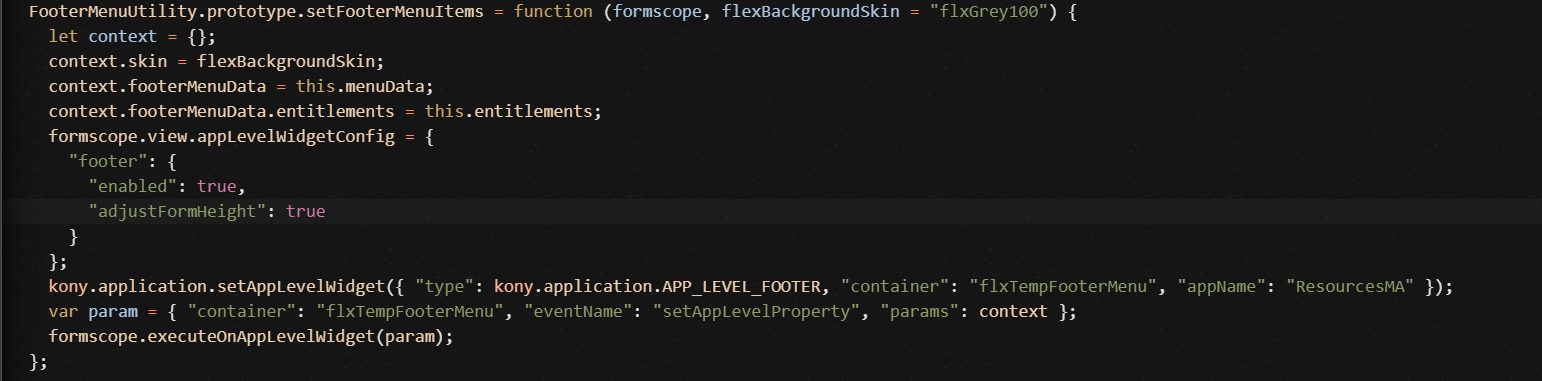
This method sets the app level widget data Method to set app level widget data using the kony.application.setAppLevelWidget API. This API configures a container widget as a footer menu at an application level. The kony.application.setAppLevelWidget API maps the Context Data to the App level widget using the executeOnAppLevelWidget function inside the API definition.
| Parameter | Value |
|---|---|
| Input parameter |
|
|
How to Consume from Form Controller |
preShow: function() {
	var scope = this;
	this.footerMenuUtility.setFooterMenuItems(scope, "flxPrimary500");
}
|
|
Return Type |
None |
handleFooterMenuError Method
This method handles any error that occurs in the component. This method passes an error object information from the component to the Segment Template controller.
| Parameter | Value |
|---|---|
| Input parameter |
The JSON object contains the following keys.
|
|
How to Consume from the App Level Widget Template Controller |
//Gets triggered if any exception occurs in Footer Menu Component.
scope.view.FooterMenu.onError = function(errorObject) {
	scope.footerMenuUtility.handleFooterMenuError(errorObject);
};
|
|
Return Type |
NA |
handleFooterMenuNavigation Method
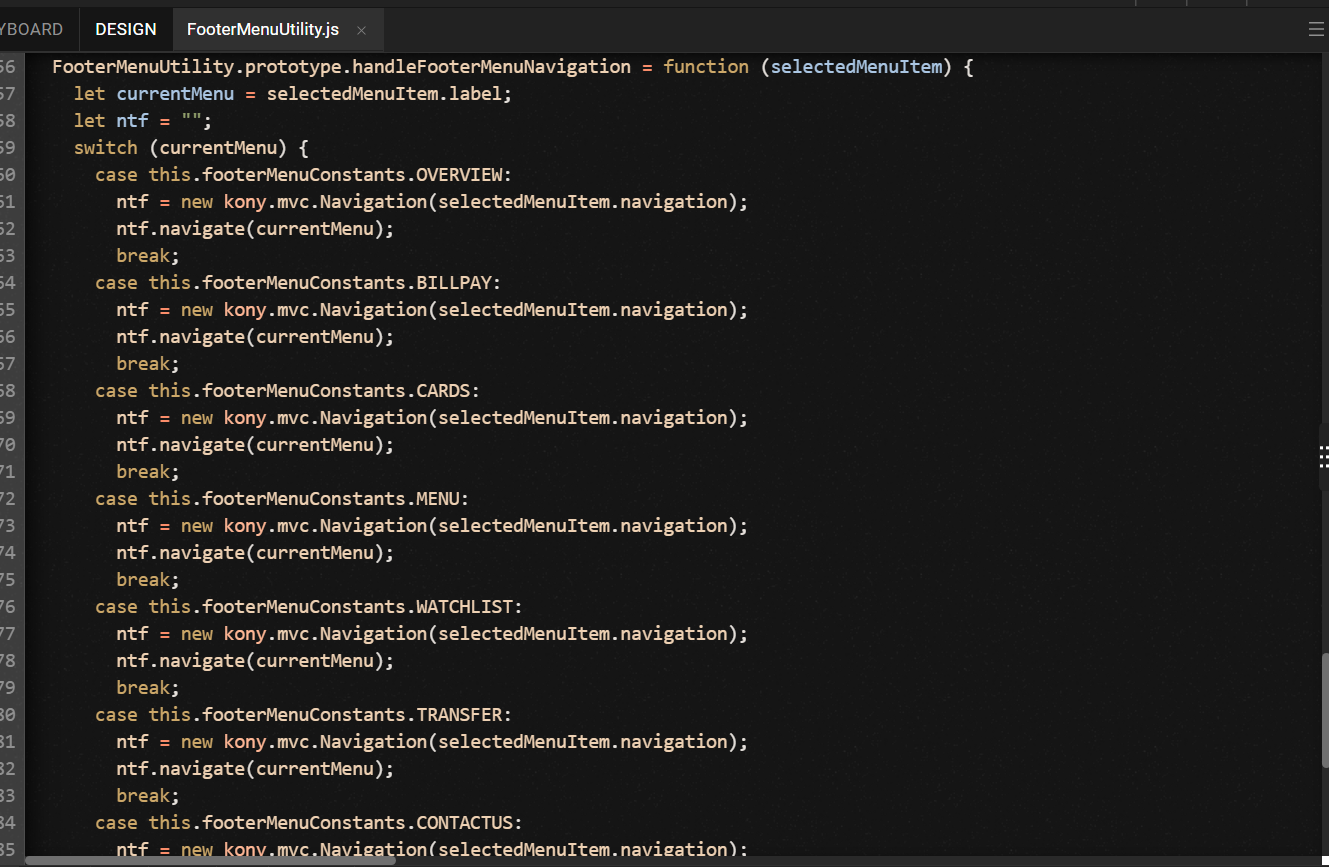
This method binds the navigation callback actions for each menu item. These callback actions ses the destination form for each menu constant.
| Parameter | Value |
|---|---|
| Input parameter |
|
|
How to Consume from the App Level Widget Template Controller |
//Gets triggered onSelection of Footer Menu item.
scope.view.FooterMenu.handleCallToAction = function(selectedMenuItem) {
	scope.footerMenuUtility.handleFooterMenuNavigation(selectedMenuItem);
};
|
|
Return Type |
None |
In this topic
