Configuring Product Determination
This section helps the user to understand the configuration of product determination
Heavy Weight
- To configure heavy weight products, go to Admin Menu > Payment Hub > Product Determination > Product Condition – Heavy. It displays the list of heavy weight products defined in the system.
- Do one of the following:
- To view a record, click
 .
. - To amend or edit a record, click
 .
. - To create a new product, click
 .
.
This page is used to define the product conditions (input attributes) to determine a product for heavy weight payment and corresponding output attributes. A product is determined and output attributes are linked to various subsequent processing components given below.
- Fee
- Ledger
- Client Condition
- Posting and Routing
This is based on the payment characteristics that are defined by using the product conditions. Additionally, it is linked to various transaction codes that are used for booking the payments. It also influences the payment flow based on the STP indicator, imposed flag, and message priority.
 Input Attributes
A heavy weight product is defined for each company. This is the company of the debit account and processing company of the payment. The bank user uses the following input attributes to configure heavy weight products:
- To enter a new amount range, click
 .
. - To delete an amount range, click
 .
.
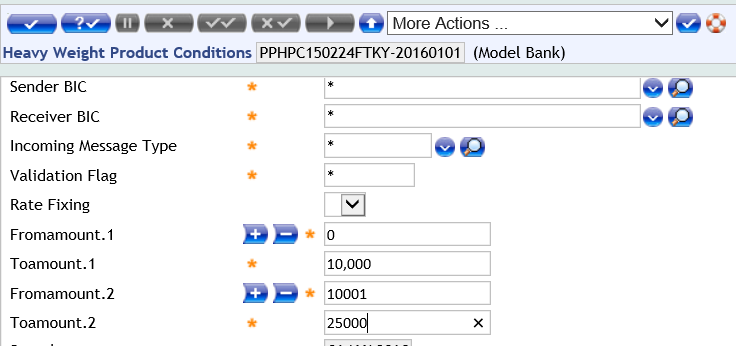
The entire set of output attributes are configured in the Output Parameters tab for each amount range. For example, if the input attributes are defined for two amount ranges, then two sets of output parameters are configured corresponding to each amount range.
Output Attributes
| Field | Description |
|---|---|
| Client Condition Group |
Client condition product. It is used as an input for client condition component. |
| Source Product Group |
Configure one of the following values:
If the Source Indicator is S, product determination refers it and enters the ‘Source’ product with Originating Source.
|
| Routing Product Group | Routing product that becomes an input for Routing & Settlement. |
| Impose Routing Flag | Indicates the system’s actions when the routing product configured in Routing Product Group is not found during processing.
|
| Fee Product Group | Fee product that is used as an input parameter for fees. |
| Posting Product Group | Posting product that is used as an input parameter for posting scheme. |
| Filtering Product Group | Payment Filtering product that is used as an input parameter for filtering component. |
| Duplicate Type |
ID of the |
| Debit Book Code | Booking code for the debit entry on the payment transaction amount.
|
| Debit Charge Book Code | Booking code for the charge debit. |
| Debit VAT Book Code | Booking code for VAT debit. |
| Credit Book Code | Booking code for the credit entry on the payment transaction amount. |
| Credit Charge Book Code | Booking code for the charge credit. |
| Credit VAT Book Code | Booking code for VAT credit. |
|
NOTE: The user needs to configure the Debit Book Code, Debit Charge Book Code, Debit VAT Book Code, Credit Book Code, Credit Charge Book Code, and Credit VAT Book Code fields, which becomes an input parameter for posting scheme.
|
|
| Regulatory Reporting Indicator |
Indicates whether the payment meets regulatory reporting requirements. Configure one of the following values:
|
| New Priority |
Configure one of the following values:
New priority of the payment. NOTE: The user can ignore the existing priority and define a new priority.
|
| Non STP Indicator |
Enables to move the payment to Manual Repair instead of processing using STP. Configure one of the following values:
|
| PSD Compliant Flag | Defines whether the payment is PSD compliant. onfigure one of the following values:
Used by Date Determination and Fee components for processing the payment.
NOTE: Ensure to install PPPSDC component to configure this parameter. |
| EC Compliant Flag | Defines whether the payment is EC compliant. Configure one of the following values:
|
| Forward Entry Flag | Defines whether forward entries are raised for the payment. Configure one of the following values:
|
| Switch Account |
Allows to enable or disable account switching in Temenos Payments at product determination level. This is applicable for inward payments and book payments. If configured, Temenos Payments validates whether the credit main account is switched out. Configure one of the following values:
NOTE: This feature is available with PH license.
|
| STP Indicator Payment Order |
Decides whether a payment coming from
|
| Currency Market | Identifies the correct exchange and revaluation rates to be applied to each Currency in case of FX transactions.
|
| Txn Stop Map Rule |
If this field is configured, it denotes that Transaction Stop Check needs to be performed on the debit main account. A stop instruction is captured in this field and it links to the Transaction Stop Module, which performs blacklist checking for the debit main account. If this field is not configured, then Transaction Stop check is not performed on the account. NOTE: The value configured needs to be a valid record in
TZ.TRANSACTION.STOP.MAP.RULES. |
| Rate Fixing | Configure one of the following values in this field
Indicates the definition of rate fixing at product condition level precedes over the configuration at company level ( |
Medium Weight
- To configure medium weight product, go to Admin Menu > Payment Hub > Product Determination > Product Condition – Medium. It displays the list of medium weight products defined in the system.
- Do one of the following:
- To view a record, click .
- To amend or edit a record, click .
- To create a new product, click .
- To view a record, click
This screen defines the product conditions, determines a product for medium weight payments and corresponding output parameters. The product is determined and output attributes are linked to various subsequent processing components given below.
- Fee
- Ledger
- Client Condition
- Posting and Routing
This is based on the payment characteristics defined using the product conditions. Additionally, it is linked to various transaction codes that are used for booking the payments. It also influences the payment flow based on the STP indicator, imposed flag, and message priority.
Input Attributes
A medium weight product is defined for each company. This is the company of the debit account and processing company of the payment. The bank users can configure medium weight products by using the following product conditions (input attributes):
| Field | Description |
|---|---|
|
Payment Direction |
Configure one of the following values:
Invokes the following:
The Payment Direction field along with Charge Type field (BEN, SHA, OUR or *) determines the fee processing.
|
| Clrg Trn Type |
Clearing transaction type for the payment.
Example
|
| Domestic International |
Configure one of the following values:
Payments are categorised as Domestic or International based on currency and geography.
|
| Single/Batch/Clg |
Configure one of the following values:
Bank receives single payments or batch payments (such as salary processing).
|
| Charge Type |
Configure one of the following values :
The Use Charge Type field along with the Direction field for processing the payment charges.
|
| Currency |
Configure one of the following values:
|
| From Amount |
Start of the amount range.
|
| To Amount |
End of the amount range.
|
- To enter a new amount range, click
- To delete an amount range, click .
The entire set of output attributes are configured in the ‘Output Parameters’ tab for each amount range. For example, if the input attributes are defined for two amount ranges, then configure two sets of output parameters corresponding to each amount range.
| Field | Description |
|---|---|
| Source Group | Source group of the payment |
| Message Type | Type of the payment message |
| Clearing Nature Code | Nature of the clearing payment |
|
NOTE: The user can configure one of the following values in Source Group, Message Type, and Clearing Nature Code fields:
|
|
| Ben Pty IBAN Ctry | Country code or country group in the IBAN of the beneficiary party. |
| Ord Pty IBAN Ctry | Country code or country group available in the IBAN of the ordering party. |
|
NOTE: The user can configure one of the following values in Ben Pty IBAN Ctry and Ord Pty IBAN Ctry fields:
|
|
| Beneficiary Party IBAN Present | Indicates presence of beneficiary party IBAN. |
| Ordering Party IBAN Present | Indicates presence of ordering party IBAN. |
| Ben BIC Present | Indicates presence of beneficiary party BIC. |
| Ord BIC Present | Indicates presence of ordering party BIC. |
|
NOTE: The user can configure one of the following values in Ordering Party IBAN Present, Ben BIC Present, and Ord BIC Present fields:
|
|
| Ord Pty Residency | If the ordering (debit) party is a non-resident, special requirements can be available for regulatory reporting. Configure one of the following values:
|
| Final Codeword | Codeword component assigns a final codeword, which becomes an input to product determination as multiple codewords in a payment message can be available. Configure one of the following values:
|
Output Attributes
| Field | Description |
|---|---|
| Client Condition Group | Defines the Client Condition product, and is used as an input for client condition component. |
| Source Product Group |
|
| Routing Product Group | Defines the Routing product and is used as an input for R&S. |
| Impose Routing Flag | Indicates the system’s actions, when the Routing product configured against Routing Product Group is not found during processing.
|
| Fee Product Group | Fee product that is used as an input parameter for fees. |
| Posting Product Group | Posting product that is used as an input parameter for posting scheme. |
| Filtering Product Group | Payment Filtering product that is used as an input parameter for filtering component. |
| Duplicate Type |
|
| Debit Book Code | Booking code for the debit entry on the payment transaction amount.
|
| Debit Charge Book Code | Booking code for the charge debit. |
| Debit VAT Book Code | Booking code for VAT debit. |
| Credit Book Code | Booking code for the credit entry on the payment transaction amount. |
| Credit Charge Book Code | Booking code for the charge credit. |
| Credit VAT Book Code | Booking code for VAT credit. |
|
NOTE: The user needs to configure the Debit Book Code, Debit Charge Book Code, Debit VAT Book Code, Credit Book Code, Credit Charge Book Code, and Credit VAT Book Code fields, which becomes an input parameter for posting scheme.
|
|
| Regulatory Reporting Indicator | Indicates whether the payment meets regulatory reporting requirements.
|
| New Priority | New priority of the payment.
|
| Non STP Indicator |
|
| PSD Compliant Flag | Defines whether the payment is PSD compliant.
NOTE: PPPSDC component needs to be configured. |
| Settlement Type | Specifies whether the product is determined for a pre or post settled direct debit clearing.
|
| Clearing Holiday | Indicates the clearing for which the non-working days are checked for the payment (during date calculation).
NOTE: Calculates the settlement date considering the clearing business date. This is used to settle the child payments . |
| EC Compliant Flag | Defines whether the payment is EC compliant.
|
| Switch Account |
Allows to enable or disable account switching in Temenos Payments at product determination level. This is applicable for inward payments and book payments. If configured, Temenos Payments validates whether the credit main account is switched out. Configure one of the following values:
NOTE: This feature is available with PH license.
|
| Currency Market | Identifies the correct exchange and revaluation rates to be applied to each currency (during FX transactions).
|
| Txn Stop Map Rule |
If this field is configured, it denotes that Transaction Stop Check needs to be performed on the debit main account. A stop instruction is captured in this field and it links to the Transaction Stop Module which performs blacklist checking for the debit main account. If this field is not configured, then the Transaction Stop check is not performed on the account. NOTE: The value configured needs to be a valid record in
TZ.TRANSACTION.STOP.MAP.RULES. |
| Rate Fixing | Configure one of the following values in this field:
Indicates the definition of rate fixing at product condition level precedes over the configuration at company level |
Light Weight
- To configure light weight products, go to Admin Menu > Payment Hub > Product Determination > Product Condition – Light. It displays the list of light weight products defined in the system.
- Do one of the following:
- To view a record, click .
- To amend or edit a record, click .
- To create a new product, click .
- To view a record, click
This screen is used to define the product conditions to determine a product for light weight payments and corresponding output parameters. A product is determined and output parameters are linked to various subsequent processing components given below.
- Fee
- Ledger
- Client Condition
- Posting and Routing product
This is based on the payment characteristics defined using the product conditions. Additionally, it is linked to various transaction code that are used for booking the payments. It also influences the flow of payment based on the STP indicator, imposed flag, and message priority.
Input Attributes
A light weight product is defined for each company. This is the company of the debit account and processing company of the payment. The bank users can to configure light weight products by using the following product conditions (input attributes):
| Field | Description |
|---|---|
| Source |
Identifies the originating source group of the payment. Configure one of the following values:
|
| Msg Type | A valid message type of the payment. |
| Domestic International |
Configure one of the following values:
Payments are categorised as Domestic or International based on currency and geography. Output channel, different charges to be applied, R&S and Fee product are defined based on this parameter. |
|
Clearing Transaction Type |
Identifies the clearing transaction type. Distinguishes between returns or refunds, credit transfers or direct debits, and so on. Configure one of t,he following values:
|
| Clearing Nature Code |
Nature of the clearing transaction. Configure one of the following values:
|
| Settlement Indicator | Identifies whether the payment is a settlement transaction or not. Configure one of the following values:
|
| Payment Direction | Direction of the payment. Configure one of the following values:
|
Output Attributes
| Field | Description |
|---|---|
| Client Condition Group | Client Condition product that becomes the input for client condition component. |
| Source Product Group |
Configure one of the following values:
To enable Product Determination to refer the Source Indicator and enter ‘Source’ product with Originating Source, set the Source Indicator as ‘S’.
|
| Routing Product Group | Routing product that is used as an input for R&S. |
| Impose Routing Flag | Indicates the system’s actions when routing product configured against Routing Product Group is not found during processing.
|
| Fee Product Group | Fee product that is used as an input parameter for Fees. |
| Posting Product Group | Posting product that is used as an input parameter for posting scheme. |
| Filtering Product Group | Payment Filtering product that is used as an input parameter for filtering component. |
| Duplicate Type |
|
| Debit Book Code | Booking code for the debit entry on the payment transaction amount.
|
| Debit Charge Book Code | Booking code for the charge debit. |
| Debit VAT Book Code | Identifies the booking code for VAT debit. |
| Credit Book Code | Booking code for the credit entry on the payment transaction amount. |
| Credit Charge Book Code | Booking code for the charge credit. |
| Credit VAT Book Code | Booking code for VAT credit. |
|
NOTE: The user needs to configure Debit Book Code, Debit Charge Book Code, Debit VAT Book Code, Credit Book Code, Credit VAT Book Code and Credit VAT Book Code fields, which is used by the posting scheme.
|
|
| Regulatory Reporting Indicator | Indicates whether the payment meets regulatory reporting requirements.
|
| Non STP Indicator | Indicates whether to process the payment using STP or Non-STP.
|
| PSD Compliant Flag | Defines whether the payment is PSD compliant. Configure one of the following values:
|
| Settlement Type | Specifies whether the product that is determined, is for a pre or post settled direct debit clearing.
|
| Clearing Holiday | Indicates the clearing for which the non-working days is checked for the payment during date calculation.
NOTE: Calculate the settlement date considering the clearing business date using which the child payments are settled. |
| EC Compliant Flag | Defines whether the payment is EC compliant. Configure one of the following values:
|
| Forward Entry Flag | Defines whether forward entries needs to be raised for the payment. Configure one of the following values:
|
| Switch Account |
Allows to enable or disable account switching in Temenos Payments at product determination level. This is applicable for inward payments and book payments. If configured, Temenos Payments validates whether the credit main account is switched out. Configure one of the following values:
NOTE: This feature is available with PH license.
|
| Currency Market | Identifies the correct exchange and revaluation rates to be applied to each currency (during FX transactions).
|
| Txn Stop Map Rule |
If this field is configured, it denotes that Transaction Stop Check needs to be performed on the debit main account. A stop instruction is captured in this field and it links to the Transaction Stop Module, which performs blacklist checking for the debit main account. If this field is not configured, then Transaction Stop check is not performed on the account. NOTE: The value configured needs to be a valid record in
TZ.TRANSACTION.STOP.MAP.RULES. |
| Rate Fixing | Configure one of the following values in this field:
Indicates the definition of rate fixing at product condition level precedes over the configuration at company level |
In this topic
