
Clients must only publish the APIs they would support. Any APIs in the delivered Temenos provided Swagger that the bank does not support should be removed from the Swagger before publishing.
Introduction to PSD2
The second Payment Services Direct (PSD2) enables Third Party Providers (TPPs) to gain access to customer’s accounts and initiate payments. It is effective from September 2019.
Application programming interfaces (APIs) facilitate the information exchange and initiation processes.
A number of security layers and authentication processes are required to accept and process requests from TPPs. TPPs must be regulated to offer their services and the customer must give consent or approval for specific services to be performed.
A TPP can be registered as one or more of the following roles:
- Account Information Service Providers (AISP) – account aggregators
- Payment Initiation Service Provider (PISP) – merchants or third parties that can initiate payments on a customer’s account
- Card-based Payment Instrument Issuer (CBPII) or Payment Instrument Issuer Service Provider (PIISP)
Processing a request from a TPP depends on the following factors:
- If required, whether consent is provided by the customer.
- The need for authentication or Strong Customer Authentication (SCA) from the customer, ensuring that the request is genuine.
- Checking the customer’s permissions to ensure that the requesting customer has sufficient permissions to perform services via TPPs.
In Temenos Transact, there are two PSD2 modules:
- Payment Initiation (PX) to assist with Payment Initiation flows from TPPs.
- Account Information (PZ) to assist with Account Information and Funds Checking flows from TPPs.
Read the user guides in the above links for more information about each function.
The functionality described in this user guide is for the Temenos Transact modules. A number of other non-Temenos Transact user guides should be read to understand the end-to-end flows.
Solution Overview
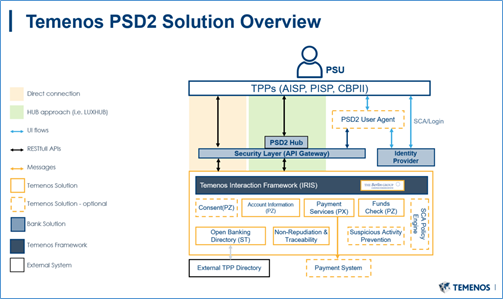
 Aspects of PSD2 in Scope of Temenos Transact Module(s)
- Open Banking Directory which can hold a list of regulated TPPs (to be optionally populated by the Bank) - ST module
- TPP Role Validation and Consent Validation (ST module)
- Consent Framework for AIS calls (PZ module)
- Provider APIs – Temenos Transact enquiries and versions to support:
- Consent Management (PZ module)
- PSD2 Account Information flows (PZ module)
- PSD2 Payment Initiation flows (PX module)
Dependencies
- SEPA module (for Payments)
- IBAN (for Payments)
- AA Framework (for Consent)
- Interaction Framework (IRIS) (for Published APIs)
In Scope of Temenos Products
- Temenos Transact Workflows – Supporting functionality within Temenos Transact to assist the processing of TPP requests.
- User Agent – Channels Delivery. Read the User Agent user guide for more information.
- Published APIs – IRIS and Interaction Framework Delivery. Read the IRIS user guide for more information.
- Policy Engine or Fraud Monitoring – Financial Crime Management Product Delivery. Read the FCM user guide for more information.
- Non-repudiation and traceability – Security Product Delivery. Read the Security user guide for more information.NOTE: Temenos currently supports the Berlin Group workflows using REDIRECT mechanisms for Consent and Payments.
Not in Scope of Temenos Products
- API Gateway or Security Layer – Not provided by Temenos, but is mandatory in the bank’s architecture.
- Identity or Authentication Provider – Not provided by Temenos, but is mandatory in the bank’s architecture.
- PSD2 Hubs – Not provided by Temenos, but can be optionally interfaced.
Generic Applications and Processes
As Temenos provides two modules (PZ and PX), there is some processing generic between the two workflows. It includes the following:
Open Banking Directory
TPPs must be regulated to make requests, this directory of eligible TPPs must be managed by the bank.
The Open Banking Directory application can be used to hold the details of regulated TPPs. It can be manually populated through a locally created interface or can be configured to be handled externally (for example, when a Hub or bank’s own API Gateway provides this capability).
Where populated within Temenos Transact, the system can hold the content uploaded by the bank, and validate the TPP Role, if required.
The Temenos Transact solution does not perform all required security checks required in the bank’s architecture.
Read the TPP Validation section for more information on the validation processes.
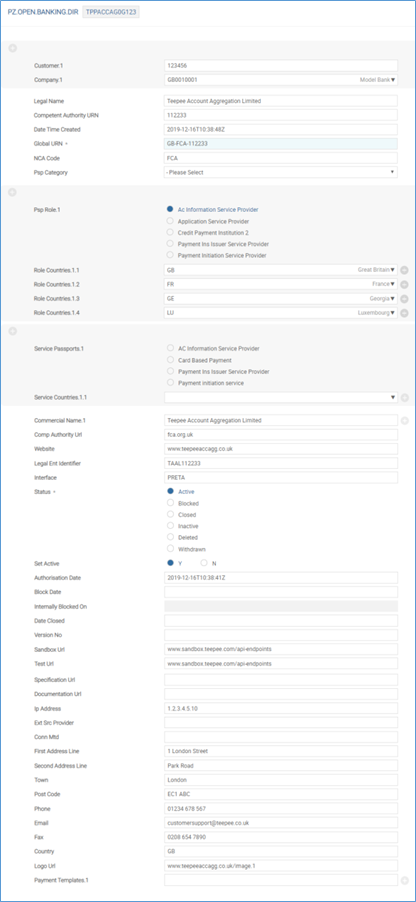
PZ.OPEN.BANKING.DIR
This application holds the list of regulated TPPs identified by the bank.
It allows banks to maintain a set of information about the TPP including attributes like the TPP name, global unique identifier and also their regulated roles and countries in which they are allowed to operate.
The screenshot below shows an example of the application, a quick summary of each field and its intended use.
| Field | Description |
|---|---|
| Customer |
If the TPP company is also a customer within Temenos Transact, this field can be populated with a valid Temenos Transact customer number.
This field is optional and is manually entered by a user. The value in this field is not populated through an interface and is used for informational purposes only. |
| Company | Transact company of the customer in the previous field. This field requires manual input. |
| Legal Name | Registered name of the TPP, as per the NCA. |
| Competent Authority URN | Unique Reference Number (URN) of the TPP at the NCA. |
| Date Time Created | Date and time that the TPP was uploaded to the Directory. This is a no-change and mandatory field. |
| Global URN |
Global URN of the TPP. This should be a unique reference.
It includes a country code, NCA identifier and then a unique numeric value.
For example, GB-FCA-100008. |
| NCA Code | ID of the record in the NCA table, which contains the NCA data for this record. |
| Psp Category | Valid TPP category |
| Psp Role |
Multi-value field and is used to define the role for which the TPP is registered. It is used in the TPP Validation process to check if the TPP is allowed to make a particular request. The allowed options for this field are:
|
| Role Countries |
This field is the second part of a multi-value set and is linked to the Psp Role field. It holds the country in which the TPP is regulated to operate its services for the specific role mentioned in Psp Role. For example, if a TPP is regulated as an ‘Account Information Service Provider’ in both Great Britain and France, the Psp Role would be Account Information Service Provider and the Role Countries value would be GB and FR. This value is used during the TPP Validation. A comparison is made against the Local Country of the COMPANY receiving the request.
|
| Deleted |
Allowed values are:
|
| Service Passports | Currently not in use. |
| Service Countries | Currently not in use. |
| Commercial Name |
Multi-valued list of commercial names for the entity. For example, Google Payments, Google Pay. If there is a single commercial name, only one name is recorded here. |
| Comp Authority Url | URL to the NCA source of this data. |
| Website | Website of the TPP as specified in the NCA Register. |
| Legal Ent Identifier | Free text field. The Legal Entity Identifier of the entity as specified in the NCA Register. It accepts alphanumeric characters. |
| Interface | Free text field. Enter the name of interface. For example, PRETA. |
| Status |
Holds the NCA or PRETA status of the TPP.
Allowed options are:
|
| Set Active |
This field is not populated from the external directory and must be manually input and maintained by an authorised bank user.
It holds the bank’s (ASPSP’s) own status of the TPP and whether they want to actively accept requests from this TPP.
In validation processes, it is used in conjunction with the Status field.
Allowed values are:
|
| Authorisation Date | Date on which the entity is authorised by the NCA. |
| Block Date | Date on which the entity is blocked by NCA. It is mandatory when Status is BLOCKED. |
| Internally Blocked On |
No input field. If Set Active field is changed from any other value to N, the current server date and time are captured in this field. Reset to NULL if Set Active is changed from N to any other value. |
| Date Closed | Holds the date the entity is withdrawn from the NCA Register. |
| Version No |
Holds the version number of the TPP record from the external directory. This version increments each time a new version is published and refers to the version number in the NCA directory. This may be part of a regular download (daily) or based on a real-time update when the source data changes. |
| Sandbox Url | Optional field |
| Test Url | Optional field |
| Specification Url | Optional field |
| Documentation Url | Optional field |
| Ip Address | Holds the registered IP address of the TPP. |
| Ext Src Provider | Free text field |
| Conn Mtd | Holds the connection method. It is an optional field. |
| First Address Line | Holds the first line of the TPP’s registered address. |
| Second Address Line | Holds the second line of the TPP’s registered address. |
| Town | Holds the town of the TPP’s registered address. |
| Post Code | Holds the postcode of the TPP’s registered address. |
| Phone | Holds the registered telephone number of the TPP. |
| Holds the registered email address of the TPP. | |
| Fax | Holds the registered fax number of the TPP. |
| Country | Holds the country of the TPP’s registered address. |
| Logo Url | Includes the URL link to the TPP’s registered logo. |
| Payment Templates | Types of payments allowed for an entity. |
| Time Zone | Time zone in which the TPP operates. |
| Alternate Id | Holds any alternative identifiers of the TPP, if required. |
Manual Population of Open Banking Directory
Banks are able to manually update TPPs within the Open Banking Directory application.
The following steps need to be performed to allow the bank to manually populate the Open Banking Directory.
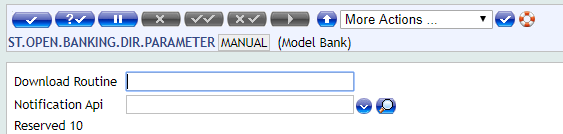
- Create a record in the
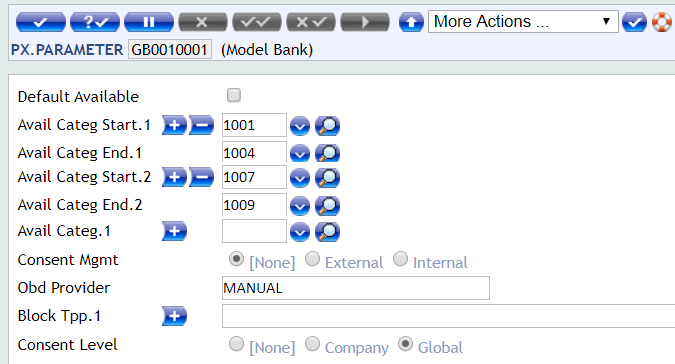
ST.OPEN.BANKING.DIR.PARAMETERapplication. The @ID of the record is the discretion of the bank.In the example below, it is named as MANUAL.

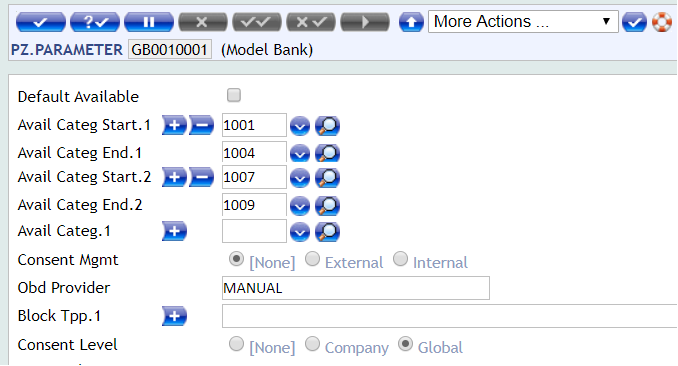
- Within the parameter records, enter the value of the above record (ID) in the Obd Provider field.
The screenshot below shows the PZ.PARAMETERapplication, where PZ is installed.
The screenshot below shows the PX.PARAMETERapplication, where PX is installed.
- For each TPP that is manually uploaded in the
PZ.OPEN.BANKING.DIRapplication, the Interface field for each record must match the value of the record input into the Obd Provider field in the application.
 API Mapping
Outside of Temenos Transact, IRIS holds an API Mapping that maps the incoming endpoint or request to a TPP role and consent type. This information is used during the TPP and consent validation processes.
This API linking is maintained as API definitions by IRIS for APIs for which consent availability must be checked.
| Incoming Endpoint | API Standard | TPP Role | Consent Type(s) Required |
|---|---|---|---|
| GET/v1/accounts | Berlin Group | AIS | Available Accounts |
| GET/v1/accounts/{account-id} | Berlin Group | AIS | Accounts |
| GET/v1/accounts/{account-id}/balances | Berlin Group | AIS | Balances |
| GET/v1/accounts/{account-id}/transactions | Berlin Group | AIS | Transactions |
| GET/v1/accounts/{account-id}/transactions/{resourceId} | Berlin Group | AIS | Transactions |
| POST/v1/consents | Berlin Group | AIS | n/a |
| GET/v1/consents/{consentId} | Berlin Group | AIS | n/a |
| DELETE/v1/consents/{consentId} | Berlin Group | AIS | n/a |
| GET/v1/consents/{consentId}/status | Berlin Group | AIS | n/a |
| POST/v1/consents/{consentId}/authorisations | Berlin Group | AIS | n/a |
| GET/v1/consents/{consentId}/authorisations | Berlin Group | AIS | n/a |
| GET/v1/consents/{consentId}/authorisations/{authorisationId} | Berlin Group | AIS | n/a |
| PUT/v1/consents/{consentId}/authorisations/{authorisationId} | Berlin Group | AIS | n/a |
| POST/v1/funds-confirmations | Berlin Group | CBPII | n/a |
| PUT/v1/{payment-service}/{payment-product}/{paymentId}/authorisations/{authorisationId} | Berlin Group | PIS | n/a |
| PUT/v1/{payment-service}/{payment-product}/{paymentId}/cancellation-authorisations/{cancellationId} | Berlin Group | PIS | n/a |
| POST/v1/{payment-service}/{payment-product}/{paymentId}/authorisations | Berlin Group | PIS | Not required |
| POST/v1/{payment-service}/{payment-product} | Berlin Group | PIS | Not required |
| GET/v1/{payment-service}/{payment-product}/{paymentId} | Berlin Group | PIS | Not required |
| DELETE/v1/{payment-service}/{payment-product}/{paymentId} | Berlin Group | PIS | Not required |
| GET/v1/{payment-service}/{payment-product}/{paymentId}/status | Berlin Group | PIS | Not required |
| GET/v1/{payment-service}/{payment-product}/{paymentId}/authorisations | Berlin Group | PIS | Not required |
| GET/v1/{payment-service}/{payment-product}/{paymentId}/authorisations/{authorisationId} | Berlin Group | PIS | Not required |
| POST/v1/{payment-service}/{payment-product}/{paymentId}/cancellation-authorisations | Berlin Group | PIS | Not required |
| GET/v1/{payment-service}/{payment-product}/{paymentId}/cancellation-authorisations | Berlin Group | PIS | Not required |
| GET/v1/{payment-service}/{payment-product}/{paymentId}/cancellation-authorisations/{cancellationId} | Berlin Group | PIS | Not required |
For example, if a GET/{accounts}/{accountID}/balances request is made, the system identifies that the request is an AISP-related request and the customer must have ‘balances’ consent in place on the given account to return the account balances response.
TPP Validation
Depending on the bank’s architecture, TPP validation may happen within Temenos Transact or an external system.
- If the TPP Validation is handled within Transact, please refer to the INTERNAL flow.
- If the TPP Validation is handled through an external system (like LUXHUB), please refer to the EXTERNAL flow.
It is mandatory that TPPs are regulated to make PSD2- related requests.
A second check then identifies if the TPP is regulated as per the role of the request. A validation process (to assist with this) is handled in the background and included here for informational purposes.
The routine that handles the validation is called ‘getTppValidateRequest’ and is automatically triggered when receiving a PSD2 request.
The underlying Temenos Transact enquiries for this include:
- PZ.API.VALIDATE.REQUEST.1.0.0
- PX.API.VALIDATE.REQUEST.1.0.0
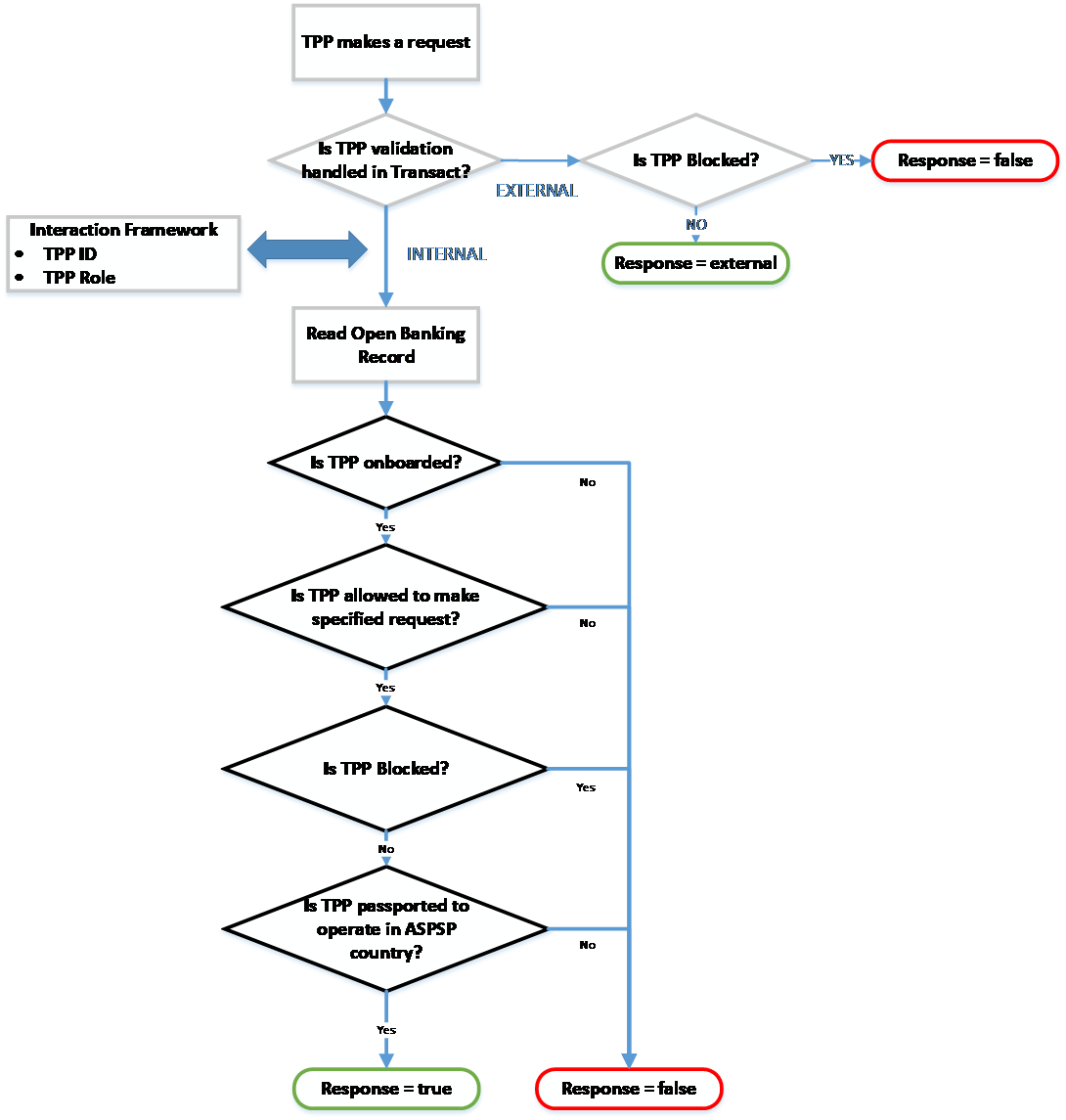
A diagrammatic representation of the background validation is shown below:
Internal Flow
When the Obd Provider field in PZ.PARAMETER or PX.PARAMETER is set as a valid ST.OPEN.BANKING.DIR.PARAMETER record ID, the TPP validation is handled in Temenos Transact.
The validation process includes the following steps:
Is the TPP regulated in the directory application?
The system validates if the TPP making the incoming request is included within the Open Banking Directory. This is performed by validating whether the Global URN of the TPP matches a value held in the Global URN field in PZ.OPEN.BANKING.DIR.
- If the Global URN does not exist, it implies that the TPP is not regulated. The validation process ends and an error is returned. The request is not accepted or processed.
- If the Global URN exists, it implies that the TPP is regulated. The following checks happen.
Is the TPP regulated as per the role of the request it is making?
If the Global URN exists, the following checks happen.
Based on the type of request that the TPP is making, validate if the TPP is regulated as per the role of the request. Only TPPs regulated as specific roles can make specific requests.
The IRIS layer identifies the type of request the TPP is making. Read the API Mapping section for more information on API definition.
For example, a TPP regulated only as an ‘AISP’ can make account information calls. For example, GET/accounts.
However, a TPP regulated only as a ‘PISP’ cannot make account information calls. Therefore, if a TPP regulated only as a PISP makes a ‘GET/accounts’ call, this is rejected.
The logic for identifying the type of call based on the incoming API is handled within an API definition at the IRIS or Interaction Framework layer.
The type of call and the TPPs regulated roles are compared, which are held in the PSP Role field in the PZ.OPEN.BANKING.DIR record.
- If the TPP is not regulated as the role of the request, the validation returns an error. The request is not accepted.
- If the TPP is regulated as the role of the request, the validation continues to the next check.
Is the TPP blocked or restricted in any way?
If the TPP is regulated as per the role of the request, the following checks happen.
The system checks against the Status and Set Active fields within the PZ.OPEN.BANKING.DIR record.
- The Status field holds the NCA status of the TPP.
- The Set Active field holds the bank’s own status of the TPP.
Only if both fields are set positively, the validation is successful at this stage. The logic for this is as given below:
- If the Status field is set to any status other than ‘Active’, the validation provides an error at this stage. The request is not accepted or processed.
- If the Status field is set as Active, a secondary check is made against the Set Active field.
- If the Set Active field is set as No, the validation provides an error. The request is not accepted or processed.
- If the Set Active field is set as Y or null, the validation is successful.
Is the TPP regulated to operate in the country of the ASPSP?
When the preceding validation was successful, a final check is made against the TPP to identify if the TPP is passported to operate in the country of the ASPSP. The system performs a validation against the Local Country of the COMPANY where the request is received and compares this against the list of ROLE.COUNTRIES (of the TPP role of the request).
- If the Local Country does not match one of the values in the Role Countries field, the validation provides an error as the TPP is not regulated to operate within the country of the ASPSP.
- If the Local Country does match one of the values in the Role Countriesfield, the validation is successful as the TPP is regulated to operate within the country of the ASPSP.
If all validations are successfully passed, the TPP Validation response is true.
At this stage, the request can be partially accepted and the Consent Validation process is triggered.
External Flow
When the Obd Provider field in PZ.PARAMETER or PX.PARAMETER is set as EXTERNAL, the Open Banking Directory is handled externally by an external system or hub.
With this configuration, the system does not expect any values in PZ.OPEN.BANKING.DIR. Therefore, no validation is performed against this table. Instead, the system expects that the TPP Validation is performed before reaching Temenos Transact and that the TPP is regulated to make the request.
One validation is performed in Temenos Transact to check if the TPP is manually blocked by the bank. This is configured in the Block Tpp field in the PZ.PARAMETER and/or PX.PARAMETER applications.
The expected value in this field, if entered, is the Global URN of the TPP.
- If the Global URN of the TPP is included within this multi-value field, it highlights the TPP is blocked by the bank. The validation returns an error. The request is not accepted or processed.
- If the Global URN of the TPP is not included in this multi-value field, the TPP is not considered to be blocked and the TPP validation is successful. The technical response to this call would be ‘external’ to identify that the TPP validation is successful; however, it is checked mainly by an external system.
At this stage, the request can be partially accepted and the Consent Validation process is triggered.
Consent Validation
If the TPP Validation is successful and it is identified that the TPP is allowed to make a particular request, the system performs a second check to identify if consent is required for the call.
The routine that handles the validation is called ‘getTppValidateRequest’ and is automatically triggered when receiving a PSD2 request.
The underlying Temenos Transact enquiries are:
- PZ.API.VALIDATE.REQUEST.1.0.0
- PX.API.VALIDATE.REQUEST.1.0.0
If consent is required for the call; Is consent available and is it valid.
This validation forms part of the getTppValidateRequest routine. The below workflow outlines the steps that occur within this process:
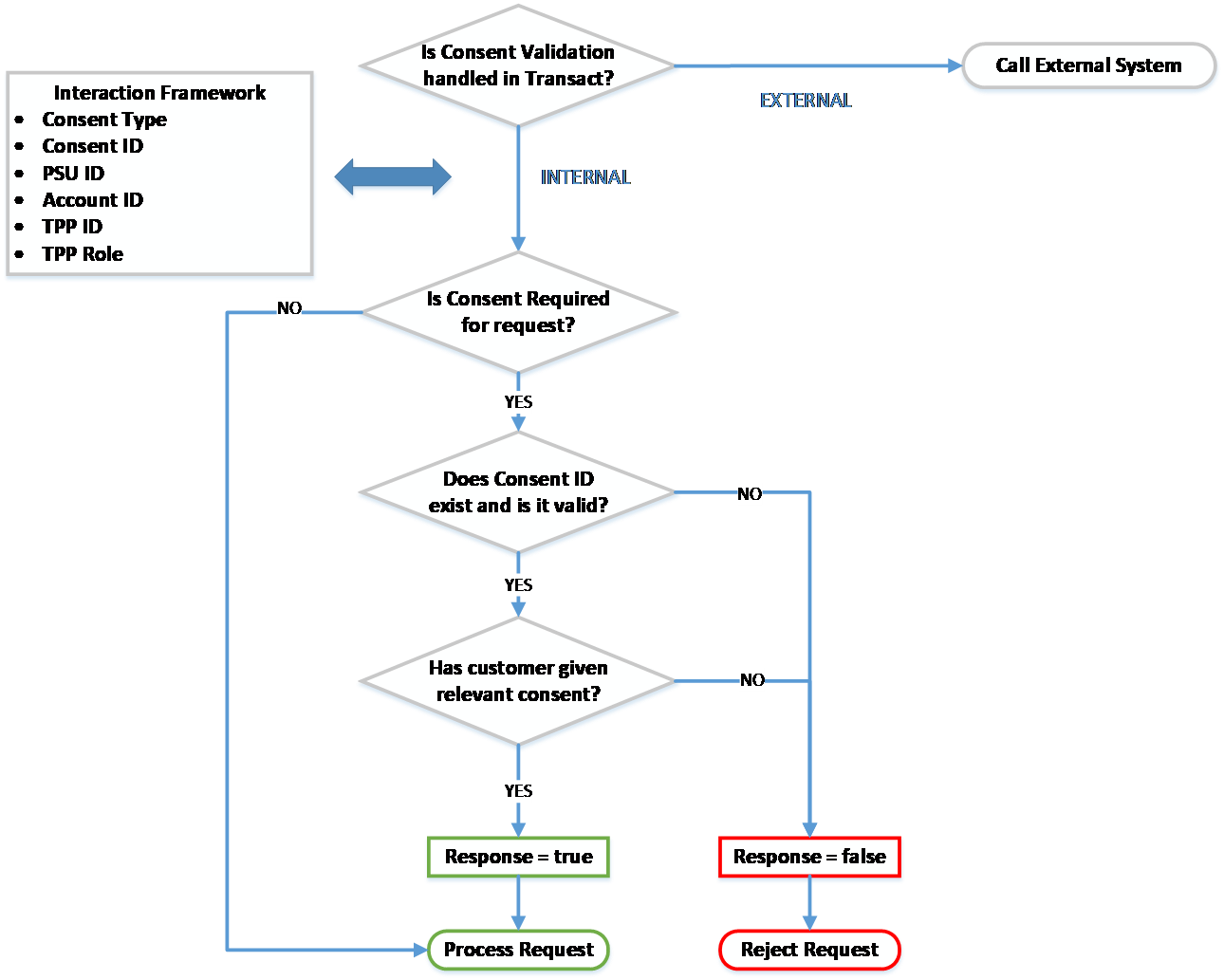
A check is made to identify if Consent Validation is handled within Temenos Transact.
This is defined in the Consent Mgmt field in PZ.PARAMETER.
PX.PARAMETER as consent for payments is not required under the Berlin Group standard.Consent handled in bank’s External system
If the Consent Mgmt field in PZ.PARAMETER is set as EXTERNAL, the consent management process is handled by an external system and is not within Temenos Transact.
Consent handled internally in Temenos Transact
If the Consent Mgmt field in PZ.PARAMETER is set as INTERNAL, the consent management process is handled within Temenos Transact. The system performs a number of checks:
Is consent required for the request?
A check is made at the IRIS layer to identify the type of request that is being made. The IRIS layer holds an API Mapping, which identifies the following:
- Type of request that is being made
- If consent is required for the type of request
- If consent type is required for the request
For Berlin Group payment requests, consent is not required. Instead, a separate approval and authentication process is followed.
For Account Information requests, consent is required before accepting the request and sharing any account information to the TPP.
Does Consent ID exist (if given) and is it valid?
The Consent ID must be passed in the incoming request from the TPP.
The Consent ID in the request is compared with the consent arrangement for that customer and TPP combination.
The Consent ID is not considered to be valid when:
- The Consent ID cannot be found.
- The Consent ID is in history.
- The Consent ID does not link to the TPP/customer/account combination.
- The Consent ID has expired.
The Consent ID is considered to be valid when:
- The Consent ID exists.
- It has not expired (the expiry date has not passed).
- It links to the TPP/customer/account combination.
Has the customer given Consent on the account to process the request?
If the Consent ID is valid, a final check is made to check if the customer has given consent to the relevant consent type on the account.
The request is processed only if the customer has granted the consent type required for the request on the account.
The respective API is accepted and processed in the system after the above validations are successfully met. A response is provided to the incoming TPP request.
Permissions Validation
Temenos Transact can determine where the user’s online channels permissions are managed. This determines where validations against the user’s permissions are performed during PSD2 workflows. Permission validation is managed:
- Within Temenos Transact through configurations in the EB.EXTERNAL.USER application.
- Within an external system such as Spotlight.
AISP Permissions
To configure the permissions validations for consent creation, the Permissions Check field in the PZ.PARAMETER application must be set as:
- Null – The user’s permissions are managed within Temenos Transact (EB.EXTERNAL.USER).
- EXTERNAL – The user’s permissions are managed within an external system, that is, Spotlight.
When the Permissions Check field in PZ.PARAMETER is set as EXTERNAL to configure permissions checks for subsequent AISP and fund requests, this is managed through the following configuration in the PSD2Accounts-config.properties configuration file.
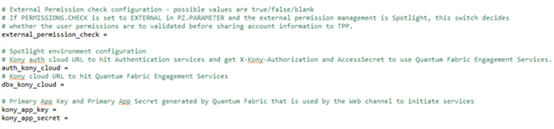
If the external_permission_check field is set as:
- False or Null – User’s permission validations are skipped.
- True – User’s permissions are validated within the external system, that is, Spotlight.
Valid external Kony cloud URLs are to be set in auth_kony_cloud and dbx_kony_cloud fields to which HTTP requests are sent to validate the user access permissions (Open Banking and Account Level access).
Primary App key and App Secret generated by the above defined Quatum fabric to initiate services to be set in the kony_app_key and kony_app_secret fields.
PISP Permissions
To configure the permissions validations for PSD2 payments, the Permissions Check field in PX.PARAMETER must be set as:
- Null – The user’s permissions are managed within Temenos Transact.
- EXTERNAL – The user’s permissions are managed within an external system, that is, Spotlight.
Housekeeping Service
A housekeeping service can be configured to delete unauthenticated or unapproved PSD2 requests after bank-defined timeframes. This service applies, when a user has not successfully logged in, confirmed or cancelled the request.
- For consent, this service can be configured in the Retention Period field in the PZ.PARAMETER application.
- For payments, this service can be configured in the Retention Period field in the PX.PARAMETER application.
The housekeeping service is enabled, if a value is defined in the Retention Period field in the PZ.PARAMETER or PX.PARAMETER application. This value defines how long unprocessed records will remain in the system before being deleted or rejected.
The BNK/RT.CLEANUP.PSD2.RECORDS service that performs the housekeeping service, must be started to initiate the housekeeping process. When the service is run for the first time, any unauthorised PSD2 records (that is, in IHLD or INAU) exceeding the bank-defined timeframe are deleted from the system.
If this service is run on an ongoing basis, it deletes any eligible PSD2 records exceeding the bank-defined timeframe.
The housekeeping service applies to:
- Consent:
- PSD2 Consent – Any records older than the retention period defined in PZ.PARAMETER are deleted.
-
Payments:
- Single Payments via PAYMENT.ORDER – Any records older than the retention period defined in PX.PARAMETER are deleted.
- Recurring Payments via STANDING.ORDER – Any records older than the retention period defined in PX.PARAMETER are deleted.
- Bulk Payments via FTBM and PAYMENT.ORDER – Any Funds Transfer Bulk Master (FTBM) records older than the retention period defined in PX.PARAMETER are marked as Discarded and the linked PAYMENT.ORDER records are deleted.
For each of the above-mentioned payment types, the housekeeping service additionally updates the Payment Status field value as RJCT in the PX.PYT.RESOURCE application.
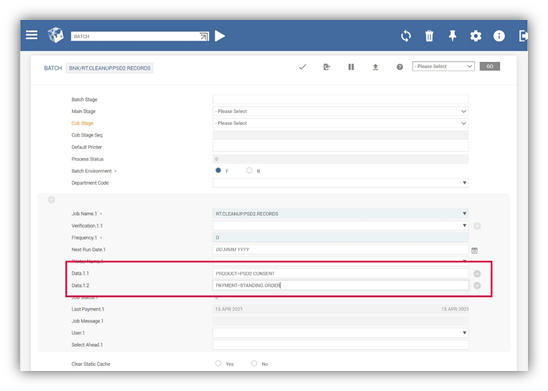
If a bank wants to change the types of records for which this housekeeping service applies to, the bank can define a specific value in the Data field in the BATCH application. The following values can be defined in the Data field to specify which types of records this housekeeping service applies to:
- PRODUCT = PSD2.CONSENT (to enable housekeeping for consent)
- PAYMENT = PAYMENT.ORDER (to enable housekeeping for single payments)
- PAYMENT = STANDING.ORDER (to enable housekeeping for recurring payments)
- PAYMENT = BULK (to enable housekeeping for bulk payments)
In the below screenshot, the housekeeping service has only been enabled for PSD2.CONSENT and STANDING.ORDER records.
In this topic
