Overview of AA Accounting Processing
The Arrangements module extensively uses the rules based accounting. Arrangements are comprised of a series of balances that can be defined by product type. As a result, the accounting process is flexible to reflect the rules of the underlying products.
The AA modules provide a series of allowed activities that can be performed on a contract. Each activity corresponds to a business action that can take place during the life of the contract.
The methods invoked when an activity is performed on an arrangement don’t generate hard coded accounting movements. Instead, an activity can result in different accounting events being generated. The accounting event reflect the need for an accounting action at that stage of the life of the arrangement and has a context linking it to the business activity such as event amount, currency and so on.
Core accounting system processes the accounting events. A series of accounting rules allow the event processing to be controlled to determine the following:
- Amount to be posted and destination of posting (that is, balance type, P&L, internal account, transaction account)
- Dates to be applied to the movements both value date (used for interest calculation purposes) and exposure date
- Other details of the movements such as transaction codes, system IDs
The accounting rules determine the way a repayment amount for example is allocated against the outstanding balances.
All the AA modules use Soft Accounting for accounting purpose.
Soft Accounting
The main components of Soft Accounting comprise of the following:
- AC.BALANCE.TYPE
- AC.EVENT
- AC.ALLOCATION.RULE
- AC.POSTING.DETAILS
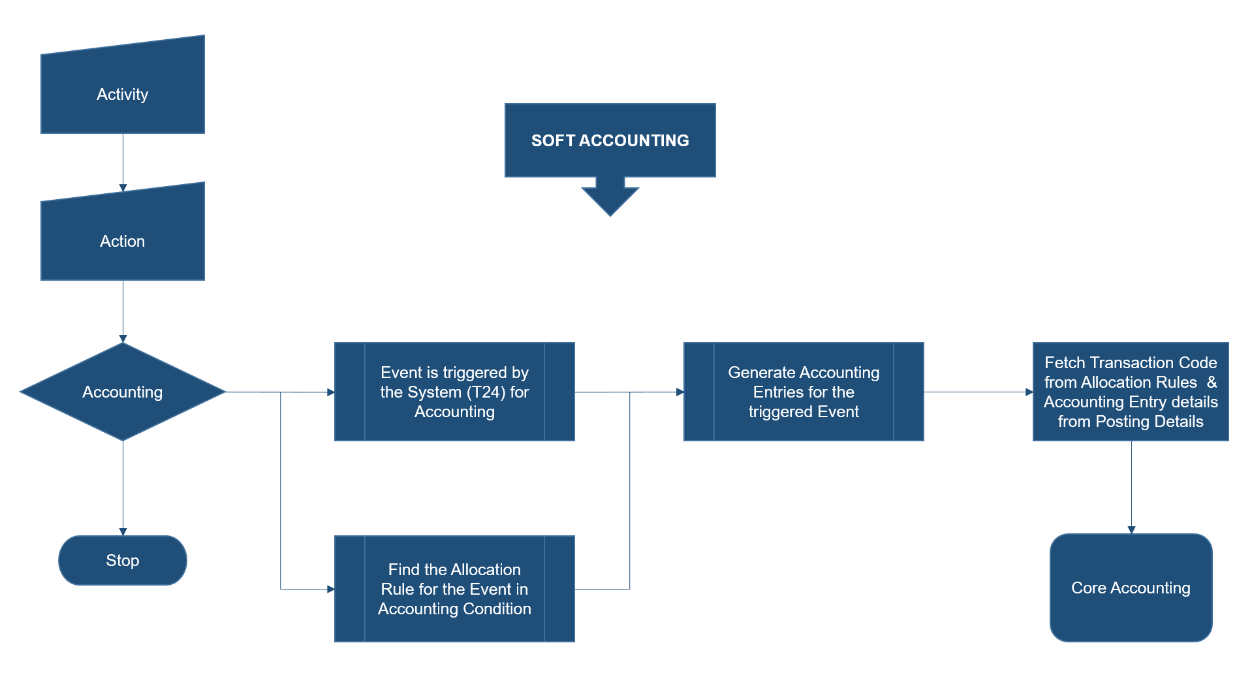
On occurrence of an Activity, system triggers soft accounting, only when accounting is required. The corresponding event for this action is defined in Temenos Transact under AC.EVENT. For each Action, the corresponding Allocation Rule can be defined by the user in Accounting Product Condition.
Based on these two inputs, the system generates the accounting entry. The transaction code for the different legs of the accounting entry is available in Allocation Rules, and the Posting Details gives the information that has to be populated in the accounting entry.
Key Applications and Tables
 Accounting Condition
The Accounting Property Class is used by all financial products and this controls the link between the accounting events generated by the property actions and the accounting allocation rules to be applied to these events.
Accounting rules can be defined either based on Property, Property Class or combination of them.
- If it is defined based on Property Class, then for all instances of the Property Class the same action and allocations are triggered.
- If accounting is defined based on Property Class and Property, then Property takes precedence.
There are proofing validations in the product that guide the users towards the Balance Types, AC Event configuration in Allocation Rule setup that is missing.
Read Accounting Property Class user guide.
AC.BALANCE.TYPE
Each financial Product Line is made of Property Classes, which refers to the possible information required to be setup in order for a particular product to be sold to the customer. The Property Classes set as Mandatory, always have to be part of the final product.
In AA.PROPERTY.CLASS it is decided that if the property is part of a particular product line and which are the expected balance prefixes that will be used while raising accounting.
The balance types represent the financial components of a product. At this level the type of entries that should be generated (STMT.ENTRY, RE.CONSOL.SPEC.ENTRY or CATEG.ENTRY) and the balance nature (contingent or non-contingent) are decided. Virtual and internal balances can also be defined.
Some of the balance type are hard coded by Temenos. Creation and amendment of new ones due to the definition of new Properties is possible.
The AC.BALANCE.TYPE application is used for the maintenance all the financial balances in AA. Either the system or the user can create the AC.BALANCE.TYPE records and it can be of the type contingent or non-contingent. Balance types can also be classified as internal reporting type.
Apart from this, the virtual balances, which are sum of AC.BALANCE.TYPES, are used for calculation of penalty interest and not reported.
There are Charge Off related AC.BALANCE.TYPE generated automatically by Temenos Transact AA framework, if charge off component is configured in the lending product. The AC.BALANCE.TYPE looks like CURBALANCECO, CURBALANCECUST.
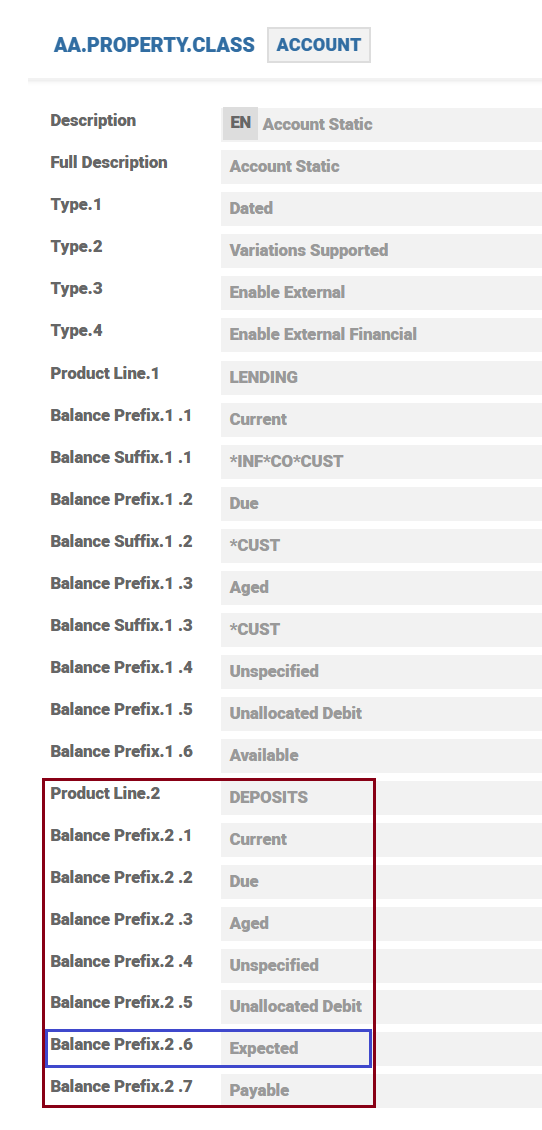
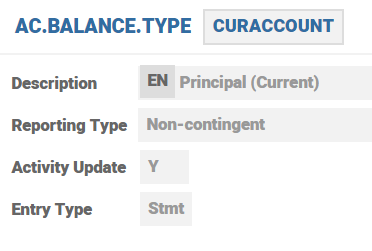
Under Property Classes, the balance prefix is hardcoded for each Property Class. These balance prefixes denotes the life cycle of an arrangement by which financial balance moves from one stage to the other. For instance CUR+BALANCE, ACC+PRINICIPALINT
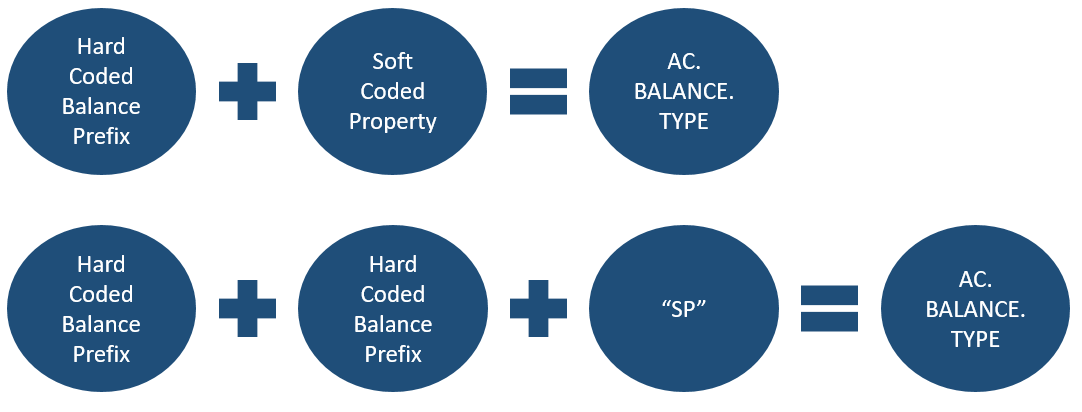
When the Property is suspended, the accruals are posted to the balance types suffixed with a SP, instead of PL.
Temenos Transact has no validations on AC.BALANCE.TYPE record ID. Read Virtual Balance Type options to know more.
Auto Creation of Balance Types
- System auto creates AC.BALANCE.TYPE records during creation or rebuild of Product Group when the Rebuild Balance Type attribute in the AA.PRODUCT.GROUP is set to YES.
- System considers the Balance Prefix and Balance Suffix attributes in the AA.PROPERTY.CLASS for defining the AC.BALANCE.TYPE record name.
- The naming convention of a system created balance type with an example is given below:
- Record ID: CURACCOUNTCUST
- <PRFX><CLASSNAME> - CUR indicates the PREFIX. ACCOUNT indicates the Property. Note that there is one entry per PREFIXCLASS combination.
- <SUFFIX> - CUST indicates the SUFFIX. Currently supported suffixes include SP, CO, CUST, INF
Blue Print Records
- Temenos releases blue print records with the prefix System*. The blue print records has the AC.BALANCE.TYPE content (for example, Reporting Type, Entry Type, etc.) that are mandatory to define a balance type.
- System uses the blue print records to auto create balance type records when a Product Group is authorised during creation or rebuild.
External Product Line
- AC.BALANCE.TYPE records created for external Product Lines are indicated with the suffix INF.
- The balances types are stored in EB.LOOKUP table under External Balance Prefix.
Ageing Balance
Balance types are auto created for the overdue statuses available in the EB.LOOKUP table with the AA.OVERDUE.STATUS*<BALANCE.TYPE> record ID.
- System restricts the input of SYSTEM* Balance Types (blue print records) in Activity Restriction, Payout Rules, Payment Rules Property Classes, and AA.PRODUCT.DESIGNER.
- Set the Signed Type attribute as YES for CUR balances in the ACCOUNT Product Line.
Balance Type Auto Creation Settings Matrix
The settings for various balances are tabled below.
| PROPERTY CLASS | PREFIX | SUFFIX | REPORTING | ACTIVITY.UPDATE | ENTRY.TYPE |
|---|---|---|---|---|---|
| ACCOUNT | CUR | NON CONTINGENT | Y | STMT | |
| INF | INTERNAL | Y | STMT | ||
| CO | CONTINGENT | Y | SPECIAL | ||
| CUST | INTERNAL | Y | SPECIAL | ||
| DUE | NON CONTINGENT | Y | STMT | ||
| CUST | INTERNAL | Y | SPECIAL | ||
| AGE | NON CONTINGENT | Y | STMT | ||
| CUST | INTERNAL | Y | SPECIAL | ||
| UNC | NON CONTINGENT | Y | STMT | ||
| UND | NON CONTINGENT | Y | STMT | ||
| AVL | CONTINGENT | Y | SPECIAL | ||
| EXP | CONTINGENT | Y | SPECIAL | ||
| PAY | NON CONTINGENT | Y | STMT | ||
| CHARGE | ACC | NON CONTINGENT | N | SPECIAL | |
| SP | NON CONTINGENT | Y | SPECIAL | ||
| DUE | NON CONTINGENT | Y | STMT | ||
| AGE | NON CONTINGENT | Y | STMT | ||
| DEF | NON CONTINGENT | Y | SPECIAL | ||
| PAY | NON CONTINGENT | Y | STMT | ||
| INV | NON CONTINGENT | Y | SPECIAL | ||
| INTEREST | ACC | NON CONTINGENT | N | SPECIAL | |
| SP | NON CONTINGENT | Y | SPECIAL | ||
| INF | INTERNAL | Y | SPECIAL | ||
| CO | CONTINGENT | Y | SPECIAL | ||
| CUST | INTERNAL | Y | SPECIAL | ||
| DUE | NON CONTINGENT | Y | STMT | ||
| AGE | NON CONTINGENT | Y | STMT | ||
| SP | NON CONTINGENT | Y | SPECIAL | ||
| CUST | INTERNAL | Y | SPECIAL | ||
| DEF | NON CONTINGENT | Y | SPECIAL | ||
| SP | NON CONTINGENT | Y | |||
| CUST | |||||
| RES | NON CONTINGENT | Y | SPECIAL | ||
| REC | NON CONTINGENT | Y | STMT | ||
| PAY | NON CONTINGENT | Y | STMT | ||
| RSP | NON CONTINGENT | Y | SPECIAL | ||
| ACR | SP | NON CONTINGENT | Y | SPECIAL | |
| PERIODIC.CHARGES | DUE | NON CONTINGENT | Y | STMT | |
| PAY | NON CONTINGENT | Y | STMT | ||
| DEF | NON CONTINGENT | Y | SPECIAL | ||
| AGE | NON CONTINGENT | Y | STMT | ||
| TAX | DUE | NON CONTINGENT | Y | STMT | |
| AGE | NON CONTINGENT | Y | STMT | ||
| TERM.AMOUNT | CUR | CONTINGENT | Y | SPECIAL | |
| TOT | CONTINGENT | Y | SPECIAL |
Attributes
Attribute level explanation of the AC.BALANCE.TYPE application is given below.
| Attribute | Description |
|---|---|
| GB Description | A meaningful description for the balance type. |
| Reporting Type |
Allows the user to define how the balance type should be used with respect to reporting. Available balances are: CONTINGENT – reported as a contingent NON-CONTINGENT – on balance sheet type INTERNAL – not to be used in reporting VIRTUAL – denotes the balance is calculated during runtime. BUNDLE – indicates this balance is used in bundles CRA – indicates this balance is used in CRA balances. Read AC.BALANCE.TYPE section for more details on the significance of the value CRA. |
| Self-Balancing | Self-balancing is an option allowed for contingent type that causes the accounting system to automatically raise self-balancing entries. |
| Virtual Bal |
Virtual balances are sum of AC.BALANCE.TYPE. These are used for run time calculation (for example, penalty interest, and CRA balance) and are not reported. Virtual balances are mandatory for Virtual reporting type. NOTE: Duplicate values are not allowed in the multi value.
|
| Suspend Balance |
Allows the user to designate if the balance type can be suspended (for example, contract moves to NAB). NOTE:
|
| Activity Update |
This attribute is used to determine whether a dated balance file (for example, ACCT.BALANCE.ACTIVITY) should be updated when this balance type is updated. This can be achieved by setting the value as YES. When the balance type (for example, accruals) is not required to maintain a dated history, set the value as NO. It is recommended that this field is always set to Yes for AA Balance Types. |
| Movement Suppress | This attribute allows the user to suppress movements. For internal movements, the entry records can be suppressed when Reporting Type is defined as INTERNAL and if this attribute is set as YES, then no accounting entries gets updated in the corresponding files – STMT.ENTRY or RE.CONSOL.SPEC.ENTRY but balances are updated in the account for the respective balance type. |
| Entry Type | Allows the user to define whether the entry type should be STATEMENT or SPECIAL. |
| Signed Type |
Allows the user to define whether the balance type is signed type. For Accounts Product Line, the account balance can switch signs (between debit and credit) hence this field is set as Yes |
| Exclude Cr Check |
Allows the user to specify whether entries with this balance type should be excluded from the credit check processing. Default value is NO, by default the movement does a credit check and updates the limit. NOTE: This is be a NO change attribute.
|
|
Product Line Product Group Product Exclude Balance Type |
The multi value set attribute (Product Line, Product Group, Product, Exclude, Balance Type, Absolute Value) is used when a Product Line or Product Group or Product is: Specific to a balance type (or) it must be excluded from a balance type. For example, when the setup is defined as shown below: Reporting type = CRA Product = SAVINGS.ACCOUNT Balance Type = CURRENT.BALANCE Then, the CRA balance is calculated by the system only by summing up the current balances of the savings account pertaining to the family group defined at the arrangement level. |
| Absolute Value |
This attribute handles negative balances in lending and account arrangements. When the attribute value is set to YES, the negative balances are transposed as absolute value (for example, outstanding balance $ -15,000 is displayed as $ 15,000). NOTE:
This field is used for pricing rules evaluation and not applicable for raising absolute entries in AA.
|
AC.EVENT
At the Activity Class level, all the actions that are performed on a particular Property Class are defined at AA.ACTIVITY.CLASS level. A corresponding record is available in AA.PROPERTY.CLASS.ACTION, where it is decided if the underlying action raises an accounting entry or otherwise.
The AC.EVENT records are released by core accounting and acts as the link between the Soft Accounting configuration in AA and what is passed to the core accounting to be processed as accounting entries. A combination of these records can be used to create the entries required for any given activity in AA. The description advises the user on the accounting entry generated by the event: CR EXPACCOUNT Balance.
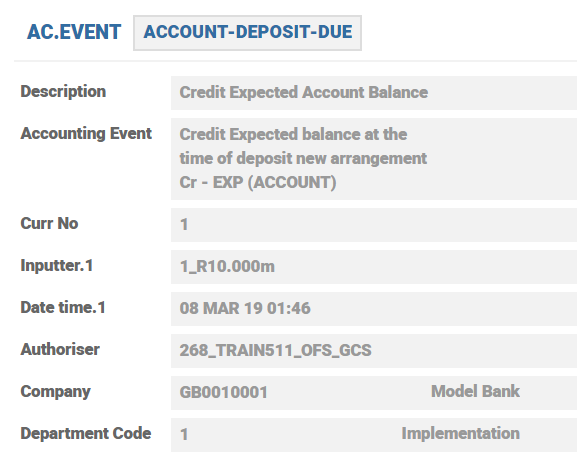
Record ID of AC.EVENT is PROPERTY.CLASS-ACTION.NAME-PAYMENT.METHOD-ADDITIONAL.INFO.
For example, ACCOUNT-DEPOSIT-DUE INTEREST-ACCRUE-DUE-SP.
AC.EVENT records are configured used in AC.ALLOCATION.RULE records, which in turn are linked to AA.PRD.CAT.ACCOUNTING Property Class record.
Read AC.EVENT and corresponding Allocation Rule required for mapping.
AC.ALLOCATION.RULE
The AC.ALLOCTION.RULE table defines the accounting events used by the soft accounting process, where the event is used to identify mapping tables to determine the type of accounting entries to be raised and the content of these entries.
The accounting event is supplied by the underlying application. An identifying code is supplied as part of the event interface information from the underlying application.
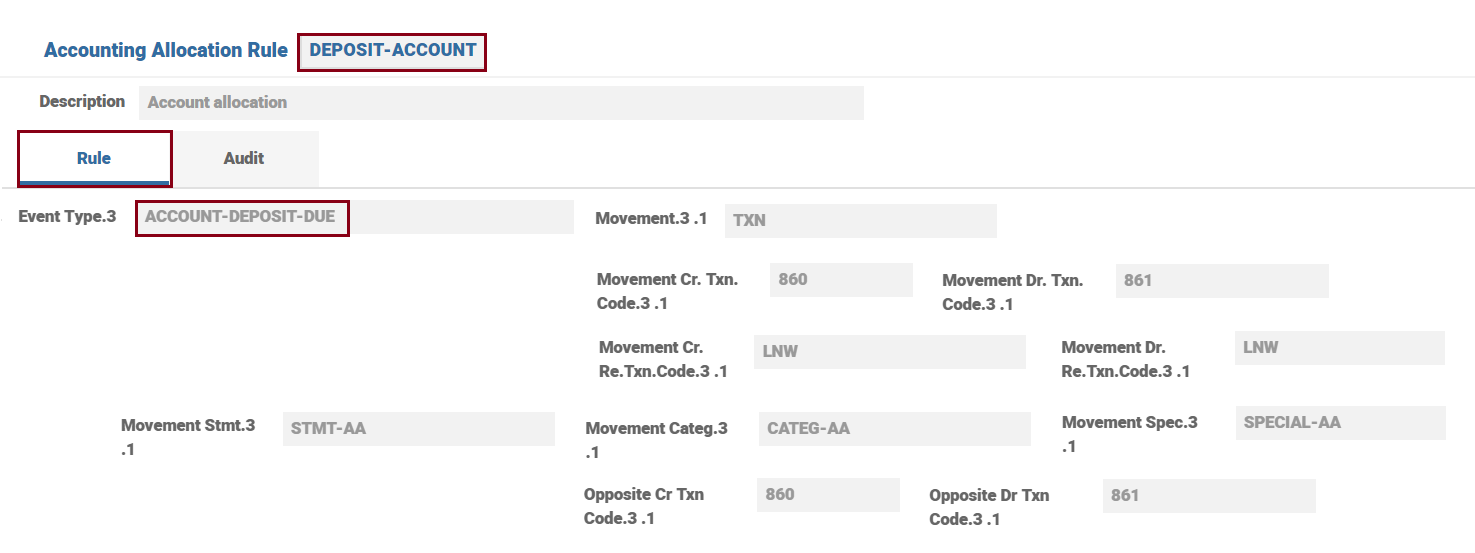
For each event, the debit and credit transaction codes with which the entries are posted is defined.
The Action and Allocation Rules per Property or Property Class, applicable for a specific Product are defined in AA.PRD.CAT.ACCOUNTING Product Condition attached to Accounting Property.
Attributes
Attribute level explanation of the AC.ALLOCTION.RULE application is given below.
| Attribute | Description |
|---|---|
| Description | A meaning full description for the allocation rule. |
| Event Type |
An optional identifier to allow the allocation associated only when the event type supplied with the accounting event matches. Null value is assumed to be the default value. No duplicate values allowed. The applications should document the structure of their accounting events to allow this table to be configured correctly. A valid AC.EVENT record is allowed. |
| Entry Print Mask | This attribute indicates if masking is required for the event type. Masking can be applied by setting the value as YES. |
| Mvmt Target |
This attribute indicates the target balance associated with the event type. It is sub-valued and can be expanded to allow multiple movements to be raised. Values allowed when Mvmt Detail is set to STMT:
Values allowed when Mvmt Detail is set to CATEG: PL*CATEGORY key - category code for profit and loss posting Values allowed when Mvmt Detail is set to SPECIAL: CRB - TXN indicating that the contract of the event will be used. No input is allowed if the attribute Mvmt Detail is not populated. |
| Mvmt Cr Txn |
Defines the transaction to be used when creating credit STMT.ENTRY or CATEG.ENTRY movement entries. When this attribute is left blank, the value in the Def Cr Txn attribute is used. |
| Mvmt Dr Txn |
Defines the transaction to be used when creating debit STMT.ENTRY or CATEG.ENTRY movement entries. When this attribute is left blank, the value in the Def Dr Txn attribute is used. |
| Mvmt Cr Re T |
Defines the RE.TXN.CODE to be used when creating credit RE.CONSOL.SPEC movement entries. When this attribute is left blank, the value in the Def Cr Re T attribute is used. |
| Mvmt Dr Re T |
Defines the RE.TXN.CODE to be used when creating debit RE.CONSOL.SPEC movement entries. When this attribute is left blank, the value in the Def Dr Re T attribute is used. |
| Mvmt Stmt |
Defines the AC.POSTING.DETAIL to be used when creating STMT.ENTRY movement entries. This AC.POSTING.DETAIL is also used for opposite entries if the Opp Stmt is left blank. |
| Mvmt Categ |
Defines the AC.POSTING.DETAIL to be used when creating CATEG.ENTRY movement entries. This AC.POSTING.DETAIL is also used for opposite entries if the Opp Categ attribute is left blank. |
| Mvmt Spec |
Defines the AC.POSTING.DETAIL to be used when creating RE.CONSOL.SPEC.ENTRY movement entries. This AC.POSTING.DETAIL is also used for opposite entries, if the Opp Spec attribute is left blank. |
| Opp Target |
The target balance associated with the event type. This attribute is sub-valued and can be expanded to allow multiple movements to be raised. Values allowed when Opp Detail is set to STMT:
Values allowed when Mvmt Detail is set to CATEG: PL*CATEGORY key - category code for profit and loss posting. Values allowed when Opp Detail is set to SPECIAL: CRB - TXN indicating that the contract of the event will be used. No Input allowed if the Opp Detail attribute is not populated. |
| Opp Cr Txn |
Defines the transaction to be used when creating credit STMT.ENTRY or CATEG.ENTRY opposite entries. When this attribute is left blank, the value in the Def Cr Txn attribute is used. |
| Opp Dr Txn |
Defines the transaction to be used when creating debit STMT.ENTRY or CATEG.ENTRY opposite entries. When this attribute is left blank, the value in the Def Dr Txn attribute is used. |
| Opp Cr Re T |
Defines the RE.TXN.CODE to be used when creating credit RE.CONSOL.SPEC opposite entries. When this attribute is left blank, the value in the Def Cr Re T attribute is used. |
| Opp Dr Re T |
Defines the RE.TXN.CODE to be used when creating debit RE.CONSOL.SPEC opposite entries. When this attribute is left blank, the value in the Def Dr Re T attribute is used. |
| Opp Stmt |
Defines the AC.POSTING.DETAIL to be used when creating STMT.ENTRY opposite entries. When this attribute is left blank, the value in the Mvmt Stmt attribute is used. |
| Opp Categ |
Defines the AC.POSTING.DETAIL to be used when creating CATEG.ENTRY opposite entries. When this attribute is left blank, the value in the Mvmt Categ attribute is used. |
| Opp Spec |
Defines the AC.POSTING.DETAIL to be used when creating RE.CONSOL.SPEC.ENTRY opposite entries. When this attribute is left blank, the value in the Mvmt Spec attribute is used. |
Parallel Accounting
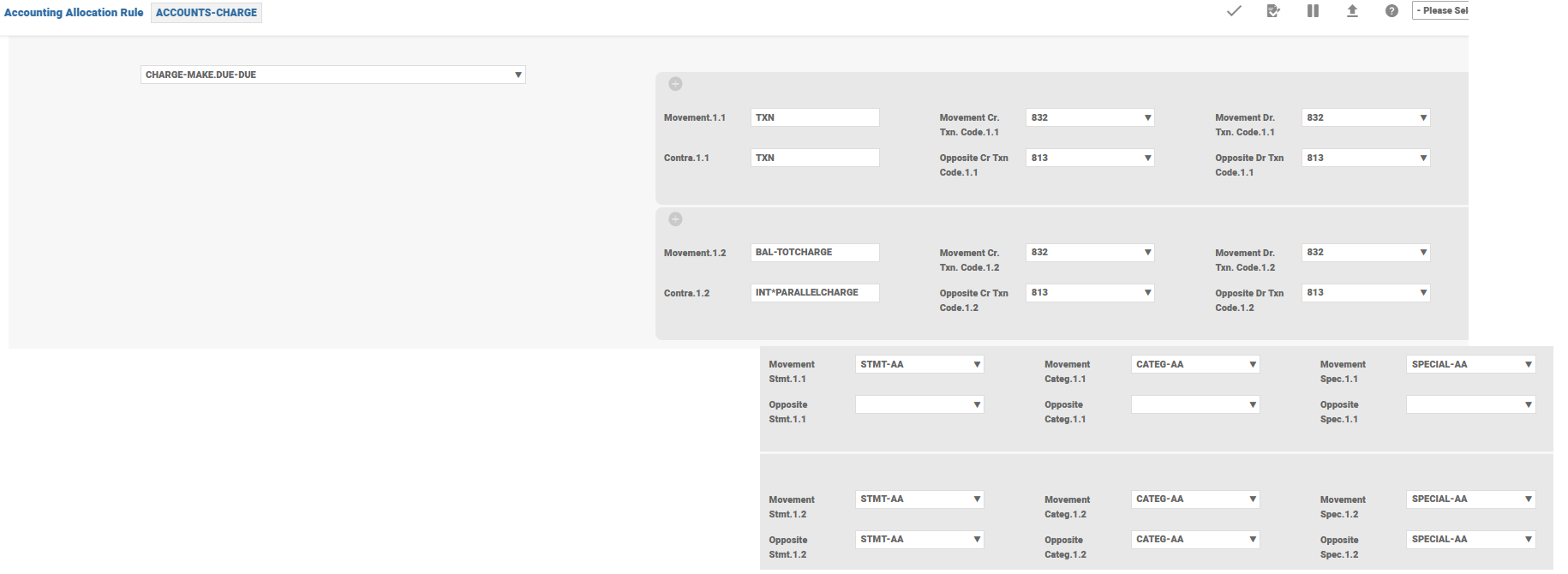
Multiple Targets and Contra Targets can be created from the same event:
- This allows additional movements to be created if required
- Target options include P&L, Internal Account, specific Balance Type
- Default is balance type supplied with the entry through AC.POSTING.DETAILS
In the below example for a make due charge, there is a parallel accounting raised (for analysis of the bank or any such requirement) outside the regular accounting. Incorrect usage of this option could result in inflated balance updates. Hence, care should be taken to use the correct Balance Type based on the requirement. In this example, it could be a contingent Spec entry that is being raised in addition to the original Stmt and Spec Entries.
AC.POSTING.DETAIL
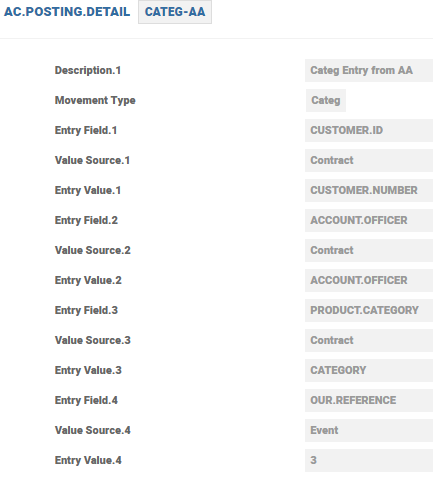
The AC.POSTING.DETAIL is used to define the mapping rules of the generation of the entry detailed content. The definition in these records controls how the content of the accounting entries are built.
The movement type can be:
- CATEG – CATEG.ENTRY records
- STMT – STMT.ENTRY records
- SPECIAL –RE.CONSOL.SPEC.ENTRY records

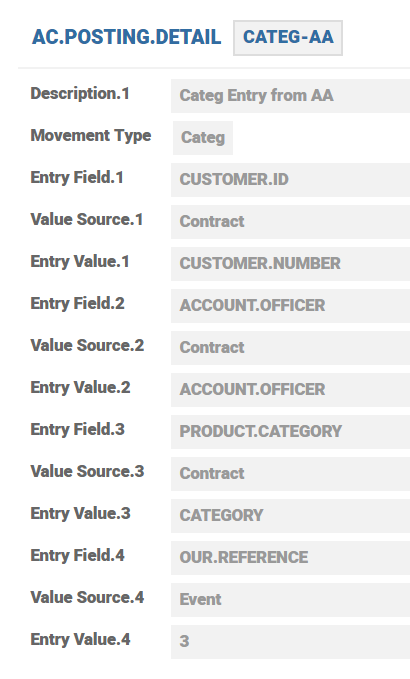
For example, in order to map and record the additional fields in STMT.ENTRY, a new set of values are added in the AC.POSTING.DETAILS for storing the additional field and it is modified to allow a new value.
A multi-value field is introduced for storing the additional field name along with its value as an associated field instead of using the Reserved field as and when the requirement rises. Further, it has been restricted that the duplicate occurrence in one of the field is made mutually inclusive with the other field.
The Soft Accounting process looks for the additional fields in the event and populate both the name and its corresponding value from the event information into the new statement entry fields.
Attributes
Attribute level explanation of AC.POSTING.DETAIL is given below.
| Attribute | Description |
|---|---|
| Description | A meaning full description for the posting. |
| Movement Type |
Allows the user to define the entry being generated
|
| Entry Field |
Allows the user to designate the name of the Entry Field to be mapped. Must be valid name in the STMT.ENTRY standard selection record, and must be one of the identified attributes that can be mapped. |
| Value Source |
Allows the user to define the source of the data to be mapped into the associated Entry Field. Available values are:
|
| Entry Value | Identifies the item in the Value Source attribute that contains the source data to be mapped. Values should match the allowed list. |
Structure Overview
The underlying core applications generate AC.EVENT and AC.BALANCE.TYPE. These are then passed to Soft Accounting. The relevant AC.ALLOCATION.RULE is determined by the system from the Product configuration (accounting condition). Once detected the Allocation Rule to be used, the system uses the setup defined for the specific AC.EVENT and raises accounting.
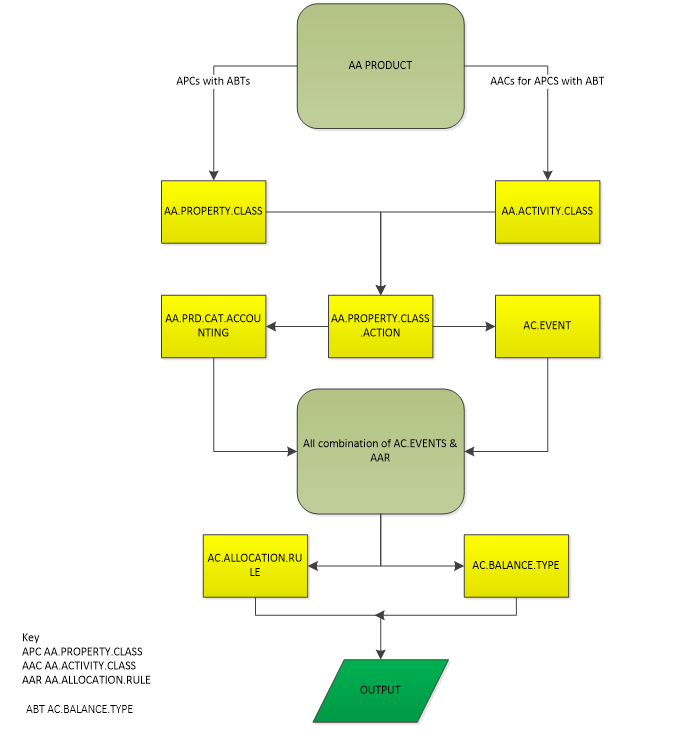
The detailed flow is also shown below.
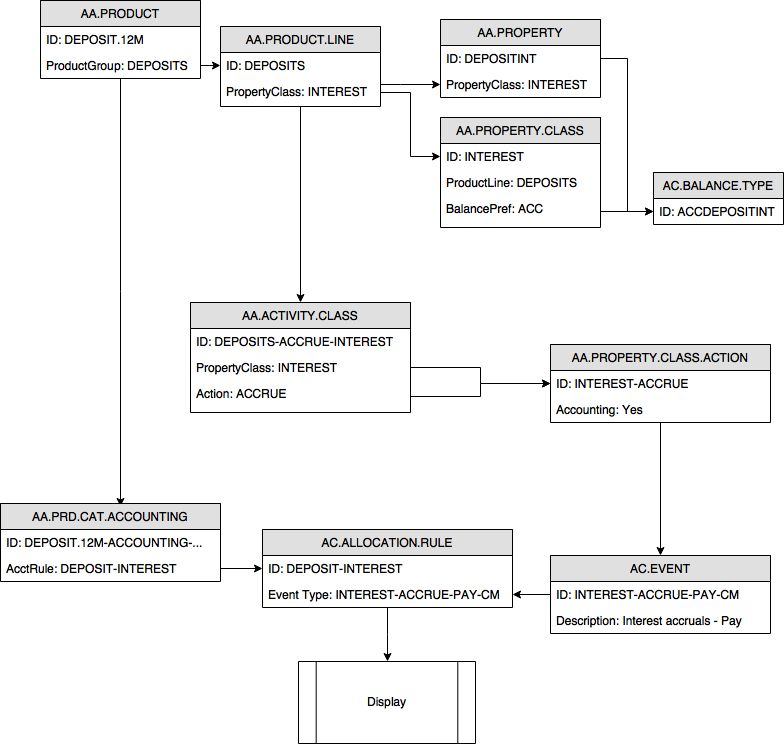
Accounting Schema Flow
In Temenos Transact, accounting entries are automatically generated for authorised transactions. AA provides a certain amount of flexibility in defining broad rules for a desired accounting set-up. When an Activity involving accounting is processed, that raises an accounting event. Accounting Property Class is used to define Property-wise and Action-wise allocation rules. Further, Properties having a financial implication like Interest, Charge, etc. can have multiple balances which can be defined by users. Allocation Rules define the rules for debit and credit transactions of every accounting event type like which type of entries need to be generated, the balances to be updated, etc. Temenos Transact core accounting raises the necessary accounting entries (Spec Entry, Stmt Entry and Categ Entry) and update the required balances as set in the Allocation Rules. These balances are consolidated and reported in financial reports.
Check Activity Class Records and Identify the Actions for Property Classes that May Raise Accounting Events
The starting point in the flow should be the Activity Class. All the Property Classes that have balance types defined may generate accounting entries while a particular activity is triggered.
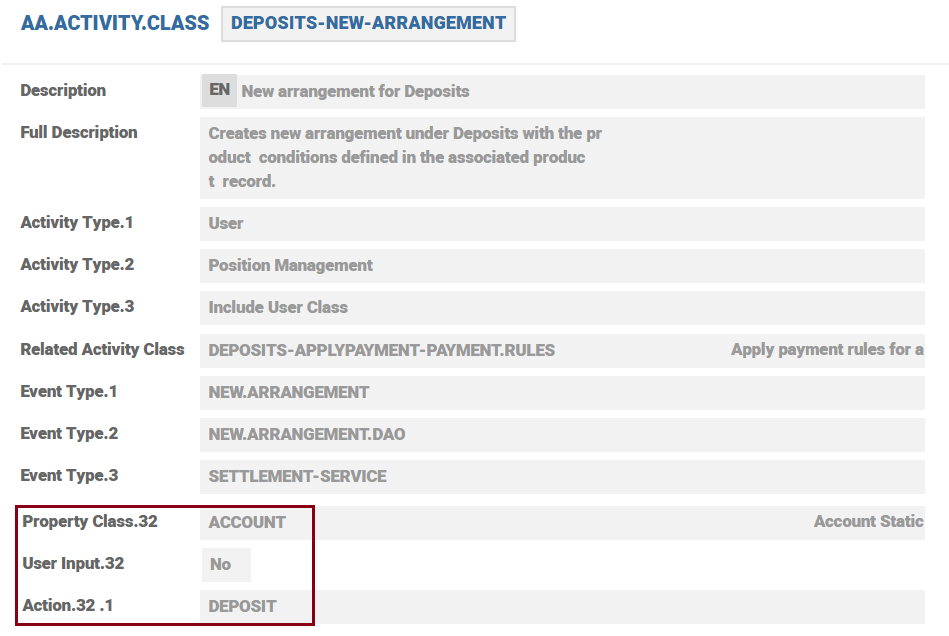
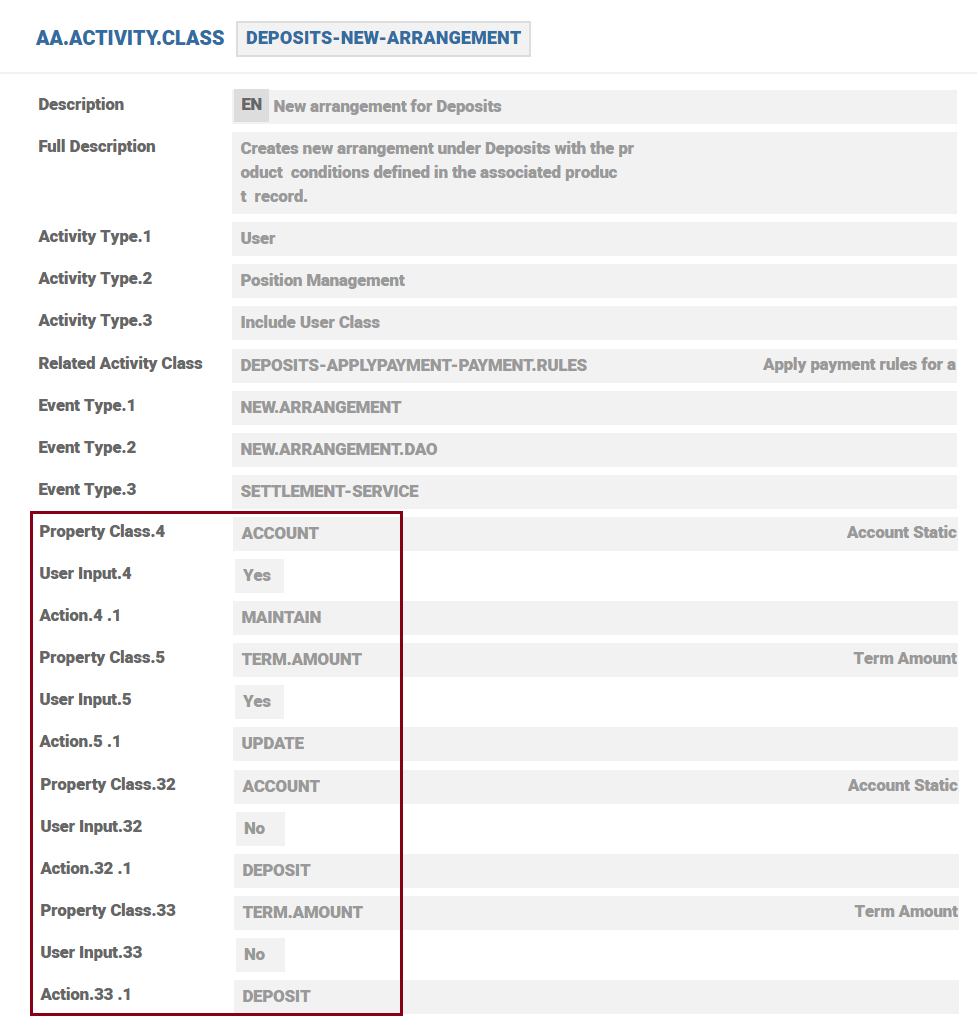
The Property Classes that may generate financial or accounting entries for DEPOSITS-NEW-ARRANGEMENT are Account and Term Amount.
In the example below for DEPOSIT-NEW-ARRANGEMENT we have identified the following actions:
- ACCOUNT-MAINTAIN
- TERM.AMOUNT-UPDATE
- ACCOUNT-DEPOSIT
- TERM.AMOUNT-DEPOSIT

 Check Property Class Actions and Identify Events Raising Accounting
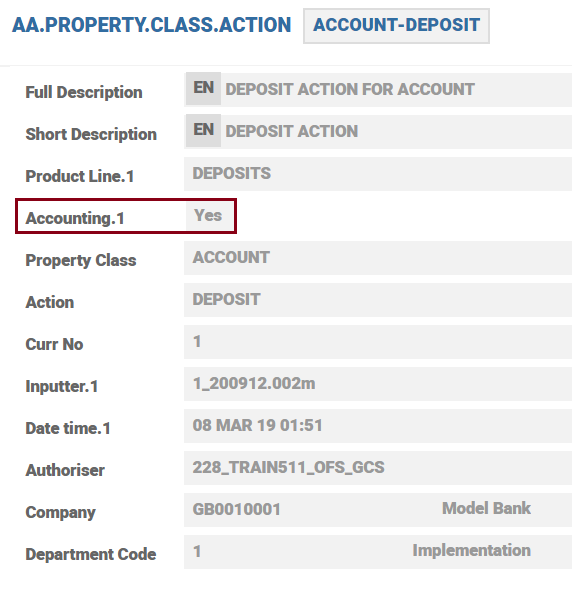
Each of the Actions defined in the Activity Class have an entry in AA.PROPERTY.CLASS.ACTION. When Accounting is set to YES in Action, accounting is triggered for the product.
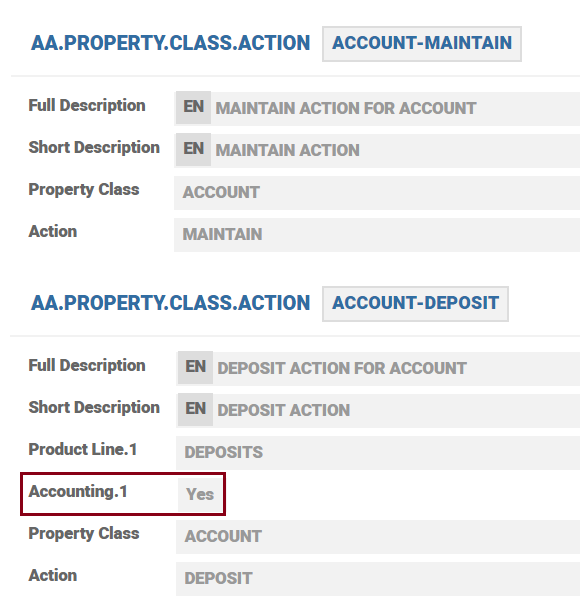
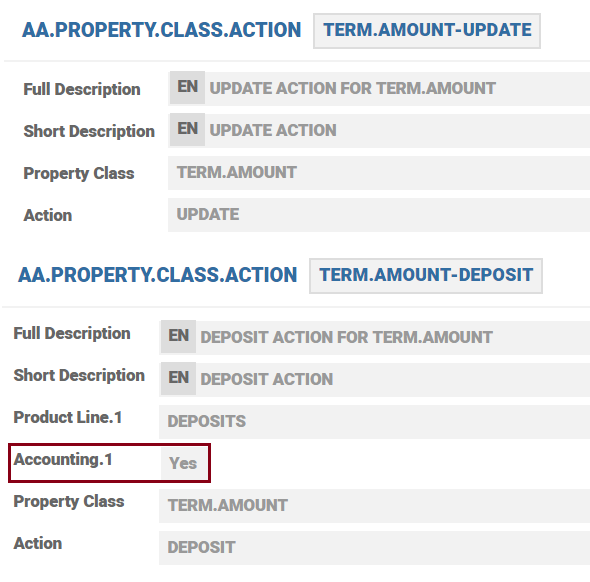
While looking at these records, notice that only ACCOUNT-DEPOSIT and TERM.AMOUNT-DEPOSIT has the field Accounting set to YES. This means that it is only this one can actually do any accounting and the associated action is DEPOSIT.
Check in the Accounting Condition of the Product the Allocation Rules Assigned to Each Financial Property Action
When accounting is set to YES for a particular action, to process the transaction, the system looks for the appropriate allocation rule to be used for the PROPERTY. This can be derived from the product condition that is cataloged under AA.PRD.CAT.ACCOUNTING. System locates the most suitable allocation rule by Property and if there is no rule for the property then the system takes Property Class rule.
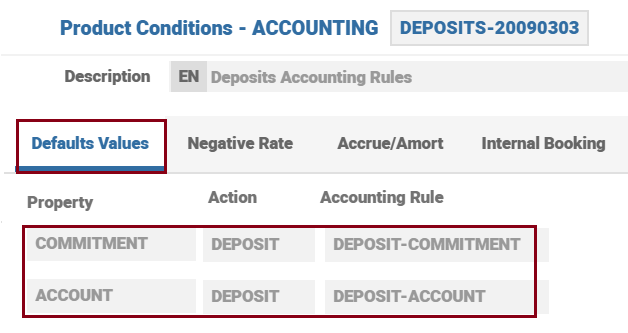
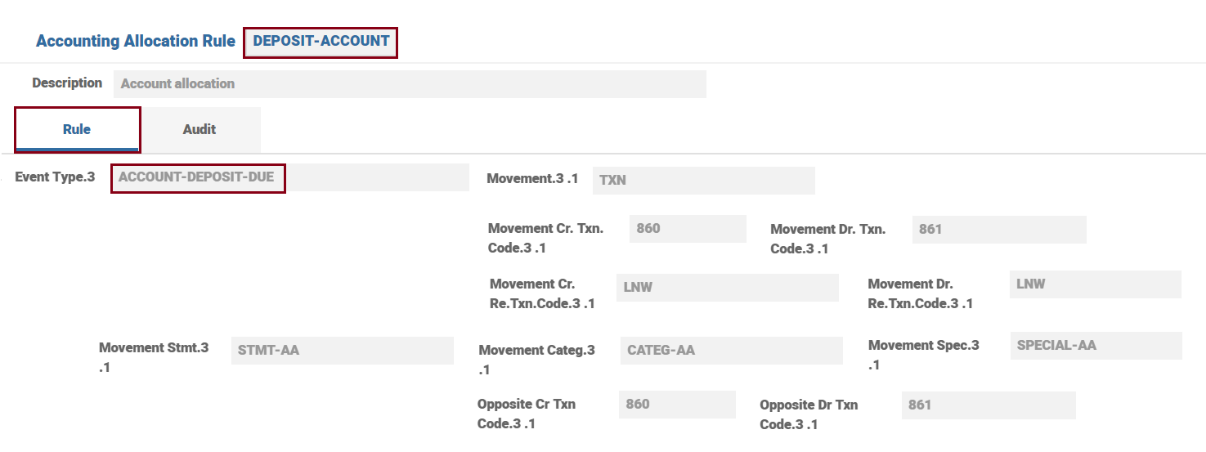
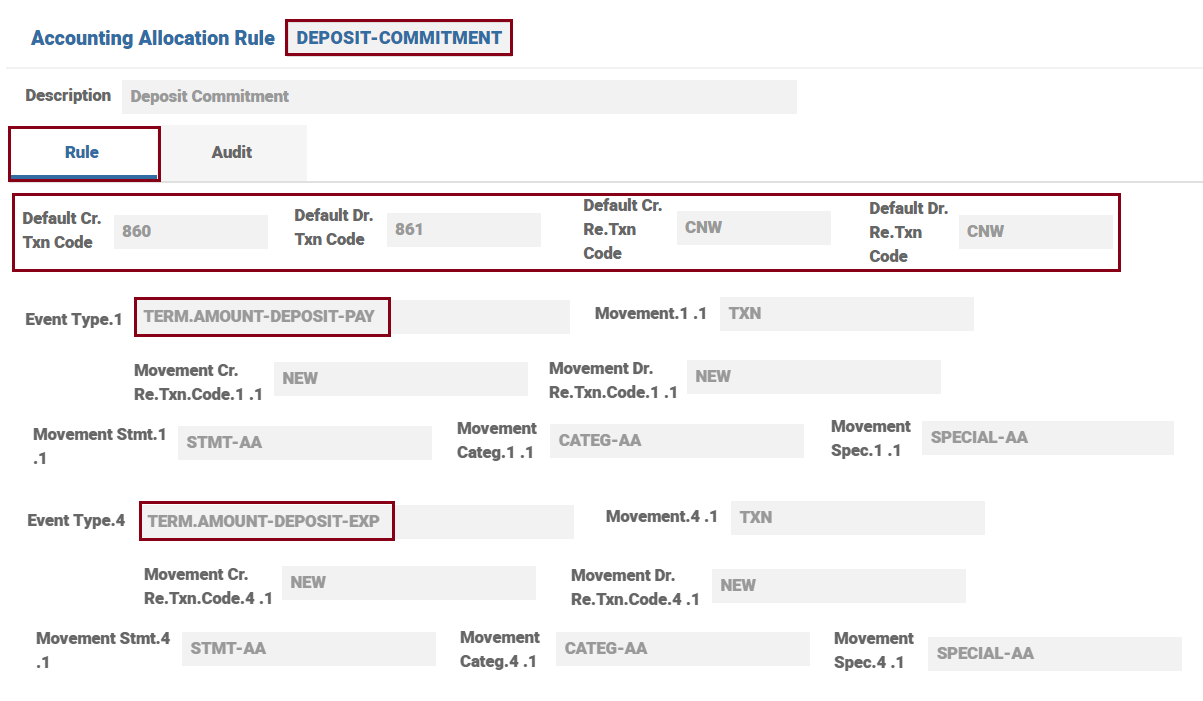
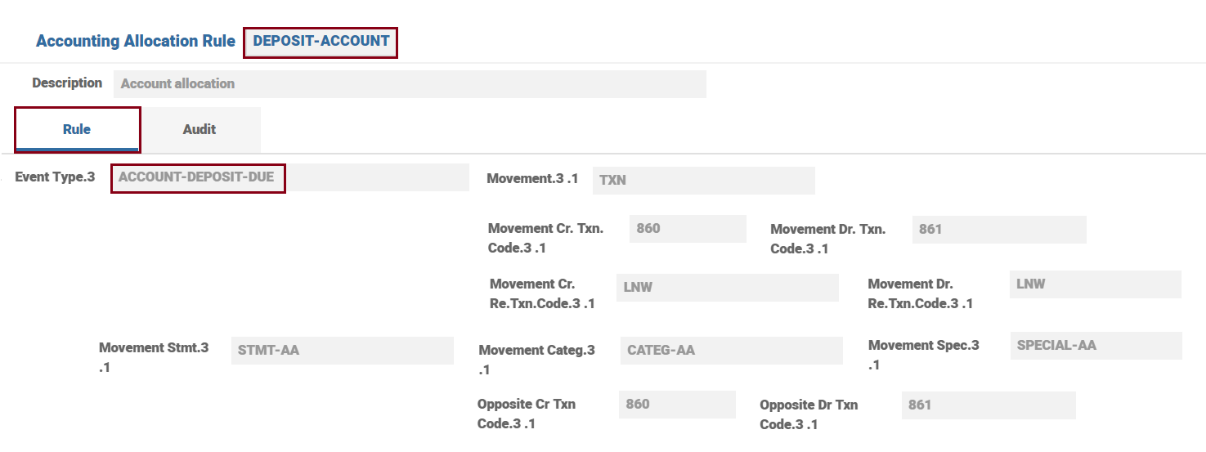
The accounting definition can be at Property or Property Class level. If it is defined at both level then Property takes precedence. The AC.ALLOCATION.RULE linked to the ACCOUNT Property us DEPOSIT-ACCOUNT and the one to TERM.AMOUNT is DEPOSIT-COMMITMENT.
AA.PRD.CAT.ACCOUNTING
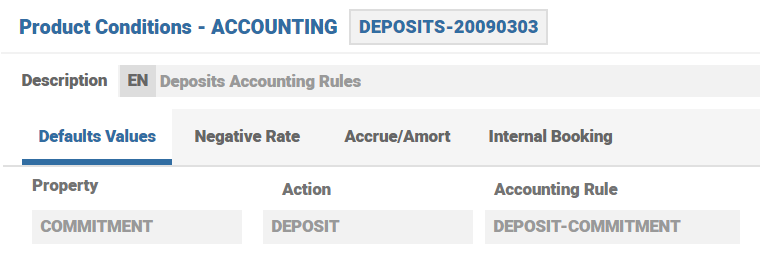
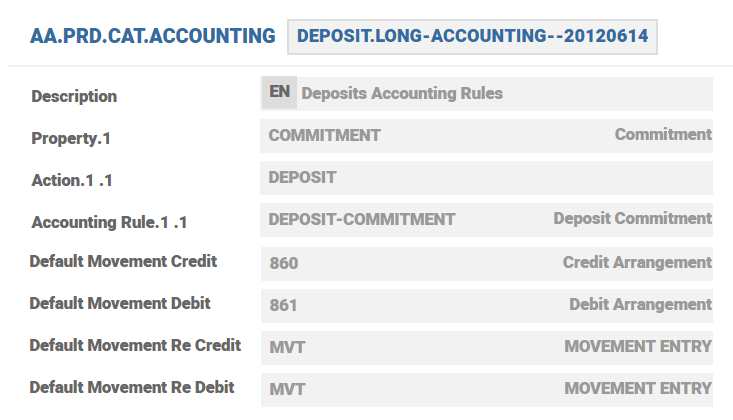
The Action and Allocation Rules for each Property or Property Class pertinent to a specific Product is defined in AA.PRD.CAT.ACCOUNTING. The below screenshot shows the Accounting pertaining to Long Term Deposit to Commitment or Term Amount Deposit.
 Identify the AC Event Records for the Property Action
AA processing generates an AC.EVENT and determines the AC.BALANCE.TYPE that should be updated.
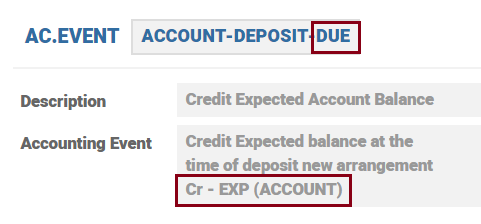
ACCOUNT-DEPOSIT
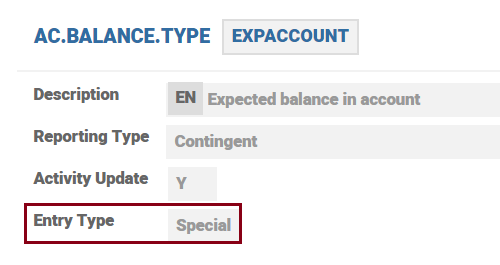
As per core description this event should credit the EXPACCOUNT balance type. The underlying AC.BALANCE.TYPE for this asset type is EXPACCOUNT (contingent, RE.CONSOL.SPEC.ENTRY record should be raised).
 Check for the Applicable Allocation Rule to See the Expected Accounting Entries Details
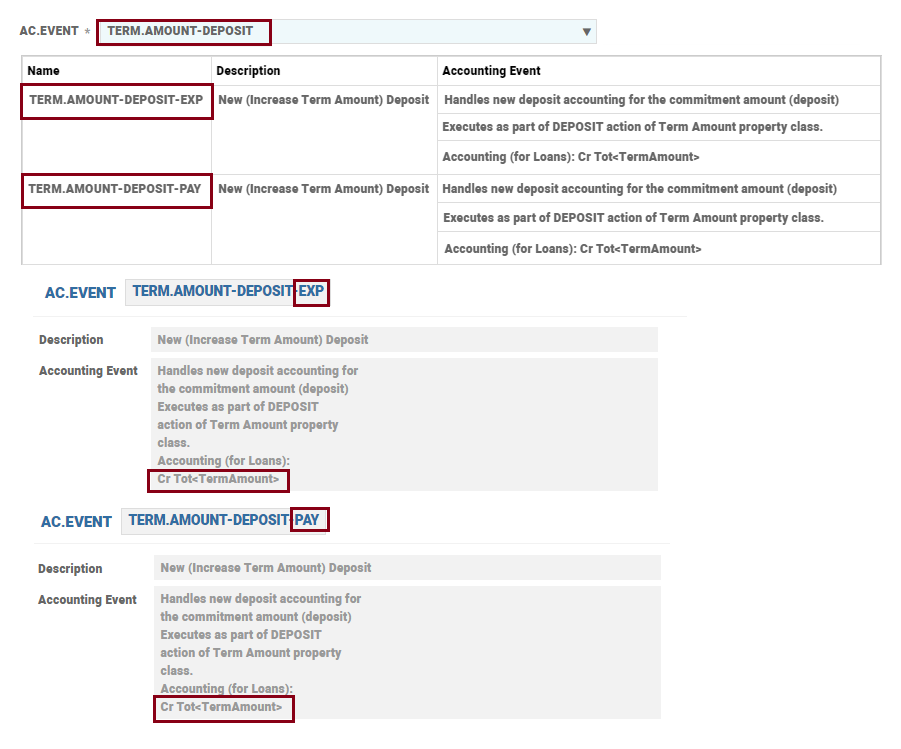
After event is identified, the system looks at the relevant AC.ALLOCATION.RULE and identifies the transaction codes that are pertinent to the underlying event. In the example, the event is TERM.AMOUNT-DEPOSIT-EXP and the associated transaction codes are NEW indicating that it is a new contract.
Same as above for TERM.AMOUNT-DEPOSIT Action.
 Check the Balance Type
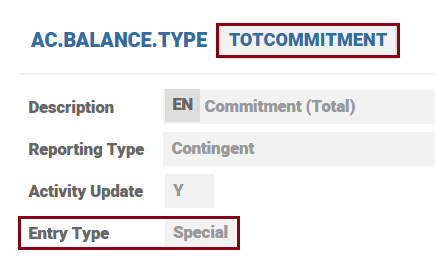
It raises contingent entries, RE.CONSOL.SPEC.ENTRY.
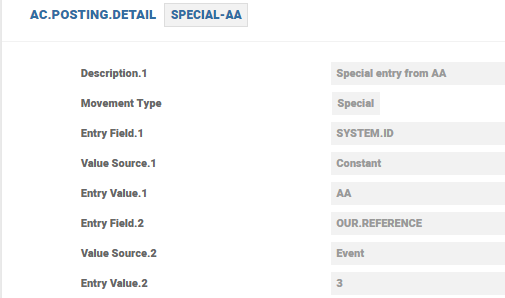
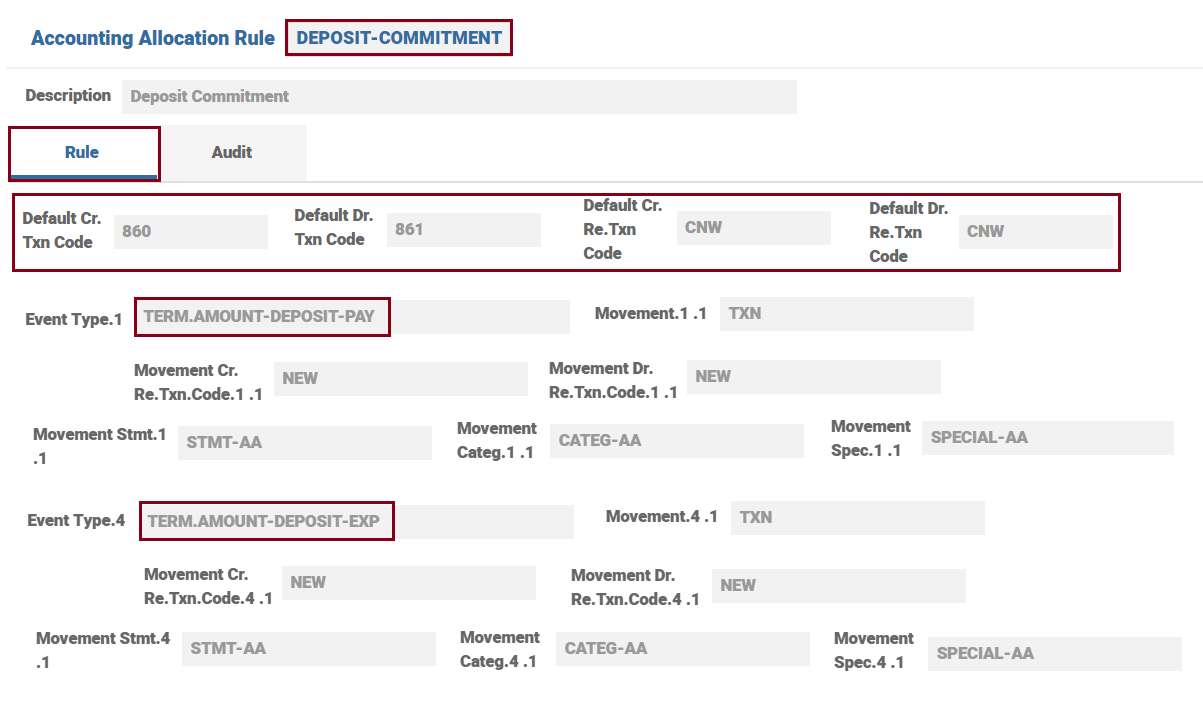 Check the Posting Detail Records
For Special Entries (RE.CONSOL.SPEC.ENTRY)
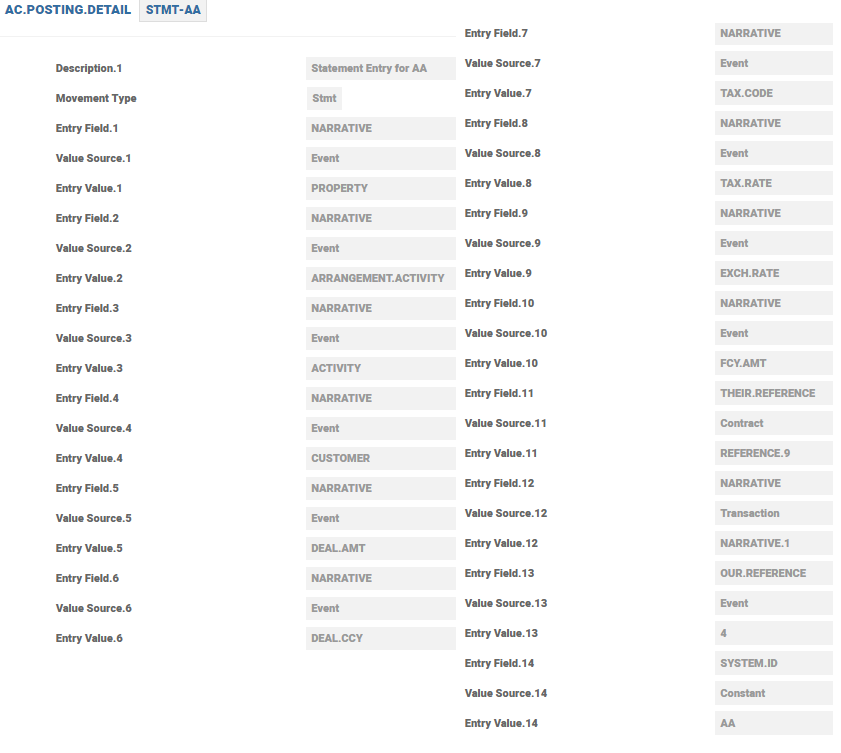
For Statement Entries (STMT.ENTRY)
For CATEG.ENTRY
Illustration
The soft accounting entries that gets generated for an arrangement is illustrated with the help of an example – funding of a deposit contract. The screen shots provided below reflect the set up details as explained in the above sections.
Deposit Arrangement – Not Funded
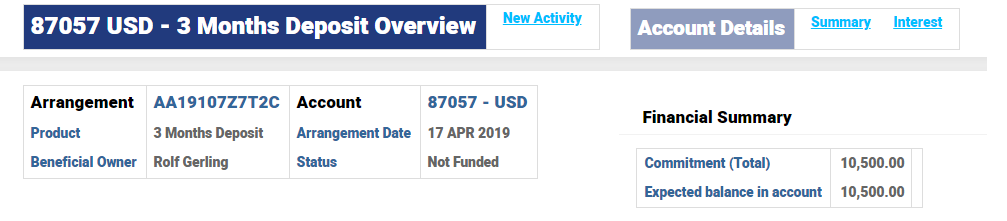
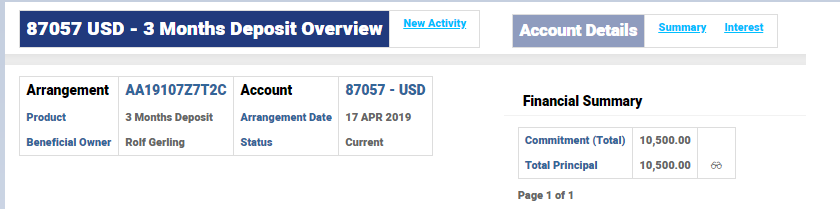
Once an arrangement has been created, various updates happen in the system. Further, when the funding is done, additional updates happen. The below screen shot shows the overview of the deposit arrangement.
Arrangement 87057 is in Not Funded Status with a total commitment of $10,500 and the expected funding is for the same amount $10,500.
Balances
The enquiry on EB.CONTRACT.BALANCE and the corresponding EB.CONTRACT.BALANCE is given here.
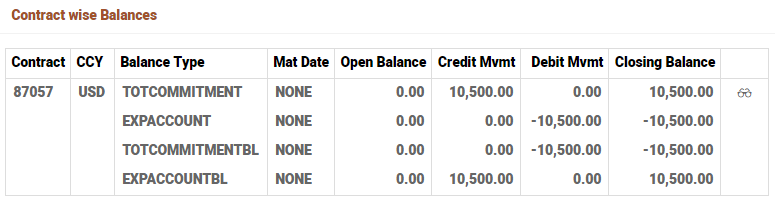
TOTCOMMITMENT is contingent balance type indicating the total deposit amount 10,500 USD and the EXPACCOUNT is also a contingent balance indicating the expected funding in the account 10,500 USD.
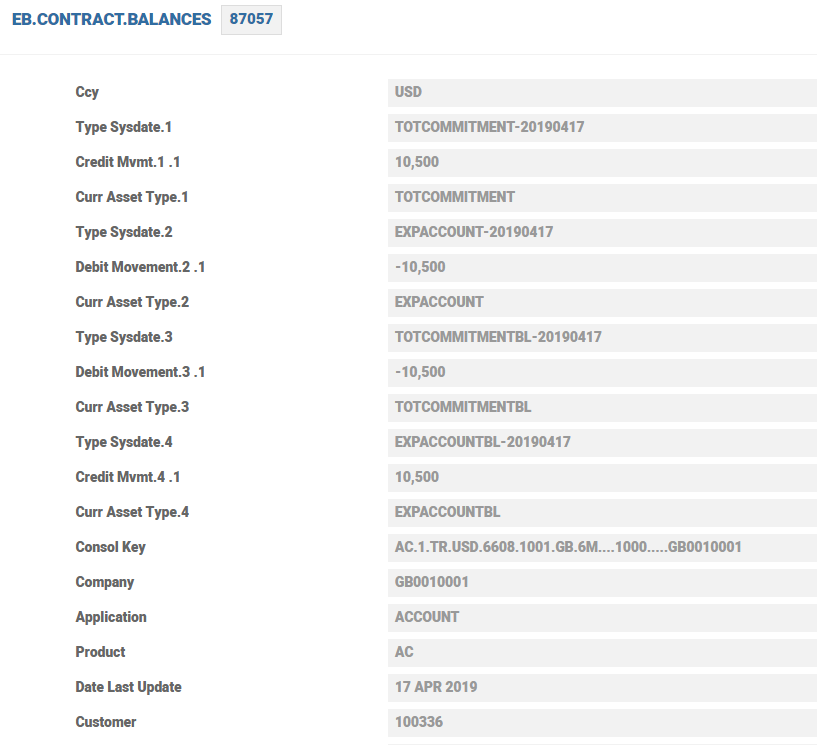
The TOTCOMMITMENTBL and EXPACCOUNTBL balances are self-balancing entries of the single legged contingent entries generated based on the setting in CONSOLDIATE.COND.
Accounting Entry
Accounting entries for TOTCOMMITMENT and EXPACCOUNT are given below.
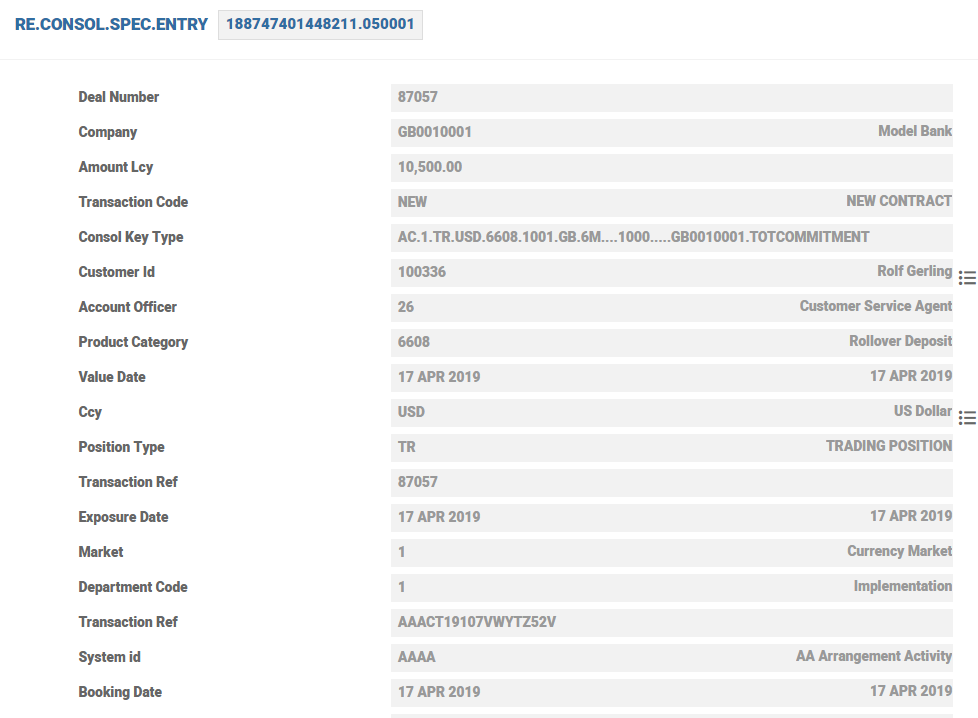
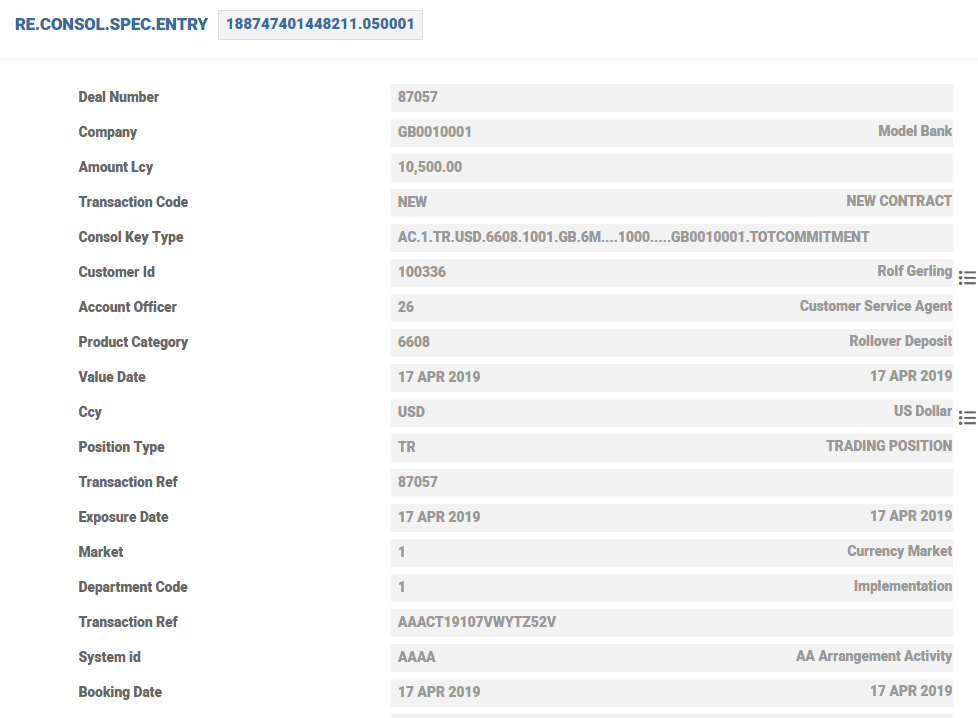
The RE.TXN.CODE ‘NEW’ is the same as assigned in the corresponding AC.ALLOCATION.RULE for the AC.EVENT TERM.DEPOSIT-EXP.
Deposit Arrangement – Live (Funded)
After funding the deposit the EXPACCOUNT balance is reduced and live balance (non contingent) is USD10500.
Balances
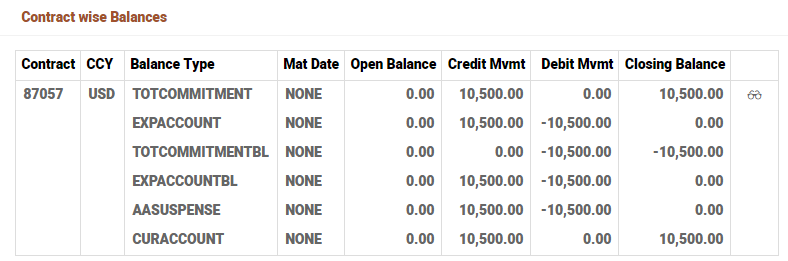
The enquiry of EB.CONTRACT.BALANCES and EB.CONTRACT.BALANCE is given here.
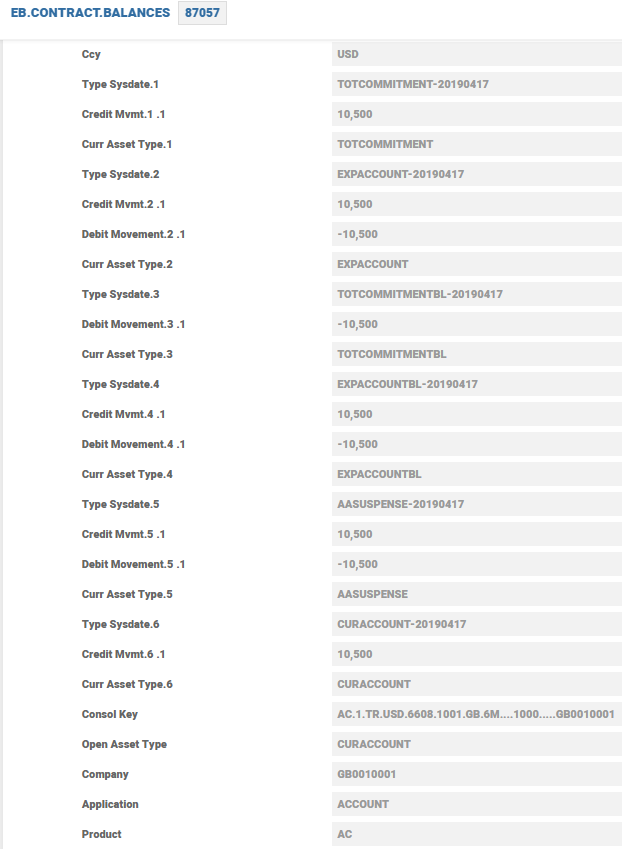 Accounting Entry
The accounting entries are given below:
EXPACCOUNT balance is reduced by $10,500 as the arrangement is fully funded.
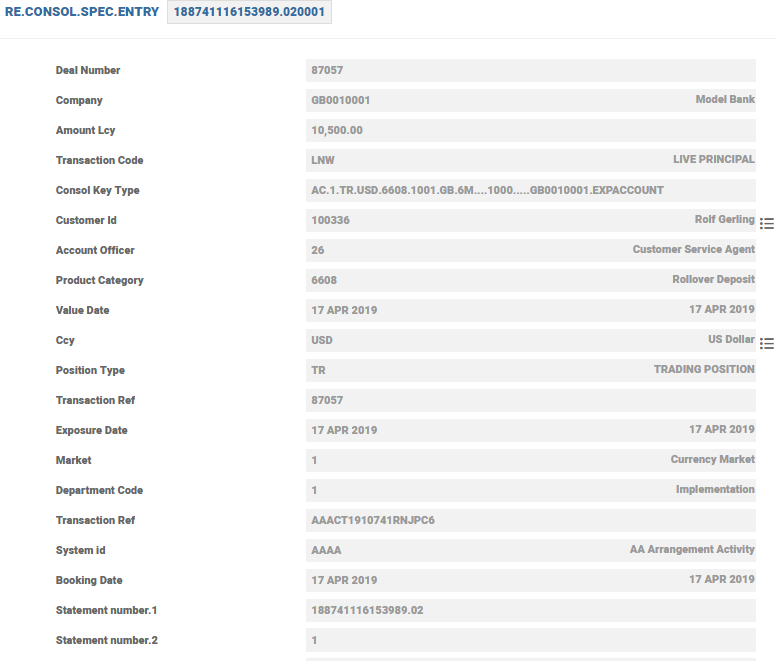
There are self-balancing contingent entries for this EXPACCOUNT entry and an AASUSPENSE entry also generated.
The credit to the Deposit, which is a result of the funding is an Applypayment Activity for the Deposit and is generated as a STMT.ENTRY.
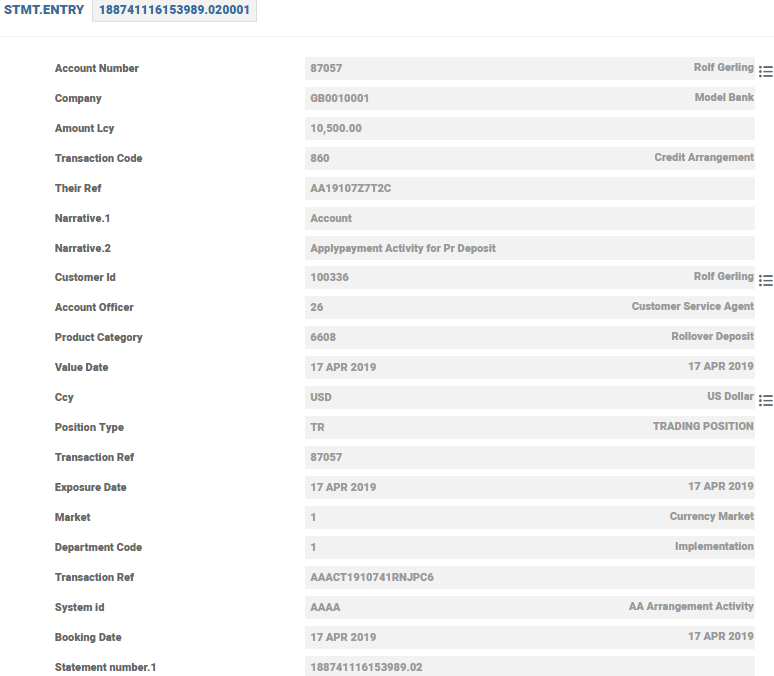
The accounting entry is generated based on the setup in AC.POSTING.DETAILS. The transaction information is taken from the transaction indicated in posting details. The Narrative, Their Reference, Transaction Reference and the System Id fields are also based on AC.POSTING.DETAILS configuration.
In this topic
