Configuring Interest Adjustments
The methods for configuring Interest Adjustments are described below.
Reverse and Replay
The standard AA Reverse and Replay functionality is the default behaviour of the system to recalculate and repost interest/charges as a result of back-valued activities.
In this mode,
- All relevant activities between the effective date of the back-valued activity and the date when it was booked would be reversed.
- The effect of the back valued activity is recorded.
- All the reversed activities are replayed.
If there were any scheduled capitalisation of Interest, Charges or Periodic Charges that had taken place in-between, they would be reversed and replayed as well. The result would be the original Accounting entries fully reversed and rebooked with new amounts.
For AR Arrangements, Reverse and Replay is triggered in the Close of Business of the day when the backdated transaction/activity was booked. No special configuration is required.
AA controls the Reverse and Replay (RR) process by classifying the activities into following categories through the Activity Type field in the respective AA Activity Class record:
- NOREPLAY - Signifies that the activity will not take part in RR, that is, it is not reversed and replayed during RR process.
- NORR - Signifies that the activity does not initiate the Reverse and Replay process when triggered for a back-value date.
- NORR and NOREPLAY - Signifies the activity will neither initiate nor take part in the RR process.
- NORR and NOREPLAY not defined - Signifies that the activities that initiates RR and takes part during RR process.
Read Working with Interest Adjustments for more information on how the options of Reverse and Replay work.
Reverse and Replay with Credit Interest Set to Liquidate
When a payment type with Alt Payment Method field set to Cap And Inv, is used in Payment Schedule Property Class, an invoice balance bill can be generated when capitalisation process tries to move the account to negative balance. The generated bill can be settled manually or automatically by configuring the Reconstruct Settlement field in AA.PARAMETER table.
 Back Dated Settlement Processing for Interest Liquidation
Reconstruct Settlement field in AA.PARAMETER is used in Back Dated Settlement processing.
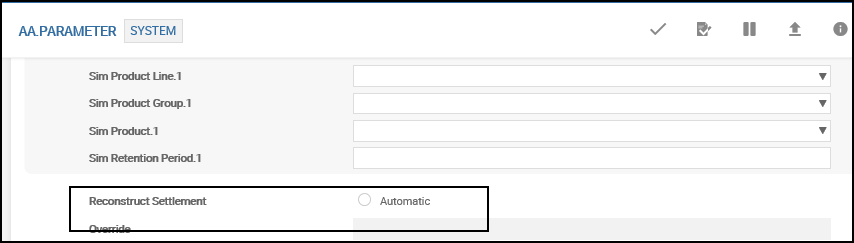
This is a system wide parameter which controls the happenings in a Reverse and Replay scenario. When set to Automatic this functionality is initiated.
This parameter setting is not required for initial backdated processing for a new arrangement. By default this functionality automatically works in a backdated scenario.
Configuration of Invoice Bill Generation During Interest Liquidation
When a back value dated interest correction is posted to an account, it might result in an overdraft in the account. The system can be configured not to result in unauthorised overdraft balance but create a new invoice bill for the difference.
In the Product definition and Payment Schedule, the AA.PAYMENT.TYPE record INV.INTEREST, has to be defined.

This special payment type is configured with the Alt Payment Method field set to Cap And Inv.
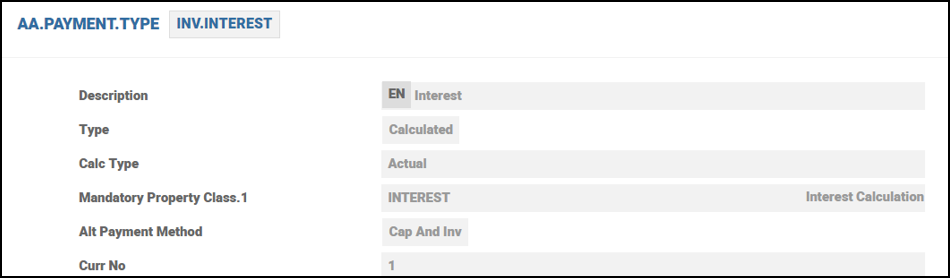
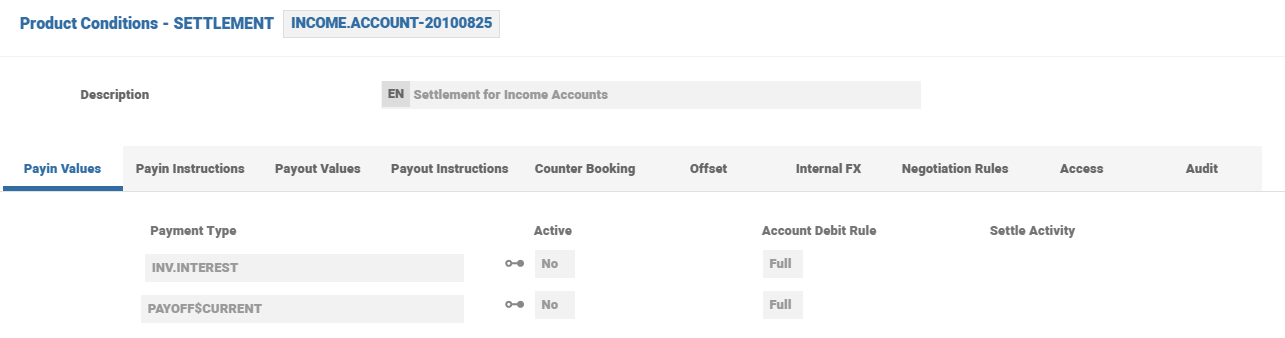
In the Settlement record of this product definition, the same AA.PAYMENT.TYPE has to be configured in the Pay In side of the record.
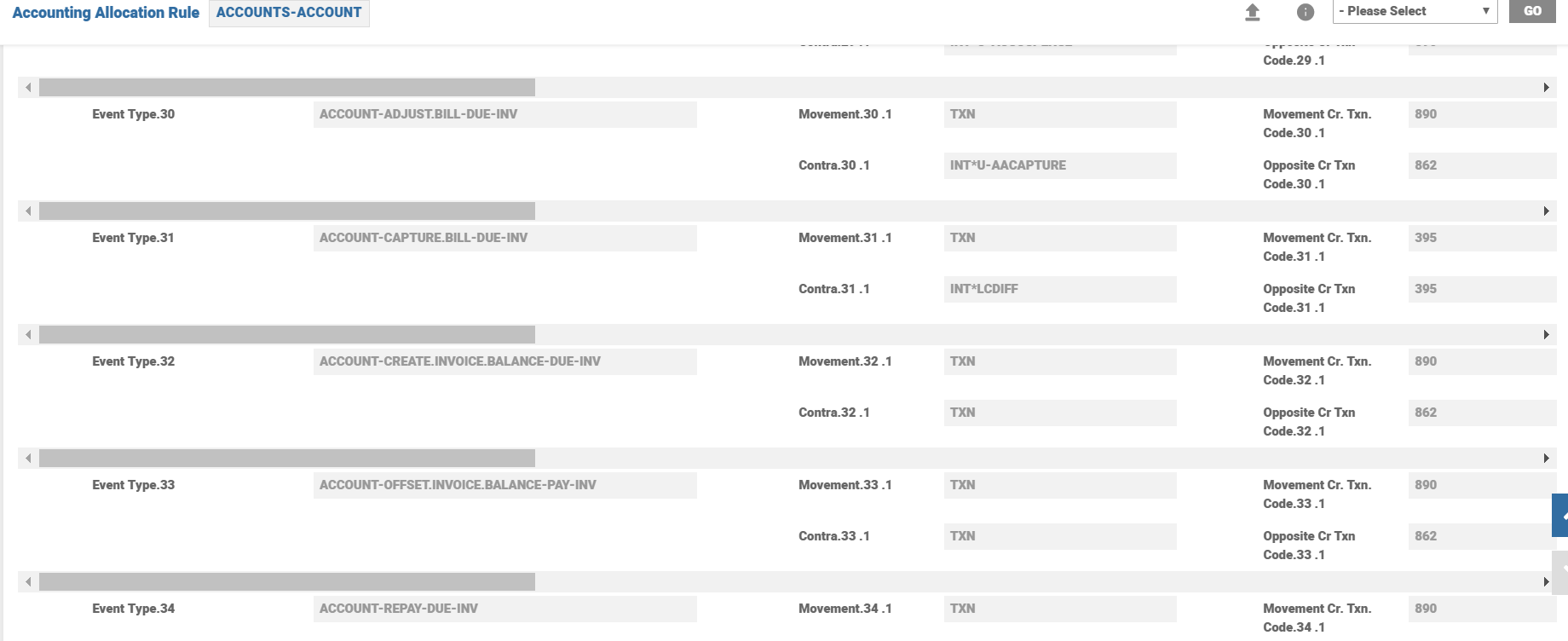
The associated AC.ALLOCATION.RULE record is shown below.
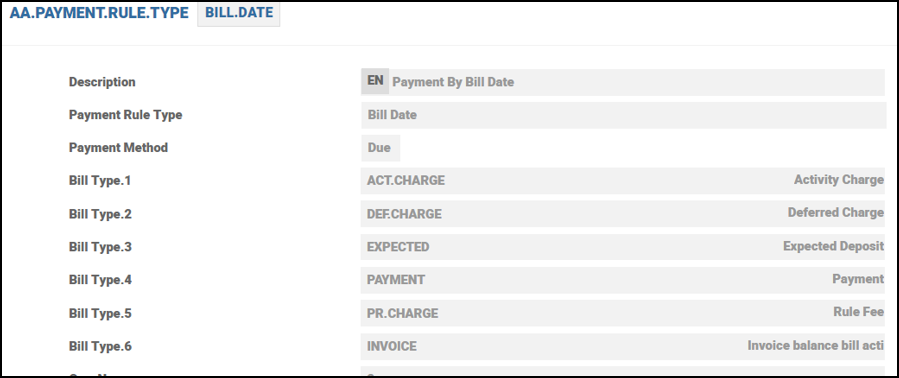
Payment Rules have to be configured or changed and the appropriate AA.PAYMENT.RULE.TYPE amended and invoice added.
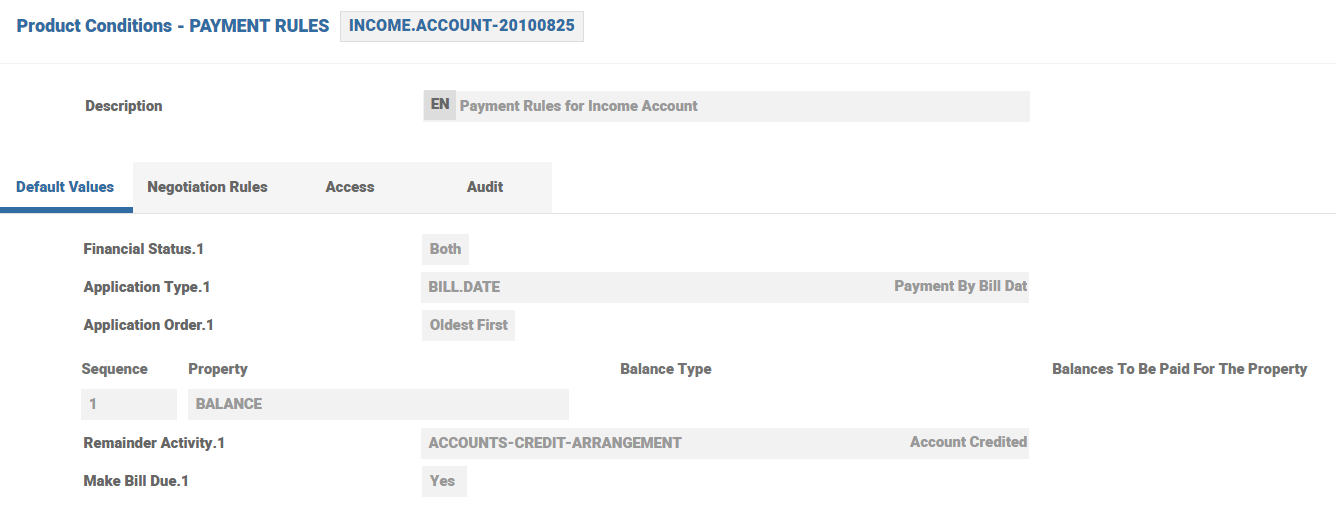
AA Payment Type amendment is shown below.
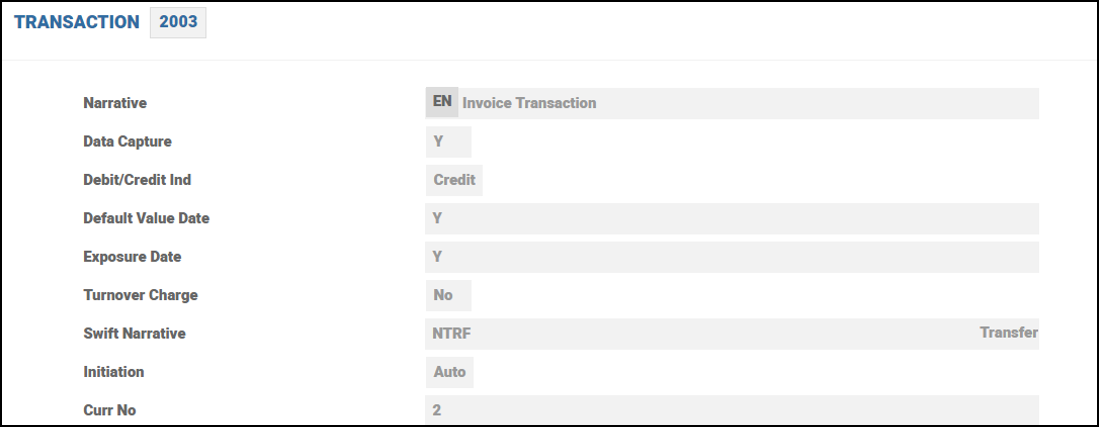
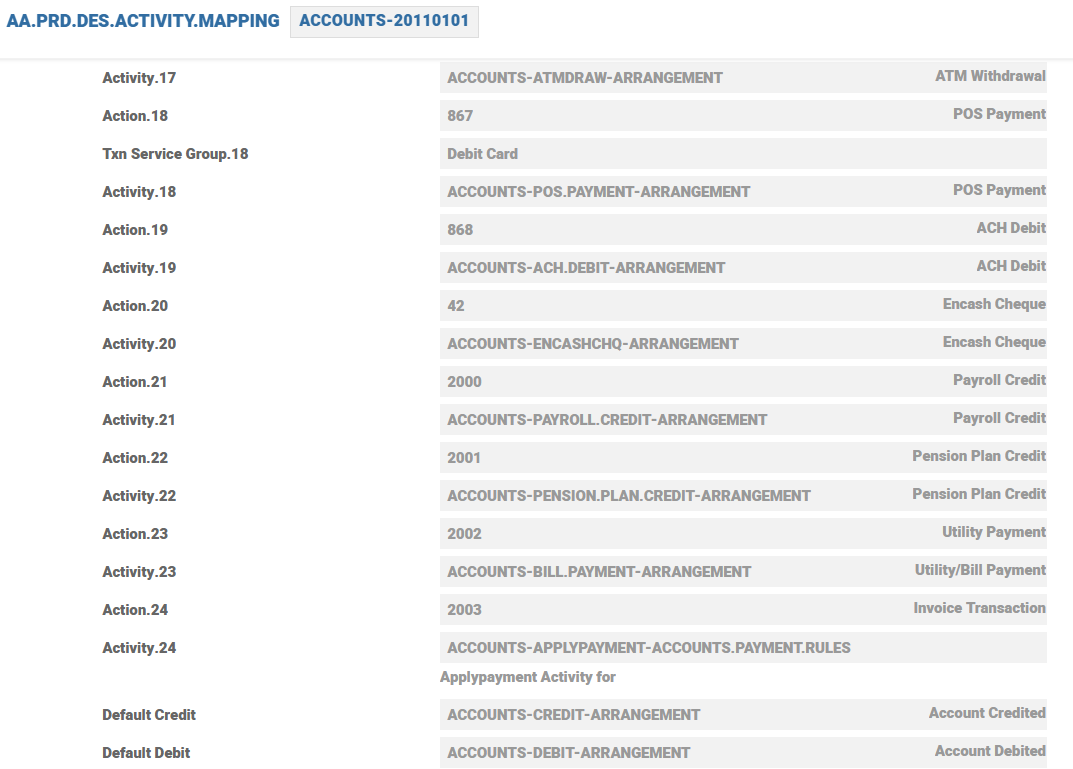
Using Activity Mapping, a dedicated TRANSACATION code of 2003 can be linked to Payment Rules.
The Activity Mapping record is shown below.
Configuration of Auto Settlement for Invoice Bills
For Auto Settlement, the Product Group has to be added in AA.PARAMETER
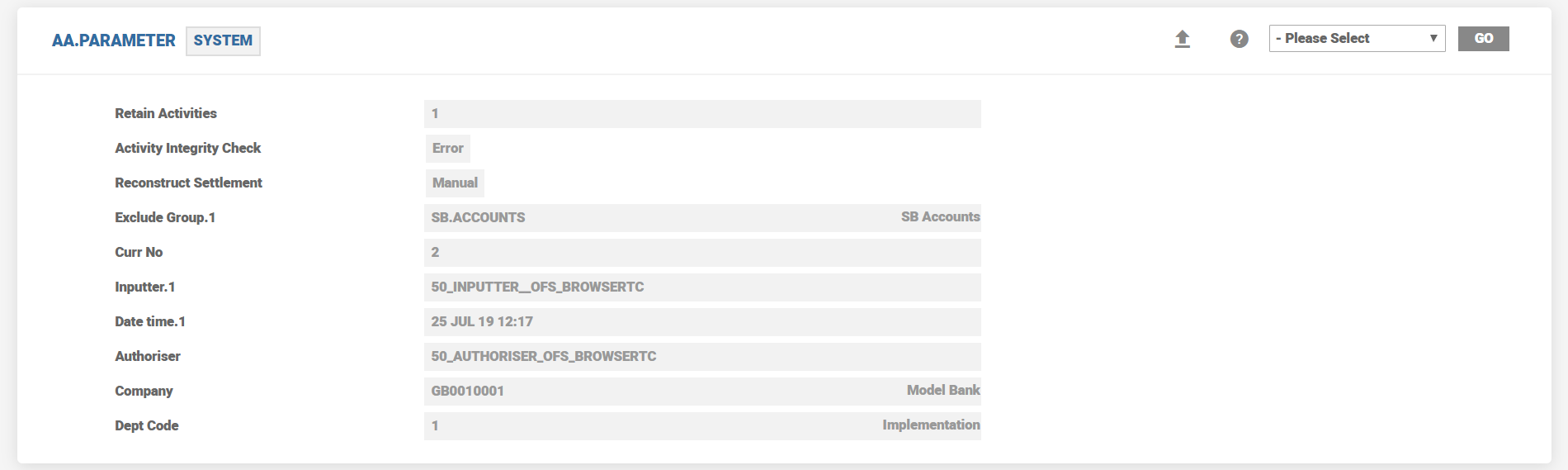
AC EVENTS related to auto settlement of invoice bills are as follows.
| AC Event ID | Description | Full description | Mvmt | Contra |
|---|---|---|---|---|
| ACCOUNT-ADJUST.BILL-DUE-INV | Adjust the Invoice account | Adjust the Invoice account | TXN | INT*U-AACAPTURE |
| ACCOUNT-CAPTURE.BILL-DUE-INV | Capture the Invoice Bill | Capture the Invoice Bill | TXN | INT*LCDIFF |
| ACCOUNT-CREATE.INVOICE.BALANCE-DUE-INV | Invoice Balance Creation | Invoice Balance Creation | TXN | TXN |
| ACCOUNT-OFFSET.INVOICE.BALANCE-PAY-INV | Offset Invoice Balance | Offset Invoice Balance | TXN | TXN |
| ACCOUNT-REPAY-DUE-INV | Repayment of Invoice Balance | Repayment of Invoice Balance | TXN | TXN |
| INTEREST-ADJUST.BILL-DUE-INV | Adjust bill interest | Adjust Bill Interest | TXN | INT*U-AACAPTURE |
| INTEREST-CAPITALISE-DUE-INV | Invoice balance creation | Invoice balance creation | TXN | TXN |
| INTEREST-CAPITALISE-DUE-INV.ADJ.DUE | Interest adjust capitalisation -Due | Interest adjust capitalisation -Due | TXN | TXN |
| INTEREST-CAPITALISE-DUE-INV.CR.ACC | Credit INV account balance | Credit INV account balance | TXN | TXN |
| INTEREST-CAPITALISE-DUE-INV.DR.CUR | Interest invoice balance creation | Interest invoice balance creation | TXN | TXN |
| INTEREST-CAPITALISE-DUE-INV.SP | Interest capitalisation - Due-suspense | Dr CURAccount Cr ACCInterestSP | TXN | TXN |
| INTEREST-CAPITALISE-PAY-INV.ACC | Interest Capitalisation - Pay | Dr INVInterest | TXN | TXN |
| INTEREST-CAPITALISE-PAY-INV.CAP | Interest Capitalisation - Pay | Cr INVAccount | TXN | TXN |
| INTEREST-CAPTURE.BILL-DUE-INV | Interest invoice bill capture | Interest invoice bill capture | TXN | INT*U-AACAPTURE |
| INTEREST-CHARGEOFF-DUE-INV | Raise chargeoff entry | Raise chargeoff entry | TXN | |
| INTEREST-PAYOFF.CAPITALISE-DUE-INV.CR.ACC | Credit INV account balance | Credit capitalized Interest against INV account | TXN | TXN |
| INTEREST-REPAY-DUE-INV | Repayment of Invoice balance | Repayment of Invoice balance | TXN | TXN |
Interest Adjustments Options for a Back Value Dated Transaction
When a back value dated transaction is posted, the interest adjustment can be performed,
- On the next accrual cycle (accrual activity) or
- On the next capitalisation date (during COB)
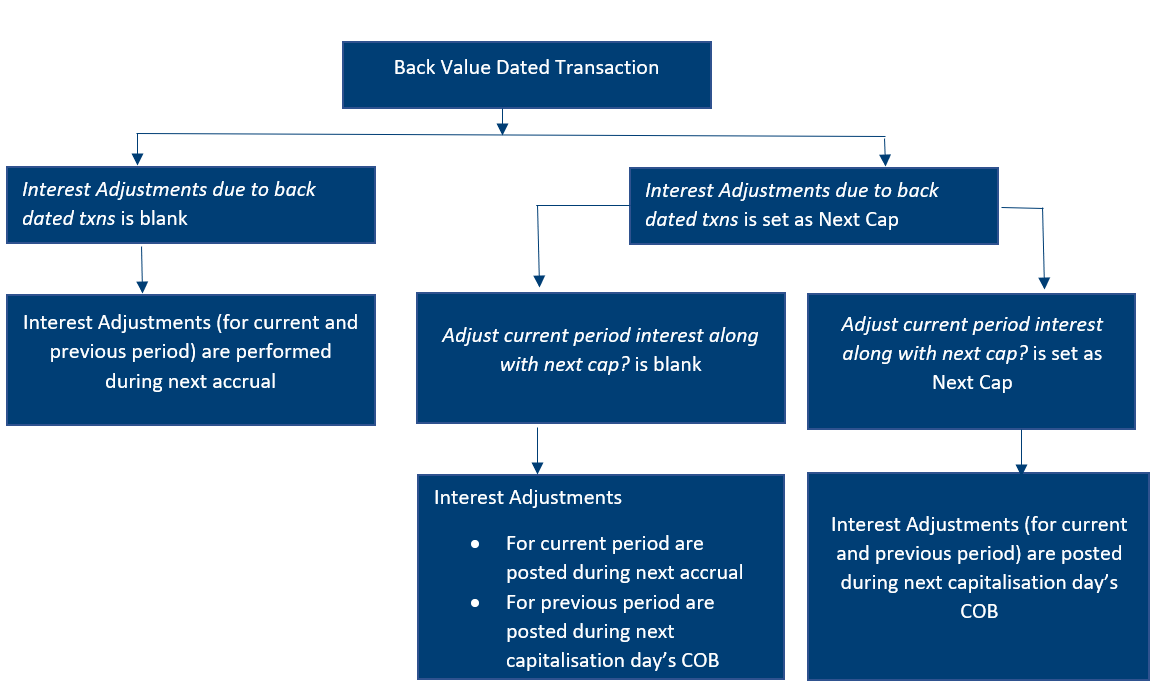
This can be configured using Interest Adjustments due to back dated txns.
- When this field is left blank,
- The interest adjustments are performed during the next accrual for the complete interest adjustment period.
- When the this field is set as Next Cap,
- The interest accruals for the previous periods are adjusted and re-accrued in AA.INTEREST.ACCRUALS on the next capitalisation date’s COB.
- The interest accruals adjustment for the current period(from last capitalisation date till last accrual date) are performed based on the Adjust current period interest along with next cap? field:.
- When this field is set as yes, the current period adjustments are period adjustments are performed on the next capitalisation date
- When this field is left blank, the current period adjustments are period adjustments are performed during the next accrual
- The interest accruals from the current date till the next capitalisation date are always based on the updated balance due to the back value dated activity.
- The capitalisation entries are posted during the next capitalisation date’s COB for the respective value date.
Adjustment at Next Capitalisation
Instead of the reversal and rebooking of entries, it is also possible to have the system to post only the difference amounts. This is based on a product level configuration in Accounting Property Class. Setting the Adjustment Option field to NEXT.CAP would result in the system posting the interest adjustments on the next capitalization date. When this option is set, only Interest would be adjusted (One adjustment entry per interest property per Interest period that was affected because of the back-valued Activity). Charges/Periodic Charges would neither be recalculated nor adjusted.
If this field is left blank, the default behaviour of Reverse and Replay, as part of COB will happen for all the accounts in that Product.
Full Adjustment
If Adjust current period interest along with next cap? (FULL.ADJUSTMENT) is set, and Interest Adjustments due to back dated txns is set to as Next Cap, and a back value dated activity is performed within the current interest period, the system:
- Adjusts the accrual amounts (for the applicable interest period) on the next capitalisation date (during COB).
- Posts the capitalisation entries on the next capitalisation date based on the amounts available for the different dates.
If Adjust current period interest along with next cap? is not set, and when a back value dated activity is performed, the system adjusts the interest accruals for the current period during the next accrual process . The previous period interest adjustments are based on the option chosen in the Interest Adjustments due to back dated txns field.
- Adjust current period interest along with next cap? (FULL.ADJUSTMENT) can be set only when Interest Adjustments due to back dated txns (ADJUSTMENT.OPTION) is set to as Next Cap. Else, the system raises a proofing error.
- The system raises a proofing error if Adjust current period interest along with next cap? (FULL.ADJUSTMENT) field is set for any Product line other than ACCOUNTS.
Implementation Considerations
The following is a comparison of the system behavior with/without Adjustment Option set to Next cap.
|
Adjustment Option is set to Next Capitalisation date. |
AR Reverse and Replay (Adjustment option is not set). |
|---|---|
|
Reverse Replay facility in Arrangements are suppressed and adjustments are posted during the COB of the next capitalisation date |
The system triggers standard AA Reverse and Replay during the next accrual. |
|
Adjustment is for Interest only. Charges and Periodic Charges are not re-assessed.
|
All scheduled Interest, Charges and Periodic Charges affected by the back-valued Activity would be reversed and replayed. |
|
The resultant accounting would only be for the difference amount |
Accounting entries would be reversed and rebooked |
|
Even if the Payment Method is set to Make Due/Pay, system would post the difference amount against the designated settlement account |
If the Payment Method is set to Make Due/Pay, the difference amount will not automatically be settled against the settlement account. |
|
The following Activities cannot be triggered for a value date less than the last schedule date.
|
No restrictions on the Activities can be triggered for a value date less than the last schedule date. |
The following is a comparison of the system behavior when Adjustment Option is set to Next.cap with/without Full Adjustment set.
|
Next Cap with Adjust Current Period Interest option |
Next Cap without Adjust Current Period Interest option |
|---|---|
|
When a back-value dated transaction takes place within the current interest period, the system adjusts the interest accruals (from the back-value date till current date) on the next capitalisation date’s COB |
When a back-value dated transaction takes place within the current interest period, the system adjusts the interest accruals (from the back-value date till current date) during the accrual process. |
|
A system generated entry is made in the Pending Adjustment Date field of AA.ACCOUNT.DETAILS application. This is cleared on the next capitalisation date when the interest adjustments are completed. |
A system generated entry is made in the Pending Adjustment Date field of AA.ACCOUNT.DETAILS application. This is cleared after the accrual process or next capitalisation date based on whether the back value dated entry is for the current period or previous period respectively. |
In this topic
