Introduction to Migration of Account Details
As an upgrading client who wants to move their AC accounts into the AA ecosystem, the user can retain the AC account number during takeover of an AR arrangement. Subsequently, that account would be fully operational as an AR arrangement across Temenos Transact (Cheque Issue, STO, Sweeps, Securities, Statements, etc.). ACCOUNTS-TAKEOVER-ARRANGMENT allows this subject to AC account passing certain validations.
- Account transaction history is retained
- Customer correspondence can continue to be with the same account number.
The feature supports:
- Retaining the AC account number during take-over of AR arrangement
- Automatically import the account’s principle balance into the AR arrangement
- Capturing accrued interest(s) offsetting against AC account’s accrual.
- The PL (Profit and Loss) remains untouched.
Before Taking Over
- Training or services engagement during upgrade scoping to train bank on AA and AR.
- Key points for consideration and decisions to be made before moving an AC account to AR Arrangement
- AR Product Catalog
- AR Product Conditions and Negotiation Rules
- A decision on whether the AC accounts taken over into AR retain their existing conditions or unified under new Product Conditions. It is possible to make a one-time product setup change that allows existing accounts to retain their Conditions and then subsequently change the Product Conditions before opening the system for production.
Takeover Approach
It is assumed that the standard DM (Data Migration) Tool or some kind of Data Migration utility is used for the purpose of migration from AC accounts to AR arrangements and that the arrangement specific conditions and data are supplied through this utility.
- If there are account specific conditions in AC, then it requires that the AR product is set to negotiable. Thus, at the time of takeover arrangement, the arrangement level conditions are set based on account conditions.
- The Temenos Transact applications that currently accept an account number continues to accept the below option.
- It is possible to use the arrangement reference in the place of account number wherever the system automatically converts it into the account number.
AR Product
The following configuration is required as part of upgrading from AC to AR.
- Configure AR products for each existing AC product (or following the decision under pre-conversion considerations above).
- Read the Account Features - AC & AR for a quick cross-reference on Retail Accounts using AR, for AC accounts (and some additional) features.
- The Activity Mapping, Accounting Product Condition and Allocation Rules require special care for proper transaction mapping for Account Statements and GL/PL purposes.NOTE: The user has to configure specific Events and Actions to enable automatic takeover of principle balance and capture of accrued interest. (Read the Configuration section for more details)
- Interest and Charge conditions have to be configured at product level or negotiated at arrangement level as applicable (depending on how they are in the AC account).NOTE: Ensure that the Periodic Attributes used in Activity Restriction are suitable for the requirement.
 Interest - Accrual Rule
- Default Accrual Rule in AC is First Day Inclusive.
- If the Last Day Inclusive field in
ACCOUNT.ACCRUALis Yes, then AR Interest Accrual rule should be BOTH. - If the Last Day Inclusive field in
ACCOUNT.ACCRUALis left blank, then AR Interest Accrual rule should be FIRST. For a monthly schedule,- When SOD capitalisation is set, it is common to have the payment schedule on the first day of the month and Accrual Rule set as First (so that it includes all the days in the previous calendar month).
- When EOD capitalisation is set, it is common to have the payment schedule on the last day of the month and Accrual Rule set as BOTH (so that it includes both first and last days of the current calendar month).
Handling HVT Accounts
If the account is enabled for HVT, then it has to be disabled. To disable HVT on AC accounts,
- Set HVT Flag to No. The system immediately merges the balances.
- Run the ACCOUNTS-TAKEOVER-ARRANGEMENT Activity on the AC account.NOTE: If the HVT flag is set to Yes at the time of Account upgrade from AC TO AR (either in AC Account or in AR Arrangement), then the system raises an error.
After completion of the Takeover Activity, the Account Property field for HVT Account can marked to Yes as required and AR arrangement begins HVT processing (available only in R18 and above).
Notification of Customers on Base Rate Change
When the client either upgrades or takes over a contract from the legacy system to the AA framework, it is possible to have a configuration to notify customers, in advance, about the future dated floating rate change. During a take over from a legacy system, if the rate change is triggered:
- Before the takeover- The Apply Rate Activity and the Change Interest scheduled Activity are triggered as secondary activities. Thus, an advance notification is generated along with takeover or is scheduled for a future date as per the Activity Messaging configuration.
- After the takeover - The regular process of Change Interest and Apply Rate activity are triggered. The customer gets notified based on the Activity Messaging configuration.
During an upgrade, if the rate change is triggered:
- Before the upgrade - The opportunity for triggering secondary activity does not arise. Hence no notifications are triggered for the rate fixing completed.
- After the upgrade - The regular process of Change Interest and Apply Rate activity are triggered. The customer gets notified based on the Activity Messaging configuration.
Processing of Back Dated Schedules
Banks are recommended to complete account migration using the following activity sequence.
- Takeover of the account
- The interest rates should be defined as fixed rates.
- The system updates interest accrual records for all interest properties based on payment schedule definition.
- Capture the interest bills along with corresponding tax amount using the Capture Historic Bill activity
- This updates the HIS<ACCOUNT> ladder as of the respective bill dates. The Total Due Amount in AA.INTEREST.ACCRUALS is updated .
- The From Date and To Date of the respective accrual period should be updated. The amount is amortised and the respective interest accrual is updated in the corresponding periods. Capture historical balance movement using CAPTURE.HISTORIC.BAL activity.
- This updates HIS<ACCOUNT> ladder considering the interest movements on respective cap dates
- Post these two activities, the users can capture accruals (ACC<INTEREST>) and account (CUR<ACCOUNT>) balances as of current date.
- It is recommended to include the HIS<ACCOUNT> as part of the interest calculation source to calculate the interest adjustment amount because of a back value dated movement.
The following events must be configured in AC.EVENTS to process back dated schedules.
- ACCOUNT-CREDIT-PAY-HIS
- ACCOUNT-DEBIT-DUE-HIS
- INTEREST-CAPTURE.BILL-DUE-HIS
- INTEREST-CAPTURE.BILL-PAY-HIS
Read AC.EVENTS for more details.
Illustration
Consider the following example to know about how account migration and update is processed for the below mentioned arrangement.
- The migration effective date is 01 Jan, 2021 which is the oldest date until which the back valued transactions have to be accepted.
- The interest capitalisation dates till current date (15 Apr, 2021) are: 01 Feb, 01 Mar and 01 Apr
- The account balance movement dates before 15 Apr are as follows:
- 05 Jan
- 10 Feb
- 15 Mar
- 06 Apr
From 15 Apr, the account is migrated to Transact by performing the ACCOUNTS-TAKEOVER-ARRANGEMENT activity, and the bills and balances are captured as of this date.
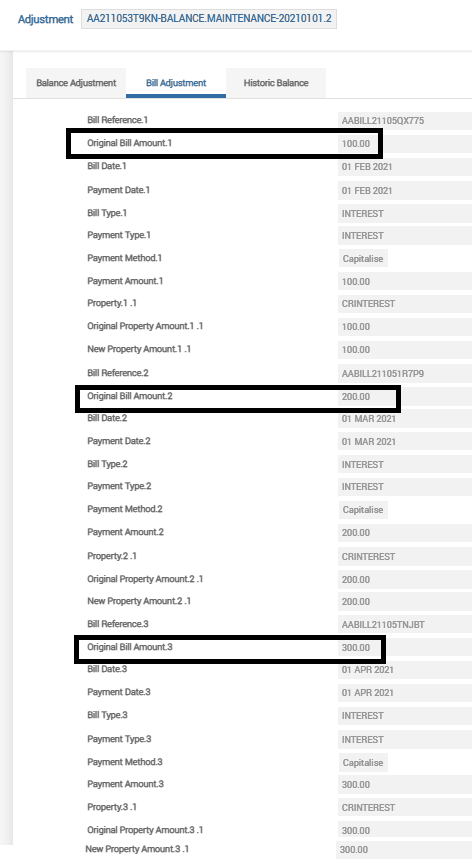
The user performs the Capture Historical Bill activity to capture the bills which were capitalised on 1 Feb, 2021, 1 Mar, 2021 and 1 Apr, 2021.
|
Historical Bill Date |
Historical Bill Balance Movement |
Closing Balance |
|---|---|---|
|
01-Feb-21 |
100 |
100 |
|
01-Mar-21 |
200 |
300 |
|
01-Apr -21 |
300 |
600 |
The below screenshot shows the ACCOUNTS-CAPTURE.HISTORIC.BILL-BALANCE.MAINTENANCE activity which the user has triggered on 15 Apr to capture the historic bill details mentioned above.
The account balances after the Capture Historical Bill Activity is shown below with the HISBALANCE balance type updated.

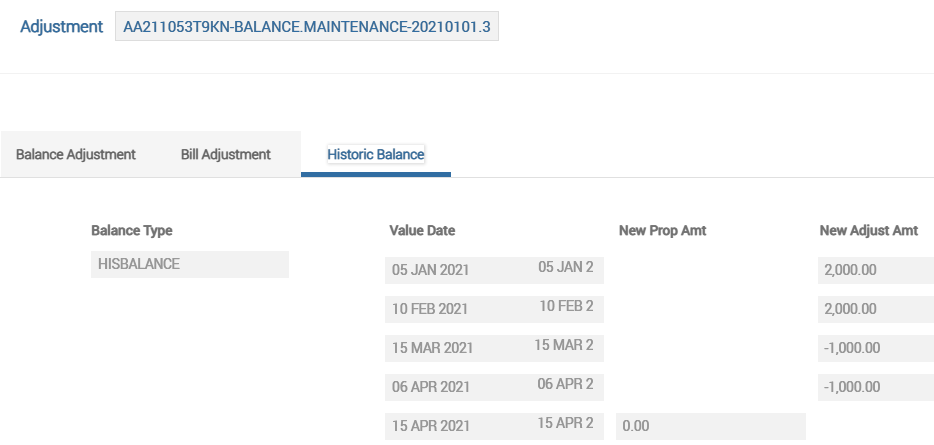
The user performs the Capture Historical Balance activity to capture the account balance movements till 15 Apr, 2021.
| Historical Balance Date | New Prop Movement | Adjust movement |
|---|---|---|
| 5-Jan-21 | 2000 | |
| 10-Feb-21 | 2000 | |
| 15-Mar-21 | -1000 | |
| 6-Apr-21 | -1000 | |
| 15-Apr-21 | 0 |
The below screenshot shows the ACCOUNTS-CAPTURE.HISTORIC.BAL-BALANCE.MAINTENANCE activity triggered by the user to capture the historic account balance movements as mentioned above.
The below screenshot shows that the net movement (captured in the Capture Historical Balance activity )for a given day is updated under the HISBALANCE balance.

The accounting movements during the period from 1 Jan, 21 to 15 Apr, 21 are as follows:
| Historical Balance Date | New Prop Movement | Adjust movement | Opening Balance | CR Movement | Dr Movement | Closing Balance |
|---|---|---|---|---|---|---|
| 5-Jan-21 | 2000 | 2000 | 2000 | |||
| 1-Feb-21 | 2000 | 100 | 2100 | |||
| 10-Feb-21 | 2000 | 2100 | 2000 | 4100 | ||
| 1-Mar-21 | 4100 | 200 | 4300 | |||
| 15-Mar-21 | -1000 | 4300 | 1000 | 3300 | ||
| 1-Apr-21 | 3300 | 300 | 3600 | |||
| 6-Apr-21 | -1000 | 3600 | 1000 | 2600 | ||
| 15-Apr-21 | 0 | 2600 | 0 |
The balances (account balance, accrual balance, etc.,) from the legacy system as of 15 Apr are captured by triggering the Capture Balance Activity:
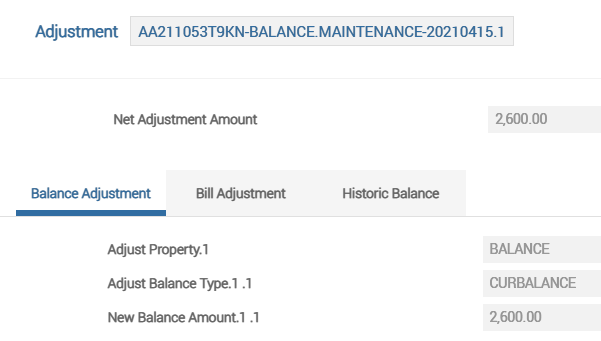
The Transact account balance after the Capture Balance Activity is triggered is shown below.

After this, the user can perform a credit transaction of USD 10,000 to the migrated account with a back value date of 18 Mar, 2021. As a result of this, the system performs reverse-replay by updating the AA.RR.SERVICE.LIST application with the account arrangement ID.
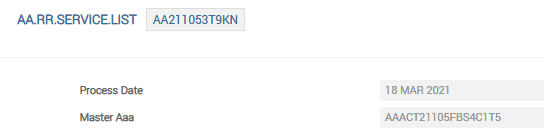
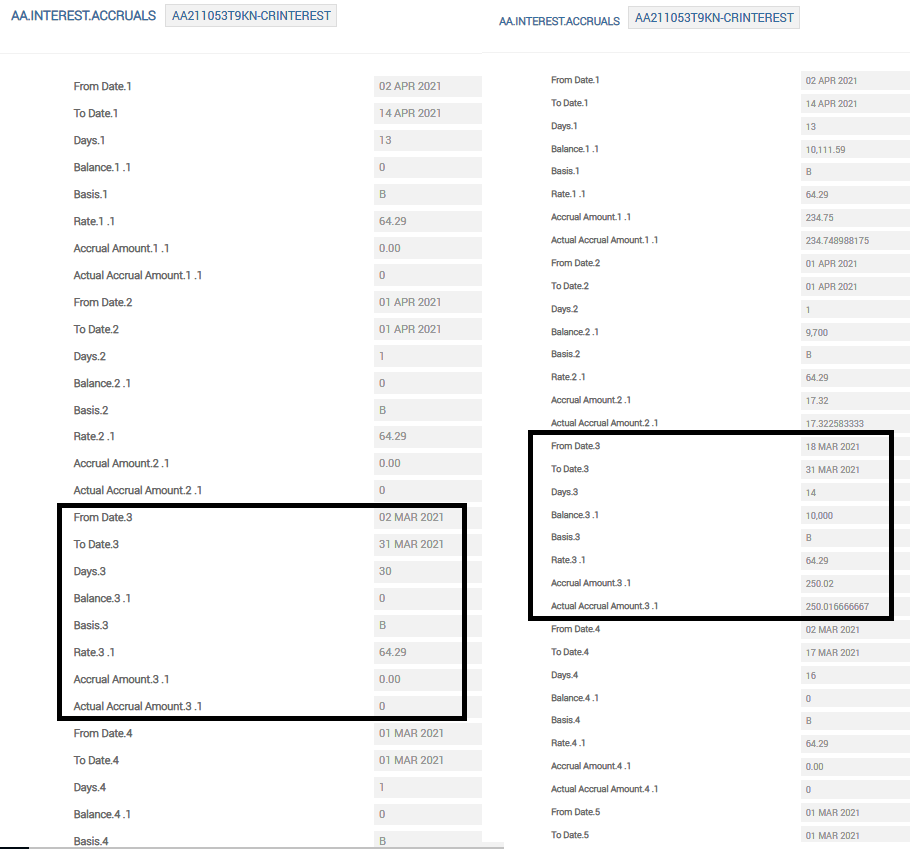
On triggering the Retrospect Arrangement Activity (ACCOUNTS-RETROSPECT-ARRANGEMENT) either online or as a service (BNK/AA.RR.SERVICE) or during COB, the system processes the reverse-replay. Thus, the arrangement record in AA.RR.SERVICE.LIST is cleared and the adjustments in the interest accruals due to the back value dated credit are reflected in the AA.INTEREST.ACCRUALS table. The screenshot given below shows the interest accrual adjustment that happened due to the back value dated transaction.
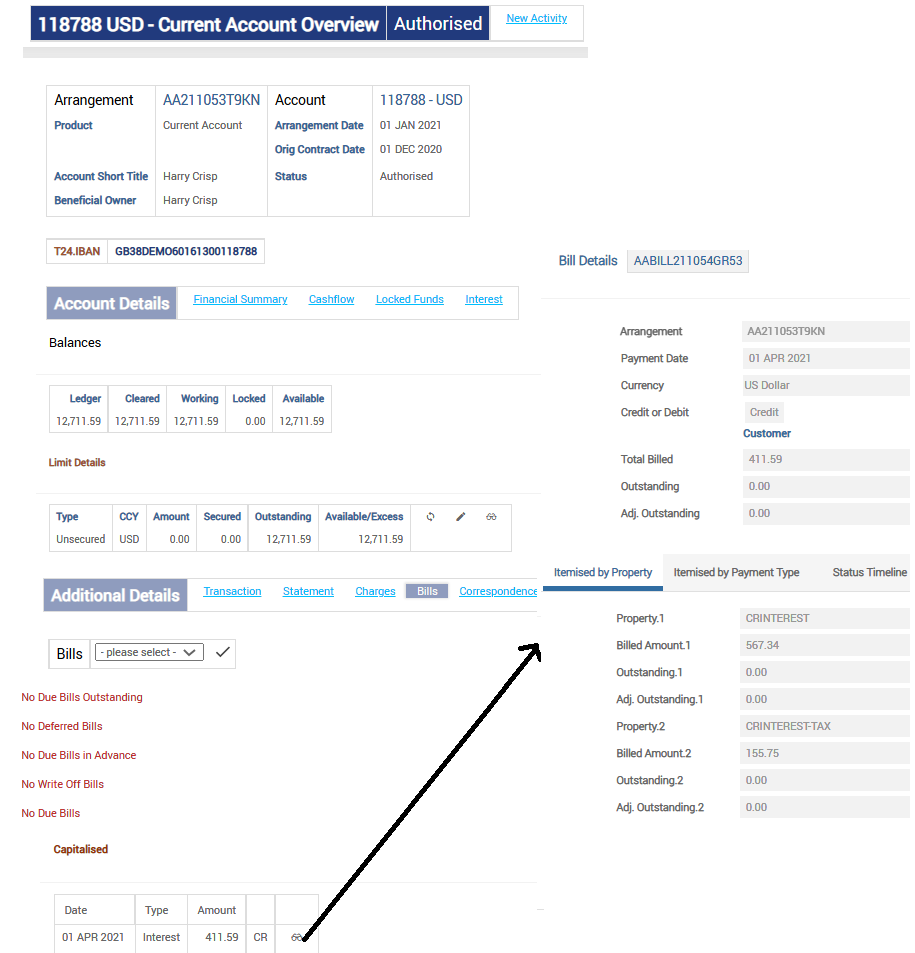
Due to the reverse-replay, the system generates a new bill to capitalise the new amount and this is available in the Arrangement Overview page under the Bills tab.
In this scenario,
- The increase in accrued interest (in USD) from the period 18 Mar to 1 Apr: 250.02 + 17.32 = 267.34.
The already capitalised interest as on 1 Apr for USD 300 is reversed and a new bill is generated.
- The new bill amount (in USD): 300 +267.34 = 567.34
Out of this, the tax component (in USD) : 155.75
- The final bill amount (in USD): 567.34 – 155.75 = 411.59.
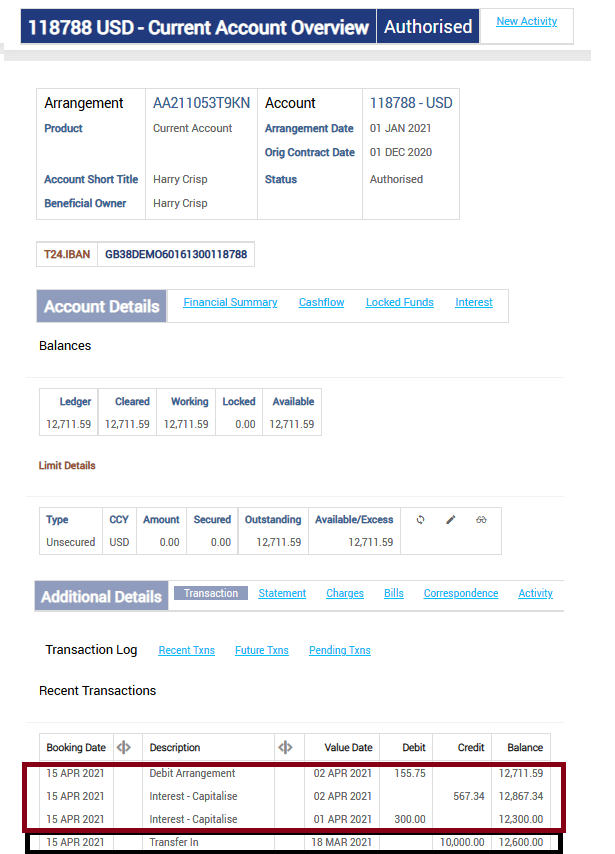
The system also modifies the arrangement account balance based on the increase in the capitalised interest on 1 Apr.
|
Balance Movements |
Amount (in USD) |
|---|---|
|
Opening account balance |
2600 |
|
Back value dated credit of USD 10,000 |
10,000 |
|
Increase in accrued interest for the period 18 Mar to 1 Apr |
267.34 |
|
Deduct tax on the capitalised interest |
155.75 |
|
Closing account balance |
12,711.59 |
In this topic
