Configuring Transactions in an Account
This section describes the user about the simple and complex credit and debit activities in account transactions.
Managing Simple Credits and Debits
Any financial transaction, either triggers ACCOUNTS-DEBIT-ARRANGEMENT or ACCOUNTS-CREDIT-ARRANGEMENT Activity Class. The credit and debit arrangement activities follow direct accounting and does not have to be a part of payment or payout rules. Therefore, these movements are against the balance of the account.
Accounts can be credited or debited by using any channels and for different types of transactions.
 Creating and Linking an Activity
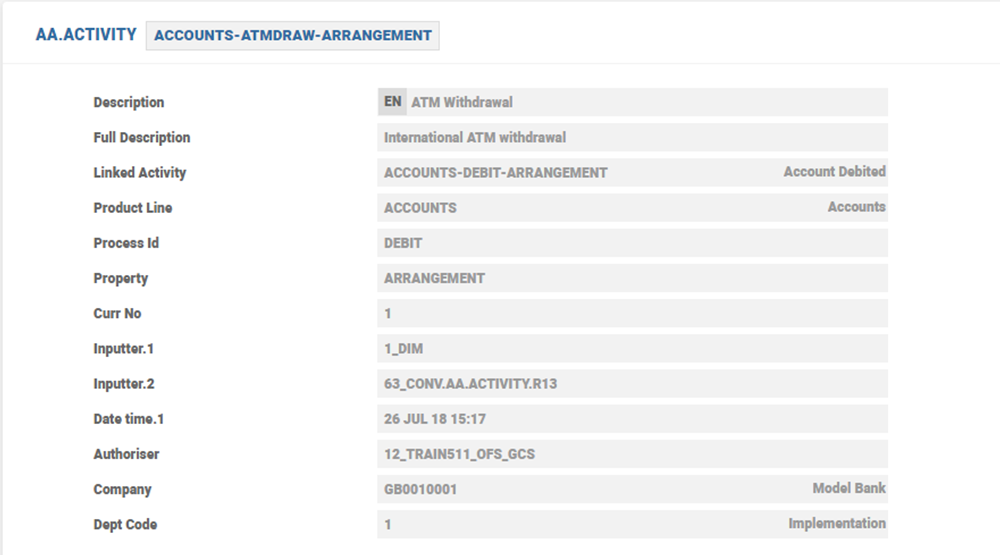
In order to map the different transaction types to different activities, it is possible to create named instances of ACCOUNT-CREDIT-ARRANGEMENT and ACCOUNTS-DEBIT-ARRANGEMENT activity classes and link them to the system created credit and debit activities. These named activities can be used in assessment of charges.
Named activity also helps to monitor similar scenarios like foreign currency transactions. The linked activities have been pre-defined in the Model Bank as ACCOUNTS-FCYCASHDEP-ARRANGEMENT and ACCOUNTS-FCYCASHDRAW-ARRANGEMENT to indicate deposits and withdrawals, respectively.
Managing Complex Credits and Debits
The Arrangement Architecture (AA) allows interest and charges to be either made due or payable besides capitalising against the balance. In such cases, to settle the due or pay balances, the respective credit or debit transaction codes are mapped to activities on the payment or payout rule.
Mapping an Activity
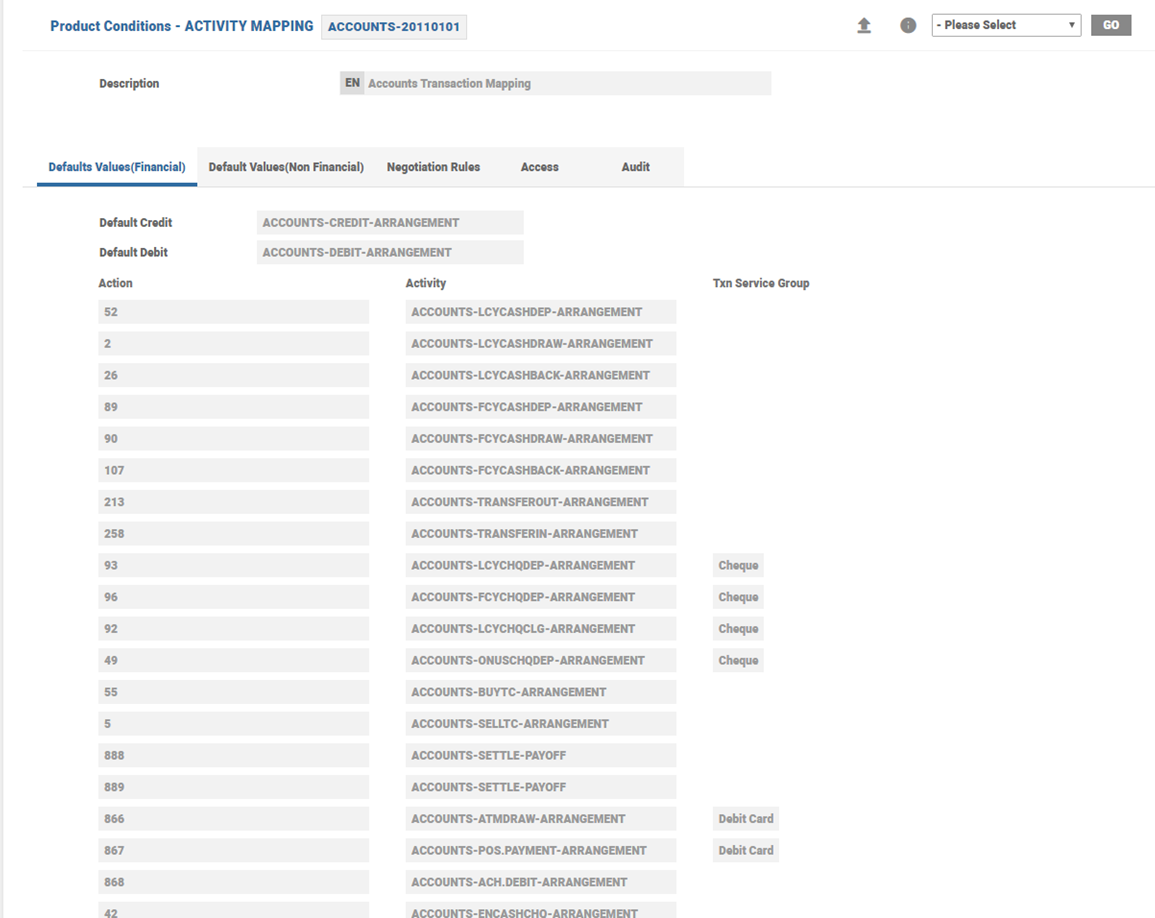
The Activity Mapping Property Class provides a link between financial transactions (initiated in Temenos Transact and outside of AA module) and the activity that has to be processed for this transaction in the arrangement.
Any application that posts a financial transaction to an account, raises an activity in AA. The activity processed is mapped to the TRANSACTION code (used in the Temenos Transact application accounting) in the Activity Mapping Property Class.
Configuring Non-Sufficient Funds
This topic helps the user to configure NSF parameter.
NSF.PARAMETER
The NSF exception processing is based on the NSF.PARAMETER setup. This parameter determines:
- The order of processing the debit and credit items to the account
- The settlement types
- The expiry date
- The default decisions for the respective settlement types
A System-level or Company-level configuration is possible.
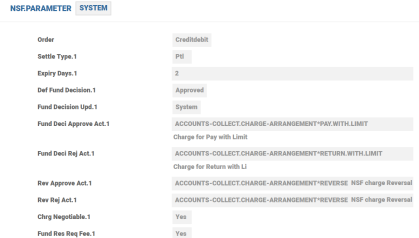
The order of processing transactions is configured in the Order field. The possible values of this field are:
- CreditDebit - This is the default value and it indicates credit items are processed first followed by the debit items in the order of time.
- Time - It indicates credits and debits are processed in the order of time.
The associated set of fields from Settle Type to Chrg Negotiable define the default rules for funds decision for approval, rejection and reversal. The usage of these fields is given in the table below:
|
Field |
Description |
|---|---|
| Settle Type | The possible values in the field are,
|
| Expiry Days |
This field indicates the cut-off period for manual decision making. This is the number of days within which the user has to either approve or reject the NSF item and negotiate the NSF fee or charge. If the decision is not actioned manually, then the default decision if defined in the NSF parameter applies on the COB of the expiry date of the NSF exception item. |
| Def Fund Decision |
Approved or Rejected - It indicates if the decision is approved or rejected. |
| Fund Decision Upd |
System or Manual - It indicates who updated the fund decision. |
| Fund Deci Approve ActFund Deci Rej ActRev Approve ActRev Rej Act |
Arrangement Activity to be triggered for the default decision processing for fund approval or rejection or reversal approval or rejection. |
| Charge Negotiable |
Yes or No - It indicates if the NSF fee or charge is negotiable. |
Charging on Automatic and Manual Decisioning
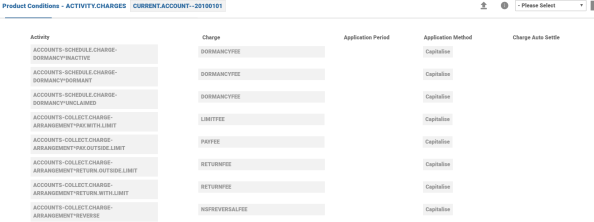
The Activity Charges configured in the product enables charging the account for NSF pProcessing and decisioning. The charges are linked to the Arrangement Activity for default decision processing namely fund approval or rejection or reversal approval or rejection.
Balance Availability Checks
AC.BALANCE.COMPONENT - Temenos released balance components are available in this table. These are used to configure the available balance for credit check during the NSF processing in addition to the options available in Balance Availability.
AC.CREDIT.CHECK - Different combinations of balance components are defined in the AC.CREDIT.CHECK and used in credit check processing when the transaction is initiated.
There are two parts in these configuration:
- Base Balance Type - This is a mandatory single value field and is one of the Base type balance component released by Temenos in the
AC.BALANCE.COMPONENT. - Option Balance Type - This is an optional multi-value field and the bank has a choice to configure any number of the Option type balance component released by Temenos (in AC.BALANCE.COMPONENT).
Read NSF Exception Processing for more information.
Limit
The credit facilities for an account are classified as:
- Grace limit
- A mere amount, which is used to cover debit items without any charge
- Indicated using Tolerance Amount and Currency in Balance Availability Class
- Overdraft protection
- Funds available other accounts
- Indicated using Sweep funds
- Courtesy limit
- Provided using Limit in Limit Property Class
Cap for NSF Fee
- For each selected Program in Pricing Rules, the indicated Properties are evaluated for the given Rules for a Periodic Attribute and Property is waived or applied.
- For Pricing evaluation of NSF Processing, the rule is evaluated every single time charge is assessed on the account. Rule checks if Charge exceeds the PR.VALUE and is set to WAIVE when the rule is failed.NOTE: Partial waivers are not possible in this feature using Cap in Pricing Rules.
- Recommendation: Cap amount should be multiple of the individual charge amount.
- There are seven instances where either of the fee is assessed on an account for the given day.
- When evaluating the seventh charge, the system has already charged 6 occurrences totaling to 210.
- The seventh charge breaches the cap 210 and takes it to 245.
- Since the result is defined as waive, the fee for the seventh instance will be waived fully.
The Progress Rules Tab displays the following details.

The Benefits Tab displays the following details.

Individual Fee Posting for NSF fees
Activities To be Charged
When the exception records are authorised during cut-off process, the system creates an activity to register the type of exception that took place on the account. The activities can be:
- Paid through limit
- Paid outside limit (Pay)
- Returned outside limit (Return)
The system uses the ACCOUNTS-COLLECT.CHARGE-ARRANGEMENT which is a generic Activity to collect adhoc charges from outside AA.
To have specific activities for each settle type, acvirtual table definition can be used. The EB.LOOKUP application that is, AA.CHARGE.EVENT is used for handling NSF charges.
|
EB.LOOK.UP application |
Charge |
|---|---|
AA.CHARGE.EVENT*PAY.WITH.LIMIT
|
NSF charge event |
AA.CHARGE.EVENT*PAY.OUTSIDE.LIMIT
|
Charge for transaction beyond limit |
AA.CHARGE.EVENT*RETURN.OUTSIDE.LIMIT
|
Transaction reject fee beyond limit |
AA creates a linked Activity for each Charge Event defined.
Each of these activities is linked with the transaction activity for tractability purposes.
The applicable fee for each type of exception (AA.ACTIVITY) can be mapped in activity charge as deferred charges.
When the charges are deferred, a record is created in the system with the following information:
- Activity that triggered the charge
- Calculated charge amount
- Waived charge amount and waive reason
- Actual (net) charge.
Context values are used to populate the negotiated charge amount and charge reason.
|
Context Name |
Purpose |
|---|---|
CHARGE.ACT.AMOUNT
|
To Pass Negotiated Charge Amount |
CHARGE.REASON
|
Reason for charge waive or Negotiation |
Periodic Charges - Group Charges
Periodic charges has the ability to group multiple charges into one and can also validate against a cap / floor amount if specified. A consolidated charge amount would be posted on to the account and any amount that is waived in the process would be updated in the underlying periodic charge detail record.
Cap Group Charges
CAP, a Periodic Attribute Class Type is used to cap the charge amount calculated. The Cap Charge periodic attribute is an instance of the AA.GET.CAP.CHARGE.VALUE class. This periodic attribute is used to cap the charge amount
When the cap is defined, for each charge amount calculated, the system updates the underlying charge detail record with the total amount that is charged for each exception activity. The cumulative charge amount is updated on to the periodic charge record. If the cap is breached by a particular charge, then the charge amount is modified to the extent of cap and the rest of the amount is waived.
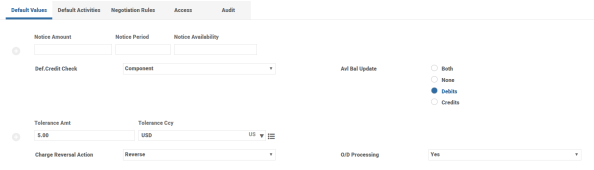
Overdraft Processing using NSF Functionality – Balance Availability Property Class
The Balance Availability has specific attributes for NSF processing used in AR Accounts.
If the Overdraft Processing attribute is selected as Yes, then the system enables processing the debit items in an account using NSF functionality.
A currency limit called Grace Limit can be set for an account using the Tolerance Amount field.
Component based balance checking during transaction processing is possible by setting the Credit Check attribute as Component. When set to Component, the Activity Class and Activity specific choice of credit and limit check is possible. The attributes from Activity Class to OD Charge Action are a set of associated fields, which define the rules for the activity defined in the Activity Class.
Activity Class and On Activity - Defines the arrangement Activity Class or Activity that is triggered by the transaction processing.
Act Credit Check - A record for AC.CREDIT.CHECK to indicate the balance components that has to be checked during the credit check processing for this specific activity.
Limit Check - Checks if limit check can be opted in.
- If the user selects the Opt-in option, then limit check is performed.
- If the user selects the Opt-out or Blocked option, then limit check cannot be performed during the transaction processing.
Overdrawn Action - Defines the action that has to be performed by the system for the given Activity or Activity Class in the event of insufficient funds while performing balance check, Possible values Post, Reject or Settle.
OD Charge Action - Checks whether the activity charges are accessed or waived for this transaction. Possible values are Assess and Waive.
The Default Values Tab displays the following details.
The Default Activities Tab displays the following details.
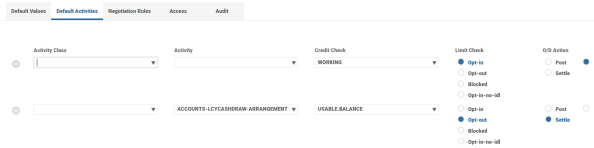
In this topic
