Configuring Composite Screen
This feature enables you to create a title for the composite screen and large linked mult-ivalue set for defining the contents of each frame and makeup of the frames of the composite screen. This section provides the steps to create a new composite screen, search and edit an existing composite screen.
Creating Composite Screen
To create a new composite screen,
- Login as <<Role>>. From the Transact Standard dashboard’s left pane, click Configuration > Composite Screen.
- Click Add New from the home page.
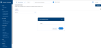
- Enter the name of the composite screen in the Create Composite Screen dialog box and click OK. A composite screen is created successfully.

Editing Composite Screen
To edit an existing composite screen,
- Login as <<Role>>. From the Transact Standard dashboard’s left pane, click Configuration > Composite Screen.
- Search for the composite screen and make the necessary changes. Click
 against each screen name to provide values in all Transact supported languages.
 - Validate and commit the changes to the database.


In this topic
