Defining and Using Outward Landing Table
The IF.OUTWARD.DESIGN.LANDING table can be defined for any exit point type. This table is used as a source table for Workbench event designer and also becomes a source for IF Events and flow packaging without making the IF.EXIT.POINTS and IF.INTEGRATION.FLOW.CATALOG table editable.
The Landing table, IF.EXIT.POINTS and IF.INTEGRATION.FLOW.CATALOG tables should be in sync, so that whenever a flow is published from event designer or workbench, all the related records in the three tables will either be created or updated.
Similarly, whenever the Landing table (IF.OUTWARD.DESIGN.LANDING) is modified and authorised, the changes will reflect in the IF.EXIT.POINTS and IF.INTEGRATION.FLOW.CATALOG tables.
The following are the fields present in the IF.OUTWARD.DESIGN.LANDING application:
- @ID – The record ID entered in this field should be a valid flow name, which has its entry in IF.INTERGRATION.FLOW.CATALOG table.
- SOURCE TYPE – It is a no input field that is used to record the type of the flow source. The flow can be originated from different sources of types, such as versions, applications, TSA service, component services, AA, banking framework or inflow.
- SOURCE NAME – It is a no input field that holds the source where the flow is attached to. The source can be versions, applications and TSA service or component service.
- FLOW ATTRIBUTES – Denotes the additional attributes added to the flow that impacts the format and mode of the event. This can be any one of the following values:
- .EVENT PRIORITY – Holds the priority of an event record provided while defining the flow in Event Designer. Only numeric values are allowed.
- QUEUE NAME – Allows events to deliver to a specific queue and holds the destination to deliver the events. If the flow attribute is WRITE.TO.QUEUE or RAW.XML, then the queue name should be provided. This represents the queue to which the Raw IF event is posted when using direct posting.
- COMPANIES LIST – Provides the list of valid companies for which the event should be triggered. f duplicate company names are present in the list, the system displays a validation error.
- EXIT POINT NAME – It is a no input field that holds the name of the exit point to which the associated Integration Flow is attached to. The exit points are the places in Temenos Transact applications or versions and component services from which the integration flow is executed to emit any notification out of corresponding Temenos Transact application, version, component service or TSA service.
- OVERRIDE CODES – Holds the override codes associated with APPLICATION or VERSION exit points. Integration Framework raises these overrides using the standard Temenos Transact override mechanism while delivering events. The system displays validation error, if the duplicate override codes are available.
- EXIT POINT SOURCE – It is a Key field in this table to store the source of the exit point.
- FIELD SOURCE – Holds the source name of fields in case of complex exit point types, such as AA, INFLOW and BANKING FRAMEWORK, where each of its field is associated with a source application or table record. It remains empty in case of simple exit points and displays an error if any value is entered. Duplicate values are not allowed.
- FIELD NAME – It is used to store the name of a field in the flow source application and duplicate values are not allowed.
- JOIN DEFINITION – It stores a link that consists of applications and fields, which are linked together to form a path. Users are allowed to provide either the FIELD NAME or define a JOIN and not both. Validations are placed to ensure that the join definition provided is a valid one. Duplicates are validated except for complex joins.
- API MAPPING – It is used to add the L1 API definition, if required.
- FIELD TYPE – Holds the data type for the field given in the associated FIELD.NAME. It behaves as a plain user input field for all exit point types except COMPONENT.SERVICE for which the FIELD.TYPE will be a drop-down holding the complex field types. It carries a validation if entered any invalid field type.
- FIELD XML NAME – Holds the user defined name of the field. When a flow is created, each data (or enrichment) of the flow is expected to give a unique name, which is used to identify the data and its position. If the xml name starts with any numeric character and duplicate field xml names, the system displays the validation errors.
- OPERATION NAME – Provides the list of L1/L3 API names. The API names of external components are read from OPERATION.NAME field in the EXTERNAL record of the IF.FLOW.API table. Whereas the internal component names are read from the SYSTEM record of the IF.FLOW.API table.
- INPUT.NAME – Holds the input parameter name to be passed to the chosen operation.
- FLOW.FIELDS – Holds the field names chosen by the user to associate with the INPUT.NAME field of the API.
- OUTPUT.NAME – Holds the output parameter name to be passed to the chosen operation.
- PARAM.NAME – It is a no input field that holds the list of parameter names of the chosen operation.
- PARAM.DIRECTION – It is a no input field that holds the list of parameter directions as IN or OUT or INOUT of the chosen operation.
- PARAM.TYPE – It is a no input field that holds the list of parameter types of the chosen operation or API.
| Value | Description |
|---|---|
| INCLUDE.BEFORE.IMAGE | It adds the previous image or value of the fields chosen in the event when generated. |
| PROCESS.ONLY.UPDATES | If this attribute is added, it leads the event to hold the values, which are updated or modified during trigger. |
| WRITE.TO.QUEUE | By default, the RAW_XML attribute is added and the delivery mode posts the message to the queue mentioned in the QUEUE.NAME field. |
| RAW.XML | The flow attribute RAW_XML is added in the IF.INTEGRATION.FLOW.CATALOG record. And, the mode of delivery is switched to integration service or adapter based on the IF.INTEGRATION.SERVICE.PARAM configuration or adapter. The IF event data values are stored in IF.EVENTS.INTERFACE.TABLE as an internal XML representation in the EVENT.DATA and OLD.EVENT.XML fields. |
| WRITE.TO.OUTBOX | It is added to redirect the IF event to outbox. |
| STREAMING.EVENT | It is added in the corresponding IF.INTEGRATION.FLOW.CATALOG record to redirect the IF event to DES. |
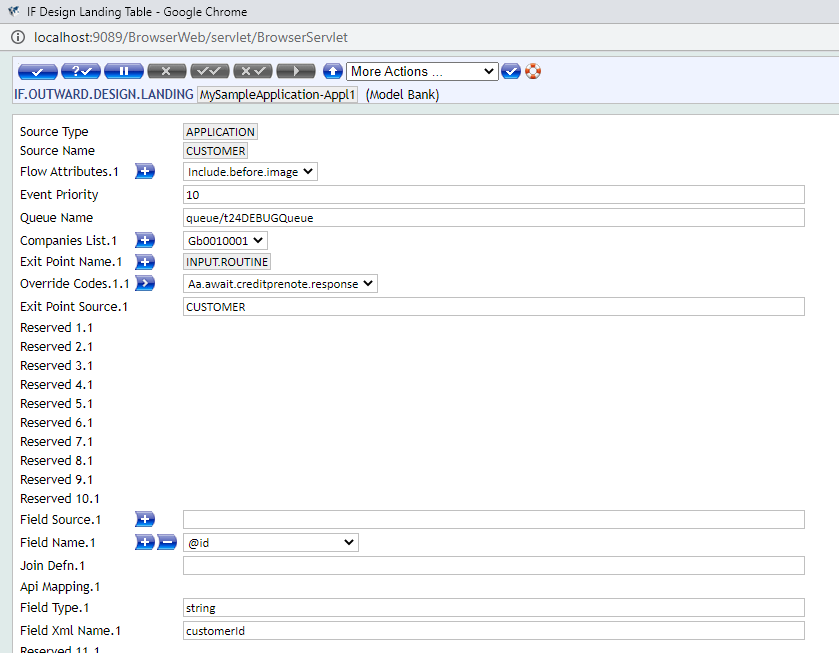
Sample Landing Table Record Defined for a Simple Exit Point (Application)
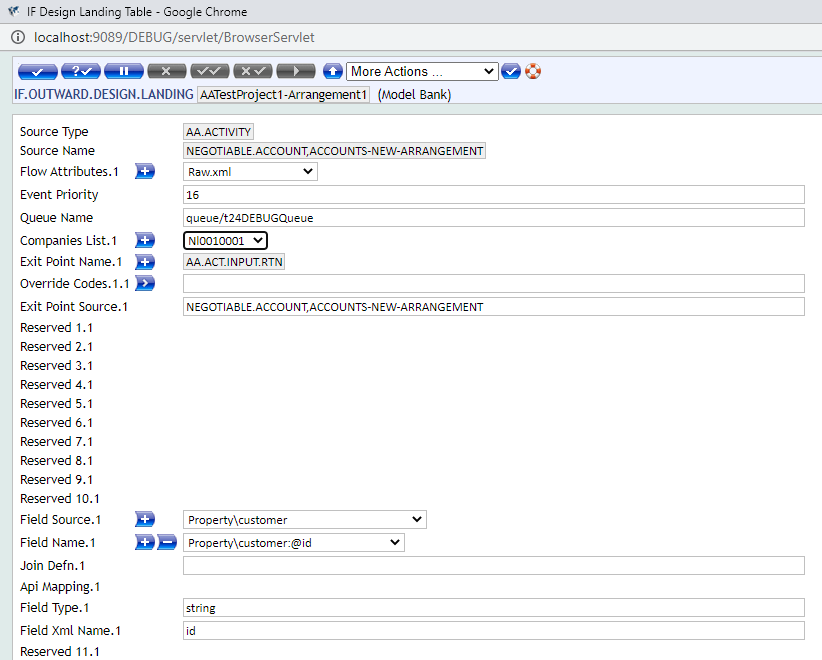
Sample Landing Table Record Defined for a Complex Exit Point (AA)
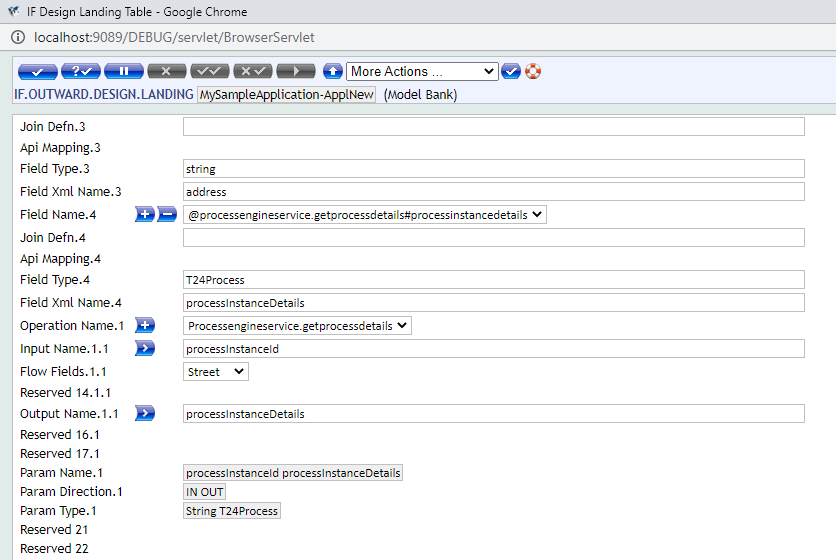
Sample Landing Table Record Defined with API Parameters
In this topic
