Using Data Library for Integration Framework
This topic helps users to understand how to move the Integration Framework related data records between Transact servers.
The Integration Framework architecture is incredibly flexible and it allows an event to be emitted from any Temenos Transact transaction. Integration Studio is the design-time tooling, which enables a system-integrator to construct a notification message based on data from the originating Transact contract, or from the inputs to the component service operation, depending on the type of exit point.
This topic describes concepts that require basic knowledge of DL.DEFINE. Follow the steps below to move the Integration framework related data records between Transact servers.
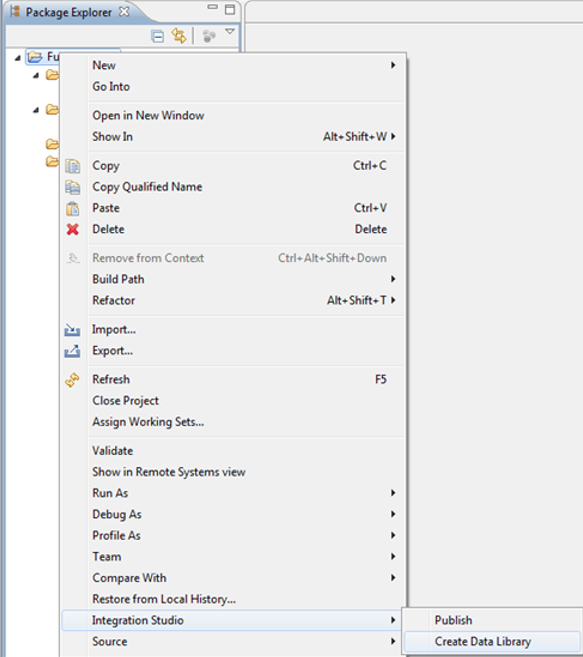
- Click the Data Library menu option in Integration Studio (EE): Right-click the Event Designer project, and then click Integration Studio > Create Data Library.

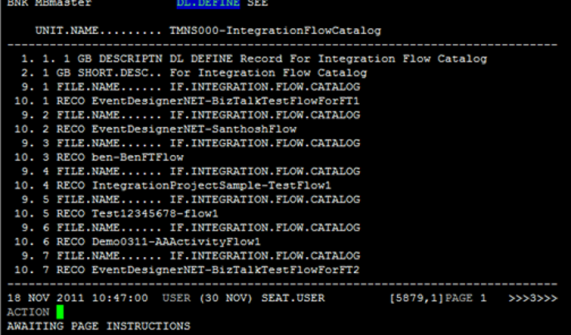
In Transact, a new record is created, with all the relevant information for copying the Flow catalog to another server. If this record already exists, it gets overwritten with the latest details. On verifying this record, the data is copied to the ../F_DL_DATA/TMNS000-IntegrationFlowCatalog/ directory.

- After you have exported the data, import it to your production server: copy the created directory to the ../F.DL.DATA/DL.RESTORE directory on the production server.
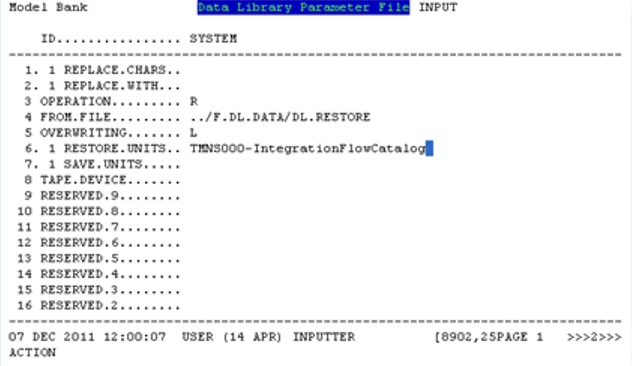
- Set up the DL.DEFINE record with R as the operation.

On verifying the DL.PARAMETER record, a record in the DL.DEFINE application is created with ID TMNS000-IntegrationFlowCatalog and with Operation set to R. On verifying the DL.DEFINE record, the IF.EXIT.POINTS and IF.INTEGRATION.FLOW.CATALOG records will get restored in the IHLD status.
In this topic
