Configuration Files
Before you deploy Inflow_EE.ear a, make sure that the connection factory, queue connection factory and the queues are created in the application server and the required modifications are done in the configuration files.
Configuration Files in Inflow_EE.ear\META-INF
The application.xml file defines the contents of the INFLOW_EE.ear file. The META-INF folder contains application server-specific files too. These configuration files should not be edited.
Configuration Files in Inflow_MDB.jar
The application server-specific configuration file need to be edited to provide the JNDI name or the binding name for queue, queue connection factory, data source and the locking data source.
InflowMDB Configuration
The default queue that InflowMDB is listening to is queue/inflow.
Configurable sections in ejb-jar.xml
The JNDI names for the resources are provided in the application server configuration file.
All the entries below are configurable:
- runtimeProperties
This variable is used to set the comma-separated runtime properties for TAFJ session. OFS.SOURCE is the mandatory property and you need to define it in the following way:
<env-entry>
   <description>Comma Separated Runtime Properties for TAFJ Session</description>
   <env-entry-name>runtimeProperties</env-entry-name>
   <env-entry-type>java.lang.String</env-entry-type>
   <env-entry-value>OFS_SOURCE=IFPAOFS</env-entry-value>
</env-entry>
- superTransaction
This property is used to configure the transaction boundary. For Inflow, you need to set this property to true.
<env-entry>
   <description>Enable/Disable TAFJ Super Transaction, Disable [false : For Container managed] / Enable [true : For Bean managed] transactions
   </description>
   <env-entry-name>superTransaction</env-entry-name>
   <env-entry-type>java.lang.Boolean</env-entry-type>
   <env-entry-value>true</env-entry-value>
</env-entry>
- healthCheckMode
Use this property to set the MDB to run in health check mode. To run the inflow request, you must set this property to false.
<env-entry>
   <description>Health check mode</description>
   <env-entry-name>healthCheckMode</env-entry-name>
   <env-entry-type>java.lang.Boolean</env-entry-type>
   <env-entry-value>false</env-entry-value>
</env-entry>
- userId
This property is used to set the Transact user ID to authenticate in both the application server and in Transact. This user should have the PREAUTHENTICATED attribute set and should have all the necessary permissions to run the required inflow in Transact.
<env-entry>
   <description>User ID</description>
   <env-entry-name>userId</env-entry-name>
   <env-entry-type>java.lang.String</env-entry-type>
   <env-entry-value>SSOUSER1</env-entry-value>
</env-entry>
- transactionMode
This property is used to set the transaction mode for inflow. The default value is CONTAINER.
<env-entry>
   <description>Provide the Transaction Mode [BEAN or CONTAINER]</description>
   <env-entry-name>transactionMode</env-entry-name>
   <env-entry-type>java.lang.String</env-entry-type>
   <env-entry-value>CONTAINER</env-entry-value>
</env-entry>
DispatcherMDB Configuration
The default queue that DispatcherMDB is listening to is queue/inflowListener.
Configurable Sections in ejb-jar.xml
The JNDI names for the resources are provided in the application server configuration file
All the below entries are configurable:
- runtimeProperties
This variable is used to set the comma-separated runtime properties for TAFJ session. OFS.SOURCE is the mandatory property and you need to define it in the following way:
<env-entry>
   <description>Comma Separated Runtime Properties for TAFJ Session</description>
   <env-entry-name>runtimeProperties</env-entry-name>
   <env-entry-type>java.lang.String</env-entry-type>
   <env-entry-value>OFS_SOURCE=IFPAOFS</env-entry-value>
</env-entry>
- superTransaction
This property is used to configure the transaction boundary. For Inflow, you need to set this property to true.
<env-entry>
   <description>Enable/Disable TAFJ Super Transaction, Disable [false : For Container managed] / Enable [true : For Bean managed] transactions
   </description>
   <env-entry-name>superTransaction</env-entry-name>
   <env-entry-type>java.lang.Boolean</env-entry-type>
   <env-entry-value>true</env-entry-value>
</env-entry>
- healthCheckMode
Use this property to set the MDB to run in health check mode. To run the inflow request, you must set this property to false.
<env-entry>
   <description>Health check mode</description>
   <env-entry-name>healthCheckMode</env-entry-name>
   <env-entry-type>java.lang.Boolean</env-entry-type>
   <env-entry-value>false</env-entry-value>
</env-entry>
- userId
This property is used to set the Transact user ID to authenticate in both the application server and in Transact. This user should have the PREAUTHENTICATED attribute set and should have all the necessary permissions to run the required inflow in Transact.
<env-entry>
   <description>User ID</description>
   <env-entry-name>userId</env-entry-name>
   <env-entry-type>java.lang.String</env-entry-type>
   <env-entry-value>SSOUSER1</env-entry-value>
</env-entry>
- transactionMode
This property is used to set the transaction mode for inflow. The default value is CONTAINER.
<env-entry>
   <description>Provide the Transaction Mode [BEAN or CONTAINER]</description>
   <env-entry-name>transactionMode</env-entry-name>
   <env-entry-type>java.lang.String</env-entry-type>
   <env-entry-value>CONTAINER</env-entry-value>
</env-entry>
- A new bean instance pool specific for dispatcherMDB can be added in jboss-standalone-utp.xml and you need to reference it in the following way:
<stateless>
                    <bean-instance-pool-ref pool-name="slsb-strict-max-pool"/>
                    <bean-instance-pool-ref pool-name="dispatcher-strict-max-pool"/>
</stateless>
<strict-max-pool name="dispatcher-strict-max-pool" max-pool-size="20" instance-acquisition-timeout="5" instance-acquisition-timeout-unit="MINUTES"/>
<assembly-descriptor>
        <p:pool>
            <ejb-name>DispatcherMDB</ejb-name>
            <p:bean-instance-pool-ref>dispatcher-strict-max-pool</p:bean-instance-pool-ref>
        </p:pool>
  </assembly-descriptor>
Configuration Files in Inflow_REST.war
The REST-based web service in inflow reads details about the inflow. All the configuration files in Inflow_Rest.war are available in the WEB-INF directory.
The application server specific configuration file needs to be edited to provide the JNDI name or the binding name for queue, queue connection factory, data source and the locking data source.
springrest-servlet.xml
This is the REST service configuration file that has the information to connect to Transact.
The bean definition with the ID t24DataSource is used to provide the JNDI name of the data source that connects to Transact.
<bean id="t24DataSource" class="org.springframework.jndi.JndiObjectFactoryBean">
   <property name="jndiName">
      <value>jdbc/t24DS</value>
   </property>
   <property name="resourceRef">
      <value>true</value>
   </property>
</bean>
The ban definition with the ID readFlow defines the properties to run requests:
- runtimeProperties
This variable is used to set the comma-separated runtime properties for TAFJ sessions. OFS.SOURCE is the mandatory property.
- superTransaction
This property is used to configure the transaction boundary. For Inflow, this property is set to false as the purpose of this REST-based web service is to read inflow-related information in Transact.
- healthCheckMode
This property specifies whether the MDB is running in health check mode. To run the inflow request, set this property to false.
- userId
This property is used to set the Transact user ID that is used to authenticate in application server and in Transact. This user should have the PREAUTHENTICATED attribute set and should have all the necessary permissions to run the required request in Transact.
- transactionMode
This property is used to set the transaction mode for inflow. The default value is CONTAINER.
<bean id="readFlow" class="com.temenos.technology.inflow.queue.model.RuntimeProperty" scope="singleton">
   <property name="runtimeProperties">
      <value>OFS_SOURCE=IFPAOFS</value>
   </property>
   <property name="superTransaction">
      <value>false</value>
   </property>
   <property name="healthCheckMode">
      <value>false</value>
   </property>
   <property name="transactionMode">
      <value>CONTAINER</value>
   </property>
   <property name="userId">
      <value>SSOUSER1</value>
   </property>
</bean>
Configuration Files in InflowListener.war
The Inflow Listener module is used to send inflow ids of staged inflow messages to listener queue. All the configuration files in InflowListener are available in WEB-INF and META-INF folders.
The application server specific configuration file (jboss-web.xml) need to be edited to provide the JNDI name or the binding name for queue, queue connection factory, data source and the locking data source.
The bean definition with the t24DataSource ID is used to provide the JNDI name of the data source that connects to Transact.
<resource-ref>
	<res-ref-name>jdbc/t24DataSource</res-ref-name>
	<res-type>javax.sql.DataSource</res-type>
	<jndi-name>java:/jdbc/t24DS</jndi-name>
</resource-ref>
Spring Beans Configuration
The InflowScheduler bean is used to configure the listener, which listens for the incoming message. It has a scheduled timer task to poll for incoming message. By default, once in every 30 seconds, the Listener listens to the incoming message.
The InflowFailureListener bean is used to configure the options, which are used to retry the failed messages. It has a scheduled timer task configuration to poll for failed messages. By default, once in every 30 seconds, the InflowFailureListener retries a message.
The sample of Listener scheduler tasks is given below:

The link here shows the sample reference for configuring spring scheduler task.
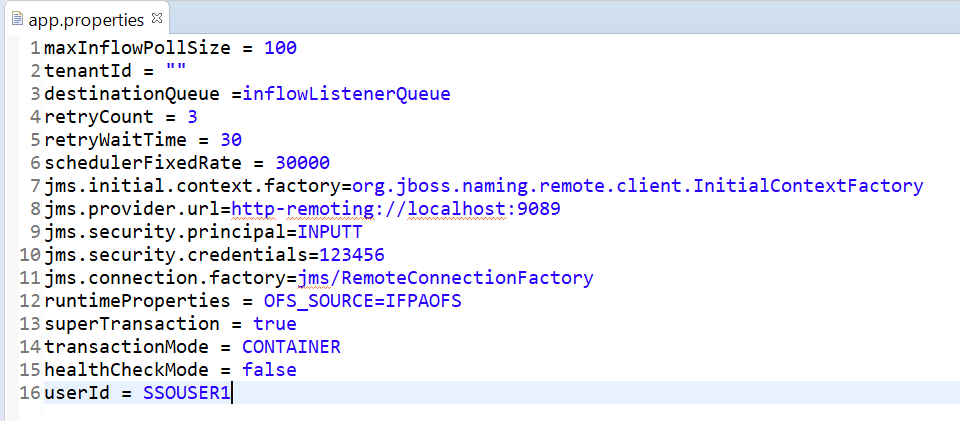
Configuring app.properties
It is the configuration file, which has properties specific to the following listener spring beans:
- listener
- failureRecoveryListener
| Property | Description | Default value |
|---|---|---|
| maxInflowPollSize | Specifies the maximum number of records to be fetched in one poll | 100 |
| tenantId | Used to configure tenant Id | “ “ |
| destinationQueue | Inflow Listener Queue (jms queue name) to which inflow ids will be posted | inflowListenerQueue |
| retryCount | Number of retries for failed messages in failureRecoveryListener | 3 |
| retryWaitTime | Retry wait time for failure retries in seconds | 30 |
| schedulerFixedRate | Fixed time interval in seconds between scheduled tasks | 30000 |
| jms.initial.context.factory | Initial context factory for jms connection | org.jboss.naming.remote. client.InitialContextFactory |
| jms.provider.url | Provides url for jms connection | http-remoting://localhost:9089 |
| jms.security.principal | Credentials for jms connection | INPUTT |
| jms.security.credentials | Credentials for jms connection | 123456 |
| jms.connection.factory | Connection factory for jms connection | jms/RemoteConnectionFactory |
| runtimeProperties | Used to set the comma separated Runtime Properties for TAFJ session. OFS.SOURCE is the mandatory property. | OFS_SOURCE=IFPAOFS |
| SuperTransaction | used to configure the transaction boundary. To run the Inflow request, you must set this property to true | True |
| TransactionMode | used to set the transaction mode for inflow and the default value is CONTAINER | CONTAINER |
| HealthCheckMode | used to set the MDB to run in health check mode. To run the inflow request, you must set this property to false | False |
| userId | used to set the Transact user ID to authenticate in both application server and Transact. You should have the PREAUTHENTICATED attribute set and should have all the necessary permissions to run the required inflow in Transact | SSOUSER1 |
The sample of app.properties configuration file is given below:
In this topic
