Deleting Inflow Records in Transact using Inflow Designer
You can delete inflow records using the Inflow Designer.
Deleting Records at Design Level
Follow the steps below to delete records at design level.
- Access the chosen inflow in Transact to verify the availability of the inflow.

- Right-click the design and select Inflow Designer and Delete Inflow.

A dialog is displayed prompting you to delete the design file.

- Click Yes to delete the designs created in design and the schemas created in schema. In the log folder, you can view the delete log.
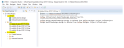
- Click No to delete only the schemas created in the schema folder.
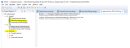
Either way, the record will be deleted from the IF.INFLOW.CATALOG table.

- Click Yes to delete the designs created in design and the schemas created in schema. In the log folder, you can view the delete log.


Deleting Records at Project Level
Follow the steps below to delete records at project level.
- Access the chosen inflows in Transact.

- Right-click the project. Select Inflow Designer and Delete Inflow.

A dialog box is displayed with Yes and No options.

- Click Yes to delete the design (in the designs folder) and the schema (in the schemas folder). You can view the Delete log in the log folder.
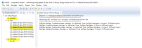
- Click No to only delete the schema (in the schemas folder).
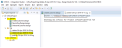
Either way the inflow record is deleted from the IF.INFLOW.CATALOG table.


In this topic
