Configuring Session Replication
By default session replication is disabled in WebSphere Application Server. This section shows you how to manually configure session replication.
If you want to replicate your HTTP sessions, you need to manually configure it. For session replication, there are two steps. First you have to create a replication domain and then map each of your application servers in a cluster (where you want to enable session replication only) to that replication domain. Servers on one replication domain can only be replicated to each other. Session replication is in fact defining a replication boundary.
Procedure
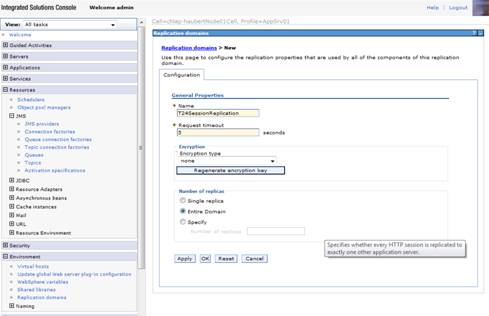
- Click Environment > Replication domain > New.
- Specify the following properties:
- Name as T24SessionReplication.
- Request timeout as 3 seconds.
- Number of replicas as Entire Domain.
- Click OK and save settings to master configuration.
In this topic
