Configuring WebSphere for Temenos Transact
This section creates service integration and adds a Bus member. A bus needs to be assigned to run on one or more application servers and server clusters. For most development activity, you will create and assign a single bus member to the bus. When a bus member is added, a messaging engine is created in that WebSphere instance, which has its own data store for messages.
Procedure
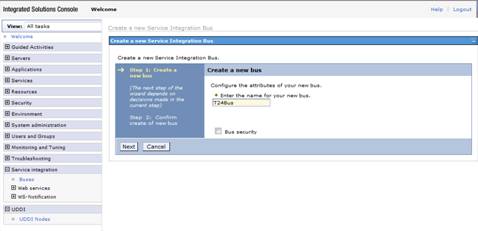
- In the WebSphere administration console, click Service Integration > Buses > New.
- Specify the bus name as T24Bus.
- Click Next.
- Click Finish and save settings to master configuration.
- Click the T24Bus link and then click the Local Topology tab.
- Expand T24Bus > Bus members and click Add.
- Select the Server radio button and then select the server name from the drop down menu.
- Click Next.
- Select File store and click Next.
- Click Next.
- Click Finish.
- Click Save.


Notes
You can see the status of the messaging engine by clicking the Local Topology tab of the T24Bus screen and drilling down through Bus members and Messaging engines.

By default, the messaging engine status is  (Stopped). You need to stop and start the WebSphere Application server. This will change the message engine status automatically to
  (Started) during startup.

From this point, all new resources and variables must have the same scope. In Standalone mode, the scope has to be the server. For example,
Server scope = Node=nodename,Server=servername
When you see in this guide: Scope -> Server
It means: Scope ->Node=nodename,Server=servername
In this topic
