Creating Activation Specification
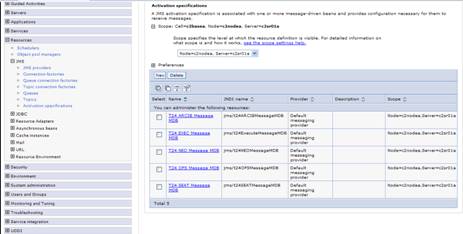
You create a JMS activation specification if you want to use a message-driven bean to communicate with the default messaging provider through Java™ EE Connector Architecture (JCA) 1.5. JCA provides Java connectivity between application servers such as WebSphere® Application Server, and enterprise information systems. It provides a standardized way of integrating JMS providers with Java EE application servers, and provides a framework for exchanging data with enterprise systems, where data is transferred in the form of messages. One or more message-driven beans can share a single JMS activation specification.
Procedure
- Click Resources > JMS > Activation Specification > Scope > Server > New.
- Select Default messaging provider and click OK.
- Specify the following details:
- Name as T24 OFS Message MDB.
- JNDI Name as jms/t24OFSMessageMDB.
- Destination JNDI name as jms/t24OFSQueue.
- Bus as T24Bus.
- Click OK and save settings to master configuration.
- Repeat steps 1 to 4 with the following details:
- Name as T24 ARCIB Message MDB.
- JNDI Name as jms/t24ARCIBMessageMDB.
- Destination JNDI name as jms/t24ARCIBQueue.
- Bus as T24Bus.
- Repeat steps 1 to 4 with the following details:
- Name as T24 NEO Message MDB.
- JNDI Name as jms/t24NEOMessageMDB.
- Destination JNDI name as jms/t24NEOQueue.
- Bus as T24Bus.
- Repeat steps 1 to 4 with the following details:
- Name as T24 SEAT Message MDB.
- JNDI Name as jms/t24SEATMessageMDB.
- Destination JNDI name as jms/t24SEATQueue.
- Bus as T24Bus.
- Repeat steps 1 to 4 with the following details:
- Name as T24 EXEC Message MDB.
- JNDI Name as jms/t24ExecuteMessageMDB.
- Destination JNDI name as jms/t24EXECQueue.
- Bus as T24Bus.

In this topic
