Creating JMS Queues
External components need to send request and receive response from Temenos Transact. Each component has a receive queue and a reply queue.
Procedure
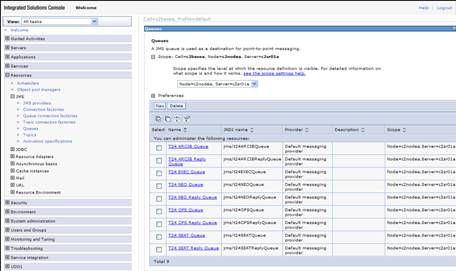
- Click Resources > JMS > Queues > Scope > Server > New.
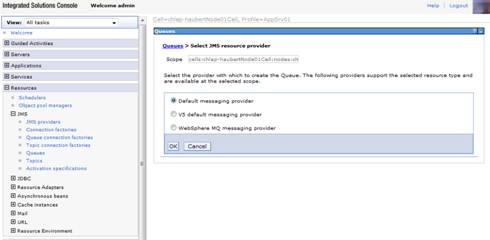
- Select Default messaging provider and click OK.
- Specify the following details:
- Name as T24 OFS Queue.
- JNDI Name as jms/t24OFSQueue.
- Select T24Bus from the Bus Name drop down menu.
- Select Create Service Integration Bus destination from the Queue Name drop down menu.
- Specify Identifier as t24OFSQueue.
- Click Next twice and then Finish to create physical destination and then the page will be redirected to JMS queue page where you have to click OK.
- Save settings to master configuration.
- Repeat steps 1 to 8 to create OFS reply queue with the following details:
- Name as T24 OFS Reply Queue.
- JNDI Name as jms/t24OFSReplyQueue.
- Identifier as t24OFSReplyQueue.
- Repeat steps 1 to 8 to create NEO queue with the following details:
- Name as T24 NEO Queue.
- JNDI Name as jms/t24NEOQueue.
- Identifier as t24NEOQueue.
- Repeat steps 1 to 8 to create NEO reply queue with the following details:
- Name as T24 NEO Reply Queue.
- JNDI Name as jms/t24NEOReplyQueue.
- Identifier as t24NEOReplyQueue.
- Repeat steps 1 to 8 to create ARCIB queue with the following details:
- Name as T24 ARCIB Queue.
- JNDI Name as jms/t24ARCIBQueue.
- Identifier as t24ARCIBQueue.
- Repeat steps 1 to 8 to create ARCIB reply queue with the following details:
- Name as T24 ARCIB Reply Queue.
- JNDI Name as jms/t24ARCIBReplyQueue.
- Identifier as t24ARCIBReplyQueue.
- Repeat steps 1 to 8 to create SEAT queue with the following details:
- Name as T24 SEAT Queue.
- JNDI Name as jms/t24SEATQueue.
- Identifier as t24SEATQueue.
- Repeat steps 1 to 8 to create SEAT reply queue with the following details:
- Name as T24 SEAT Reply Queue.
- JNDI Name as jms/t24SEATReplyQueue.
- Identifier as t24SEATReplyQueue.
- Repeat steps 1 to 8 to create EXEC queue with the following details:
- Name as T24 EXEC Queue.
- JNDI Name as jms/t24EXECQueue.
- Identifier as t24EXECQueue.

NOTE: If you do not click OK before saving, then the queue will not be properly created.
In this topic
