Deploying Browser
This section shows you how to deploy BrowserWeb.war in the application server.
Procedure
- Click Applications > New Application > New Enterprise Application.
- Select the Remote file system deployment option and specify the full path to the BrowserWeb.war file under the % TAF_HOME%\appserver folder. For example,
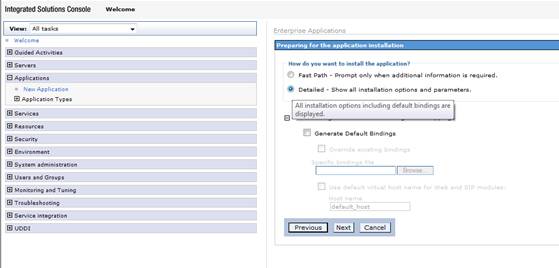
- Select Detailed - Show all installation options and parameters.
- Click Next.
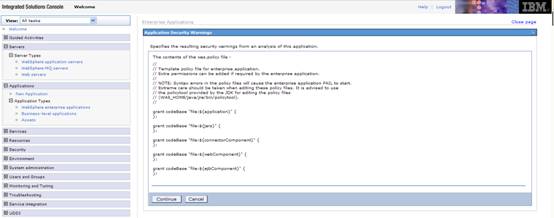
- Click Continue.
- Perform the following steps in the following screen:
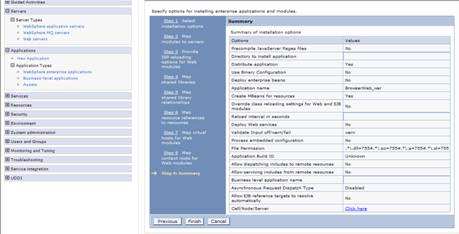
- Step 1: Select installation options. Let values default and click Next.
- Step 2: Map modules to servers. Let values default and click Next.
- Step 3: Provide JSP reloading options for Web modules. Let values default and click Next.
- Step 4: Map shared libraries. Let values default and click Next.
- Step 5: Map shared library relationships. Let values default and click Next.
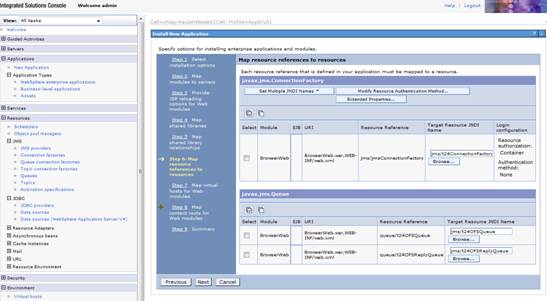
- Step 6: Map resource references to resources.
bind: jms/jmsConnectionFactory to jms/t24ConnectionFactory
bind: queue/t24OFSQueue to jms/t24OFSQueue
bind: queue/t24OFSReplyQueue to jms/t24OFSReplyQueue
Click the Browse button and select the Target Resource JNDI name. Click Apply.

- Click Next and perform the following steps:
- Step 7: Map virtual hosts for Web modules. Let values default and click Next.
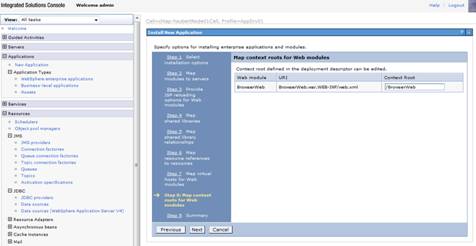
- Step 8: Map context roots for Web modules.
Context Root : /BrowserWeb

- Click Next and complete the next step.
Step 9: Summary.

- Click Next and Finish.
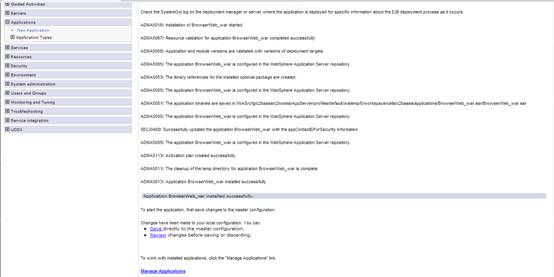
- Check that the application is installed.

- Save the changes to master configuration.
- In the Enterprise Applications page, select the BrowserWeb application and click Start.
- Browser the URL http://IP_Add:portnum/BrowserWeb/servlet/BrowserServlet.
Where, IP_Add is the IP address of the WebSphere server and portnum is the port number.
/usr/lpp/wasapps/TAFJ/appserver/BrowserWeb.war
You may get some security warnings. These can be ignored.
TAFJ Properties
The tafj.properties file is located under the %TAFJ_HOME%/conf directory. It contains a number of configurable parameters. The file is self-documented, but important parameters that need to be checked are listed below:
- temn.tafj.jdbc.username – JDBC user id for accessing DB2.
- temn.tafj.jdbc.password – The password for the above id.
- temn.tafj.jdbc.driver – The JDBC driver name. This must be COM.ibm.db2.jdbc.app.DB2Driver.
- temn.tafj.jdbc.url – Location of DB2 jdbc:db2://[DB2_HOST]:[DB2_PORT]:[DB2_LOCATION_NAME].
For example, jdbc:db2://10.44.5.224:5023/T24_DB03
In this topic
