Workload Management in TAFJ
This section shows how workload is classified and data is managed in TAFJ.
Overview
WebSphere Application Server for z/OS can exploit the Workload Manager (WLM) subsystem of z/OS in the following ways:
- Workload classification: Coarse grain workload management on a server basis.
- Transaction classification: Fine grained workload management on transaction level.
- Servant activation: Starts additional servant regions for application processing.
Below is a brief overview of service classes and enclave processing in z/OS.
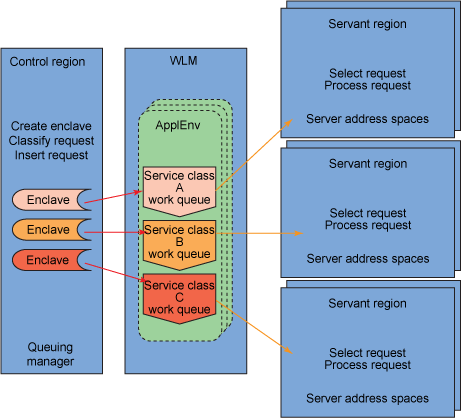
 Service Class
A service class is used to set performance goals for different work (like incoming requests, applications or operating system tasks). For example, a service class can be configured to achieve a response time of 0.2 seconds (90% of the time for incoming requests). The WLM component of z/OS will then automatically assign resources (processor, memory and I/O) to achieve the goals. This is done by comparing the definitions of the service class to real-time data on how the system is currently performing.
You can have multiple service classes, with multiple goals. The mapping of work to a service class is set up by the system programmer and can be based on a variety of choices like user ID, application or external source. In summary, a service class is the z/OS implementation of a service level agreement.
Enclaves
An enclave is a container that has a service class and reporting class attached to it. A thread can connect to this enclave and execute its work with the priority of the enclave. WebSphere Application Server for z/OS uses this technique to pass transactional work (the user application) from a servant to an enclave. The application then runs with the priority of the enclave and WLM can make sure that the performance goals for the application are achieved.
In summary, an enclave is used to assign the user application a service class during runtime.
Workload Classification
WebSphere Application Server for z/OS is capable of classifying incoming work on a server basis. To do this, the control region of an application server checks to see which application server the request belongs. It will then assign the request accordingly to the WLM queue. Each servant will process work for one service class at any point in time.
Incoming work is assigned a service class and optionally a reporting class by the WLM classification rules. The work is then executed according to the performance criteria of the service class. Granularity is at the application server level.
Transaction Classification
Transaction classification can be used to classify the transactions handled by the application. This technique can be used to prioritize special requests.
A request that enters the system is assigned a transaction class, using the request details like utilized protocol, requested URI, or other metrics. The transaction class is then mapped to a service and reporting class inside the WLM subsystem, using a workload classification document. This file is an XML file that has to be populated with mapping rules. Transaction classification can be used with the following protocols:
- Internal classification
- IIOP classification
- HTTP classification
- MDB classification
- SIP classification
In case of TAFJ, you can use MDB classification to assign a transaction class in order to prioritize a particular transaction, such as Account balance enquiry.
To use transaction classification, the following steps must be performed:
- Decide which TAFJ transactions need particular performance goals.
- Create a workload classification document. The following example shows a workload classification document for MDB requests:
<?xml version="1.0" encoding="UTF-8"?> <!DOCTYPE Classification SYSTEM "Classification.dtd" > <Classification schema_version="1.0"> <InboundClassification type="mdb" schema_version="1.0" default_transaction_class="qrs"> <endpoint type="messagelistenerport" name="IPVListenerPort" defaultclassification="MDBX" description="ABC"> <classificationentry selector="Location='East'" classification="MDB2" description="XYZ" />
Each InboundClassification element can contain one or more endpoint elements with a messagelistenerport type defined. Define one endpoint element for each listener port that is defined in the server that you want to associate transaction classes with the message-driven bean.
Use the following rules when defining your endpoint elements:
- The type attribute must always be messagelistenerport.
- The name attribute corresponds to the listener for your endpoint element. The value of the name attribute must be the name of the listener port that is specified in the administration console for the server.
- The defaultclassification element is the default transaction class that is associated with the message-driven beans. The value of this attribute overrides the default transaction classification value.
- The description field is optional; however, you should use it on all the endpoint elements. The description is displayed when you monitor the transaction classes in SDSF.
- Each endpoint element can have zero, one, or more classificationentry elements. Use the selector attribute of the classificationentry element to assign a transaction class to a message-driven bean that has a selector clause in its deployment descriptor. Use the following rules when defining your classificationentry elements:
- The value of the selector attribute must match exactly to the selector clause in the MDB deployment descriptor.
- The value of the selector attribute must have the correct syntax for an XML document. You must replace the < and > symbols with the entity references < and >, respectively. Similarly, if you use an apostrophe or quotation mark, use the ' and " entity references.
This final workload classification document needs to be copied to a path where the application server control region can access it. It is also necessary to create a DTD (Document Type Definition) file in the same directory, which is referenced in the header of the workload classification document. Here is an example of that reference:
<!DOCTYPE Classification SYSTEM "Classification.dtd" >
A sample DTD that can be used as is can be found in the IBM WAS Information Center (link supplied is correct for WAS v7 at the time of writing):
http://publib.boulder.ibm.com/infocenter/wasinfo/fep/index.jsp?topic=%2Fcom.ibm.websphere.nd.multiplatform.doc%2Finfo%2Fae%2Fae%2Ftrun_wlm_tclass.html
- Configure the WebSphere Application server to use the classification document.
- In order to activate the workload classification document, a new WebSphere variable needs to be defined with the path to the document.
- Select Environment à WebSphere variables in the administrative console.
- Select the scope for the workload classification document. If the WebSphere variable is defined at the cell scope, the classification document is valid for the complete cell.
- Click New.
- Create a new variable named wlm_classification_file. The corresponding value should point to the complete USS path of the workload classification document.
- Save and synchronize the changes with nodes.
- In order for the classification file to take effect in a particular application server, it has to be restarted.
- Modify the WLM settings to use transaction classes. The same transaction classes specified in the workload classification document need to be defined in the Classification Rules of Subsystem CB in WLM. A classification rule maps a transaction class to a defined service class and reporting class. If you want to distinguish between multiple service classes within one application server, one servant region is required for each service class. Consequently, the minimum and maximum amount of servant regions must be adjusted in order to handle the incoming workload.
- In order to verify the defined workload classification, it is necessary to create some workload for the transactions involved and monitor the classified enclaves in SDSF. All the active enclaves with the assigned service class and report class can be viewed in the SDSF.ENC panel.
Servant Activation
An application server can have multiple servant regions that process the user application. If the response time goals defined for the applications cannot be kept, WLM can start additional servant regions to process incoming, or queued up requests faster.
The number of servants to be started initially and dynamically through WLM can be defined in the following path of the administrative console:
Application Servers > app_server > Java and Process Management > Server

In this panel, the minimum and maximum amount of servants can be defined. To use more that one servant region, the check box “Multiple Instances Enabled” must be checked. The minimum amount of servants will be started initially during startup of the application server. If response times of user transactions do not meet the defined goals, then the WLM can start additional servant regions. Therefore, the maximum amount of servants defined must be higher than the minimum amount. If both numbers are the same, the WLM will not be able to start additional servant regions dynamically. Moreover, the WLM can only start additional servants dynamically until the maximum number of servants is achieved.
Basic WLM Classifications
The usage of WLM classification for the control and servant region address spaces is a basic z/OS approach. It is part of the installation process of the WebSphere Application Server for z/OS.
The following recommendations apply:
- Control regions should be assigned a service class with high priority in the system, whether it is the SYSSTC service class or a high importance or velocity goal. This is because controllers perform processing that is required to receive work into the system, manage the HTTP transport handler, classify the work, and do other housekeeping tasks.
- The servant classification should not be higher in the service class hierarchy than more important work, such as the controller and CICS®, or IMS™ transaction servers. It is recommended to use a high velocity goal.
- Enclaves for WebSphere Application Server for z/OS are classified using the Subsystem CB. The performance goals set here depend on your application and the environment; therefore, no quantitative recommendation can be made here. However, usually a percentile response time goal is advisable.
- OMVS components of WebSphere Application Server for z/OS need to be classified as well. Some OMVS scripts are executed during server startup, therefore if these are not classified in the WLM, the server startup time will be increased.
In this topic
