DB2
The Temenos Transact DB2 Direct Connect driver is a middleware component between Temenos Transact and DB2 database. It enables Temenos Transact to send to and retrieve data from DB2 database storage. The data is stored in DB2 server as either XML columns or BLOBs (Binary Large Objects) for internal or work files. This section provides details about the database configuration, commands, transactions and driver environment variables involved in multiple database access and table details.
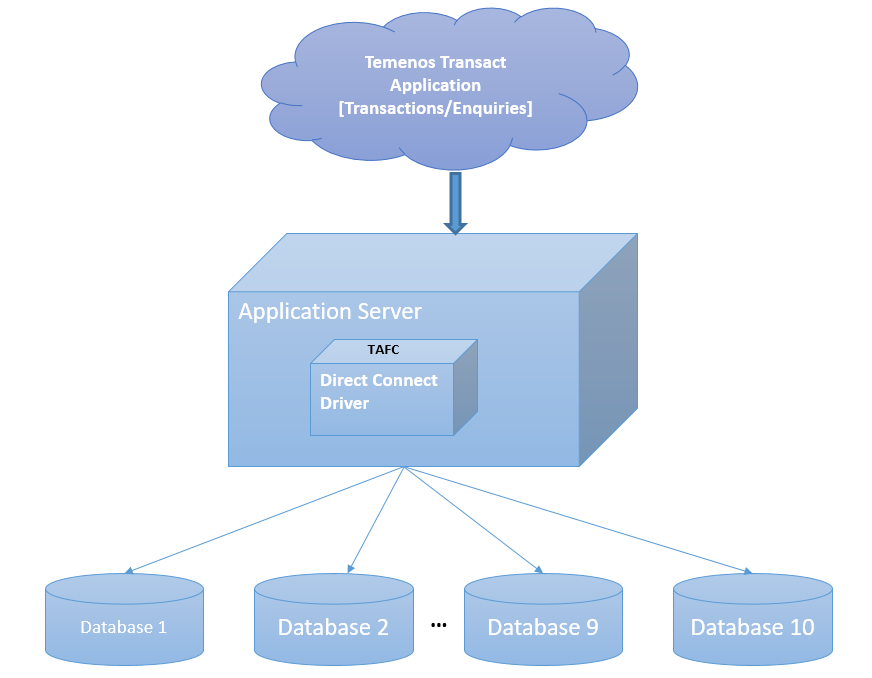
Having huge Temenos Transact data in single server or database hinders the performance of the database in both transactional and reporting services. Therefore, this data need to be separated categorically as per the business needs.
The Temenos Transact data is classified into volatile (transactional) and non-volatile (read-only) data. The data is separated and stored in different databases, which:
- Boosts the performance of the transactional processing
- Enables timely retrieval of the historical (non-volatile) data for the reports
The DB2 Direct Connect Driver (DCD) enables you to configure and access maximum of ten databases. Each database can be configured with its own credentials. A table can be created in a specific database for an easier and accurate access. Each table has two columns as listed in the following table.
|
Column |
Description |
|---|---|
|
RECID |
Holds the primary key of the table |
|
XMLRECORD |
Holds the table data. |
If the XMLRECORD is of XML type, the data will be converted from the internal dynamic array format into an XML sequence for insertion into the DB2 database. If the record is of BLOB type, the data will be stored directly in the XMLRECORD column in binary format.
On retrieval of data, the row information from the XMLRECORD column is converted back from an XML sequence into the internal dynamic array format for use by the application.
The Temenos Transact DB2 RDBMS Direct Connect driver is implemented using standard DB2 Command Line functions to communicate with the DB2 database and supports internationalized characters by the standard DB2 RDBMS code page conversion configuration.
Database Configuration
This section provides configuration for the Linux version of DB2. However, the same configuration is applicable for the Windows version as well. You need to make changes corresponding to the operating system while setting the following environment variables.
You can find the location of the DB2 server and edit the following in .profile.
- export DB2_HOME=/home/db2inst1/sqllib
- export DB2_SHLIB=$DB2_HOME/lib64
- export DB2_SHLIB_PATH=$DB2_HOME/lib64
- export DB2_LD_LIBRARY_PATH=$DB2_HOME/lib64
- export PATH=$DB2_HOME/bin:$PATH
- export LD_LIBRARY_PATH=$LD_LIBRARY_PATH:$DB2_LD_LIBRARY_PATH
- export LIBPATH=$LIBPATH:$DB2_SHLIB
To access the database, you need to use the DB2 command line tool db2.
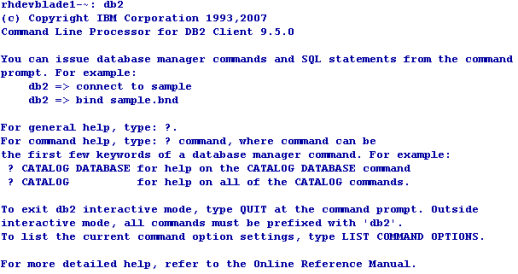
The version of the DB2 server is visible when db2 command is executed.

The XMLDB2 Driver is located in %TAFC_HOME%\XMLDB2 folder. The following table lists the libraries and executables available in the driver.
|
Libraries |
Executable |
|---|---|
|
config.XMLDB2.so config.XMLDB2.so.el |
Dynamic linked library DB2 Driver |
|
config.XMLDB2 |
Executable used for the DB2 driver configuration |
|
libTAFCdb2.so libTAFCdb2.so.el |
Shared object for DB2 |
|
libTAFCdb2utils.so libTAFCdb2utils.so.el |
Shared object for TAFC-DB2 utils |
|
libTAFCtransformer.so libTAFCtransformer.so.el |
Shared object for TAFC transformers |
The following commands enable you to edit .profile or remote.cmd.
- export DRIVER_HOME=$TAFC_HOME/XMLDB2
- export JBCOBJECTLIST=$JBCOBJECTLIST:$DRIVER_HOME/lib
- export PATH=$PATH:$TAFC_HOME/bin:$DRIVER_HOME/bin
You can configure the DB2 Direct connect driver using the config-XMLDB2 executable. This creates the jedi_config driver configuration file at %TAFC_HOME%\config, which stores all the data entered through this executable.
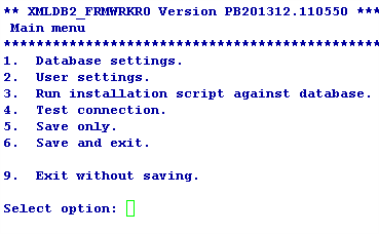
 Database Settings
You can configure the server for the database as it is automatically identified by the instance once the name of the database is given.
The first database is considered the default database. You can configure a maximum of ten databases with its own (server and user) credentials.
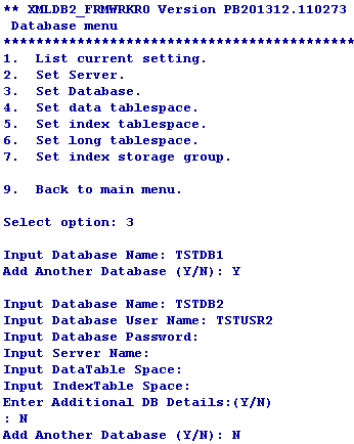
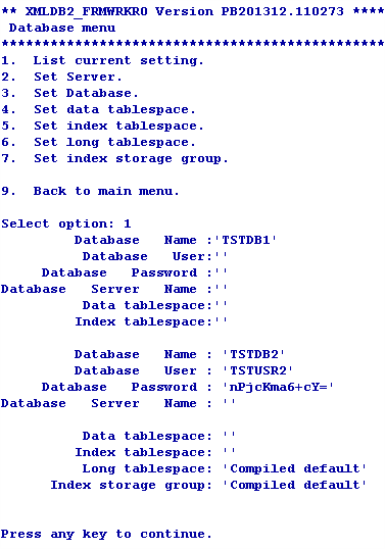
You can list or change the current settings using the options in Database menu.
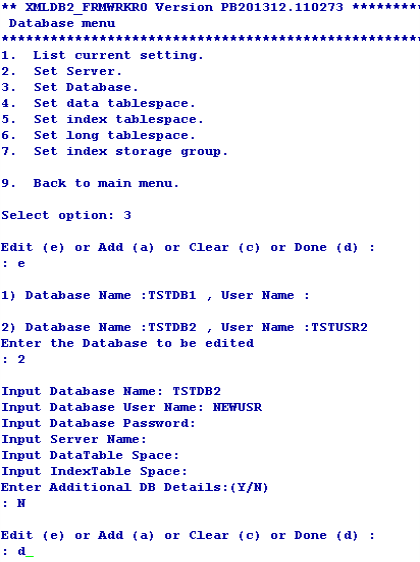
You can add or edit the database settings as required using the Set Database option in Database menu.
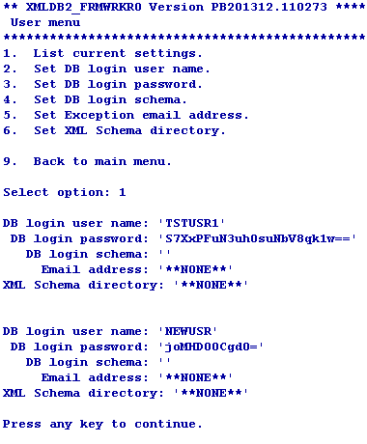
User Settings
You can use this option only for the configuration of the default database.
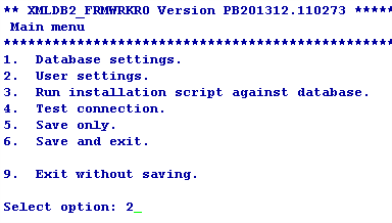
You can configure the user credentials of the first (default) database using the Set DB login user name and Set DB login password options in User menu. If you do not configure the user credentials for other databases, the user credentials of the first database is made available for all the databases.
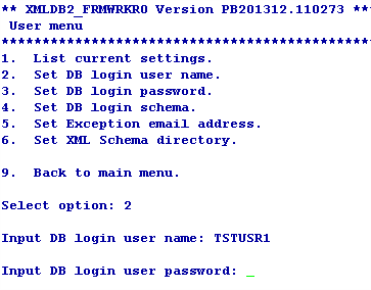
You can list or change the current settings using the options in User menu.
Installation Script
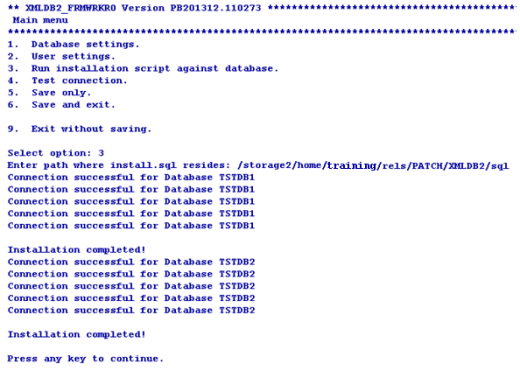
The install.sql script is available at %DRIVER_HOME%\sql. When the path is given, config-XMLDB2 loads the scripts, invokes sqlcmd at the command prompt and executes the script.
The install.sql script does the following.
- Creates STUBFILES table for table creation cross reference
- Creates T24LOCKTABLE to store the locks
- Creates functions like numsort, numcast
- Creates a view for the stubfiles
Connection Testing
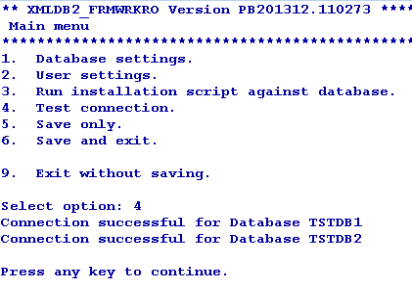
The driver tries to connect to all the configured databases. If the Connection successful… message appears for all the databases, the driver will be able to connect to DB2. If the connection fails, you need to check the database and its credentials.
Commands for Multi-Database Access
This section provides examples of commands that can be used with the DB2 driver and expected output. These commands are mostly built in the Temenos Transact environment, which you can execute with the necessary options when required.
Create File
You can use the CREATE-FILE command with a type qualifier (TYPE) to define the file to be created as a table in the DB2 RBDMS database. For example, TYPE=XMLDB2.

The above command generates the following tables in the DB2 RBDMS database.
|
Table |
Description |
|---|---|
|
D_EXAMPLE_TABLE |
This table equates to the dictionary section |
|
EXAMPLE_TABLE |
This table equates to the data section. The naming convention shows that the dots in the file name are converted to underscores in table name. |
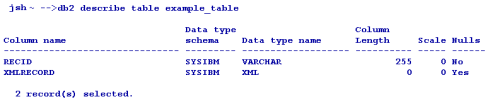
Both the tables have two columns as listed in the following table.
|
Column |
Description |
|---|---|
|
RECID |
Holds the primary key of the table |
|
XMLRECORD |
Holds the table data. |
Generally, the dictionary files are held as NOXMLSCHEMA types (BLOB) as these files are not usually queried.
For each table a cross reference entry is created in the STUBFILES table with the DB2 RDBMS database. In addition, a native file stub is also created for each table in the specified file path (in the above example, it is the current directory). The stub files are used to locate and invoke the correct driver for the corresponding table.
Based on the conversion, the stub file information may alternatively be contained within VOC, (which in turn can also be an RDBMS table), ensuring that all the related information is completely contained within the database.
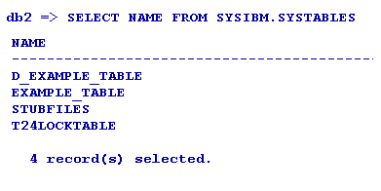
The file is created in the default database.
File Creation in a Different Database
You can create a database in any other database using the DATABASE qualifier. The following table lists the options that can be used in CREATE-FILE.
|
Qualifier |
Value |
Description |
|---|---|---|
|
TYPE |
XMLDB2 |
Indicates the type of the file to be created. |
|
DATABASE |
User specified |
Indicates the name of the pre-existing database in which the table needs to be created |
|
TABLE |
User specified |
Indicates the name of the table |
|
READONLY |
YES |
Indicates if the table is to be considered as read-only (applicable only for the data file). |
|
NOXMLSCHEMA |
YES |
Uses BLOB data type instead of XML data type to write the XML data |
|
XSDSCHEMAREG |
YES |
Registers XSD SCHEMA in the database. |
|
XSDSCHEMA |
User Specified |
Uses XSD schema to describe the data layout required for long tag XML format data. |
|
KEY |
VARCHAR[User specified length in integer] or INTEGER |
Indicates the key to alter the data type and length of RECID |
|
ASSOCIATE |
YES |
Indicates if the table has an associated read only table. |
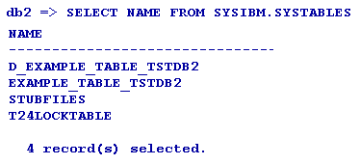
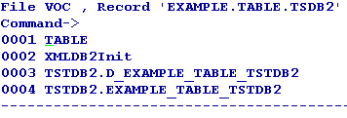
The following example shows a table created in the TSTDB2 database.

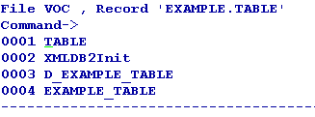
The VOC of the table gives the information about the location of the table as follows.
VOC of EXAMPLE.TABLE
VOC of EXAMPLE.TABLE.TSTDB2
EXAMPLE_TABLE Describe
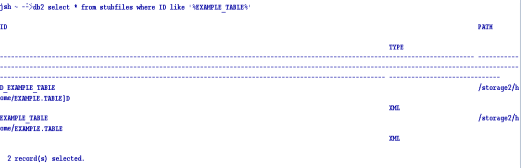
The two cross reference table entries are created in the RDBMS STUBFILE table.
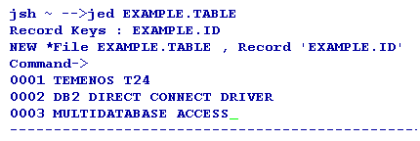
After the table is created, you can add the sample data to the table using standard tools like the command line editor ED or screen editor JED.
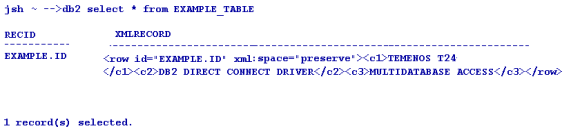
You can then view the sample XML data using the DB2 SQL select statement with the XMLRECORD column.
Delete File
You can use the DELETE-FILE command to delete the file. This command deletes both the DICT and DATA parts of the corresponding table in the database and deletes the reference from the stub.
The Oracle driver detects the table in any of the database and deletes the table, cross reference and even the stub file entry.

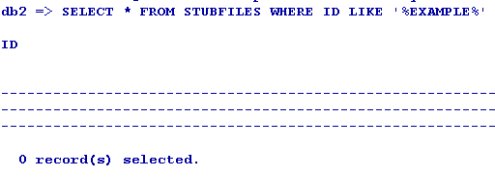
The STUBFILE table update is as follows.
File Deletion in a Different Database
There is no change in the deletion of the file. The driver picks up the name of the database in which the database resides from VOC and deletes it.
Create View
The CREATE-VIEW command enables you to create a view of the table such that, the column names can be used within SQL statements to refer the underlying XML. The command will process all the extended dictionary entries related to the file and generates the appropriate view in the DB2 RDBMS database. You need to use the verbose option (-v) to output the generated view to the terminal. This command will be executed against the table on a rebuild of the Temenos Transaction Standard Selection.

If the corresponding file is not the default file in another database, VOC is used to resolve the location of the table.
Create Extindex
The CREATE-EXTINDEX command enables you to create indexes in the DB2 RDBMS tables. You need to execute this command manually from the command line, as it is not invoked by any Temenos Transact action.
The following table lists the options to be used with the CREATE-EXTINDEX command.
|
Options |
Description |
|---|---|
|
x |
Creates an XML index |
The following screen capture displays the extindex for the table in the default database.
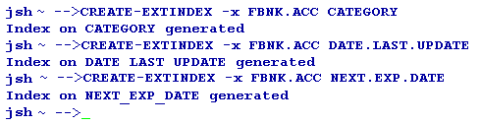
You can use the CREATE-EXTINDEX command to create index on tables of the other databases as well in the similar way. The following example screen capture shows a functional index created on a table.

You can invoke a verbose display of the index creation process using the verbose (-v) option on the CREATE-EXTINDEX command line.

List Extindex
The LIST-EXTINDEX command enables you to display all the indexes created on a table.
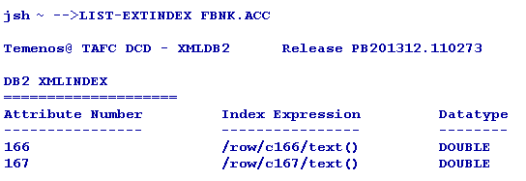
Delete Extindex
The DELETE-EXTINDEX command enables you to delete all the indexes created on a table.

Table Creation Using Long Tag XML
Generally, the XML Schema Definition document (.xsd) is not required for DB2 and XML Schema Definition is not registered, by default. However, you can use the long tag elements as per the Temenos Transact XML Schema Definition (.xsd) document and store the definition within the table. The short tag XML is the default format.
You can invoke the long tag table XML format by specifying the XSDSCHEMA qualifier when creating the table.
The XML Schema Definition (ACCOUNT in this case) must be:
- Generated by the Temenos Transact Standard Selection Rebuild (See XSD Schema Generation User Guide)
- Placed in the MSSQL Server Driver schema directory
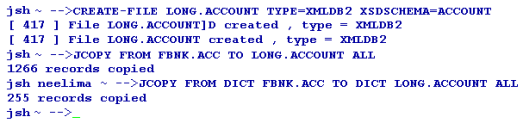
By default, the XML Schema Definition is not registered in the DB2 RDBMS Database. To register the XML Schema Definition manually, you can add the additional qualifier XSDSCHEMAREG with the CREATE-FILE command line set to YES. For example, XSDSCHEMAREG=YES.
The following screen capture displays an Oracle describe, which shows the table type to be different from the short tag XML CLOB table description
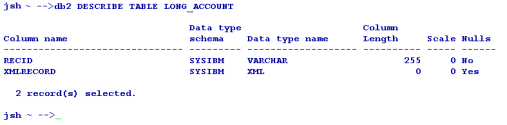
The following screen capture shows an example of a data record in the long tag structured storage format.
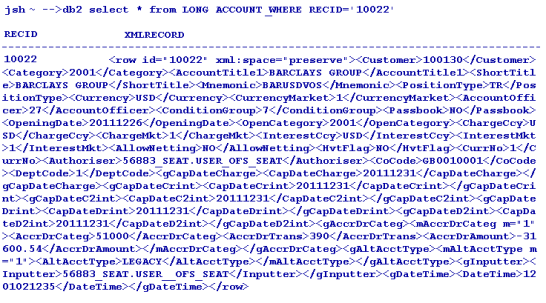
The following screen capture shows an example of index creation on a long tag xml table. It is similar to creating indexes for normal files.
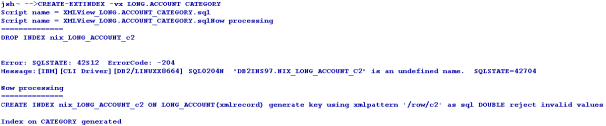
Table Querying
You can use the general jBase Query Language (JQL) queries used to query a J4/JR file, to query the tables as well. The driver converts these queries to the corresponding underlying database query and fetches the data. The translated query is logged in the log file. If the translated query is to be displayed on the standard output, you need to set JEDI_XMLDRIVER_DEBUG_DISPLAY. The following are the different commands involved in querying tables.
Select
The following format is used for the select command.
Select <filename> [WITH <ATTR> = <VALUE>]
The following sample shows @ID (Right justified) converted to numeric using numcast function.

The following sample shows ACCOUNT.TITLE.1 (left justfied) considered as a string.

Count
The following format is used for the count command.
Count <filename>

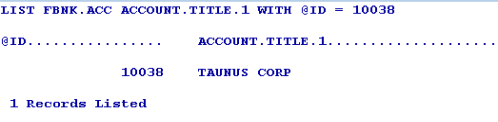
List
The following format is used for the select command.
List <filename> [ATTR1] [ATTR2]….. [ATTRN] [WITH <ATTR>= <VALUE>]
Read-Only Associate Tables
The Temenos Transact data is classified into volatile (transactional) and non-volatile (read-only) data. The volatile data is retained in LIVE or default database. The non-volatile data is moved to the second database referred to as non-volatile DB.
You can create read-only tables in any of the configured database. However, you cannot do the following.
- Create a DICT file for the read-only table
- Write, clear or delete a record from the READ-ONLY table. It results in a coredump and generates a log.
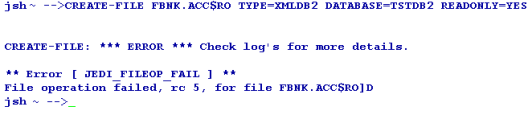

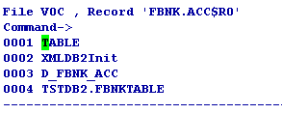
The Temenos Transact table will have an associated RO table if the LIVE file contains an ASSOCIATE flag in VOC. This RO table can reside in any of the configured databases. The VOC entry of the LIVE table evaluates the name and location of the ASSOCIATED RO table of the LIVE file.

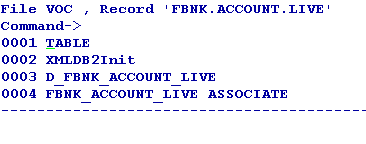
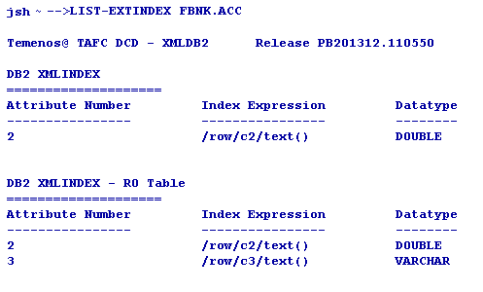
The LIST-EXTINDEX command on the LIVE table gives the details about the indexes created on the associate RO table as well.
If the LIVE database has an associated RO table in non-volatile DB, the driver queries both the tables and displays the data.
The RO table can be of any name. However, the RO file created should be <“live” file$RO>. A nickname has to be created in the LIVE database as <RO table name> for the RO table.
The user of the first database should have the permission to access and run the scripts on the second database.


When a query is executed on the LIVE file, the records are displayed from both the LIVE file and associated file avoiding the duplicates, by default. If you want to change the default functionality, you need to set the JEDI_XMLDRIVER_ASSOCIATE_FILE variable to any of the following values, as required.
|
Value |
Functionality |
|---|---|
|
1 |
Disables the redirection and query to the ASSOCIATE table |
|
2 |
Disables query for ASSOCIATE table, but redirection is active |
|
4 |
Disables PDATE in the query, but redirection and ASSOCIATE table query with UNION will be active |
If the query returns an error message as shown in the following screen capture, you need to check whether the nickname is pointing to the valid object.

Querying a file without Indexes
Creation of indexes on the files affects the query translation from JQL to SQL. When indexes are not created, the query is translated as shown in the following screen capture. The status of query translation is failure. The select statement is modified to the default selection of the table by ignoring the criteria.
Transaction in Multi-Databases
When a WRITE or UPDATE action is performed within the transaction boundary (between TRANSTART and TRANSEND), it is termed a transaction. The transaction starts only with WRITE, so only the database where the data is written is in the transaction. The transaction can also read a file from one database and write to another file from a different database.
The transaction aborts on updating or writing data to the files of multi-databases resulting in a coredump.
Driver Environment Variables
You need to configure the following environment variables to be used with the DB2 Direct Connect Driver.
Internationalisation
- JBASE_I18N=1 (Mandatory)
- JBASE_CODEPAGE=utf8
- JBASE_LOCALE=en_US
- JBASE_TIMEZONE=Europe/London
- JBASE_CORE_DUMP=1 (Force core dump on segmentation violation)
Optional
The following table lists the optional variables and their functionality.
|
Command |
Functionality |
|---|---|
|
JEDI_XMLDRIVER_TRACE=1 |
Traces all driver functions |
|
JEDI_XMLDRIVER_DEBUG=1 |
Traces only query translations |
|
JEDI_XMLDRIVER_NO_SPACE_PRESERVE=1 |
Indicates that the white space is not preserved in xml Trace |
|
JEDI_XMLDRIVER_PREFETCH_ROWS = n |
Indicates the number of rows to be pre-fetched in each fetch. The default value is 500. |
|
JEDI_XMLDRIVER_ENABLE_DB_SORT=1 |
Enables the DB sort instead of JQL Sort |
|
JEDI_XMLDRIVER_DISABLE_RECID_NUMSORT=1 |
Ignores the data type of the RECID while sorting on RECID |
|
JEDI_XMLDRIVER_ENABLE_EDICT_TYPE=1 |
Enables the EDICT data type detection |
|
JEDI_XMLDRIVER_DISABLE_DATABASE_LOCKS=1 |
Disables the DB row locks |
BASE64 XML
BASE64 is a special type of file to be specified during file creation, using the NOXMLSCHEMA qualifier. There is no specific environment variable, procedure or function associated with BASE64. It is just another file type like BLOB or WORK. After the file is created using the appropriate qualifier, the driver code manages the internal representation of the data that is written and read to the DB2 database server.
This section describes the implementation of the BASE64 changes made for Direct Connect DB2 Driver. This implementation improves the query performance by utilizing the database cache by converting the BLOB data that are stored in the BLOB type file to BASE64. This allows the data to be held in the UTF8 format, which can be stored in the XML. The conversion from BLOB to BASE64 also eliminates the possibility of illegal binary character. In addition, the XML records are cached and BLOB records are not, resulting in an increased performance as compared to BLOB.
BASE64 File Creation
The following sample command explains the creation of a BASE64 file in DB2.
jsh -->CREATE-FILE SAMPLEDB2_BASE64 TYPE=XMLDB2 NOXMLSCHEMA=BASE64
[ 417 ] File SAMPLEDB2_BASE64]D created , type = XMLDB2
[ 417 ] File SAMPLEDB2_BASE64 created , type = XMLDB2
The following sample command shows the usage of jstat to view the file stat.
  jsh -->jstat -v SAMPLEDB2_BASE64

DIRECT CONNECT DRIVER: XMLDB2 Version: R11.92279

Type = XMLDB2

DATABASE INFO   : - 09.07.0000
           Server = DB2/LINUXX8664
           User Schema = db2inst1
FILE INFO     : Key = VARCHAR(255) Record = BASE64 XML
           Table = SAMPLEDB2_BASE64, File = ./SAMPLEDB2_BASE64
The following script shows the sample data with its representation in the database table. The data is represented in the xml field as BASE64 data.
db2 => select * from SAMPLEDB2_BASE64

RECID  XMLRECORD
----------------------------
R1    <row id="R1" xml:space="preserve"><c1>TVYx/U1WMv0=</c1></row>

 1 record(s) selected.
The following script shows the representation of Base64 in the STUBFILES table.
db2 => select * from STUBFILES WHERE ID like '%SAMPLEDB2_BASE64%'

ID                     PATH         TYPE
-----------------  -----------------------------------   ------
D_SAMPLEDB2_BASE64     /home/stevew/shivtest/SAMPLEDB2_BASE64]D BASE64
SAMPLEDB2_BASE64      /home/stevew/shivtest/SAMPLEDB2_BASE64  BASE64

 2 record(s) selected.
The following script shows some sample queries on the BASE64 file.
jsh -->SELECT SAMPLEDB2_BASE64 WITH @ID like 'm2'
SELECT: SQL:2:Full: SELECT t.RECID FROM SAMPLEDB2_BASE64 t WHERE RECID LIKE 'm2' ESCAPE '\'

 No Records selected

jsh -->SELECT SAMPLEDB2_BASE64 WITH ATTR2 like 'm2'
accJQL2SQLTranslator::processLeafNode: *** WARNING *** jQLHandler exception: An internal error - "Neither i-types nor BLOB field are supported in JQL2SQL translation" occured.

SELECT: SQL:0:Fail (default): SELECT RECID, XMLRECORD FROM SAMPLEDB2_BASE64 FOR READ ONLY

 No Records selected
Extended Dictionary
This section describes the implementation of the extended dictionary changes for DCD. This enables you to utilise the description present in an extended dictionary part of an attribute. Prior to this enhancement, DCD used the justification of the attributes to determine its SQL translation—an attribute with left justification was translated to string compare in the SQL translation and attribute with right justification was translated to both numeric compare and string compare in the SQL translation.
This enhancement bypasses the justification of the attributes if extended dictionary is available for the attribute. If the numeric value 101 is present in the extended dictionary, it will either do a numeric compare or string compare.
This enhancement is available for all the ORACLE, DB2 and MSSQL direct connect drivers. In addition, to see the extended dictionary used in the translation, you need to set the following environment variables.
- JEDI_XMLDRIVER_ENABLE_EDICT_TYPE=1
- JEDI_XMLDRIVER_ENABLE_ALL_COLUMNS=1
On creating the file and specifying the attributes, you need to use the use numeric value 101 in the extended dict to enable numeric comparison and 108 or any other number for string comparison. Though any valid integer number can be used in the extended dict part for string comparison, it is recommended to use 108, as it has been tested.
In the following sample, a file with two attributes ATTR1 and ATTR2 is created, where ATTR1 is specified with a value of 101 in the Extended Dict and ATTR2 is specified with a value of 108.
File Creation
You need to create a DB2 type file using appropriate TYPE in CREATE-FILE to create the correct driver file. The file creation changes according to the driver used.
jsh-->CREATE-FILE DB2_EXTDICT TYPE=XMLDB2
[ 417 ] File DB2_EXTDICT]D created , type = XMLDB2
[ 417 ] File DB2_EXTDICT created , type = XMLDB2
Dictionary Definition for Attributes
The following script shows the definition of dictionary for the attributes created along with the file.
jsh -->JED DICT DB2_EXTDICT
  @ID
001 D
002 0
003
004 @ID
005 10L
006 S
  ATTR1
001 D
002 1
003
004 ATTR1
005 10L
006 S
007
...... (Truncated for convenience)
029
030 JBASE_EDICT_START
031 101
032
033
034 ATTR1
035
036
037
038
039 1073741824
040
041
042
043
044
045
046
047 JBASE_EDICT_END

ATTR2
001 D
002 2
003
004 ATTR2
005 10R
006 S
007
...... (Truncated for convenience)
029
030 JBASE_EDICT_START
031 108
032
033
034 ATTR2
035
036
037
038
039 1073741824
040
041
042
043
044
045
046
047 JBASE_EDICT_END
ATTR1 is a numeric type since the value 101 is used in the extended dictionary type and ATTR2 is a string type as 108 is used in the extended dictionary type.
Environment Variables
Before you start working with the created file, you need to set up the following environment variables to utilise the extended dictionary.
You need to use export command to enable these environment variables in AS5, AIX, Solaris, HP-Unix and all other UNIX clones.
export JEDI_XMLDRIVER_ENABLE_ALL_COLUMNS=1
export JEDI_XMLDRIVER_ENABLE_EDICT_TYPE=1
You need to use set command to enable these environment variables in Windows based systems.
set JEDI_XMLDRIVER_ENABLE_ALL_COLUMNS=1
set JEDI_XMLDRIVER_ENABLE_EDICT_TYPE=1
Without these two environment variables, DCD will not use the correct comparison function in the SQL translation.
Sample Queries
This section provides sample queries on the numeric and string attributes.
Numeric Attribute
The following table lists the sample query on the numeric attribute.
|
jsh |
SELECT |
|---|---|
|
jsh -->SELECT DB2_EXTDICT WITH ATTR1 EQ 100 |
SELECT: SQL:2:Full: SELECT t.RECID FROM DB2_EXTDICT t WHERE xmlexists('$xmlrecvar/row[ fn:number(c1/text()) =100]' PASSING XMLRECORD AS "xmlrecvar") |
|
jsh -->SELECT DB2_EXTDICT WITH ATTR1 NE 100 |
SELECT: SQL:2:Full: SELECT t.RECID FROM DB2_EXTDICT t WHERE xmlexists('$xmlrecvar/row[ fn:number(c1/text()) !=100 or fn:not(c1/text())]' PASSING XMLRECORD AS "xmlrecvar") |
|
jsh -->SELECT DB2_EXTDICT WITH ATTR1 GE 100 |
SELECT: SQL:2:Full: SELECT t.RECID FROM DB2_EXTDICT t WHERE xmlexists('$xmlrecvar/row[ fn:number(c1/text()) >=100]' PASSING XMLRECORD AS "xmlrecvar") |
|
jsh -->SELECT DB2_EXTDICT WITH ATTR1 LE 100 |
SELECT: SQL:2:Full: SELECT t.RECID FROM DB2_EXTDICT t WHERE xmlexists('$xmlrecvar/row[ fn:number(c1/text()) <=100 or fn:not(c1/text())]' PASSING XMLRECORD AS "xmlrecvar") |
|
jsh -->SELECT DB2_EXTDICT WITH ATTR1 EQ '100' |
SELECT: SQL:2:Full: SELECT t.RECID FROM DB2_EXTDICT t WHERE xmlexists('$xmlrecvar/row[ fn:number(c1/text()) =100]' PASSING XMLRECORD AS "xmlrecvar" |
String Attribute
The following table lists the sample query on the string attribute.
|
jsh |
SELECT |
|---|---|
|
jsh -->SELECT DB2_EXTDICT WITH ATTR2 EQ 100 |
SELECT: SQL:2:Full: SELECT t.RECID FROM DB2_EXTDICT t WHERE xmlexists('$xmlrecvar/row[c2/text()="100"]' PASSING XMLRECORD AS "xmlrecvar") |
|
jsh -->SELECT DB2_EXTDICT WITH ATTR2 NE 100 |
SELECT: SQL:2:Full: SELECT t.RECID FROM DB2_EXTDICT t WHERE xmlexists('$xmlrecvar/row[c2/text()!="100" or fn:not(c2/text())]' PASSING XMLRECORD AS "xmlrecvar") |
|
jsh -->SELECT DB2_EXTDICT WITH ATTR2 GE 100 |
SELECT: SQL:1:Part: SELECT t.RECID,t.XMLRECORD.getClobVal() FROM DB2_EXTDICT t WHERE xmlexists('$xmlrecvar/row[c2/text()>="100"]' PASSING XMLRECORD AS "xmlrecvar") |
|
jsh -->SELECT DB2_EXTDICT WITH ATTR2 LE 100 |
SELECT: SQL:1:Part: SELECT t.RECID,t.XMLRECORD.getClobVal() FROM DB2_EXTDICT t WHERE xmlexists('$xmlrecvar/row[c2/text()<="100" or fn:not(c2/text())]' PASSING XMLRECORD AS "xmlrecvar") |
|
jsh -->SELECT DB2_EXTDICT WITH ATTR2 EQ '100' |
SELECT: SQL:2:Full: SELECT t.RECID FROM DB2_EXTDICT t WHERE xmlexists('$xmlrecvar/row[c2/text()="100"]' PASSING XMLRECORD AS "xmlrecvar") |
Only string compare is used with ATTR2 since it is defined as 108 in the Extended Dict.
Log time for Database Queries
This section provides the details of the log time for database queries.
Environment Variable
This enhancement is enabled by setting the following environment variable on Unix.
export JEDI_XMLDRIVER_ENABLE_TIMED_QUERIES=N
In the above variable, N indicates the maximum query duration in seconds. Setting the variable to zero will have no effect. Any positive value enables logging of all query duration times in the driver log file.
Query Timeout
When the DCD Driver issues a call through the RDBMS client interface to submit a query to the database, a SIGALRM signal is initiated with the timeout value as a parameter, so that it triggers when the period expires. This calls a function, which will set an error value indicating query timeout, and do a SIGINT to interrupt the wait for query response. If the query completes on time, the SIGALRM is reset and processing continues as normal.
Log Messages
The level of logging depends on the tracing options selected by environment variables settings. If the TRACE option is selected, the following message is recorded.
accExecuteSelect : Set query timeout for <SQL query> to <N> seconds
If a timeout occurs for a query, the following message is written, regardless of tracing options.
accExecuteSelect: *** ERROR *** Query <SQL query> timed out after <N> seconds
When the query completes normally within the timeout period and DISPLAY tracing option is selected to write messages to the screen, the following message is displayed.
SELECT: QUERY : <SQL query>, started <T>, duration <D> seconds
The following table lists the keys in the above command and their descriptions.
|
Key |
Description |
|---|---|
|
<SQL query> |
Current SQL query executed |
|
<N> |
Timeout in seconds |
|
<T> |
Timestamp for start of query |
|
<D> |
Query duration in seconds |
Sample Query and Log file
The following is a sample query with the log file data. The environment variable JEDI_XMLDRIVER_ENABLE_TIMED_QUERIES is set to 1 in .profile.


The following environment variables should be set in .profile to enable the logging facility.
- JEDI_XMLDRIVER_TRACE=1
- JEDI_XMLDRIVER_DEBUG=1
- JEDI_XMLDRIVER_DEBUG_DISPLAY=1
Table Compression
Table compression is implemented using the following command to reduce data tablespace requirements and network traffic. The compress/decompress is done automatically at the client site.
CREATE-FILE DATA TSTBLOB TYPE=XMLDB2 NOXMLSCHEMA=YES COMPRESSION=YES
DB2 Data Encryption
The Temenos Transact data is banking data, which is highly critical and sensitive. These data must be protected from unauthorised access when stored in public cloud. The simple way to protect data is to enable encryption functionality to the data. The data has to be encrypted in the client application server before getting stored in the database server.
Encryption is the conversion of data into a form that cannot be understood at ease by unauthorised people. Decryption is the process of converting encrypted data back into its original form. This conversion happens through different algorithms or keys, which are standardised and accepted by the financial community.
A base encryption key is configured and maintained in the client server. This key is held outside the database, which protects against removal of the database or integration of an image of the database. Without access to the client, the key remains hidden. Removal of this record from the client system would disable the base encryption key.
The next level of security is given by adding an encryption key to the table. Tables are encrypted with different keys so that the decryption each table completely differs from the other. When the data is entered, the base key and encryption key are taken together processed, encrypted and stored in the database. When the data is queried, the same encryption key and base key has to be used to decrypt the data and given back to the user.
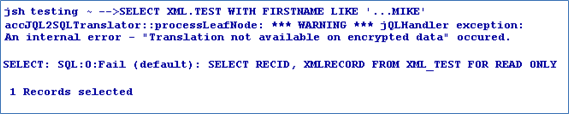
When the table is queried with criteria using JQL, the translation from JQL to SQL is suppressed. All the data in the table is sent and jQL executes the criteria on the result set, which may have some performance hiccups.
You need to configure the database server name, database name, and user credentials for the driver and check if the database gets connected using config-XMLDB2 utility.
Base Key Encryption
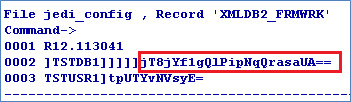
This base key is used for the encryption algorithm along with the user provided encryption key to encrypt the user data. This is the secret key of Temenos. However, the user can configure the base key using the config-XMLDB2 utility. It is stored in jedi_config in encrypted format. This forms from the first level of security for the database. Removal of this base key from jedi_config corrupts the database.
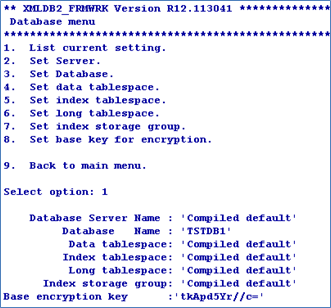
You can also configure the base key using the command line arguments of config-XMLDB2 utility.

The jedi_config file will have the XMLDB2_FRMWRK record with the details of the server, database, user credentials and base key in encrypted form.
ENCRYPT Qualifier
The ENCRYPT qualifier defines the encryption key for the table. This encryption key is stored in stub/VOC entry of the table in encrypted format. This functionality is available for both XML and BLOB types.
Data Tables
The following screen captures show tables with different types of data.
XML Type


BLOB Type


Promoted Column
A file having promoted column is also encrypted if the file is created using the ENCRYPT keyword.
Real Column
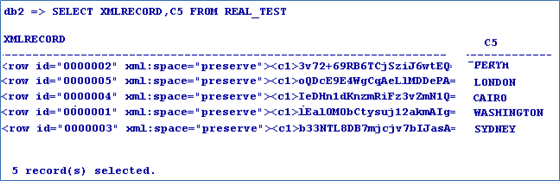
The data encryption is not available for the real column. Hence, the real column maintains the performance benefits of the indices.
Insert/Update Function
You can insert or update the data using either JED editor or WRITE/WRITEU functions of JBC. The data entered will be encrypted and stored in the database.
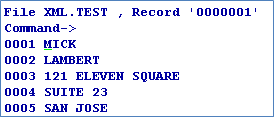
When queried, the record is displayed in the encrypted form.
Data Encryption
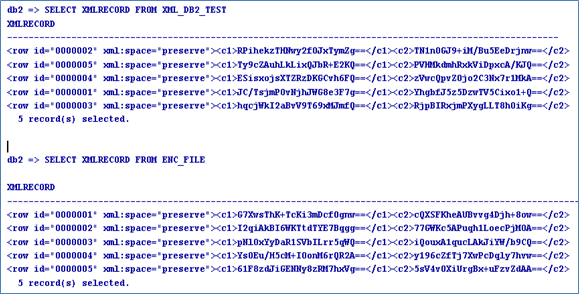
The following screen captures show tables with different types of data in encrypted form.
XML Data
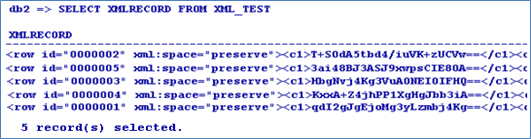
BLOB Data
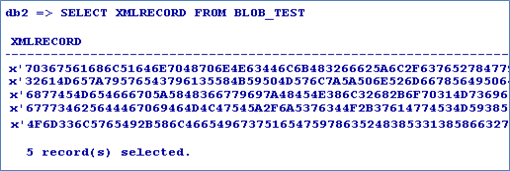
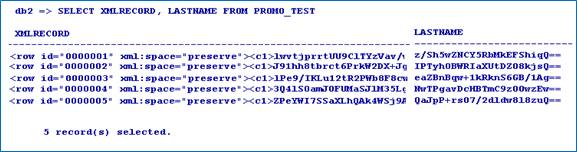
Promoted Column Data
The LASTNAME attribute is converted into promoted columns.
Real Column Data
The CITY (Attribute 5) of the file is converted into real column. The real column is not encrypted. Hence, indexes can be created and used.
Duplicating Encrypted data
You can copy data from one encrypted file to another. Encrypt key of the first file is used to decrypt the data and encrypt key of the second file is used to re-encrypt and store it in the table.

Query
When the data is queried through JQL, the query is translated into SQL. This translation enables you to use all the database performance improvement functionalities including index.
However, when the data is queried using a criteria, this functionality is suppressed because of the encryption. The stored data is encrypted and hence cannot be compared with the user-supplied data. Therefore, a default translation occurs bringing up all the data from the database and then filtering it in jBASE.
Without Criteria

With Criteria
Customisation
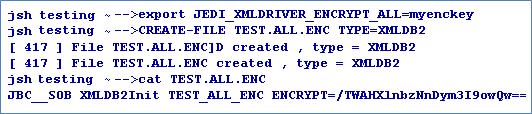
You can enable table encryption on all the tables to be created in future using the following environment variable.
set/export JEDI_XMLDRIVER_ENCRYPT_ALL=key
Restriction
You can rename or copy the encrypted table only through jBASE and never from the backend. Also, you should not change the base key after creating the encrypted tables, else, the tables get corrupted.
In this topic
