Oracle
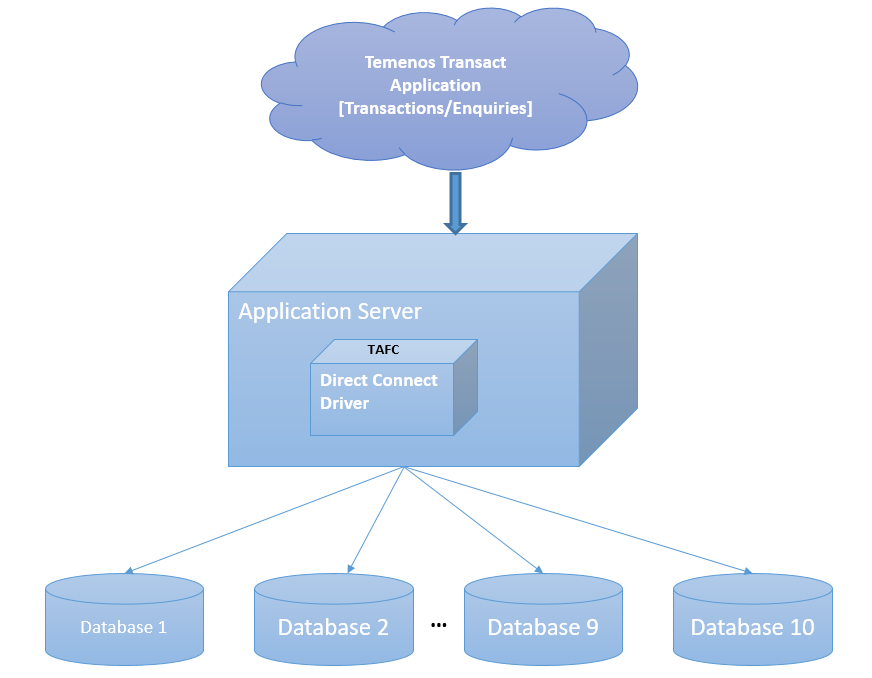
The Temenos Transact Oracle Direct Connect driver is a middleware component between Temenos Transactand Oracle database. It enables Temenos Transact to send to and retrieve data from Oracle database storage. The data is stored in Oracle server as either XML columns or BLOBs (Binary Large Objects) for internal or work files. This section provides details about the database configuration, commands, transactions and driver environment variables involved in multiple database access and table details.
Having huge Temenos Transact data in single server or database hinders the performance of the database in both transactional and reporting services. Therefore, this data need to be separated categorically as per the business needs.
The Temenos Transact data is classified into volatile (transactional) and non-volatile (read-only) data. The data is separated and stored in different databases, which:
- Boosts the performance of the transactional processing
- Enables timely retrieval of the historical (non-volatile) data for the reports.
The Oracle Direct Connect Driver (DCD) enables you to configure and access maximum of ten databases. Each database can be configured with its own credentials. A table can be created in a specific database for an easier and accurate access. Each table has two columns as listed in the following table.
|
Column |
Description |
|---|---|
|
RECID |
Holds the primary key of the table |
|
XMLRECORD |
Holds the table data |
If the XMLRECORD is of XML type, the data will be converted from the internal dynamic array format into an XML sequence for insertion into the Oracle database. If the record is of BLOB type, the data will be stored directly in the XMLRECORD column in binary format.
On retrieval of data, the row information from the XMLRECORD column is converted back from an XML sequence into the internal dynamic array format for use by the application.
Database Configuration
This section provides configuration for the Windows version of Oracle. However, the same configuration is applicable for the Linux version as well. You need to make changes corresponding to the operating system while setting the following environment variables.
- SET ORACLE_HOME= D:\app\oracle\product\11.2.0\dbhome_1
- SET LD_LIBRARY_PATH=%ORACLE_HOME%\lib
- SET PATH=%ORACLE_HOME%\bin:%PATH%
- SET TNS_ADMIN=%ORACLE_HOME%\network\admin
- SET NLS_LANG=AMERICAN_AMERICA. AL32UTF8
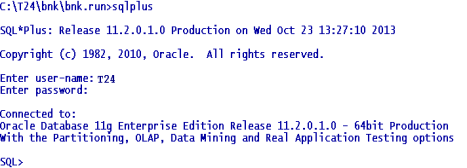
To access the database, you need to use the Oracle command line tool sqlplus.
The XMLORACLE Driver is located in %TAFC_HOME%\XMLORACLE folder. The following table lists the libraries and executables available in the driver.
|
Libraries |
Executable |
|---|---|
|
config.XMLORACLE.dll config-XMLORACLE.dll |
Dynamic linked library Oracle Driver |
|
config.XMLORACLE.exe config-XMLORACLE.exe |
Executable used for the Oracle driver configuration |
|
libTAFCtransformer.dll |
Dynamic linked library for TAFC transformers |
|
libTAFCora.dll |
Dynamic linked library for TAFC- Oracle utils |
|
libTAFCorautils.dll |
Dynamic linked library for TAFC utils |
The following commands enable you to edit .profile or remote.cmd.
- SET DRIVER_HOME=%TAFC_HOME%\XMLORACLE
- SET JBCOBJECTLIST=%JBCOBJECTLIST%;%DRIVER_HOME%\lib
- SET PATH=%PATH%;%TAFC_HOME%\bin;%DRIVER_HOME%\bin
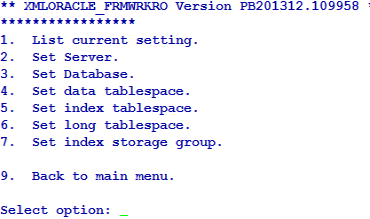
You can configure the Oracle Direct connect driver using the config-XMLORACLE executable. This creates the jedi_config driver configuration file at %TAFC_HOME%\config, which stores all the data entered through this executable.
 Database Settings
You can configure the server for the database by entering the machine name or IP address of the Oracle server.
The first database is considered the default database. For default database, you can set the server name using the Set Server option in Database menu. You can set the user name and the password for this database using User Settings. You can also configure the username and password for all additional databases. You need to set the server name for the database as the name of the database.
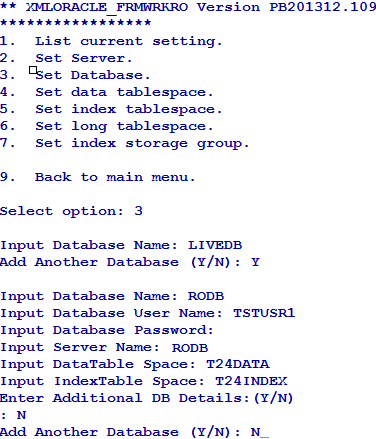
You can list or change the current settings using the options in Database menu.
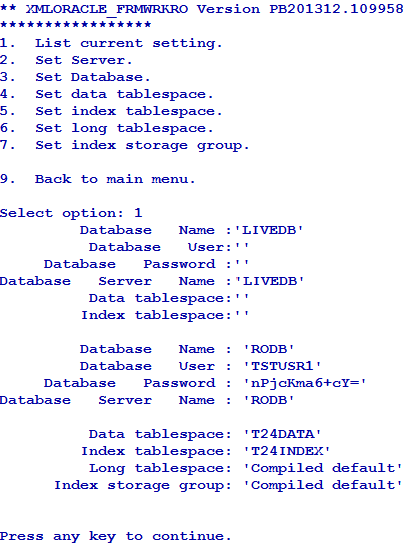
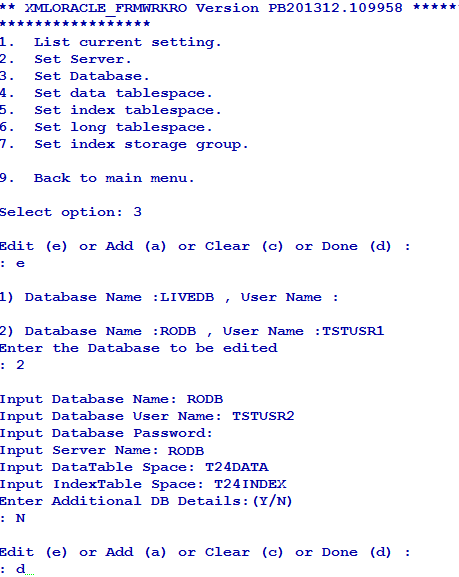
You can add or edit the database settings as required using the Set Database option in Database menu.
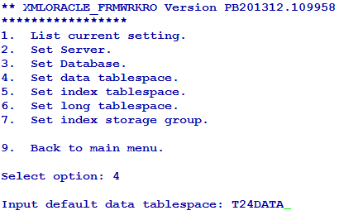
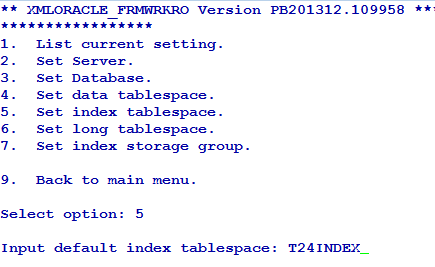
You can also set data and index tablespaces using the corresponding options in Database menu. The following screen captures show the data and index tablespaces set to T24DATA and T24INDEX, respectively.
 User Settings
You can use this option only for the configuration of the default database.
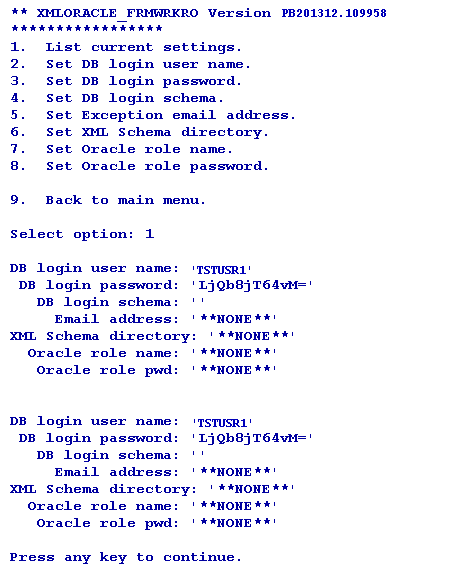
You can configure the user credentials of the first (default) database using the Set DB login user name and Set DB login password options in User menu. If you do not configure the user credentials for other databases, the user credentials of the first database is made available for all the databases.
You can store the password in either in jedi_config or external vault. To store the password in an external vault, the following environment variable must be set.
set/export JEDI_XMLDRIVER_ENABLE_EXT_PWD=1
The library should be named as libUserAPI.so (for *nix) and libUserAPI.dll (for Win) and placed in the $TAFC_HOME/lib folder. The library should contain the API, which returns the password.
The signature of the user defined API should be in the following format.
char * getExtPassword (char* database, char* schema ,char* username)
If the external vault option is enabled, DCD consumes the password provided by the user API. Otherwise, it will consume the API stored in jedi_config.
You can list or change the current settings using the options in User menu.
Installation Script
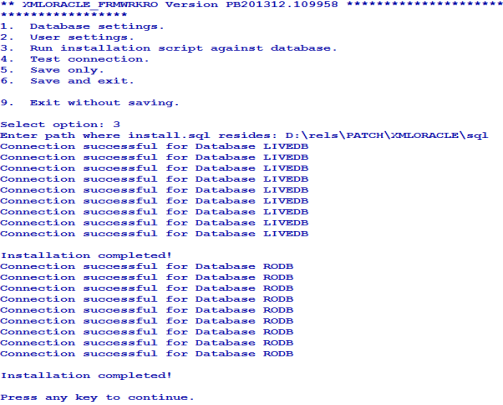
The install.sql script is available at %DRIVER_HOME%\sql. When the path is given, config-XMLMSSQL loads the scripts, invokes sqlcmd at the command prompt and executes the script.
The install.sql script creates the following.
- STUBFILES table for table creation cross reference
- T24LOCKTABLE to store the locks
- Functions like numsort, numcast
- View for the stubfiles
Connection Testing
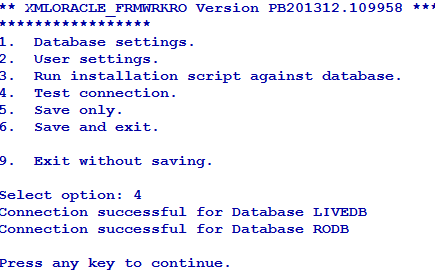
The driver tries to connect to all the configured databases. If the Connection successful… message appears for all the databases, the driver will be able to connect to Oracle. If the connection fails, you need to check the database, its credentials and reconfirm whether the service and listener are running.
Commands for Multi-Database Access
This section provides examples of commands that can be used with the Oracle driver and expected output. These commands are mostly built in the Temenos Transact environment, which you can execute with the necessary options when required.
Create File
You can use the CREATE-FILE command with a type qualifier (TYPE) to define the file to be created as a table in the Oracle RBDMS database. For example, TYPE=XMLORACLE.

The above command generates the following tables in the Oracle RBDMS database.
|
Table |
Description |
|---|---|
|
D_EXAMPLE_TABLE |
This table equates to the dictionary section |
|
EXAMPLE_TABLE |
This table equates to the data section. The naming convention shows that the dots in the file name are converted to underscores in table name. |
Both the tables have two columns as listed in the following table.
|
Column |
Description |
|---|---|
|
RECID |
Holds the primary key of the table |
|
XMLRECORD |
Holds the table data |
Generally, the dictionary files are held as NOXMLSCHEMA types (BLOB) as these files are not usually queried.
For each table a cross reference entry is created in the STUBFILES table with the Oracle RDBMS database. In addition, a native file stub is also created for each table in the specified file path (in the above example, it is the current directory). The stub files are used to locate and invoke the correct driver for the corresponding table.
Based on the conversion, the stub file information may alternatively be contained within VOC, (which in turn can also be an RDBMS table), ensuring that all the related information is completely contained within the database.
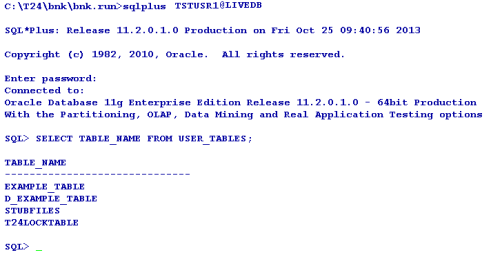
The file is created in the default database.
File Creation in a Different Database
You can create a database in any other database using the DATABASE qualifier. The following table lists the options that can be used in CREATE-FILE.
|
Qualifier |
Value |
Description |
|---|---|---|
|
TYPE |
XMLORACLE |
Indicates the type of the file to be created |
|
DATABASE |
User specified |
Indicates the name of the pre-existing database in which the table needs to be created |
|
TABLE |
User specified |
Indicates the name of the table |
|
READONLY |
YES |
Indicates if the table is to be considered as read-only (applicable only for the data file). |
|
DATATABLESPACE |
User specified |
Indicates the name of the tablespace where the data needs to be stored |
|
INDEXTABLESPACE |
User specified |
Indicates the name of the tablespace where the indexes needs to be stored |
|
KEY |
VARCHAR[User specified length in integer] or INTEGER |
Indicates the key to alter the data type and length of RECID |
|
NOXMLSCHEMA |
YES |
Uses BLOB data type instead of XML data type to write the XML data |
|
XSDSCHEMAREG |
YES |
Registers XSD SCHEMA in the database. |
|
XSDSCHEMA |
User Specified |
Uses XSD schema to describe the data layout required for long tag XML format data. |
|
ASSOCIATE |
YES |
Indicates if the table has an associated read only table. |
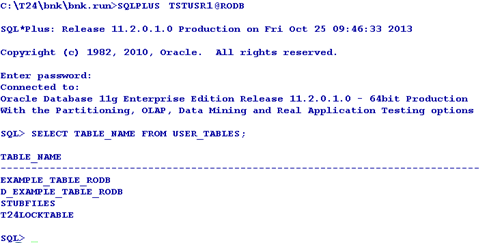
The following example shows a table created in the RODB database.

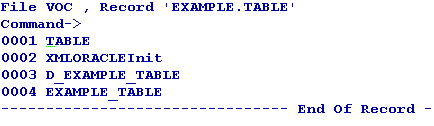
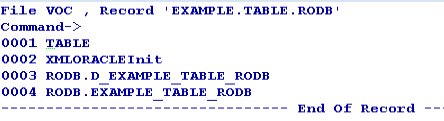
The VOC of the table gives the information about the location of the table as follows.
VOC of EXAMPLE.TABLE
VOC of EXAMPLE.TABLE.RODB
EXAMPLE_TABLE Describe

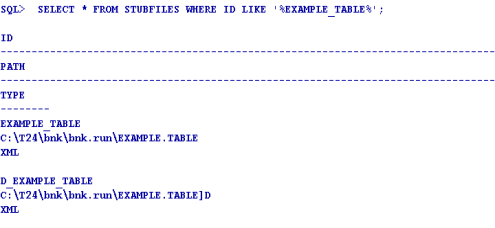
The two cross reference table entries are created in the RDBMS STUBFILE table.
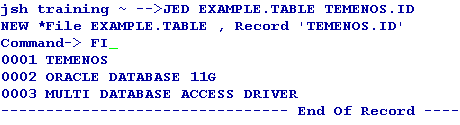
After the table is created, you can add the sample data to the table using standard tools like the command line editor ED or screen editor JED.
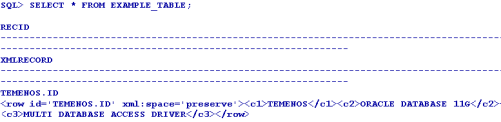
You can then view the sample XML data using the Oracle SQL select statement with the XMLRECORD column.
Delete File
You can use the DELETE-FILE command to delete the file. This command deletes both the DICT and DATA parts of the corresponding table in the database and deletes the reference from the stub.
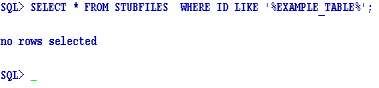
The Oracle driver detects the table in any of the database and deletes the table, cross reference and even the stub file entry.

The STUBFILE table update is as follows.
File Deletion in a Different Database
There is no change in the deletion of the file. The driver picks up the name of the database in which the database resides from VOC and deletes it.
Create View
The CREATE-VIEW command enables you to create a view of the table such that, the column names can be used within SQL statements to refer the underlying XML. The command will process all the extended dictionary entries related to the file and generates the appropriate view in the Oracle RDBMS database. You need to use the verbose option (-v) to output the generated view to the terminal. This command will be executed against the table on a rebuild of the Temenos Transaction Standard Selection.

If the corresponding file is not the default file in another database, VOC is used to resolve the location of the table.
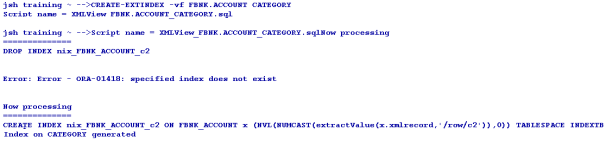
Create Extindex
The CREATE-EXTINDEX command enables you to create indexes in the Oracle RDBMS tables. You need to execute this command manually from the command line, as it is not invoked by any Temenos Transact action.
The following table lists the options to be used with the CREATE-EXTINDEX command.
|
Options |
Description |
|---|---|
|
x |
Creates an XML index |
|
f |
Creates function based index |
The following screen capture displays the extindex for the table in the default database.
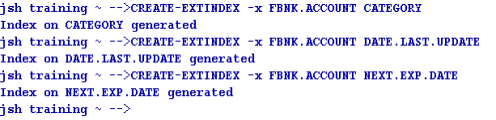
You can use the CREATE-EXTINDEX command to create index on tables of the other databases as well in the similar way. The following example screen capture shows a functional index created on a table.

You can invoke a verbose display of the index creation process using the verbose (-v) option on the CREATE-EXTINDEX command line.
List Extindex
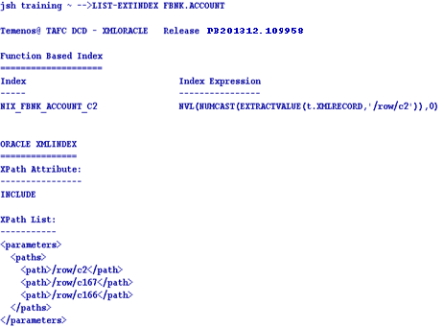
The LIST-EXTINDEX command enables you to display all the indexes created on a table.
Delete Extindex
The DELETE-EXTINDEX command enables you to delete all the indexes created on a table. You can use this command on any table irrespective of the location of their database.
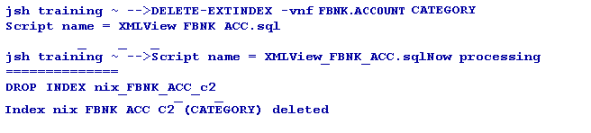
Table Creation Using Long Tag XML
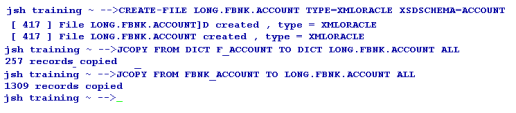
The XML Schema Definition document (.xsd) is required for Oracle and XML Schema Definition is registered, by default. However, you can use the long tag elements as per the Temenos Transact XML Schema Definition (.xsd) document and store the definition within the table. The short tag XML is the default format.
You can invoke the long tag table XML format by specifying the XSDSCHEMA qualifier when creating the table.
The XML Schema Definition (ACCOUNT in this case) must be:
- Generated by the Temenos Transact Standard Selection Rebuild (See XSD Schema Generation User Guide)
- Placed in the Oracle Driver schema directory
By default, the XML Schema Definition is not registered in the Oracle RDBMS Database. To de-register the XML Schema Definition manually, you can add the additional qualifier XSDSCHEMAREG with the CREATE-FILE command line set to NO. For example, XSDSCHEMAREG=NO. This creates an XML CLOB type table but uses long tag XML format for data storage.
The following screen capture displays an Oracle describe, which shows the table type to be different from the short tag XML CLOB table description

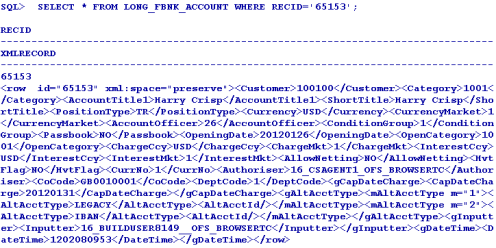
The following screen capture shows an example of a data record in the long tag structured storage format.
The following screen capture shows an example of index creation on a long tag xml table. It is similar to creating indexes for normal files.
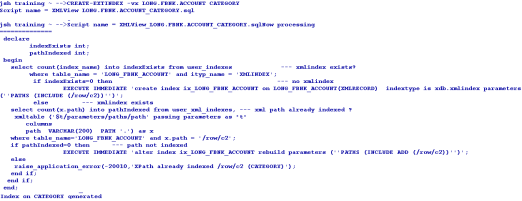
Table Querying
You can use the general jBase Query Language (JQL) queries used to query a J4/JR file, to query the tables as well. The driver converts these queries to the corresponding underlying database query and fetches the data. The translated query is logged in the log file. If the translated query is to be displayed on the standard output, you need to set JEDI_XMLDRIVER_DEBUG_DISPLAY. The following are the different commands involved in querying tables.
Select
The following format is used for the select command.
Select <filename> [WITH <ATTR> = <VALUE>]
The following sample shows @ID (Right justified) comparing with a number.

The following sample shows ACCOUNT.TITLE.1 (left justfied) comparing with a string.

Count
The following format is used for the count command.
Count <filename>

List
The following format is used for the select command.
List <filename> [ATTR1] [ATTR2]….. [ATTRN] [WITH <ATTR>= <VALUE>]

Read-Only Associate Tables
The Temenos Transact data is classified into volatile (transactional) and non-volatile (read-only) data. The volatile data is retained in LIVE or default database. The non-volatile data is moved to the second database referred to as non-volatile DB.
You can create read-only tables in any of the configured database. However, you cannot do the following.
- Create a DICT file for the read-only table
- Write, clear or delete a record from the READ-ONLY table. It results in a coredump and generates a log


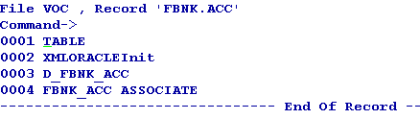
The Temenos Transact table will have an associated RO table if the LIVE file contains an ASSOCIATE flag in VOC. This RO table can reside in any of the configured databases. The VOC entry of the LIVE table evaluates the name and location of the ASSOCIATED RO table of the LIVE file.

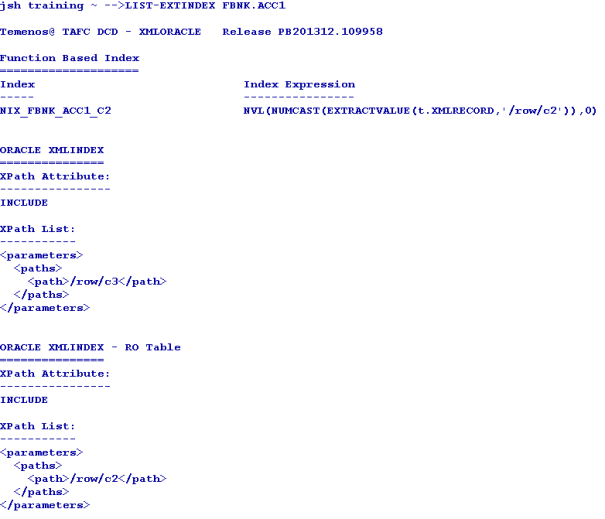
The LIST-EXTINDEX command on the LIVE table gives the details about the indexes created on the associate RO table as well.
If the LIVE database has an associated RO table in non-volatile DB, the driver queries both the tables and displays the data.
The RO table can be of any name. However, the RO file created should be <“live” file$RO>. A nickname has to be created in the LIVE database as <RO table name> for the RO table.
The user of the first database should have the permission to access and run the scripts on the second database.

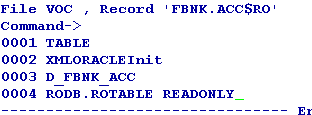
When a query is executed on the LIVE file, the records are displayed from both the LIVE file and associated file avoiding the duplicates, by default. If you want to change the default functionality, you need to set the JEDI_XMLDRIVER_ASSOCIATE_FILE variable to any of the following values, as required.
|
Value |
Functionality |
|---|---|
|
1 |
Disables the redirection and query to the ASSOCIATE table |
|
2 |
Disables query for ASSOCIATE table, but redirection is active |
|
4 |
Disables PDATE in the query, but redirection and ASSOCIATE table query with UNION will be active |
If the query returns an error message as shown in the following screen capture, you need to check whether the nickname is pointing to the valid object.

Querying a file without Indexes
Creation of indexes on the files affects the query translation from JQL to SQL. When indexes are not created, the query is translated as shown in the following screen capture. The status of query translation is failure. The select statement is modified to the default selection of the table ignoring the criteria.

Querying a file with Indexes
You can create an index on an attribute in LIVE or RO table. The driver looks up for the index on an attribute in both LIVE and RO tables. The index will be used for the query translation to enhance the data retrieval process.
The following example shows the query translation of the query with search criteria on CATEGORY. A function-based index is created on CATEGORY in non-volatile DB and not in LIVE.

If an attribute has different types of indexes in LIVE and RO, the justification of the attribute is used as the criteria to translate the query.
For example, consider a right justified attribute CATEGORY. It has xpath index in LIVE and function-based index in RO. The driver ignores the xpath index and uses the function-based index for query translation, since the attribute is right justified.
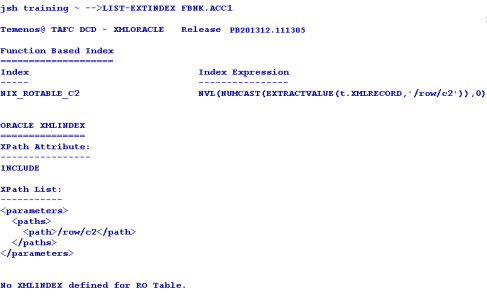
For left justified attributes XPATH index will be applied.

Data Sorting
To enable the database sort, you need to set JEDI_XMLDRIVER_ENABLE_DB_SORT=1. The status of query translation depends on the index of the attribute used in the search criteria and its justification.
SSELECT

SORT on RECID with search criteria

SORT on attribute with search criteria
The query translation status is Partial. Only the search criteria are translated and sorting is done by JQL.

Similarly, when SORT is on RECID with search criteria, but RECID is right justified the query translation is partial.

Transaction in Multi-Databases
When a WRITE or UPDATE action is performed within the transaction boundary (between TRANSTART and TRANSEND), it is termed a transaction. The transaction starts only with WRITE, so only the database where the data is written is in the transaction. The transaction can also read a file from one database and write to another file from a different database.
The transaction aborts on updating or writing data to the files of multi-databases resulting in a coredump.
Driver Environment Variables
You need to configure the following environment variables in .profile located in the bnk.run directory to be used with the Oracle Direct Connect Driver.
Internationalisation
- JBASE_I18N=1 (Mandatory)
- JBASE_CODEPAGE=utf8
- JBASE_LOCALE=en_US
- JBASE_TIMEZONE=Europe/London
Optional
The following table lists the optional variables and their functionality.
|
Command |
Functionality |
|---|---|
|
JEDI_XMLDRIVER_TRACE=1 |
Traces all driver functions |
|
JEDI_XMLDRIVER_DEBUG_DISPLAY=1 |
Traces only query translations |
|
JEDI_XMLDRIVER_NO_SPACE_PRESERVE=1 |
Indicates that the white space is not preserved in xml Trace |
|
JEDI_XMLDRIVER_PREFETCH_ROWS = n |
Indicates the number of rows to be pre-fetched in each fetch. The default value is 500. |
|
JEDI_XMLDRIVER_ENABLE_DB_SORT=1 |
Enables the DB sort instead of JQL Sort |
|
JEDI_XMLDRIVER_DISABLE_RECID_NUMSORT=1 |
Ignores the data type of the RECID while sorting on RECID |
|
JEDI_XMLDRIVER_ENABLE_EDICT_TYPE=1 |
Enables the EDICT data type detection |
|
JEDI_XMLDRIVER_DISABLE_DATABASE_LOCKS=1 |
Disables the DB row locks |
Database Objects
You need to create the following objects on the target database.
| Object | Action |
|---|---|
| Table spaces | Create two tablespaces in each of the database, one each to store data and indexes, with auto-extend functionality. |
| User | Create user with sufficient privileges and grant unlimited quota to the user on both the tablespaces created. |
Backup and Recovery Strategies
There are two standard backup types for Oracle—offline and online. You can choose the backup mode depending on whether the application can be shut down or not. If yes, offline mode is the best. If no, online mode needs to be used. Both these methods require the following.
- Database must be in archive log mode to enable point-in-time recovery using Oracle online and archived redo logs.
- Temenos Transact backup must be restored at the same time as the database backup, which means, the Temenos Transact backup and offline backup must start simultaneously, should both be restored.
Offline Backup
If the application is shut down and backup is enabled, it is called an offline or cold back up. It is a complete backup of the database, if the data files, control file and on-line redo log files are copied using an operating system copy utility.
You cannot recover any changes made after this backup, if the database is running in NOARCHIVELOG mode. All transactions are recorded in online redo log files irrespective of whether archiving is enabled or not. When redo logs are archived (ARCHIVELOG mode), Oracle allows you to apply these transactions after restoring the damaged files (assuming an active Redo log file was not among the files damaged).
Whenever the schema of the database is changed (like adding a new data file, renaming a file, creating or dropping a tablespace), you need to shut down the database and at least make a copy of the control file and schema changes. It is recommended to do a complete backup of the database.
Online Backup
If the application is running and backup is enabled, it is called an online or hot back up. Online backup is not feasible for sites, which require 24*7 database operations. Hence, Oracle provides an option to enable physical backups while the database is running and available for both read and write.
To enable online backup, the database must be in ARCHIVELOG mode. You need to backup only the data files and current control file. You can enable this backup whenever required, as the unit of an online backup is a tablespace, unlike offline backups. You can back up different data files at different times.
The recovery of a failed batch using a hot backup requires the previous complete online backup restored and redo logs applied, to bring the database to a specified point in time. The number of redo logs required depends on when the backup was taken, which determines the speed of recovery.
Split/Merge Method
You can also select the split and merge methodology for backup. The database will be stored on a triple mirror disk array. Prior to the start of a backup, the database will be shut down and one of the mirror sets will be split from the remaining. The database backup will be started on the split single mirror.
In the remaining mirror disks, the database will be restarted and operational transactions will continue to run. This allows the backup and operational transactions to be executed simultaneously. On successful completion of the backup, the disks would be merged to reform the triple mirror set.
Oracle also provides an option to create standby databases to manage in case of the main database failure. You can maintain one or more physical copies of the online database, usually on a separate server, by transferring Oracle redo log information to keep them synchronised.
If the main database fails, operations can be switched to the standby database, which then takes over as the main database, with little or no outage. You can also enable the standby database in read-only mode for designated periods to enable user reporting, if required.
- However, the standby database option is not a primary backup option and not recommended, unless required.
- For more details on split/merge method, refer Re Data Guard Concepts and Administration.
- For the best practices of backup and recovery, refer http://www.oracle.com/technetwork/server-storage/engineered-systems/database-appliance/documentation/dbappliancebackupstrategies-519664.pdf
Extended Dictionary
This section describes the implementation of the extended dictionary changes for DCD. This enables you to utilise the description present in an extended dictionary part of an attribute. Prior to this enhancement, DCD used the justification of the attributes to determine its SQL translation—an attribute with left justification was translated to string compare in the SQL translation and attribute with right justification was translated to both numeric compare and string compare in the SQL translation.
This enhancement bypasses the justification of the attributes if extended dictionary is available for the attribute. If the numeric value 101 is present in the extended dictionary, it will either do a numeric compare or string compare.
This enhancement is available for all the ORACLE, DB2 and MSSQL direct connect drivers. In addition, to see the extended dictionary used in the translation, you need to set the following environment variables.
- JEDI_XMLDRIVER_ENABLE_EDICT_TYPE=1
- JEDI_XMLDRIVER_ENABLE_ALL_COLUMNS=1
On creating the file and specifying the attributes, you need to use the use numeric value 101 in the extended dict to enable numeric comparison and 108 or any other number for string comparison. Though any valid integer number can be used in the extended dict part for string comparison, it is recommended to use 108, as it has been tested.
In the following sample, a file with two attributes ATTR1 and ATTR2 is created, where ATTR1 is specified with a value of 101 in the Extended Dict and ATTR2 is specified with a value of 108.
File Creation
You need to create a ORACLE type file using appropriate TYPE in CREATE-FILE to create the correct driver file. The file creation changes according to the driver used.
jsh-->CREATE-FILE ORACLE_EXTDICT TYPE=XMLORACLE
[ 417 ] File ORACLE_EXTDICT]D created , type = XMLORACLE
[ 417 ] File ORACLE_EXTDICT created , type = XMLORACLE
Dictionary Definition for Attributes
The following script shows the definition of dictionary for the attributes created along with the file.
jsh -->JED DICT ORACLE_EXTDICT
  @ID
001 D
002 0
003
004 @ID
005 10L
006 S
  ATTR1
001 D
002 1
003
004 ATTR1
005 10L
006 S
007
...... (Truncated for convenience)
029
030 JBASE_EDICT_START
031 101
032
033
034 ATTR1
035
036
037
038
039 1073741824
040
041
042
043
044
045
046
047 JBASE_EDICT_END

ATTR2
001 D
002 2
003
004 ATTR2
005 10R
006 S
007
...... (Truncated for convenience)
029
030 JBASE_EDICT_START
031 108
032
033
034 ATTR2
035
036
037
038
039 1073741824
040
041
042
043
044
045
046
047 JBASE_EDICT_END
ATTR1 is a numeric type since the value 101 is used in the extended dictionary type and ATTR2 is a string type as 108 is used in the extended dictionary type.
Log time for Database Queries
This section provides the details of the log time for database queries.
Environment Variable
This enhancement is enabled by setting the following environment variable on Unix.
export JEDI_XMLDRIVER_ENABLE_TIMED_QUERIES=N
In the above variable, N indicates the maximum query duration in seconds. Setting the variable to zero will have no effect. Any positive value enables logging of all query duration times in the driver log file.
Query Timeout
When the DCD Driver issues a call through the RDBMS client interface to submit a query to the database, a SIGALRM signal is initiated with the timeout value as a parameter, so that it triggers when the period expires. This calls a function, which will set an error value indicating query timeout, and do a SIGINT to interrupt the wait for query response. If the query completes on time, the SIGALRM is reset and processing continues as normal.
Log Messages
The level of logging depends on the tracing options selected by environment variables settings. If the TRACE option is selected, the following message is recorded.
accExecuteSelect : Set query timeout for <SQL query> to <N> seconds
If a timeout occurs for a query, the following message is written, regardless of tracing options.
accExecuteSelect: *** ERROR *** Query <SQL query> timed out after <N> seconds
When the query completes normally within the timeout period and DISPLAY tracing option is selected to write messages to the screen, the following message is displayed.
SELECT: QUERY : <SQL query>, started <T>, duration <D> seconds
The following table lists the keys in the above command and their descriptions.
| Key | Description |
|---|---|
| <SQL query> | Current SQL query executed |
| <N> | Timeout in seconds |
| <T> | Timestamp for start of query |
| <D> | Query duration in seconds |
Sample Query and Log file
The following is a sample query with the log file data. The environment variable JEDI_XMLDRIVER_ENABLE_TIMED_QUERIES is set to 1 in .profile.


The following environment variables should be set in .profile to enable the logging facility.
- JEDI_XMLDRIVER_TRACE=1
- JEDI_XMLDRIVER_DEBUG=1
- JEDI_XMLDRIVER_DEBUG_DISPLAY=1
Promoted Columns
This section describes the implementation of promoted columns in the Oracle server database. The promoted columns improve the performance of expensive queries by reducing the response time.
The principle is that the fields in the XML document corresponding to single value attributes in Temenos Transact, can be promoted, that is, duplicated into a separate relational column, so that it can be retrieved more quickly. In addition, an index can be created on the individual column to increase the performance further.
The driver will translate the JQL query accordingly, that is, the driver will create a SQL column expression instead of an XPATH query, which would have been used before to select the field from within the XML document column.
Currently this is implemented as a manual modification to the database, and will normally be done by Temenos technical personnel or in liaison with them at client sites.
A single value field or even a specific value of a multi-valued field, which is part of XMLRECORD, can be promoted as computed column of the table and be used in relational search conditions. Further, a relational index can be created on the computed column to improve the query performance.
The promotion of a single value XML field as a column involves the creation of the following.
- Function, which evaluates the value of the field based on this XML element. For example, c2, that is, attribute 2 of the file
- Persisted column for the specific field to hold the data for that field
- Non-clustered index on the promoted column
Function Creation
As the first step to promote a value, a user defined function should be created to evaluate the value of the field. The return value of the function should be a single scalar value. You need to use this function, to add the computed column to the table and persist the same.
The data type has to be consistent with the existing data in the table. If the data is numeric only, the function must return numeric type and for string type, the return type must be varchar. The DC Driver can recognise the column's data type and translate the SQL accordingly irrespective of the column's justification.
Example 1
In the following example, element c2 in table F_HOLD_CONTROL has a function created for it named ora_HOLD_CONTROL_C2. The data type is string, hence the return type is varchar() and results in scalar promotion of single valued field
CREATE OR REPLACE FUNCTION ORA_HOLD_CONTROL_C2(XMLRECORD SYS.XMLTYPE)
RETURN VARCHAR2 DETERMINISTIC
AS
RTNVAL VARCHAR2(50);
BEGIN
 SELECT XMLCAST( XMLQUERY('/ROW/C2/TEXT()' PASSING XMLRECORD RETURNING CONTENT) AS VARCHAR2(50)) INTO RTNVAL FROM DUAL;
  RETURN RTNVAL;
END;
Example 2
In the following example element c14, mv8 in table FBNK_CARD_ISSUE has a function created for it named ora_CARD_ISSUE_CUSTOMER_C14_8. The data type is numeric, hence the return type is integer and results in scalar promotion of specific multi-valued field.
CREATE OR REPLACE FUNCTION ORA_CARD_ISSUE_CUSTOMER_C14_8(XMLRECORD SYS.XMLTYPE)
RETURN INTEGER DETERMINISTIC
AS
RTNVAL INTEGER;
BEGIN
 SELECT XMLCAST( XMLQUERY('/ROW/C14[@M=8]/TEXT()' PASSING XMLRECORD RETURNING CONTENT) AS INTEGER) INTO RTNVAL FROM DUAL;
  RETURN RTNVAL;
END;
If c14 is a local-ref column, the function return value will be as follows.
LOCAL-REF<1,1> -----
CREATE OR REPLACE FUNCTION ORA_CARD_ISSUE_CUSTOMER_C14(XMLRECORD SYS.XMLTYPE)
RETURN INTEGER DETERMINISTIC
AS
RTNVAL INTEGER;
BEGIN
 SELECT XMLCAST( XMLQUERY('/ROW/C14[NOT(@M)]/TEXT()' PASSING XMLRECORD RETURNING CONTENT) AS INTEGER) INTO RTNVAL FROM DUAL;
  RETURN RTNVAL;
END;

LOCAL-REF<1,2> -----
CREATE OR REPLACE FUNCTION ORA_CARD_ISSUE_CUSTOMER_C14(XMLRECORD SYS.XMLTYPE)
RETURN INTEGER DETERMINISTIC
AS
RTNVAL INTEGER;
BEGIN
 SELECT XMLCAST( XMLQUERY('/ROW/C14[@M=2]/TEXT()' PASSING XMLRECORD RETURNING CONTENT) AS INTEGER) INTO RTNVAL FROM DUAL;
  RETURN RTNVAL;
END;
Persisted Column Creation
You need to run a script on the database to alter the table and add the new column.
For the example 1 discussed in the Function Creation section, the script is as follows.
ALTERTABLE F_HOLD_CONTROL
ADD ColumnName varchar2(50) generated always as (cast(ora_HOLD_CONTROL_C2(XMLRECORD) as varchar2(50)))
For the example 2 discussed in the Function Creation section, the script is as follows.
ALTERTABLE FBNK_CARD_ISSUE
ADD ColumnName integer generated always as (cast(ora.udf_CARD_ISSUE_CUSTOMER_C14_8(XMLRECORD) as integer))
Non-clustered Index Creation
After creating the persisted computed column, you need to create an index for this column.
For the example 1 discussed in the Function Creation section, the script is as follows.
CREATE INDEX ix_HOLD_CONTROL_C2 ON F_HOLD_CONTROL(C2)
For the example 2 discussed in the Function Creation section, the script is as follows.
CREATE INDEX ix_CARD_ISSUE_CUSTOMER ON FBNK_CARD_ISSUE(C14_8)
After a promoted column is created for a specific field in the table, the DC driver will automatically translate the queries to use that column relational in the WHERE clause, if there is a search condition on that field.
Configuration of Promoted Columns
The dictionary entry of CUSTOMER has SECTOR with attribute 23, that is, c23.
The following script creates the function to extract from XML node.
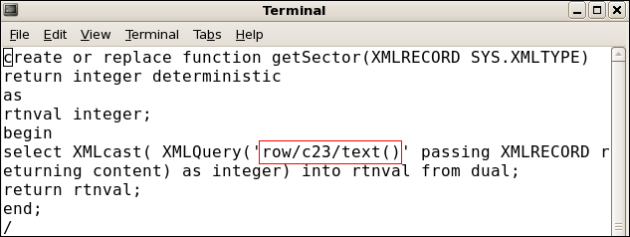
The following script creates a persisted column in the table.

Now, when you run the query, JQL is converted to SQL, which is based on the promoted column created.
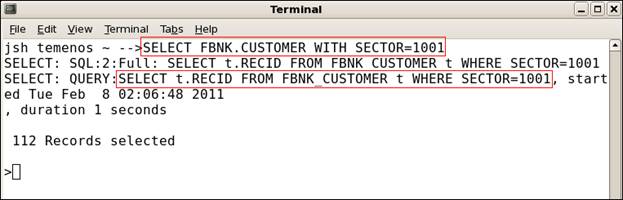
The following example shows converting the promoted columns with a function created for the second position of a multi-value field from XML node.
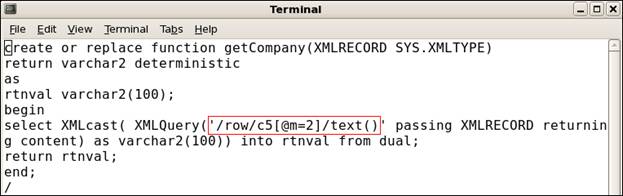
Table Compression
Table compression is implemented using the following command to reduce data tablespace requirements and network traffic. The compress/decompress is done automatically at the client site.
CREATE-FILE DATA TSTBLOB TYPE=XMLMSSQL NOXMLSCHEMA=YES COMPRESSION=YES
Oracle Binary XML and XML Index
This section provides a summary of Oracle’s Binary XML and XML Index, which were introduced in 11g Release 1 and will be supported in Temenos Transact R12.
Binary XML
Binary XML is a new storage model for semi-structured and unstructured XML storage introduced in Oracle 11g Release 1. Binary XML storage provides more efficient database storage, updating, indexing, and fragment extraction than the unstructured storage (CLOB).
The binary storage model compresses the XML data benefiting from improved performance, lower network transfer times and reduced CPU consumption. It is not affected from the XML parsing bottleneck, as it is a post-parse persistent model, that is, the same format on-disk, in-memory and across the network. As with unstructured storage (CLOB), no data conversion is needed during insert or retrieval and data is kept in document order. Binary XML has a tight integration with securefiles.
Advantages
The advantages of using Binary XML are as follows.
Reduced Storage Requirements
Binary XML is a compact representation of an XML document. The amount of disk space required for storage is reduced significantly before compression is applied.
Binary XML compresses XML documents by creating tokens for the XML tags thus reducing the storage. However, the data remains unchanged. The token to tag mapping is included in its encoded data. Space savings arise from the tokenisation of tags, as well as the conversion from text to a native representation for text nodes and attribute values.
Reduced CPU and Memory Overhead
XML type CLOB has an overhead of parsing and serialising XML every time when data moves between application tiers or before storing on disk. The Binary XML on disk representation is the same as the in-memory representation and across network representation. The same representation is shared across all tiers making it more efficient.
Reduced Network Overhead
The network overhead is reduced as Binary XML uses the compact internal format rather than the traditional serialised text format to transmit data across the network.
Query Performance
Binary XML can provide better query performance than unstructured storage (CLOB) as it avoids the XML parsing bottleneck and is optimised for indexing and fragment extraction.
Xpath and Validation Streaming
Binary XML uses a new parser that does not require a Document Object Model (DOM) tree. The validation for documents stored in Binary XML also does not require a DOM, reducing the CPU and memory requirements and improves performance.
Binary XML gives high performance fragment access and extraction. Streaming XPATH allows multiple nodes to be accessed in a single operation. Binary XML also reduces the overhead needed to validate XML documents during update, by allowing fragment level than document level validation. Only the modified parts of the XML document need to be re-validated following an update.
Partial Updates and Reduced Logging
Unlike XML type CLOB, Binary XML allows section updates, updating only the modified parts of the document. This functionality relies on the ability to perform sliding inserts, starting at the point when the document was changed instead of writing the entire document.
This feature is available only using the SECUREFILE storage option and transparent, that is, you have no control over it. The benefit is better performance due to less input/output, network traffic and logging.
Restrictions of Binary XML
Binary XML is not supported with Oracle’s Export/Import utility. Instead, you need to use Datapump export/import. The partial or sliding updates functionality requires Binary XML with SECUREFILES.
Migration to Binary XML
The recommended way to convert the existing Temenos Transact Oracle tables with columns of XML type CLOB to Binary XML is to use Oracle’s Online Redefinition utility, apart from the traditional methods such as Datapump export/import.
The advantage of online redefinition is that it can either be performed online or be parallelised. The disadvantage is that it requires additional storage equal to that of the original table(s) during processing.
XML Index
XML Index is a new universal index for Binary and text based XMLtype storage models. It supports the following operators.
| Operator Type | Operator Names |
|---|---|
| XQuery | XMLquery, XMLtable, XMLExists, XMLCast |
| Legacy XPATH | existsNode, extractValue, XMLSequence |
| DML |
This does not require code changes and prior knowledge of the XPath expressions used in queries.
Unlike a B-Tree index, which is defined for a specific column that represents an individual XML element or attribute, XML Index indexes the internal structure of the XML data. It indexes the XML tags, identifies document fragments based on the XPATH expressions that target them and records the document hierarchy information for each node. In addition, you can use path subsetting to generate a smaller index to improve index maintenance with DML and query performance with a smaller path table.
XML index uses a path table, which contains identification details for each node it indexes. Indexes can be created on the path table, but it cannot be accessed any other way.
There are two update options for XML Index—synchronous (default) and asynchronous. With asynchronous update, the insert operation does not wait for indexing to take place and the index maintenance takes place automatically in near real time.
Components of an XML Index Index
XML Index is a domain index, which is designed specifically for the domain of XML data. It is a logical index, which has three components as listed in the following table.
| Component | Description |
|---|---|
| Path index | This indexes the XML tags of a document and identifies its various document fragments. |
| Order index | This indexes the hierarchical positions of the nodes in an XML document. It keeps track of parent–child, ancestor–descendant, and sibling relations. |
| Value index | This indexes the values of an XML document. It provides lookup by either value equality or value range. A value index is used for values in query predicates (WHERE clause). |
XML Index is implemented using a path table and set of (local) secondary indexes corresponding to its components. The owner of the base table upon which the XMLIndex index is created owns all these. The path table contains one row for each indexed node in the XML document. For each indexed node, the path table stores the following.
- Corresponding rowid of the table that stores the document
- Locator, which provides fast access to the corresponding document fragment
- Order key, to record the hierarchical position of the node in the document
Query Optimisation
For BinaryXML, XMLDB can evaluate the XPATH expressions using function-based indexes, XML index and single pass streaming (evaluating a set of XPATH expressions in a single scan of the Binary XML data). During query optimisation, Oracle’s cost based optimiser picks the fastest combination of the methods.
For XMLTYPE (CLOB) using function-based indexes, functional evaluation builds a DOM tree for each XML document, resolves the XPATH programmatically using methods provided by the DOM API. If an update is involved, the entire doc is written back to disk. If XML Index is available, it is used instead of functional evaluation.
Determination of XML Index Usage
To determine if an XML Index is used in resolving a query, the explain plan output of the query needs to be examined. If the index is used, the path table, order key, or path id will be referenced in the explain plan. The explain plan will not directly indicate if a domain index was used as it will not refer to the XML Index by name.
Advantages of XML Index
An XML Index is effective in any part of a query as it is not limited to use in a WHERE clause. This is not the case for any of the other kinds of indexes used with XML data. In addition, you do not require prior knowledge of the XPath expressions that will be used in queries. This index can be used with both unstructured storage (CLOB) and Binary XML storage.
You can use an XML Index for searches with XPath expressions that target collections (multi-values). This is not the case for function-based indexes. Parallel operations are supported for XML Index creation and maintenance. You can update the XML Index indexes on Binary XML storage section wise, improving DML performance.
Disadvantages of XML Index
XML index is large and expensive to maintain when all possible paths are indexed. Path subsetting can be used to provide control over which nodes are indexed. Therefore, index size is traded for throughput against query performance. In this case, the index can optimise only the performance for the indexed paths, which can be added and removed dynamically.
XML Index generates high disk usage and has an impact on OLTP throughput. Partial re-Indexing, where only the modified content is re-indexed, requires Binary XML and Securefiles. Although you can perform partition on an XML Type table or column, you cannot create an XML Index index as such on a table or column.
SQL Query Examples
The new views available to access XML Index information are DBA_XML_INDEXES, ALL_XML_INDEXES and USER_XML_INDEXES. Temenos Transact contains programs to generate XML indexes.
Create FULL XMLIndex
The xmlindex is generated on the complete XML type CLOB column and a name for the PATH table has been supplied.
CREATE INDEX IX_FBNK_CUSTOMER ON FBNK_CUSTOMER (XMLRECORD)
INDEXTYPE IS XDB.XMLIndex
PARAMETERS
 ('PATH TABLE FBNK_CUSTOMER_PATH_TABLE');
View XMLIndex Details
select * from user_xml_indexes where INDEX_NAME='IX_FBNK_CUSTOMER';
INDEX_NAME           TABLE_OWNER
------------------------------ ------------------------------
TABLE_NAME           TYPE    INDEX_TYPE
------------------------------ ---------- ---------------------------
PATH_TABLE_NAME
------------------------------
PARAMETERS
--------------------------------------------------------------------------------
ASYNC   STALE PEND_TABLE_NAME        EX_OR_IN
--------- ----- ------------------------------ --------
IX_FBNK_CUSTOMER        T24
FBNK_CUSTOMER         BINARY   UNSTRUCTURED
FBNK_CUSTOMER_PATH_TABLE
ALWAYS  FALSE                FULLY IX
Create XMLIndex PATH Index (Single Path)
The xmlindex is generated on the complete XMLtype CLOB column and a name for the PATH table is not supplied. The name is defaulted.
CREATE INDEX IX_FBNK_ACCOUNT ON FBNK_ACCOUNT (XMLRECORD)
INDEXTYPE IS XDB.XMLIndex
PARAMETERS ('PATHS (INCLUDE (/row/c2))');
View XMLIndex Details
select * from user_xml_indexes where INDEX_NAME='IX_FBNK_ACCOUNT';
INDEX_NAME           TABLE_OWNER
------------------------------ ------------------------------
TABLE_NAME           TYPE    INDEX_TYPE
------------------------------ ---------- ---------------------------
PATH_TABLE_NAME
------------------------------
PARAMETERS
--------------------------------------------------------------------------------
ASYNC   STALE PEND_TABLE_NAME        EX_OR_IN
--------- ----- ------------------------------ --------
IX_FBNK_ACCOUNT        T24
FBNK_ACCOUNT          BINARY   UNSTRUCTURED
SYS158643_IX_FBNK_A_PATH_TABLE
<parameters>
 <paths>
  <path>/row/c2</path>
 </paths>
</parameters>
ALWAYS  FALSE                INCLUDE
Add Path to XMLIndex PATH Index
ALTER INDEX IX_FBNK_ACCOUNT REBUILD
PARAMETERS ('PATHS (INCLUDE ADD (/row/c207))');
select * from user_xml_indexes where INDEX_NAME='IX_FBNK_ACCOUNT';
INDEX_NAME           TABLE_OWNER
------------------------------ ------------------------------
TABLE_NAME           TYPE    INDEX_TYPE
------------------------------ ---------- ---------------------------
PATH_TABLE_NAME
------------------------------
PARAMETERS
--------------------------------------------------------------------------------
ASYNC   STALE PEND_TABLE_NAME        EX_OR_IN
--------- ----- ------------------------------ --------
IX_FBNK_ACCOUNT        T24
FBNK_ACCOUNT          BINARY   UNSTRUCTURED
SYS158643_IX_FBNK_A_PATH_TABLE
<parameters>
 <paths>
  <path>/row/c2</path>
  <path>/row/c207</path>
 </p
ALWAYS  FALSE                INCLUDE
Show XML Index Type
XML Index is a domain index.
select index_name,index_type from user_indexes where table_name='FBNK_ACCOUNT';
INDEX_NAME           INDEX_TYPE
------------------------------ ---------------------------
LOBI_FBNK_ACCOUNT       LOB
PK_FBNK_ACCOUNT        NORMAL
IX_FBNK_ACCOUNT        FUNCTION-BASED DOMAIN
IX_FBNK_ACCOUNT_C207      FUNCTION-BASED NORMAL
Oracle Data Encryption
The Temenos Transact data is banking data, which is highly critical and sensitive. These data must be protected from unauthorized access when stored in public cloud. The simple way to protect data is to enable encryption functionality to the data. The data has to be encrypted in the client application server before getting stored in the database server.
Encryption is the conversion of data into a form that cannot be understood at ease by unauthorized people. Decryption is the process of converting encrypted data back into its original form. This conversion happens through different algorithms or keys, which are standardised and accepted by the financial community.
A base encryption key is configured and maintained in the client server. This key is held outside the database, which protects against removal of the database or integration of an image of the database. Without access to the client, the key remains hidden. Removal of this record from the client system would disable the base encryption key.
The next level of security is given by adding an encryption key to the table. Tables are encrypted with different keys so that the decryption each table completely differs from the other. When the data is entered, the base key and encryption key are taken together processed, encrypted and stored in the database. When the data is queried, the same encryption key and base key has to be used to decrypt the data and given back to the user.
When the table is queried with criteria using JQL, the translation from JQL to SQL is suppressed. All the data in the table is sent and jQL executes the criteria on the result set, which may have some performance hiccups.
You need to configure the database server name, database name, and user credentials for the driver and check if the database gets connected using config-XMLORACLE utility.
Base Key Encryption
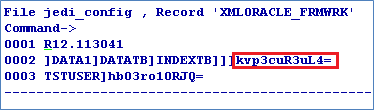
This base key is used for the encryption algorithm along with the user provided encryption key to encrypt the user data. This is the secret key of Temenos. However, the user can configure the base key using the config-XMLORACLE utility. It is stored in jedi_config in encrypted format. This forms from the first level of security for the database. Removal of this base key from jedi_config corrupts the database.
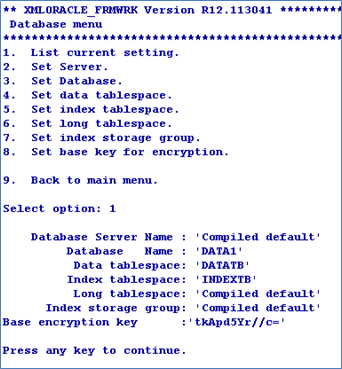
You can also configure the base key using the command line arguments of config-XMLORACLE utility.

The jedi_config file will have the XMLORACLE_FRMWRK record with the details of the server, database, user credentials and base key in encrypted form.
ENCRYPT Qualifier
The ENCRYPT qualifier defines the encryption key for the table. This encryption key is stored in stub/VOC entry of the table in encrypted format. This functionality is available for both XML and BLOB types.
Data Tables
The following screen captures show tables with different types of data.
XML Type


BLOB Type


Promoted Column
A file having promoted column is also encrypted if the file is created using the ENCRYPT keyword.
Real Column
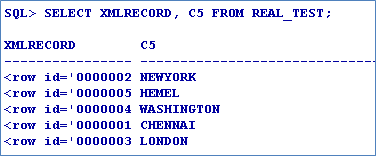
The data encryption is not available for the real column. Hence, the real column maintains the performance benefits of the indices.
Insert/Update Function
You can insert or update the data using either JED editor or WRITE/WRITEU functions of JBC. The data entered will be encrypted and stored in the database.
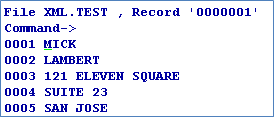
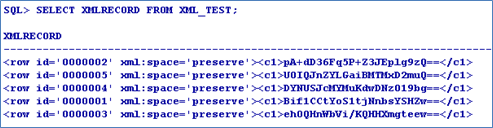
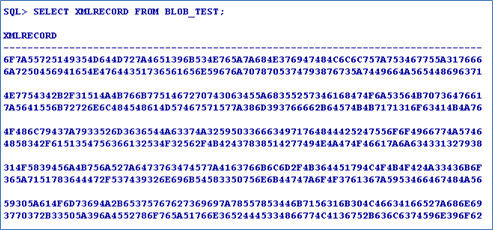
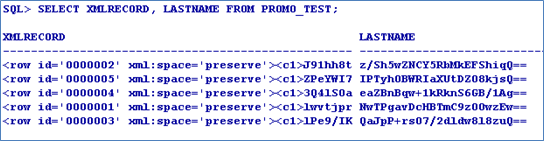
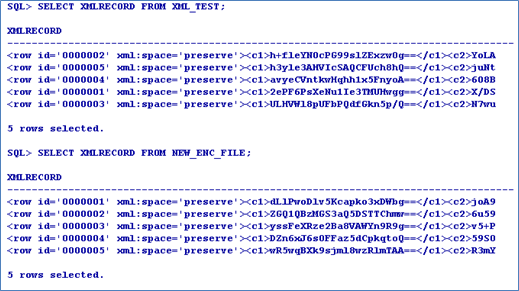
When queried in in SQL *Plus, the record is displayed in the encrypted form.
XML Data
BLOB Data
Promoted Column Data
The LASTNAME attribute is converted into promoted columns.
Real Column Data
The CITY (Attribute 5) of the file is converted into real column. The real column is not encrypted. Hence, indexes can be created and used.
 Duplicating Encrypted data
You can copy data from one encrypted file to another. Encrypt key of the first file is used to decrypt the data and encrypt key of the second file is used to re-encrypt and store it in the table.

 Query
Query
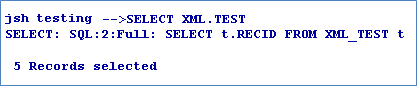
When the data is queried through JQL, the query is translated into SQL. This translation enables you to use all the database performance improvement functionalities including index.
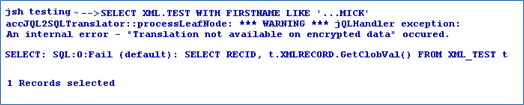
However, when the data is queried using a criteria, this functionality is suppressed because of the encryption. The stored data is encrypted and hence cannot be compared with the user-supplied data. Therefore, a default translation occurs bringing up all the data from the database and then filtering it in jBASE.
Without Criteria
With Criteria
 Customisation
You can enable table encryption on all the tables to be created in future using the following environment variable.
set/export JEDI_XMLDRIVER_ENCRYPT_ALL=key Restriction
You can rename or copy the encrypted table only through jBASE and never from the backend. Also, you should not change the base key after creating the encrypted tables, else, the tables get corrupted.
In this topic
