Enabling Commit Capture
This section shows you how the commit capture feature triggers a data event when a WRITE or DELETE function is performed inside or outside a transaction boundary of configured files and stores the triggered data event in the events table.
Configuring the TAFJ Properties File
Procedure
- In the .properties file, set the following property to enable commit capture:
temn.tafj.runtime.use.df.cache = true
- Set the following property to write the event to disk whenever the event size exceeds 32K.
temn.tafj.runtime.df.cache.huge.event=true
- Execute the following command from a JBC program to turn on or off the commit capture feature for a file. Internally, the on or off option is set in TAFJ_VOC, hence it will not be reset until it is changed again.
DF_COMMIT_CAPTURE(File_Name, Filter_Mode)
Where, File_Name is the name of the file as in TAFJ_VOC and Filter_Mode is either set as U or Y or by default NULL. Here, NULL indicates that the commit capture feature is turned OFF.
In U mode, the write events are captured whereas in Y mode, both the write and delete events are captured.
The following is the sample command to turn on the commit capture feature for a file:
EXECUTE "DF_COMMIT_CAPTURE('FBNK.CURRENCY','Y')" CAPTURING EXE.OUT
Events Table
The F.DATA.EVENTS table captures the data events. These captured events are constructed with the following fields:
| Field | Description |
|---|---|
|
Field1 |
Timestamp record created in milliseconds. For example, 1386082891.9949 |
|
Field2 |
Timestamp record processed. (Initially left blank) |
|
Field3 |
Not applicable for TAFJ |
|
Field4 |
Not applicable for TAFJ |
|
Field5 |
Multivalued list of file names. For example, FBNK.STMT.ENTRY]FBNK.ACCOUNT |
|
Field6 |
Sub-valued list of record keys related to the file names. |
|
Field7 |
Sub-valued list of data related to the key or {DELETE} if record deleted. |
|
Field8 |
Sub-valued list of table name. |
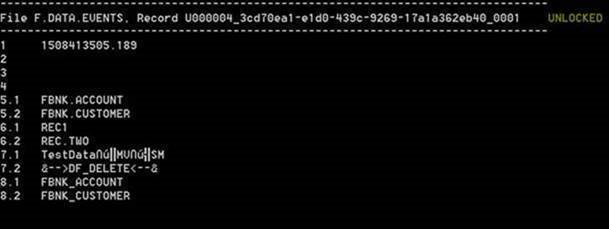
The filter record keys have the following format:
X<Port_No>_<UUID>_<sequence_number>
Where,
X - It is an indicator where, it can hold either the value U for unencrypted or E for encrypted filter records.
Port_No - It is the port number of the process performing the WRITE operation.
UUID - Universally Unique Identifier
sequence_number - Incrementing sequence number for multiple filter records describing a transaction.
In this topic
