Additional Information
This section helps you to configure database and validate kafka.
Configuring Database
This section helps you to configure database in on-premise. Service Orchestrator Microservice supports both mysql and mssql databases and it is configured to connect with mysql by default.
To configure the MySQL database, you should modify the following environmental variables available in the start-serviceorchestrator-mysql.sh/.bat file.
| Environment Variables | Values |
|---|---|
| DATABASE_KEY | MySQL |
| Username and password of MySQL | Enter your credentials |
| MYSQL_CONNECTIONURL | jdbc:mysql://serviceorchestrator-db-service-np:3306/ms_service_orchestrator |
To configure the mssql database, you should modify the following environmental variables available in the start-serviceorchestrator-mssql.sh/.bat file.
| Environment Variables | Values |
|---|---|
| DATABASE_KEY | MSSQL |
| Username and password of MSSQL | Enter your credentials |
| MSSQL_CONNECTIONURL | jdbc:sqlserver://serviceorchestrator-db-service:1433;databaseName=ms_service_orchestrator |
Kafka Validation
You can check if all the kafka pods are up and running (using the below commands) after you deploy the microservice onto Kubernetes.
- kubectl get kakfatopics -n kafka – Used to return the list of topics
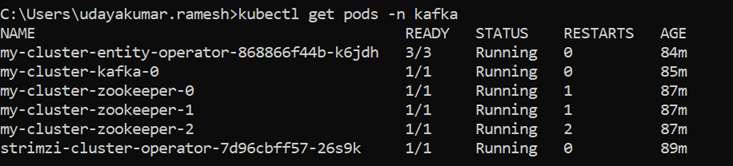
- kubectl get pods -n kafka – Used to check the status of the pods
- kubectl delete kafkatopic -n kafka <topic-name> - Used to delete the selected topics
Sample screenshot showing the result of kubectl get pods -n kafka command is given below.
In this topic
