Installing Entitlement Microservice in Kubernetes On-premise
This section helps you to install the Entitlement microservice in kubernetes.
To deploy Entitlement MS in Kubernetes on-premise,
- Download and extract entitlement-helm-sql-pack-xxx.zip. The images except db services are available in the entitlement-helm-sql-pack-xxx\entitlement\images path.
- Copy all the images available in the folder to Docker container using the docker load --input <imagename> command (For example: ms-entitlement-inboxoutbox-DEV.tar).
- Navigate to entitlement-helm-sql-pack-XXX folder and run the start-entitlement-sql.bat/.sh file, which deploys dbinitentitlement for the database and entitlement except db services in Kubernetes.
After successful deployment, Entitlement MS in Kubernetes is viewed as below.

- Check all the pods for Api, Ingester, and dbinit using the respective commands. The status of all pods should be running as shown below.
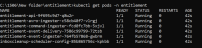
The IP address which is used to test the APIs from the local is generated as External-IP in the entitlement-api-svc pod. The IP address is localhost and the port is 7004.



In this topic
