Automatic Inbox - Outbox Clean up
Inbox outbox cleanup feature is available in all the stacks of Microservice Framework including docker, K8, Azure, AWS environment. The functionality of Inbox Outbox cleanup is given below:
- Once the message gets delivered in kafka topic, no records with status as DELIVERED are stored in ms_outbox_events table. The status is deleted automatically.
- Records available in ms_inbox_events table with status as PROCESSED are retained for 60 mins by default before deleting them automatically.
- The number of minutes to retain the record in ms_inbox_events table are available inside the config files as per each stack.
- Once the command or event is processed successfully in event store microservice, it inserts records in the ms_message_store table.
Delete Records in ms_outbox_events
Once a message is delivered in the topic, events get stored in the ms_outbox_events table with DELIVERED status by default.
No events with DELIVERED status are stored in the ms_outbox_events table and get deleted instead.
This auto cleanup process is handled as part of code, thus it does not require any configuration
Applicable for all Microservices and all stacks.
Retain and Delete Records in ms_inbox_events table after 'x' minutes
This functionality requires a scheduler to run for every five minutes, which is configured in values.yaml.
The records with PROCESSED status in ms_inbox_events table are retained and then deleted after 'x' duration of time.
Where,
-
'x' is duration property name - msf.scheduler.inboxcleanup.schedule
-
'x' mins (say 60 mins) is duration for retaining the records that are maintained in values.yaml
You should perform the following configuration to avail the inbox cleanup functionality.
Configuring K8 stack
To execute the Inbox Output cleanup feature, you should configure the ms-{microservice}-configmap.yaml file available in the ms-{microservice}-Docker\k8\on-premise\svc\templates\svc\ path.
The system auto creates a separate scheduler pods for the inbox cleanup feature.
The following conditions are used during NOSQL and SQL.
-
NOSQL
className_nosqlInboxCatchup: com.temenos.microservice.framework.scheduler.core.NoSqlInboxCatchupProcessor
operationId: nosqlInboxCatchup
temn.msf.scheduler.inboxcleanup.schedule: {{ .Values.env.scheduler.temn_msf_scheduler_inboxcleanup_schedule | quote }}
-
SQL
className_sqlInboxCatchup: com.temenos.microservice.framework.scheduler.core.SqlInboxCatchupProcessor
operationId: sqlInboxCatchup
temn.msf.scheduler.inboxcleanup.schedule: {{ .Values.env.scheduler.temn_msf_scheduler_inboxcleanup_schedule | quote }}
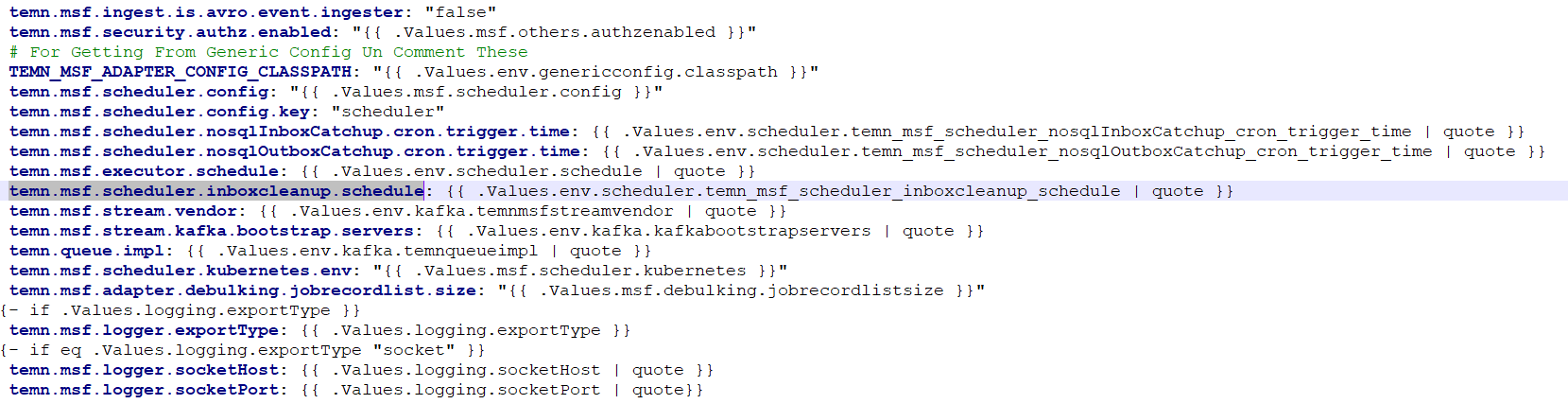
Sample Config for ms-{microservice}-configmap.yaml
The following is the sample configuration of the configmap.yaml file.
Understanding Scheduler job
This file is available in the ms-{microservice}-Docker\k8\on-premise\svc\templates\scheduler\ path.
The scheduler job available for inbox cleanup triggers the scheduler pods for every five minutes by default.
CRON time for scheduler is available in the ms-{microservice}-Docker\k8\on-premise\svc\values.yaml path.
Understanding values.yaml
This file is available in the ms-{microservice}-Docker\k8\on-premise\svc\values.yaml file.
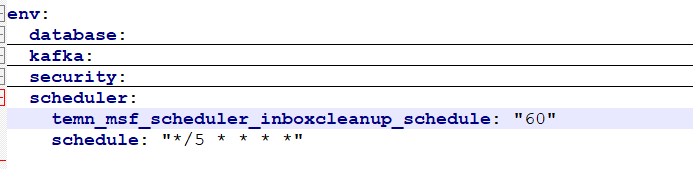
The records available in the ms_inbox_events table are retained for 60 minutes by default.
The property used to retain records in ms_inbox_events is temn_msf_scheduler_inboxcleanup_schedule.
This is maintained only in minutes and can be changed as required.
When the time exceeds the default x minutes, the record gets deleted automatically.
Sample Config for values.yaml
The following is the sample configuration of the values.yaml file.
Configuring AWS stack
To configure AWS stack, perfom the following:
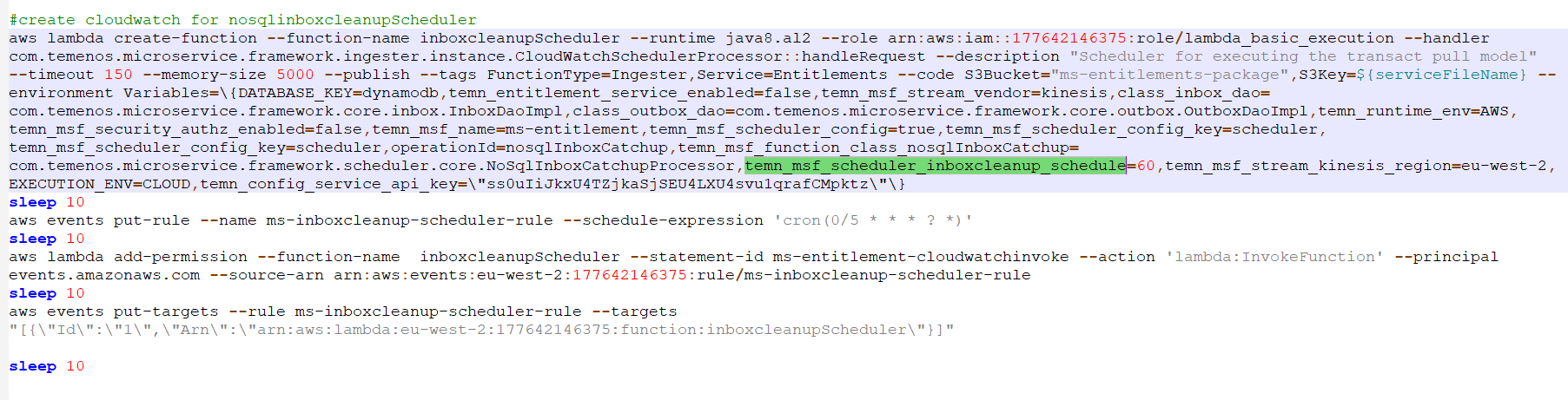
- Create a lambda function for the inbox cleanup scheduler using the install scripts.
- Create a cloud watch rule using CRON expressions
- Configure the scheduler time in the cloud watch rule using CRON expressions. Five minutes should be maintained as CRON expression.
- Add permissions for the lambda function and configure the cloud watch rule to trigger the scheduler lambda function.
The system retains the records with status as PROCESSED in ms_inbox_events table and deletes it after ‘x’ duration of time with the 'x' duration property name - temn.msf.scheduler.inboxcleanup.schedule.
‘x’ duration of minutes to retain record is 60 by default.
This configuration is added with a scheduler function in install.bat/sh for AWS stack.
The following conditions are used during NOSQL and SQL
-
NOSQL
operationId=nosqlInboxCatchup
temn_msf_function_class_nosqlInboxCatchup=com.temenos.microservice.framework.scheduler.core.NoSqlInboxCatchupProcessor
temn_msf_scheduler_inboxcleanup_schedule=60
-
SQL
operationId=sqlInboxCatchup
temn_msf_function_class_sqlInboxCatchup=com.temenos.microservice.framework.scheduler.core.SqlInboxCatchupProcessor
temn_msf_scheduler_inboxcleanup_schedule=60
Sample Configuration
Configuring Azure stack
The scheduler configuration for Azure deployment is as follows:
- In install scripts, you should add the scheduler-specific properties mentioned below under function app settings for inbox cleanup functionality
- Number of minutes to retain record is 60 by default. This is configured along with the scheduler function in install.bat/sh.
The following conditions are used during NOSQL and SQL
-
NOSQL
className_<operationId>=com.temenos.microservice.framework.scheduler.core.SqlInboxCatchupProcessor
schedulerTime=%SCHEDULER_TIME_CRON_EXPRESSION%
operationId=<operationId>
temn.msf.scheduler.inboxcleanup.schedule= 60
SQL
className_<operationId>=com.temenos.microservice.framework.scheduler.core.NoSqlInboxCatchupProcessor
schedulerTime=%SCHEDULER_TIME_CRON_EXPRESSION%
operationId=<operationId>
temn.msf.scheduler.inboxcleanup.schedule= 60
Since you configure and identify the schedulers in Microservice Framework based on the environment variable ‘operationId’, a single Azure function app cannot have more than one scheduler. Hence, additional Azure function apps are available to accommodate additional scheduler functions.
Sample Configuration


Save Records in ms_message_store table for Eventstore Microservice
When the system processes the command or event successfully, it inserts a record in the ms_message_store table as a part of the same transaction boundary.
This feature is applicable only for the event store microservice.
The system handles this process as a part of code and thus requires no configuration.
Sample Records in ms_message_store table is shown in the below screenshot.

In this topic
