Cloud Storage services Adapter
This section explains the functionality of StorageReader and StorageWriter.
StorageReader
As part of cloud agnostic file reader, a file reader that reads from a particular location is available.
This file reader is available in GetPaymentOrder, which is a sample API and it is used to get the file from a particular location through the BASE64 encoded format.
 Identifier in Swagger
An identifier in Swagger is required on the property level to indicate framework that reference data is required.
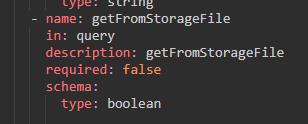
The identifier is getFromStorageFile is a Query Parameter for GetPaymentOrder API.
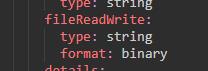
The response Payment Status has fileReadWrite in the response schema which contains the file content in base 64 encoded format.
Changes in Environment File
Docker can have the Path: prefix or no prefix to write in resource path.
temn.msf.storage.home=path:<complete path for the storage home folder>
FILE_STORAGE_URL = <Some file name and path from the Base storage home>
AWS should have the S3:// Prefix followed by bucket name.
temn.msf.storage.home=s3://metering-file-bucket
FILE_STORAGE_URL = <Some file name and path from the Base storage home>
Azure should have the blob:// Prefix followed by container name(Should be in lower cases).
temn.msf.storage.home=blob://microservicestorage
FILE_STORAGE_URL = <Some file name and path from the Base storage home>
Azure needs an extra environment variable, temn.msf.azure.storage.connection.string="DefaultEndpointsProtocol=https;AccountName=<AccountName>;AccountKey=<AccountKey>;EndpointSuffix=<suffix>".
Runtime Validation
You can validate if the getFromStorageFile is available in the query param. Then, you can check for the file, which is mentioned in the location.
If the getFromStorageFile is not available, will not construct the file in the response, if present and does not have in the file location or the file name is changed an error file does not exist is thrown.
StorageWriter
As a part of cloud agnostic file reader, a file writer is available in CreateNewPaymentOrder, which is a sample API to write to a particular location through the BASE64 encoded format.
Identifier in Swagger
An identifier in Swagger is required on the property level to indicate framework that reference data is required.
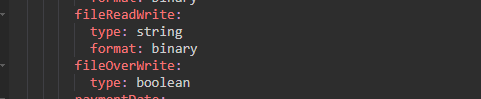
The identifier is fileReadWrite, which is a request schema of payment order of type binary in the CreatenewPaymentOrder API.
The request Payment Status has fileOverWrite in the request schema. It is used to specify if the file can be over written. If the file does not exist, the system displays an error.
The response Payment Status has fileReadWrite in the response schema. It contains the file content in base 64 encoded format.
Changes in Environment File
Docker can have the Path: prefix or no prefix to write in resource path.
temn.msf.storage.home=path:<complete path for the storage home folder>
FILE_STORAGE_URL = <Some file name and path from the Base storage home>
AWS should have the S3:// Prefix followed by bucket name.
temn.msf.storage.home=s3://metering-file-bucket
FILE_STORAGE_URL = <Some file name and path from the Base storage home>
Azure should have the blob:// Prefix followed by container name(Should be in lower cases).
temn.msf.storage.home=blob://microservicestorage
FILE_STORAGE_URL = <Some file name and path from the Base storage home>
Azure needs an extra environment variable, temn.msf.azure.storage.connection.string="DefaultEndpointsProtocol=https;AccountName=<AccountName>;AccountKey=<AccountKey>;EndpointSuffix=<suffix>".
Runtime Validation
You can validate if the fileReadWrite is available in the request body param. Then, you can write the file in the location.
Configuration
Configuration can be done using the following code.
temn.msf.storage.home = <Some Storage Location Home>
FILE_STORAGE_URL = <Some file name and path from the Base storage home>
For Azure, the following extra environment variable is required.
temn.msf.azure.storage.connection.string = <Azure Storage Connection String>
Sample Storage File Writer and File Reader
Sample CreatePaymentOrder request and response is given below.

Sample GetPaymentOrder request and response is given below.

In this topic
