Installing Event Store Microservices in AWS
This section helps you to install the Event Store Microservice in AWS cloud.
Procedure:
- Copy the generated zip file (from target folder) to the installation directory.
- Extract the zip file.
- In AWS command line, navigate to the installation directory and execute install-aws.sh shell file to set up the AWS environment.
- Modify the region information in the install-aws.sh script specific to your installation.EXAMPLE:
--region us-west-2
--event-source-arn arn:aws:kinesis:us-west-2
--uri arn:aws:apigateway:us-west-2:lambda:path/2015-03-31/functions/arn:aws:lambda:us-west-2
- Execute install-aws.sh shell file to set up the Event Store Microservice in the AWS environment. Once the installation is done, base URL is available for testing API.
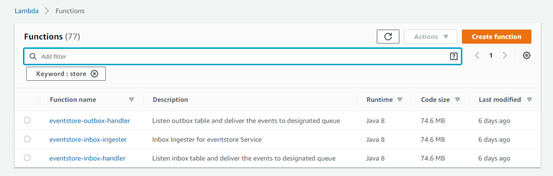
- Log in to the AWS portal and verify the Lambda functions if they have been created properly.
In this topic
