Deploying Traceability Microservice in Kubernetes
Kubernetes service allows you to deploy and manage clusters. This section details the deployment of Traceability Microservice in the K8 On-premise environment.
Pre-requisite
Before deploying, make sure you have the following software installed in the system.
- Helm.
- kubectl – Kubernetes command-line tool.
On-Premise Package Details
Traceability microservice helm pack is available as a single bundle. This section gives an overview of the helm package.
- traceability-helm-sql-pack-xxx. The below screen capture shows the unzipped file.
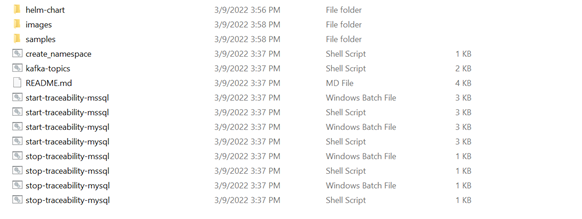
- traceability-helm-sql-pack-XXX\traceability\images folder with the images as shown in the below screen capture.

- dbinit and svc folders in the helm-chart folder. These folders contain the configuration files, which are required for Kubernetes on premise.


File Configuration for Traceability MS in Kubernetes Deployment
This section explains the configuration required for deploying the Traceability microservice in Kubernetes.
| Configurations | Purpose | Sample values |
|---|---|---|
| DATABASE_KEY | To choose database either mysql or mssql | mysql/mssql |
| MYSQL_CONNECTIONURL | To mention mysql connection url | jdbc:sqlserver://traceability-db-service:1433;databaseName=traceability |
| MSSQL_CONNECTIONURL | To mention mssql connection url | jdbc:mysql://traceability-db-service-np:3306/traceability |
| Kafkabootstrapservers | Url which is used to connect kafka | my-cluster-kafka-bootstrap.kafka:9092 |
Deploying Traceability MS in Kubernetes On-premise
To deploy Traceability MS in Kubernetes on-premise:
- Download and unzip traceability-helm-sql-pack-xxx.zip. The images for other than db services are available in traceability-helm-sql-pack-xxx\traceability\images.
- Load all the images available in the folder to Docker container using the docker load --input imagename (ex : traceability-initscripts-DEV.tar) command.
- Navigate to traceability-helm-sql-pack-XXX\ folder.
- Run start-traceability-sql.bat/.sh. which inturn deploys dbinittraceability for the database and Traceability of other than db services in Kubernetes.
- After successful deployment, Traceability MS in Kubernetes is viewed as below.
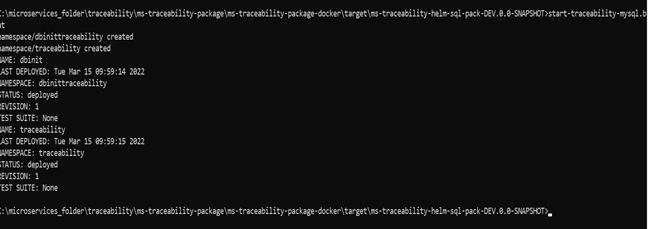
- Check all the pods for API to verify whether it is up and running.

-
The IP address which is used to test the APIs from the local will be generated as External-IP in the traceability-api-svc pod. The IP address should be localhost and the port are 7004.

Database Configuration
This section describes the steps for configuring the database in On-premise.
Traceability Microservice supports mysql and mssql database. By default, it is configured to connect with mysql.
1. For MySQL, modify the connection URL in the start-traceability-mssql.sh/.bat file.
- DATABASE_KEY=sql
- Username and password of MySQL
- MYSQL_CONNECTIONURL=jdbc:sqlserver://traceability-db-service:1433;databaseName=traceability
If there is any change in the existing URL, you must update the same in MSSQLCONNECTION_URL.
2. For mssql, modify the following in the start-traceability-mysql.sh/.bat file.
- DATABASE_KEY=sql
- Username and password of mssql
- MSSQL_CONNECTIONURL=jdbc:mysql://traceability-db-service-np:3306/traceability
Kafka Validation
Check all the kafka pods are up and running using the below commands
- kubectl get kakfatopics -n kafka
- kubectl get pods -n kafka
- kubectl delete kafkatopic -n kafka <topic-name>

In this topic
