Introduction to Debit Collection
Debit Collection (DB) application initiates single direct debit collection requests for processing through Temenos Payments. It perform the following functions:
- Capture DD collection requests (manually)
- Validate and pre-process DD requests
- Route the DD requests only to Temenos Payments system
- Channel facing API is not released for the DB application
DB supports capturing collection request for different types of clearings, such as Automated Clearing Houses (ACH) and Instant Payments. It supports only creation and capture of single DD collection requests. DB does not deal with inward collection processing (that is, collection requests initiated in another bank and received in DB bank through clearing or bilateral partner bank).
DD.DDI module of Temenos Transact allows to initiate collection requests from Transact modules that can be processed through Temenos Payments or any third party payment system. Thus, DD.DDI enables other applications in Transact to send collection requests to Temenos Payments or any third party payment system. Since the purpose of the DD.DDI module and the DB application are not the same, they continue to co-exist.
Architectural Diagram of DB Application
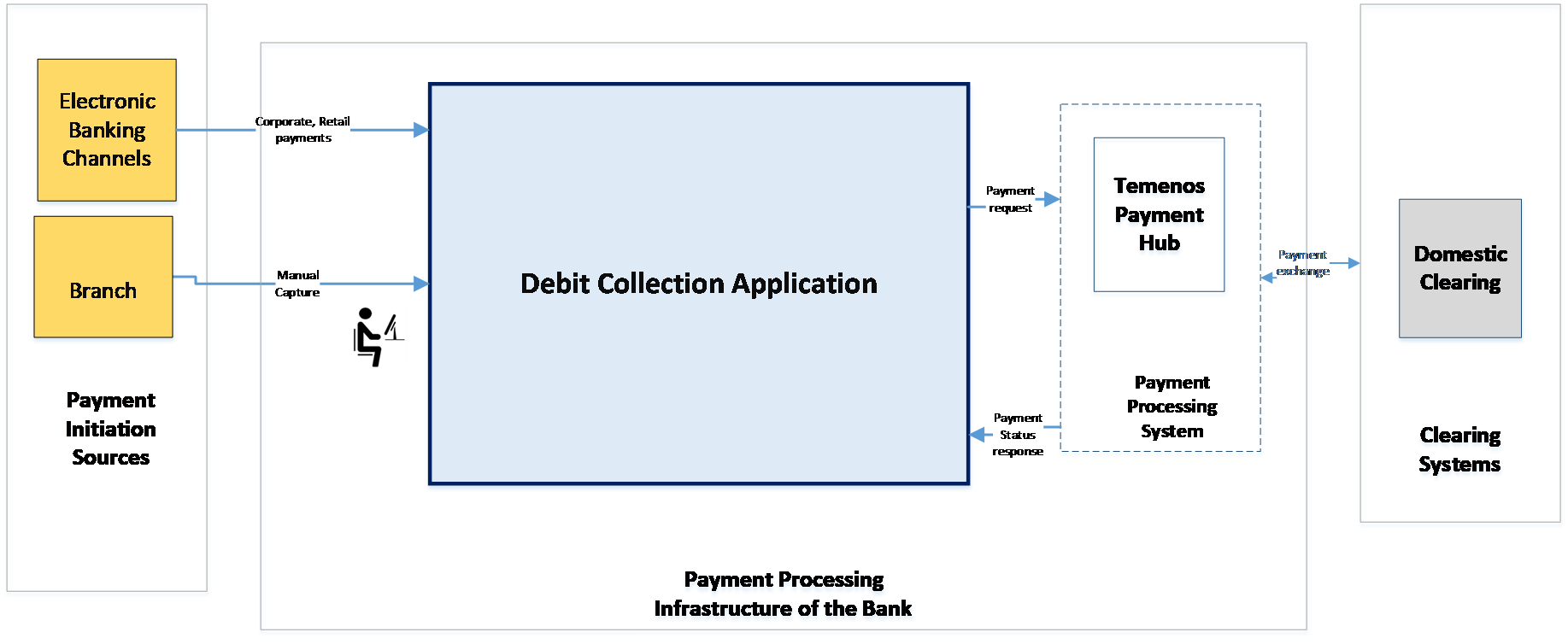
| Item | Description |
|---|---|
| Debit Collection Source | Accept payments from Branch − These are collection requests initiated by a bank’s branch or back-office user in response to an over-the-counter instruction. NOTE: Collection requests from Temenos Transact business applications are currently processed using the DD.DDI module. |
| Debit Collection Application | Receives (using standard Temenos Transact interface), validates, and routes the request to Temenos Payments. |
| Payment Processing System | Validates, books and routes collection requests to an appropriate clearing system.
|
| Clearing Systems | Captures collection requests that can be cleared using different domestic clearings. NOTE: Domestic clearings can be an instant payment clearing system or Automated Clearing Houses (ACH) that process bulk payments. |
Capturing Payment Initiation Requests Manually
DB supports capturing of Payment Initiation requests for domestic clearings and instant payments. It provides the Collection Capture page for each type that offers specific fields and appropriate to the collection or clearing. The user can request DB to perform the following:
- Validate (before submission) the captured collection information.
- Submit all collection initiations for Supervisor’s approval.
- After approval, it sends the payment to the payment system for determining the clearing and distribution.
Collection Request Processing
The following are the stages to process a collection request:
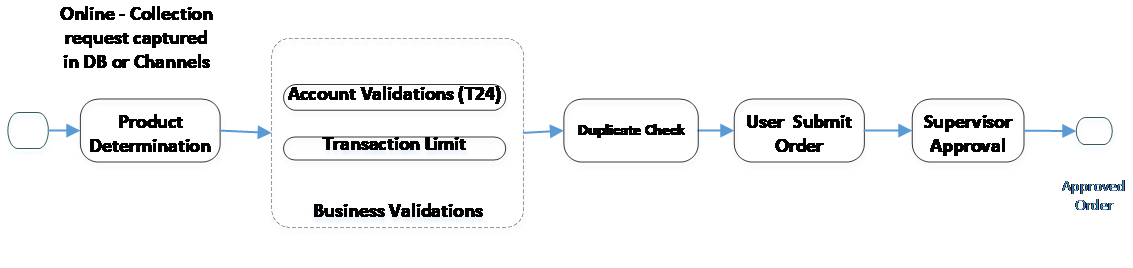
 Stage1 – Collection Capture
The collection request is captured in DB or channel during the first stage of processing a collection request.
| Item | Description |
|---|---|
| Collection Capture | The following is the mode to capture collection requests:
|
| Create Collection Request (not shown in diagram) | Maps the collection requests received to DB fields and stores it. The following are the main attributes:
|
| Product Determination | Represents the type of collection (book transfer) or clearing through which collection request is processed. The product allows to configure specific validation or process the rules for collection request linked with the product. The collection product can either be:
Read Product for more information. |
| Supervisor Approval | Supervisor needs to approve all manually captured payments |
Stage 2 – Collection Request Pre-Processing
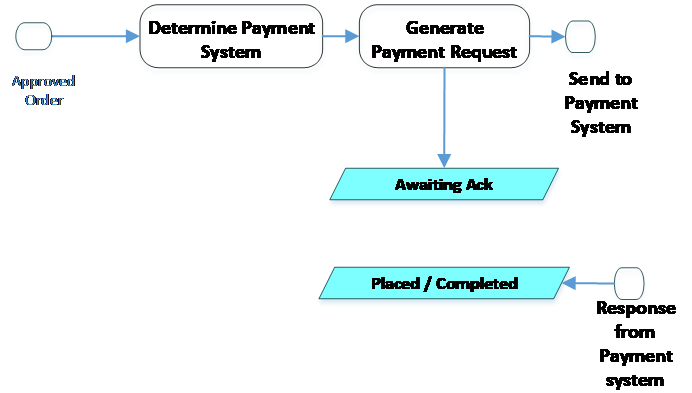
The pre-processing of the captured collection request is performed in second stage.
| Item | Description |
|---|---|
| Routing | Determines the payment system based on the configuration. NOTE: The DB application only supports Temenos Payments as payment system. |
| Generate Payment Request | Generates collection request message to payment system. |
| Response from Payment System | Receives responses from payment system. It moves the request to the following statuses:
NOTE: If the payment system sends an error code for negative acknowledgement, the user can view it against the request. |
Collection Enquiry
The user can search and view the collections as a generic enquiry, or view it by collection order status. The enquiry serves as a single dashboard for all collection types, sources and destinations, as DB aggregates payments from different channels.
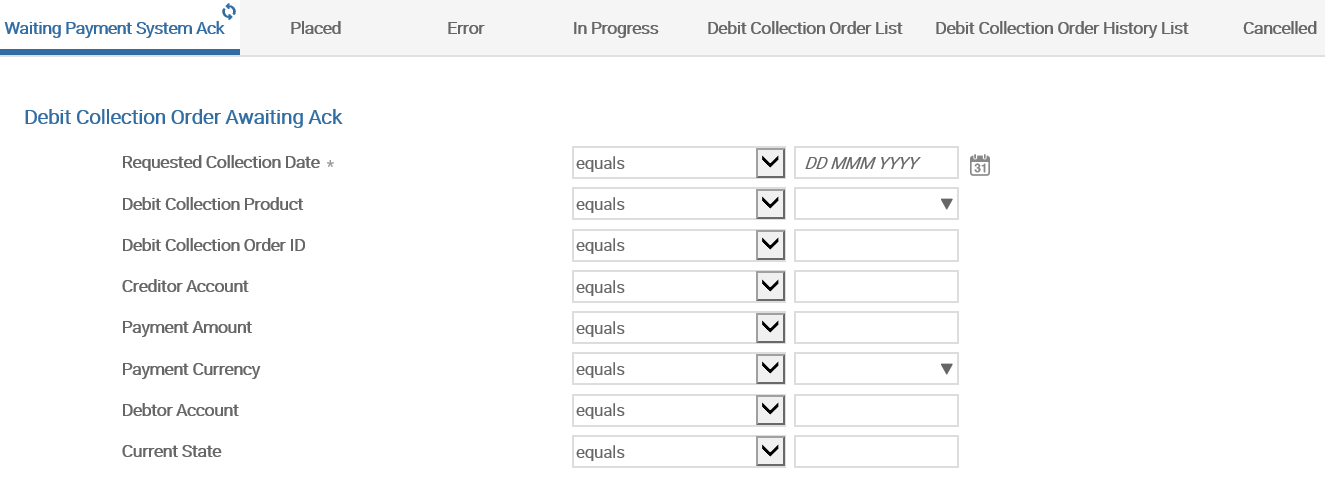
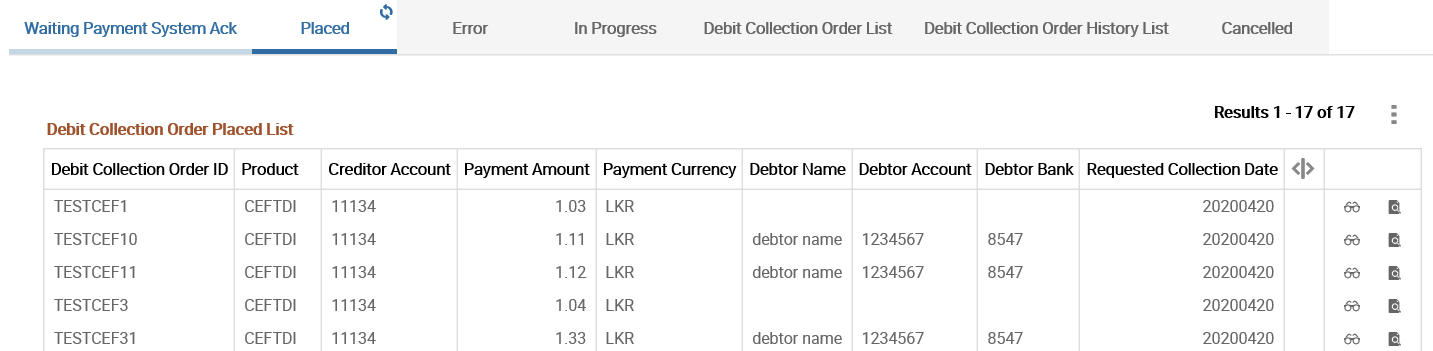
DB enquiry allows the user to view collection order and payment system status. It also enables to customise the view based on the bank’s specific requirements (which the bank needs to maintain).
Multi-Bank or Branch Support
DB can work in a multi-bank or branch model that allows users to initiate orders on the following:
- Accounts that belong to same branch (where the user logs on)
- Accounts that belong to another branch, which is in the same Temenos Transact lead company (where the user logs on)
Checking Reachability
Reachability check is the process of checking whether the counterparty bank is reachable directly or indirectly, to send a debit collection through a clearing during order initiation. This can be enabled by configuring Debit Collection Product.
Reachability directory of the specific clearing should be loaded in Temenos Transact, to perform reachability check for DB application. Refer to the Clearing Directory user guide for more details. The reachability check criteria differ from one clearing to another. Refer individual Clearing user guides for more details.
Given below are the important parameters used as input for reachability check from DB application:
- Debtor Agent Bic
- Debtor Bank Clearing Code
- Clearing Channel
- Requested Collection Date
- Payment Instrument Type
- Debit Collection Order Id
- Entire Debit Collection Order Object
System throws an override on initiation screen if the beneficiary bank is not reachable.
Illustrating Model Parameters
This section covers the below model parameters for the Debit Collection (DB) module.
| S.No. | Parameters | Description |
|---|---|---|
| 1. | DB.DEBIT.COLLECTION.PARAMETER
|
It consists of high-level Debit Collection order configuration at the company level. This application facilitates the definition of the Payment Connection method. |
| 2. | DB.DEBIT.COLLECTION.PRODUCT
|
It captures the features that are specific to a collection product. |
Illustrating Model Products
This section covers the below model products for the Debit Collection (DB) module.
| S.No. | Product Name | Product Attributes |
|---|---|---|
| 1. | DB.DEBIT.COLLECTION.ORDER
|
Payment connection method in DB.DEBIT.COLLECTION.PARAMETER is set to TPH. Hence, all the Debit collections initiated from DB.DEBIT.COLLECTION.ORDER are routed to TPH for further processing. |
In this topic
