Introduction to Funds Transfer
The Funds Transfer functionality is split in two different modules:
- Funds Transfer (license code:FT) module covers the basic functionality to perform internal transfers and corrections. It is used by finance and operations teams to perform adjustments to accounts and profit and loss (limited to use of account transaction types only).
- Legacy Payment Processing using Funds Transfer (FTFULL) module provides the Temenos legacy payments functionality through FT and supports cheques, international and local clearing payment types. Temenos customers upgrading from a release before 202009 already having the FT license code, automatically receives the FTFULL license code. Henceforth, Temenos standard payment solution is the Temenos Payments suite and FTFULL will not be offered to new customers. The existing payment types are supported for backward compatibility only, this module will not be enhanced to provide any new payment methods and standards (for example, ISO200022) above the capability available in R21.
The FUNDS.TRANSFER application handles internal transfer (under the license code FT) and external payment transfers (under the license code FTFULL). The FUNDS.TRANSFER application is integrated with the following modules:
- Accounting
- Central liability
- Delivery (Outgoing)
- Delivery (Incoming)
- Position management
Real-time updates are applied to:
- Balances
- Positions
- Cash flows
- Limits
Charges and commissions can be taken based on a variety of conditions or entered directly.
Configuring Funds Transfer
This section covers the configuration of Funds Transfer.
 Configuring
 FT.APPL.DEFAULT
The FT.APPL.DEFAULT application contains application-level default values, which will be used while processing FUNDS.TRANSFER or STANDING.ORDER instructions. These values will be applicable irrespective of the transaction type, and the user must create one record for each company on the system.
The default values defined in this application can be summarised as follows:
- Limit Amounts:
- The Auto Process Limit field defines the amount in local currency, below which incoming transactions received direct from delivery can be processed automatically.
- The Less Charges Limit field defines the amount in local currency, below which instructions for outgoing payments should not be accepted to pay on a less charges basis. For example, when charges exceed the amount of the payment.
- The Min Sto Amt field defines a minimum transfer amount, below which balance maintenance instructions will not be processed for specified currency.
- Suspense Accounts:
- The Claim Charges Acct field contains the account to be debited when charges are claimed from the ordering bank.
- General Information:
- The Secondary Tlx Chg field indicates the
FT.CHARGE.TYPErecord to be used when a telex charge is to be applied for cover and free format telex messages. The Centralised Ft field defines whether or not the funds transfer function in the bank is centralised in one department.
- The Secondary Tlx Chg field indicates the
- Commission or Charge on Error:
- When Funds Transfer applications are entered with commission or charge related fields, and any error is encountered while committing, all the commission or charges related fields are nullified and need to be entered once again or defaulted from
FT.TXN.TYPE.CONDITION.
- When Funds Transfer applications are entered with commission or charge related fields, and any error is encountered while committing, all the commission or charges related fields are nullified and need to be entered once again or defaulted from
FT.TXN.TYPE.CONDITION. To retain the commission or charges entered after encountering an error, the Chg Com On Err field can be specified as Retain in FT.APPL.DEFAULT or Null to clear the fields.
- MT103 Control:
- SWIFT message MT103+ which is processed straight through can be generated through
FUNDS.TRANSFERby giving Mt103 Type as Mt103+ and filling Account With Bank, Receiver Bank, Receiver’s Correspondent (Tag 54), Intermediary Institution (Tag 56)(Tag 52,54,55,56 & 57) with either a number of a customer who has a valid record inDE.ADDRESSfor carrier as SWIFT, or a valid BIC code prefixed with 'SW-' along with the Ben Acct No field. - When the above case is not satisfied, the system raises an error if the Mt103 Control is specified as System. When Mt103 Control is NULL, it generates an MT103 instead of an MT103+ with an override.
- SWIFT message MT103+ which is processed straight through can be generated through
- Default Receiver Bank Charges:
- To default receiver charges for outgoing or incoming MT103 messages based on the
CORR.BANK.CHARGESapplication in Funds Transfer, Def Corr Bank Chgs field can be set to Yes.
- To default receiver charges for outgoing or incoming MT103 messages based on the
- Rounding:
Rounding rule can be applied inFUNDS.TRANSFERapplication when- The default in Temenos Transact is Natural rounding (NATURAL).
- Round Type field in
FT.APPL.DEFAULTrecord can be used to setup new rounding rules. The rounding rule is set in theEB.ROUNDING.RULEapplication and is then entered into Round Type. - A rounding rule entered in the
FUNDS.TRANSFERtransaction will override the rounding rule defined inFT.APPL.DEFAULTparameter application.
Funds Transfer Transaction Conditions
The FT.TXN.TYPE.CONDITION application defines the default conditions for each transaction type, which can be processed by the FUNDS.TRANSFER and STANDING.ORDER applications. These conditions can be summarised as follows:
- The Transaction Type field identifies the type applicable to the transaction being processed. There are two basic types, outward and inward (outward includes onwards).
- The transaction codes (Transaction Code Credit and Transaction Code Debit fields) to be used for the generation of the entries. Both debit and credit transaction codes will be defined for basic entries, standing orders, debit charges and cheques.
- The default commission types are applicable for each transaction type. These commission types should be defined in
FT.COMMISSION.TYPE. - The default charge types applicable for each transaction type. These charge types must have been previously created in the
FT.CHARGE.TYPE. - The maximum forward and back value dates applicable for each transaction type must be specified. Any excess beyond these value dates will force an override at the transaction level.
- The default value date conditions are held for each transaction type. The condition for both debit and credit entries are required. That is, the user can specify the value date conditions applicable to the bank and the customer for each transaction type.
- The default value date conditions are also held on the
BC.SORT.CODEapplication. This condition will default the value date on the credit side if the Sort Code field is specified. The value date default from here will override the one from theTRANSACTIONrecord. - Default value dates generated by Cut Off Time and Cut Off Rule:
Default value dates can also be generated by use of Cut Off Time on theCURRENCYapplication and Cut Off Rule on theAGENCYapplication. The default debit value date for outgoing funds transfers, and the default credit value date for incoming funds transfers can be calculated by comparing the transaction entry time with the cut off time specified for the currency (debit currency for outgoing, credit currency for incoming). If this method is to be applied in the case of an outgoing funds transfer, the Cut Off Rule field on theAGENCYapplication must be set to 0 or 1. For an incoming funds transfer, the debit value date, date of receipt of the transaction, and the debit and credit currencies will be taken into account when deriving the default credit value date.
Using Cut Off Time and Cut Off Rule, the default debit value date on outgoing FT transactions is derived as follows:- If the transaction is entered before the time specified in Cut Off Time (for the debit currency) and Cut Off Rule is set to 0, then the debit value date will be the same working day. If Cut Off Rule is set to 1, then the debit value date will be next working day.
- If the transaction is entered after the time specified in Cut Off Time (for the debit currency) and Cut Off Rule is set to 0, then the debit value date will be the next working day. If Cut Off Rule is set to 1, then the debit value date will be the next working day +1 working day.
- If neither the debit or credit value date have been entered on an outgoing funds transfer, and the default debit value date is after the default credit value date, then the credit value date will be set to the default debit value date.
Using Cut Off Time, the default credit value date on incoming funds transfer transactions is derived as shown in the following table:
| Debit Value Date | Cut off time | Debit or Credit currency | Credit value date default |
|---|---|---|---|
| Debit value date prior or equal to date of receipt | Time of receipt prior or equal to cut off time | Debit currency equal to credit currency | Credit value date equal to date of receipt |
| As above | As above | Debit currency not equal to credit currency | Credit value date equal to date of receipt +1 working day |
| As above | Time of receipt after cut off time | Debit currency equal to credit currency | Credit value date equal to date of receipt +1 working day |
| As above | As above | Debit currency not equal to credit currency | Credit value date equal to date of receipt +2 working days |
| Debit value date after day of receipt | Time of receipt prior or equal to cut off time | Debit currency equal to credit currency | Credit value date equal to debit value date |
| As above | As above | Debit currency not equal to credit currency | Credit value date equal to debit value date +1 working day |
| As above | Time of receipt after cut off time | Debit currency equal to credit currency | Credit value date equal to debit value date +1 working day |
| As above | As above | Debit currency not equal credit currency | Credit value date equal to debit value date +2 working days |
- Temenos Transact will automatically produce a variety of outgoing SWIFT messages using the Delivery Module and Funds Transfer (FT). For Outward by telex (OT) transactions, it is possible to produce either an MT103 or MT400. For Outward by Cheque (OC) and Outward by Draft (OD) transactions, it is possible to produce an MT110 advice. To allow one of these message types to be used as an alternative, the Message Type field in the relevant
FT.TXN.TYPE.CONDITIONrecord should be entered. - Swift ID for Bank Fields:
There is an option of entering the SWIFT ID (BIC code) instead of entering the customer number, reducing the overhead of looking up the customer number (when only the SWIFT ID is known).
If the Swift Address field in theFT.TXN.TYPE.CONDITIONis set to Yes, then the user can enter the SWIFT address prefixed by 'SW-' in the following bank fields in an FT transaction:- Ordering Bank
- IN Account With Bank
- Beneficiary Bank
- Receiver's Correspondent (Tag 54)
- Intermediary Institution (Tag 56)
The following screenshot shows the FUNDS.TRANSFER application with IN Account With Bank field entered with SW.
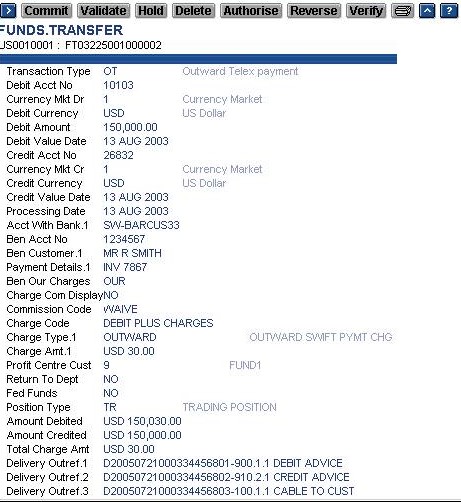
In the FT application, there is a facility to enter the account number of the bank fields mentioned above, which will get prefixed with the concerned bank fields and generate the appropriate tags in SWIFT message.

- Funds transfer with the debit after the credit value dates for Transaction Type AC can be entered. The Db After Cr and Db A Cr Max Days fields on the
FT.TXN.TYPE.CONDITIONare available to control this. The Db After Cr can be set to Yes for Transaction Type AC (and those with the first 2 characters as AC) and Db A Cr Max Days defines the maximum number of days the debit value date may be after the credit value date. - For Inward by Telex (IT) types of funds transfer, receipt of funds record can be generated in the
AC.EXPECTED.RECS. This is controlled using the Expected Recs field on theFT.TXN.TYPE.CONDITION. This field should be set to Yes for selecting and creating theAC.EXPECTED.RECSfor the qualifying accounts (applicable only for ER or EP funds types). - FT contracts that are in live can be reversed online using the reversal function. Live FT contracts are moved to history after running the Close of Business (COB). To control the reversal of FT contracts that are in history, the His Reversal field in
FT.TXN.TYPE.CONDITIONshould be set to Yes. - To process the receiver charges in the incoming MT103, the In Chg Code field in
FT.TXN.TYPE.CONDITIONcan be defined with the applicable charge code fromFT.CHARGE.TYPEapplication.
Agency
The main objective of the AGENCY application is to keep the default delivery instructions for a customer or for a BIC address and the details of operation of the NOSTRO.ACCOUNT. It provides settlement information, which otherwise must be entered repeatedly on each transaction.
The key to the AGENCY application is the customer number or the BIC address prefixed by SW. The customer number should be a valid Temenos Transact customer number and should exist on the CUSTOMER application.
The SWIFT address is prefixed by 'SW-' and must contain 11 characters for a valid SWIFT ID (without prefix) and must be present on the DE.BIC application. The DE.BIC application is loaded from SWIFT and contains the BIC codes, addresses and other details.
The Autoroute Agrd field in the AGENCY record is used where there is an agreement in place with the correspondent bank (to which the Agency record corresponds to), regarding reimbursement on payments sent to other banks. This can be used to suppress cover payment messages where they are not required.
Read AGENCY table in the System Tables User Guide for more details.
Illustrating Model Parameters
This section covers the high-level parametrization, which describes the design, setup, charges, commissions, inward and outward delivery interfaces.
| S.No. | Parameters | Description |
|---|---|---|
| 1. | FT.APPL.DEFAULT
|
This application allows the user to define application-level default values, which is used when processing FUNDS.TRANSFER or STANDING.ORDER instructions. These values will be applicable irrespective of the transaction type, and the user must create one record for each COMPANY (that is, in case of multi-company setup) on the system. |
| 2. | FT.TXN.TYPE.CONDITION
|
This application allows the user to define the default conditions for each transaction type, which can be processed by the FUNDS.TRANSFER and STANDING.ORDER applications. User can define Transaction Code Credit, Transaction Code Debit, Comm Types, Charge Types, Forw Value Max and Back Value Max for each transaction type. |
| 3. | FT.CHARGE.TYPE
|
This application allows the user to define the conditions related to various types of standard flat charges used by Temenos Transact. In addition, charge types can be linked to allow different charge structures, tax codes and so on to be applied depending on the residence of the ordering customer. |
| 4. | FT.COMMISSION.TYPE
|
This application allows the user to define the conditions related to all types of commission used in applications. Each commission type can be defined as a Flat Amount or variable amount, proportionate to the amount transferred. In the latter case, different percentages can be defined for different Bands or Levels of transfer amounts. Minimum and maximum commissions can be specified for each Band or Level together with overall minimum or maximum commission charges. |
| 5. | CORR.BANK.CHARGES
|
This application allows the user to define correspondent bank charges or commission, which will default in FT when Def Corr Bank Chgs field in FT.APPL.DEFAULT is set to Yes. |
| 6. | FT.GEN.CONDITION
|
This application allows the user to identify a specific group of customers, using a user-defined Funds Transfer General Condition number. , This will then be cross-related to the Group Condition table to define Funds Transfers conditions applicable to that group. The FT General Condition record must exist before any associated group condition is specified. The key to this table is also the key to the associated FT Group Condition record. |
| 7. | FT.GROUP.CONDITION
|
This application allows the user to define special conditions applicable to specific groups of customers or individual customers which overrides the normal conditions, used by the Funds Transfer application. A customer subjected to these conditions must first meet the selection criteria defined in FT.GEN.CONDITION and accessed using an identical key. |
| 8. | EB.DUPLICATE.TYPE
|
This application allows the user to define selected fields to check for any duplicate contracts for the given application. This application also allows the user to define duplicate check criteria for linked applications, which can be defined in the Linked Application field. It allows the user to select the following:
|
Illustrating Model Products
The following Model Bank products are released as part of the FTFULL module:
| S.No. | Product Name | Product Attributes |
|---|---|---|
| 1. | OC- Outward by Cheque |
Refers to the issuance (by the bank) of a Manager Cheque or a Bank Cheque in local currency in favor of the beneficiary who does not maintain an account with the bank. |
| 2. | OD – Outward By Draft |
Refers to the issuance (by the bank) of a Bank Draft (usually in foreign currency), in favor of the beneficiary who does not maintain an account with the bank. |
| 3. | OT –Outward by Telex |
Refers to the issuance (by the bank) of a payment via Swift or Telex. The instructions are usually sent to the correspondent bank for processing. This transaction type will produce both pay and cover cables automatically where required. |
| 4. | OB – Outward by bankers payment | Refers to the issuance (by the bank) of a banker's payment in local currency. This method of payment is used extensively in the UK to perform local currency payment. |
| 5. | BC – Outward by BACS | This transaction type is only applicable for Sterling and within the UK and refers to outward transfers by BACS (Bankers Automatic Clearing System). Currently BACS payments are not generated by the system. If it is required, it must be added as a local enhancement. Other host countries may have similar systems to which this may be adapted. |
| 6. | IC – Inward payment by cheque or draft | Refers to the receipt of a cheque or a draft by the bank, to be credited to a customer account. |
| 7. | IT – Inward by Telex | Refers to the receipt of a Swift or Telex payment by bank in favor of bank's customers, where the proceeds have to be credited to an account in bank’s books. |
| 8. | IB – Inward by banker's payment | Refers to the receipt (by the bank) of a banker's payment in favor of an account in our books (UK only). |
In this topic
