Configuring Interest and Charges - Assessment
This topic helps the user to perform configuration of interests and charges assessment.
Interest
The interest on account balances is based on the rate of interest, period of interest calculation (number of days) with interest basis, and the balance on which the interest is calculated. The banks can choose to have negative rates, compounding interest, linked interest rates, and limit utilisation based rates.
Interest Rate
The interest rate can be fixed or floating and with or without margin. Compounding interest is also possible. The Interest Property Class describes the basic features. Given below is the configuration of the advanced features of the Interest Property Class.
 Negative Interest Rates
- It is possible to set a negative interest rate on the Interest properties that are calculated on balances for an arrangement. This is done by setting the Negative Rate field in the Interest Property Condition (Read Interest Property Class for more information).
- The banks can define separate PL category codes for negative rates thereby having separate accrual posting for positive and negative rates. Tax can be calculated on positive or negative accrual amount.
- The Accounting Property Class can record entries in separate PL as configured (Read Separate PL Postings for Negative Rates section from the Accounting Property Class userguide).
- The
AA.INTEREST.ACCRUALShas separate fields to capture the positive and negative rates.
Debit Interest Linked to Limit
Debit interest is calculated based on the limit attached to the account. When the account has tiered interest rates, the first tier can be upto the limit amount while the second tier is beyond the limit amount attached to the account. This feature is enabled by setting the Refer Limit field to Yes. The Upto Amt or Tier % field in the first multi-value set must be left blank and limit attached is treated as the first tier.
When an account has temporary limits defined, a separate debit Interest condition can be defined by setting the Refer Limit attribute as Include Temp Limit.
The tiered interest rates defined have the first tier referred to the amount utilised within the limit, second to the temporary limit amount and the third to the overdraft beyond the allowed utilised limit.
In all the conditions, the Upto Amt field is left blank.
Rate Assessment from Linked Arrangements
- The Interest Product Condition allows the user to specify if the tier is a linked rate.
- If, at least one of the tier conditions is linked, the system expects the user to specify AA arrangement reference and a valid Interest Property of that arrangement.
- For each tier that is marked as linked, the system uses the Linked Rate, treats it as a base rate, applies any margin specified and calculates the effective rate for the overdraft account.
- While configuring the Linked Rate field,
- It is possible to specify the rate for a given tier as linked by setting the Linked Rate field to Yes.
- This can be mixed with normal rate calculations as well.
- Where the Linked Rate is set to Yes, the system expects that an arrangement reference is given in the Linked Arrangement field along with the Interest Property.
- While configuring the Linked Arrangement field, if at least one tier is set as linked, the user has to specify the arrangement in the Linked Arrangement field that has to be linked for calculating the Interest Rate (or the system automatically defaults, where a limit is attached).
- The Linked Property field is used to specify the Interest Property of the Linked Arrangement that should be referred for getting the Interest Rate. This field is mandatory when at least one tier is set as linked.
Balance for Interest Calculation
Interest is calculated based on Actual balance of account. It is also possible to calculate interest based on cleared balance instead of actual balance.
The ACCT.BALANCE.ACTIVITY is used to calculate interest. This application is updated based on the value date of the entry.
To calculate interest based on exposure date, Exp Upd Acct Activ is set to Yes in ACCOUNT.PARAMETER. Acct balance Activity is updated on the exposure date of the entry for all the accounts. Product Category wise choice is also possible.
STMT.ENTRYraised after the exposure date setup is turned on populates the Tdgl Details field with the value EXPOSURE.DATE.- The exposure date is applicable only for credit entries.
- If the setup is turned off, then the field is populated with the value VALUE.DATE.
Interest Calculation Methods
The source balance is calculated based on the Calculation Type defined in AA.SOURCE.CALC.TYPE. This application has to be attached to the relevant product through Product Designer. The possible values of the Calculation Type field are
- Average - Average balance can be calculated for debit and credit balances
- Daily - Daily balance can be calculated for debit and credit balances
- Highest - Highest balance calculation is allowed only for debit balances
- Lowest - Lowest balance calculation is allowed only for credit balances
- Routine - A user-defined routine can be used to return the balance amount
In AA.SOURCE.CALC.TYPE, the Calculation Start Day and Calculation End Day indicates the specific days of the calendar month used to compute balance for calculating the interest. This feature can be used to calculate the average, highest and lowest balances indicated in the Calculation Type.
Configuring Interest for Accounts Opened or Closed Mid-Month
The banks can configure to pay or not pay interest for the accounts that are opened or closed in the middle of the calendar month.
When an account is opened after the first day of the calendar month or closed on or before the 31st (last day) of the calendar month, the interest is waived only for that month. This can be done by setting the Mid Account Open and Mid Account Close to No in the AA.SOURCE.CALC.TYPE. This application has to be attached to the relevant product through Product Designer.
Accounts Opened Mid-Month
- If the Mid Account Open is disabled, then the system considers the Account Opening Day as the Calculation Start Day and calculates interest, as long as the account has been funded on the same day before Close of Business.
- If the Mid Account Open is enabled (that is, set to No), then the system considers the CALC.START.DAY as the Calculation Start Day. The End of Day balance of this account, for the days preceding the Account Opening Date, is considered to be zero. Thus, the minimum balance of that account, for that month is zero and no interest is calculated.
Accounts Closed Mid-Month
- If the Mid Account Close is disabled, then the system considers the Account Closing Day as the Calculation End Day and calculates interest (subject to the Minimum Balance calculation).
- If the Mid Account Close is enabled (that is, set to No), then the system does not consider the Account Closing Day as the Calculation End Day and derives that the End of Day balance of the account is zero and no interest is therefore calculated.
- This feature is available only for the
AA.SOURCE.CALC.TYPErecords that have the Calculation Type field set to Minimum. - This feature gives expected behaviour only for Monthly (or multiples of a calendar month) schedule frequencies. For example, Quarterly, Half-Yearly or Annual schedule follows the calendar month ends.
For Quarterly, Half-Yearly or Annual schedule, the system assesses the start day and end day of calculation for each month within that schedule period and determines if interest has to be calculated for that month.
Minimum Interest Amount
The banks can define a minimum interest amount to be charged at the product level. The Min Int Amount is compared to the accrued interest and if this is less, the minimum interest is applied or waived.
- When the Min Int Waive is set to Yes, the accrued interest lesser than the minimum interest amount is waived.
- When the Min Int Waive is not set, the minimum interest is applied.
For instance, if Min Int Amount is 20, Min Int Waive is not updated and accrued interest less than 20, the system passes the interest amount of 20.
Archival of Interest Accruals
The interest accrual values (Period Start and Period End set of values with their corresponding From Date and To Date set of values) in the AA.INTEREST.ACCRUALS application can be archived and stored in the AA.INTEREST.ACCRUAL.HIST table to improve the performance of the system. To achieve this, the user has to set Archive Period and Retain Period fields in AA.PARAMETER table .
Read Archival of Interest Accruals for more information on the archival processing of interest accruals.
Advance Notifications for Floating Rate Changes
When the floating rate changes, a new BASIC.INTEREST record is created to record the rate change with an effective date. The floating rate change for the account is triggered by a Change Interest Activity in the account.
For a future-dated floating rate change, the system applies the rate change on the account on the respective date.
When the Interest Property (that has a floating rate condition) is forward-dated and a future-dated BASIC.INTEREST record is created, the system triggers the Apply Rate Activity on the same day during COB.
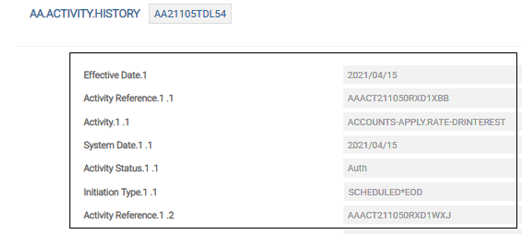
Along with the Apply Rate activity effective current date, the system also schedules the future- dated rate change using a Change Interest Activity during COB.

As a result of this, the system updates the arrangement with the forward-dated condition for new interest rate.
Configuring Notification
The Account Product’s Activity Messaging condition can be set up to generate a rate change advice by a specific number of days in advance. In the below screenshot the Account Product has Change Interest Condition with a pre-notice set. As per the below setup, for a change interest, a notification is generated 45 days in advance (as a pre-notification).
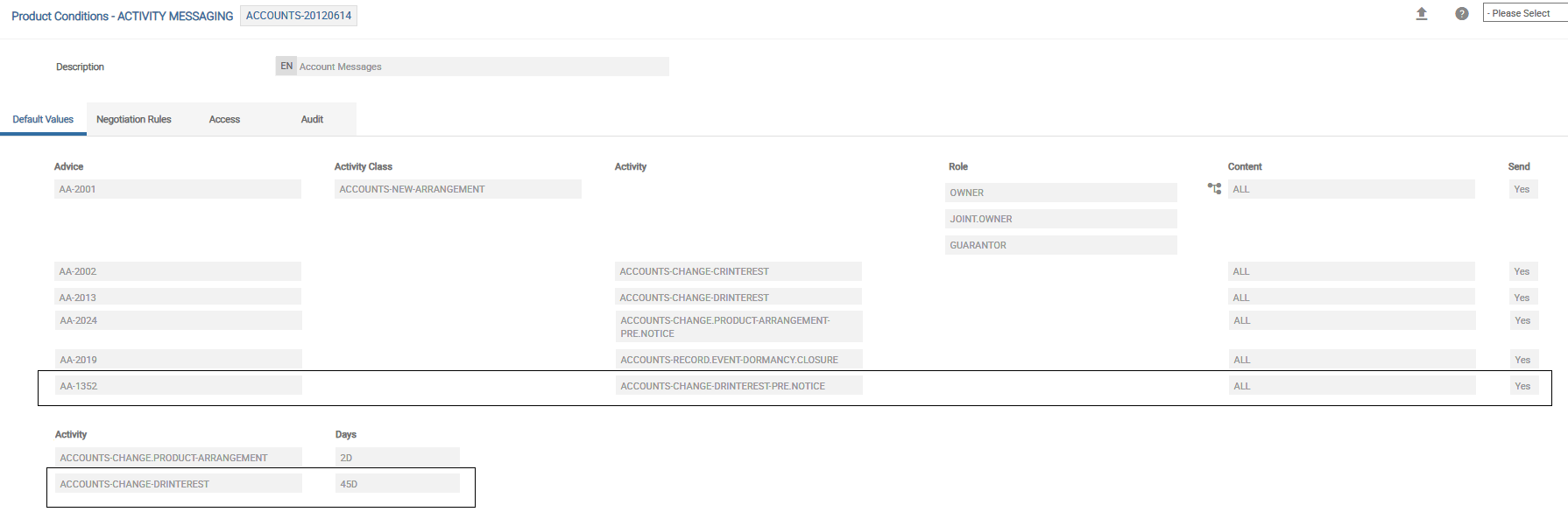
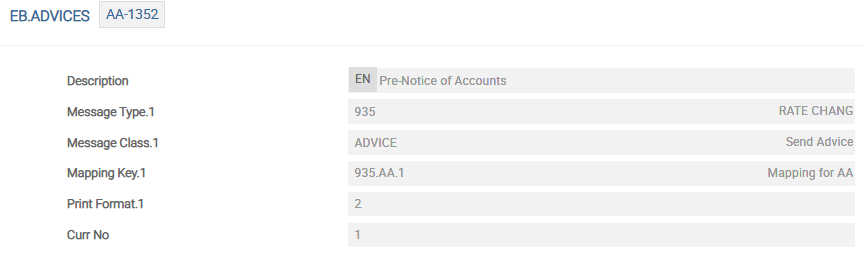
The advice record for rate change notification configuration highlighted is as given below.
Charge Setup
Read the Charges and Charge Override Property Classes for more information on Charge related set up.
Charge Linked to Limit
It is possible to link a charge to a limit using the Refer Limit field. This is used when tiered charges are based on limit sanctioned. In this set up, the first tier is blank indicating the slab upto limit and second tier is beyond limit.
Minimum Charge Amount
For an arrangement, it is possible to specify a minimum charge amount using Min Chg Amount. It is compared to the calculated charge and the minimum charge is applied or waived fully based on the setup in Min Chg Waive.
- When the Min Chg Waive is set to Yes, the charge lesser than the minimum charge amount is waived.
- When the Min Chg Waive is not set, a minimum charge is applied.
Activity Charges
Activity Charges are configured at the product level and these charges can be triggered on occurrence of a specific activity.
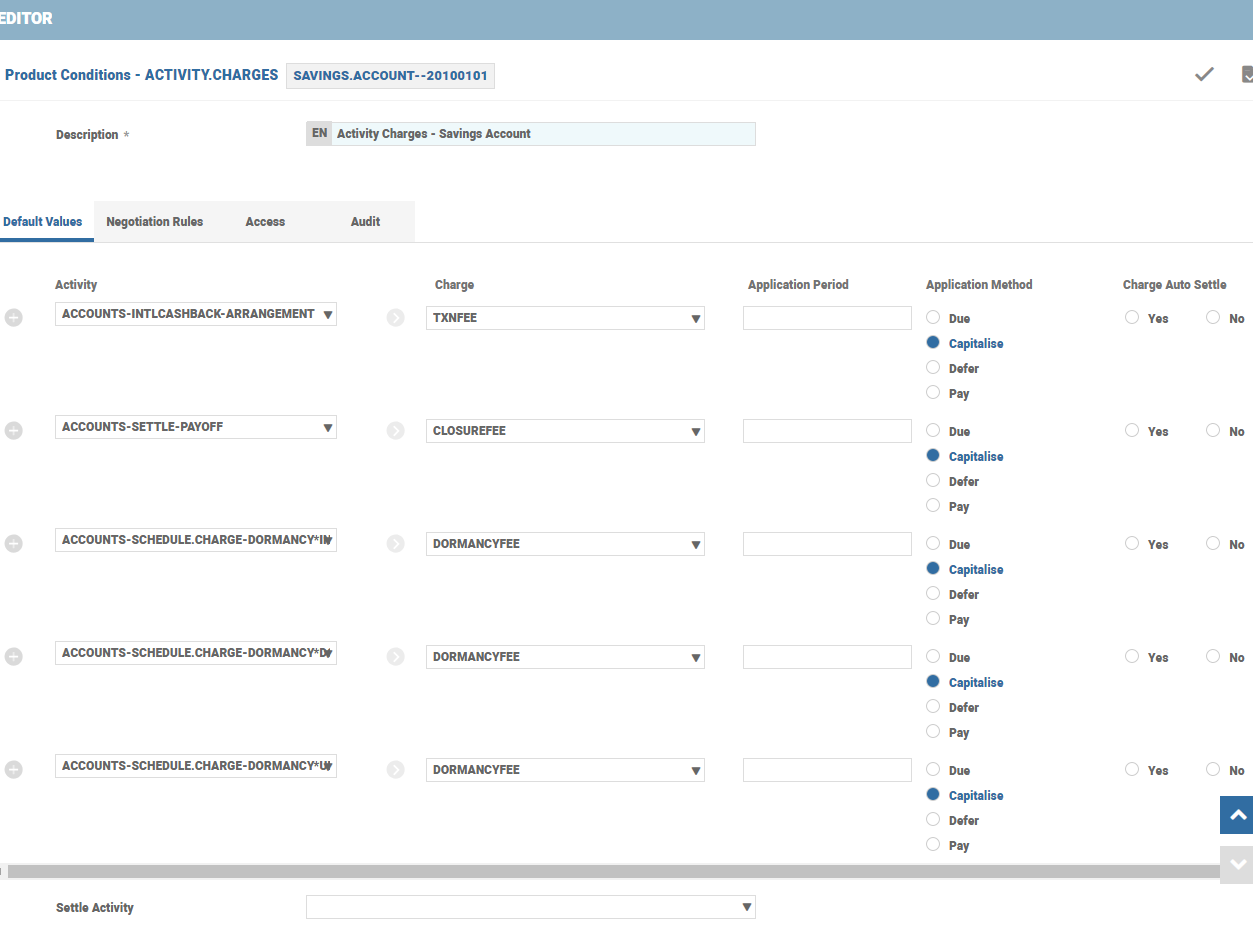
In the above screenshot, the TXNFEE Charge Property is triggered as Activity Charge on occurrence of the ACCOUNTS-INTLCASHBACK-ARRANGEMENT Activity (Transaction fee is charged on international cash back on the account).
- Charges are made due, so it can be collected from the customers when Method is Due.
- Charges are paid to customers when Method is Pay.
- Charges are capitalised to the account balance when Method is Capitalise.
- Deferred charges are capitalised post the period given in the Period field, when the Method field is set to Defer. If Period is blank, then the charges are collected as a part of
PERIODIC.CHARGESor during an account closure.
To enable automatic settlement from payment account in case of Pay or Due options in Method, set Auto Settle to Yes.
SETTLE.ACTIVITY enables the settlement from unallocated funds(Read the Account Property Class) (UNC<ACCOUNT>) and is not applicable for arrangement accounts.
Scheduled Charges
Scheduled Charges are collected or paid in specific intervals defined in the PAYMENT.SCHEDULE.
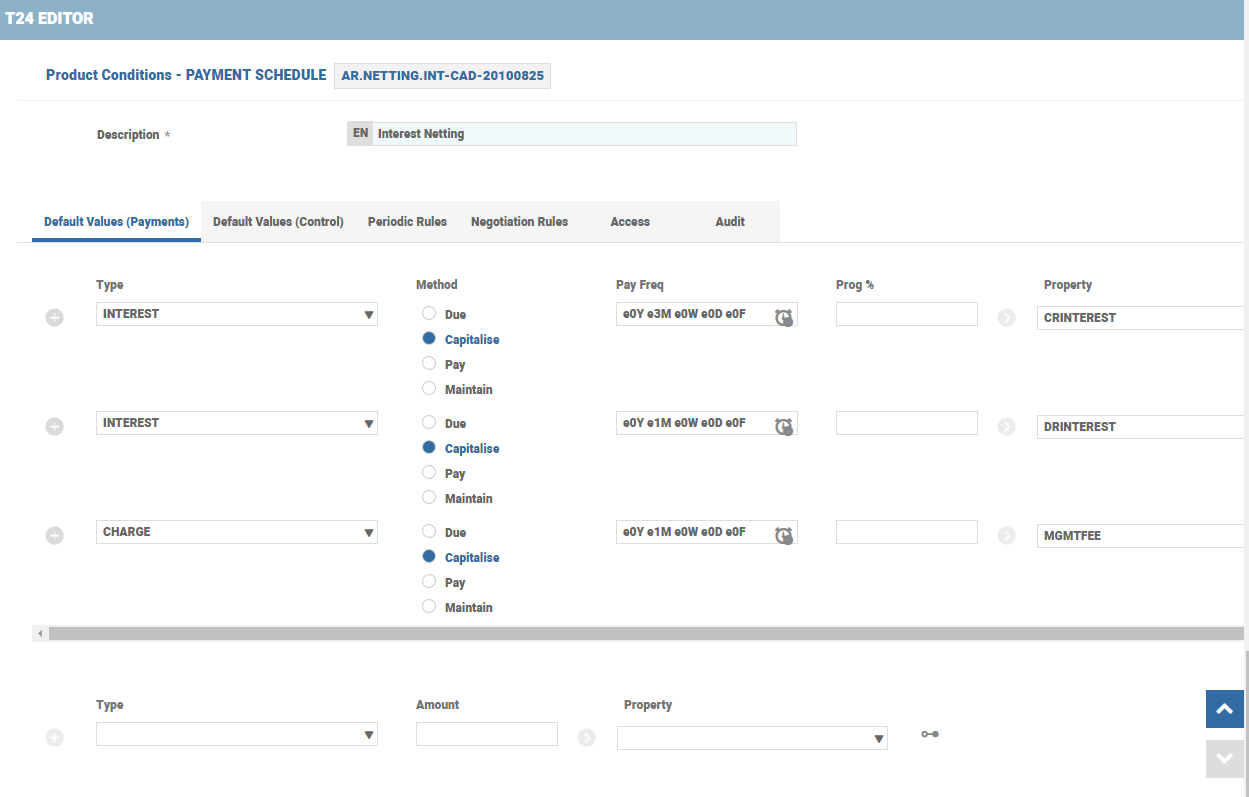
The Type refers to the AA.PAYMENT.TYPE, where the Calc Type field is set to Actual.
The charge amount is capitalised, paid or collected (Maintain option is not applicable for accounts).
The payment frequency with the Charge Property and Bill Type are also populated in the respective fields. It is possible to defer the charges for certain period using the Defer by.
Charges are settled based on the Settlement Conditions configuration.
Rule Break Charges
Account Product has predefined Terms and Conditions (Read Transaction Rules in an Account) (restricting the activity with a rule break charge). Attribute values are amended using Activities. Rules in Product Condition level allows or restricts the attribute change partially or fully with a rule break charge.
Rule break charges are applied using
- The PR.ATTRIBUTE, PR.VALUE, PR.BRK.RES, PR.BRK.CHARGE, PR.APP.METHOD and PR.APP.PERIOD set of fields in the respective Product Condition.
For example, OD (Overdraft) account holder is allowed to request a rate decrease only up to two percent. If the OD account holder requests a rate decrease more than two percent from the original rate, a rule break fee is applied on the customer account.

- The Activity Restriction Property Class can be configured to set up Rule Break charges (Read Activity Restriction Property Class for more information on field-level setup). EXAMPLE: A bank may want to restrict the number of times the customer requests a debit card re-issue. Since the rule states that the debit card cannot be issued more than once, the customer requests for a re-issue will be a rule break and results in a CARDISSUEFEE penalty charge levied on the account.


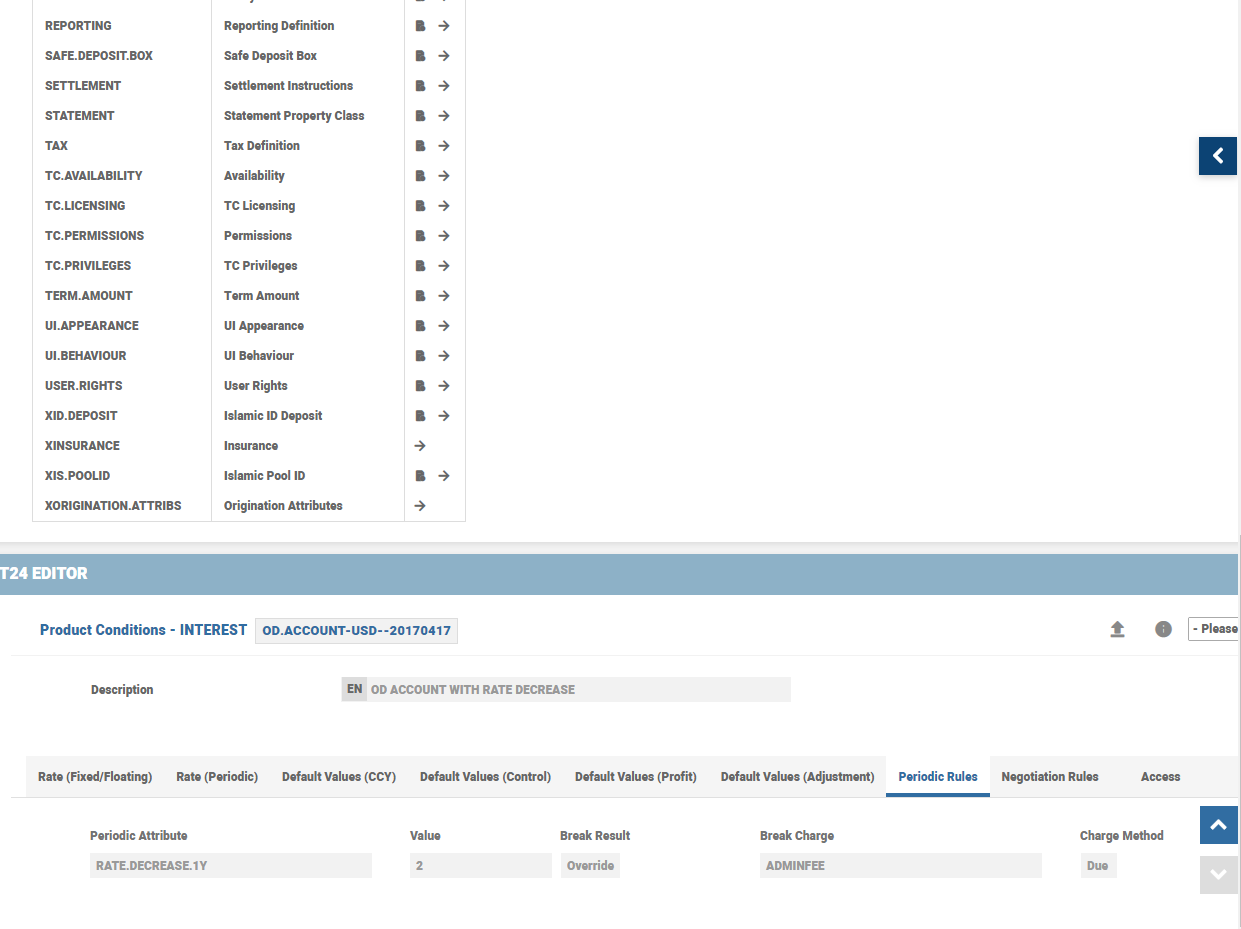
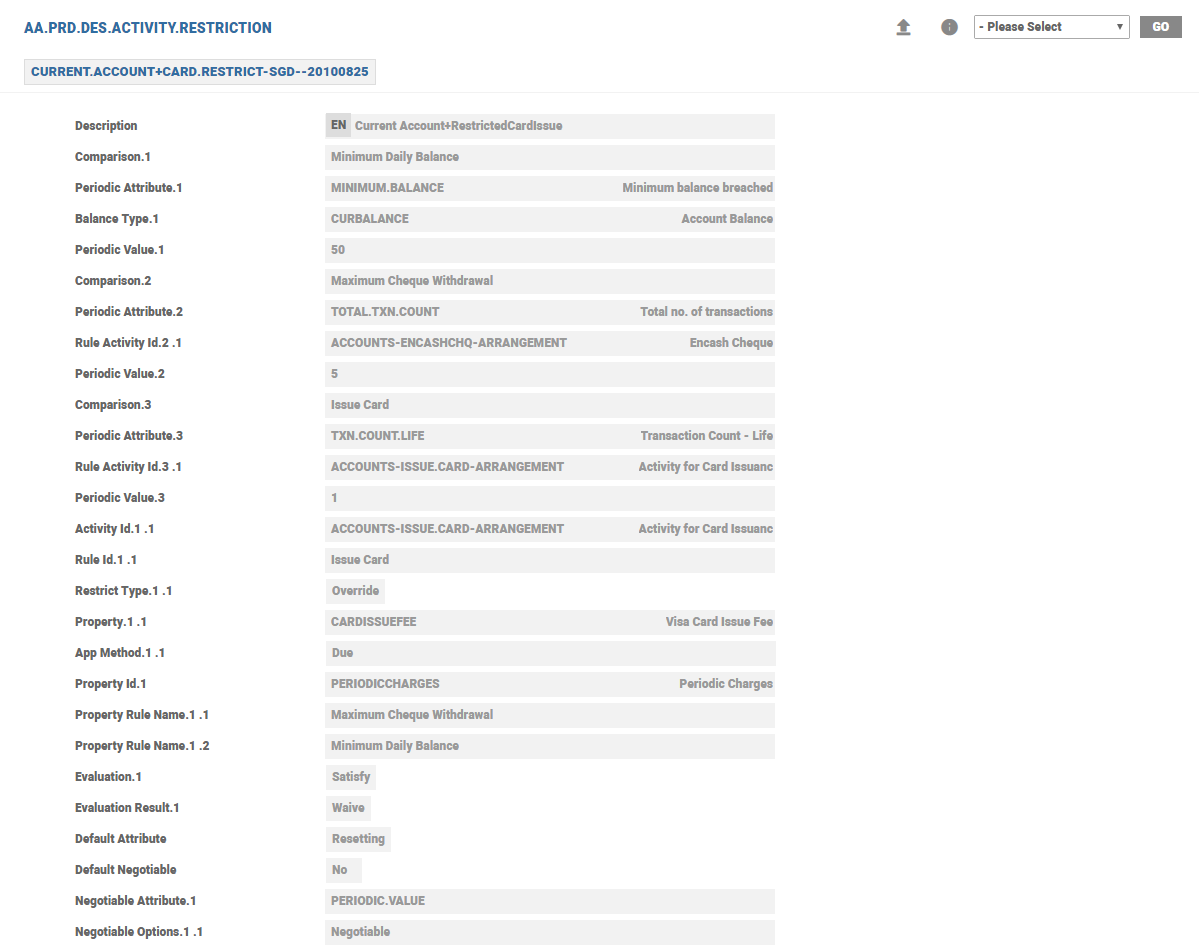
Periodic Attributes are used to control the attribute value over a period. In the first case, the rate decrease is monitored on yearly basis while the second case condition on card re-issue is throughout the life of the account. (Read Periodic Attributes for more information).
To use the functionality, the Charge Property has to be attached with the Charge Product Condition of this product at the Product Designer level (or inherited from parent product).
Periodic Charges
The banks collect account maintenance charges on regular intervals (monthly or quarterly basis). Individual charges can be triggered when a specific activity, like Named Activity (Read Transaction in an Account), occurs.
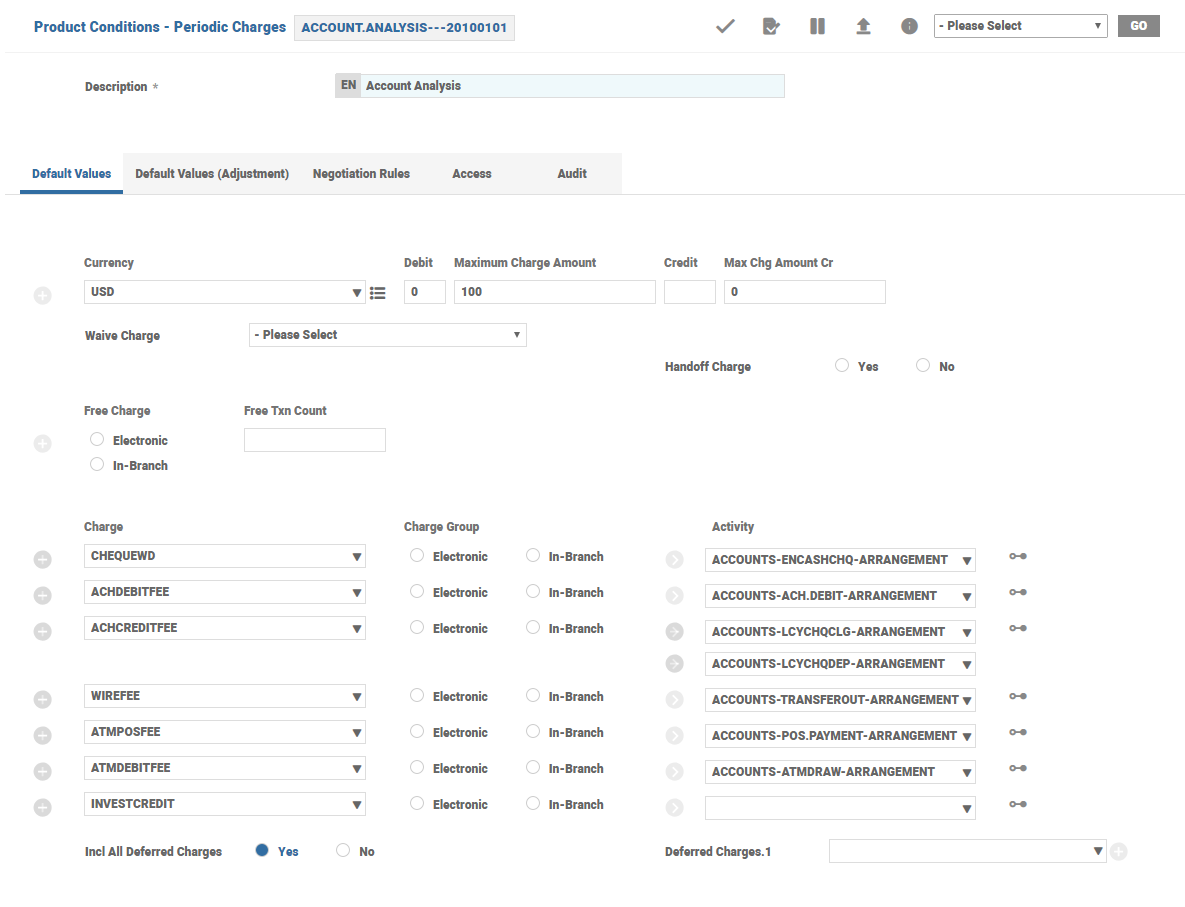
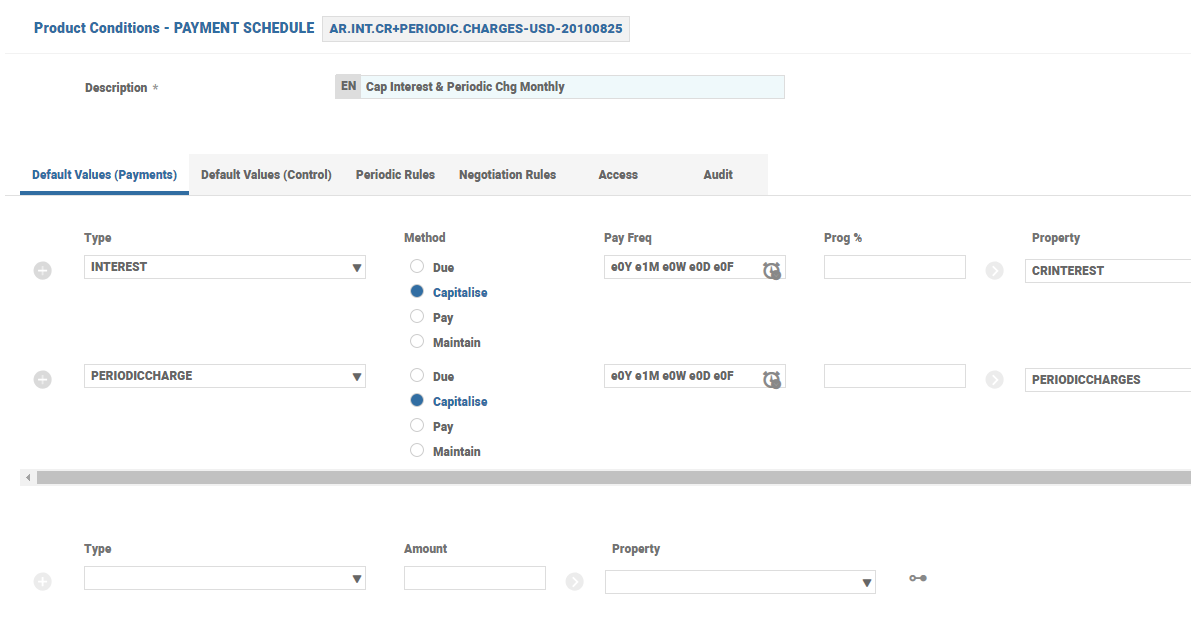
For example, ATMPOSFEE is triggered on occurrence of the Named Activity ACCOUNTS-ATMDRAW-ARRANGEMENT and CHEQUEWD is triggered on occurrence of the specific Named Activity ACCOUNTS-ENCASHCHQ-ARRANGEMENT. These charges are grouped together and collected in periodic intervals. To achieve this, a periodic charge is configured and the Periodic Charge Property is added to the payment schedule with payment type as Actual.
Periodic charge is added to Payment Schedule Product Condition.
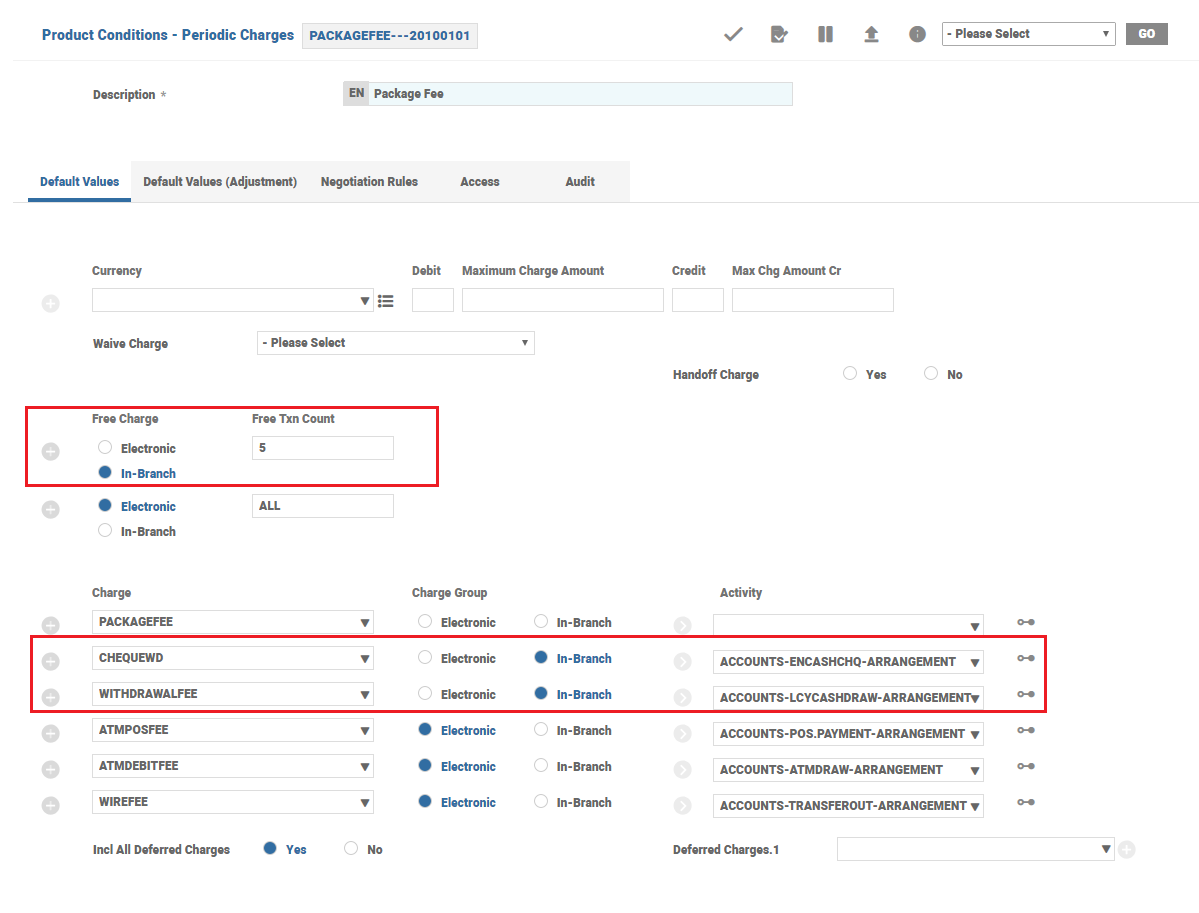
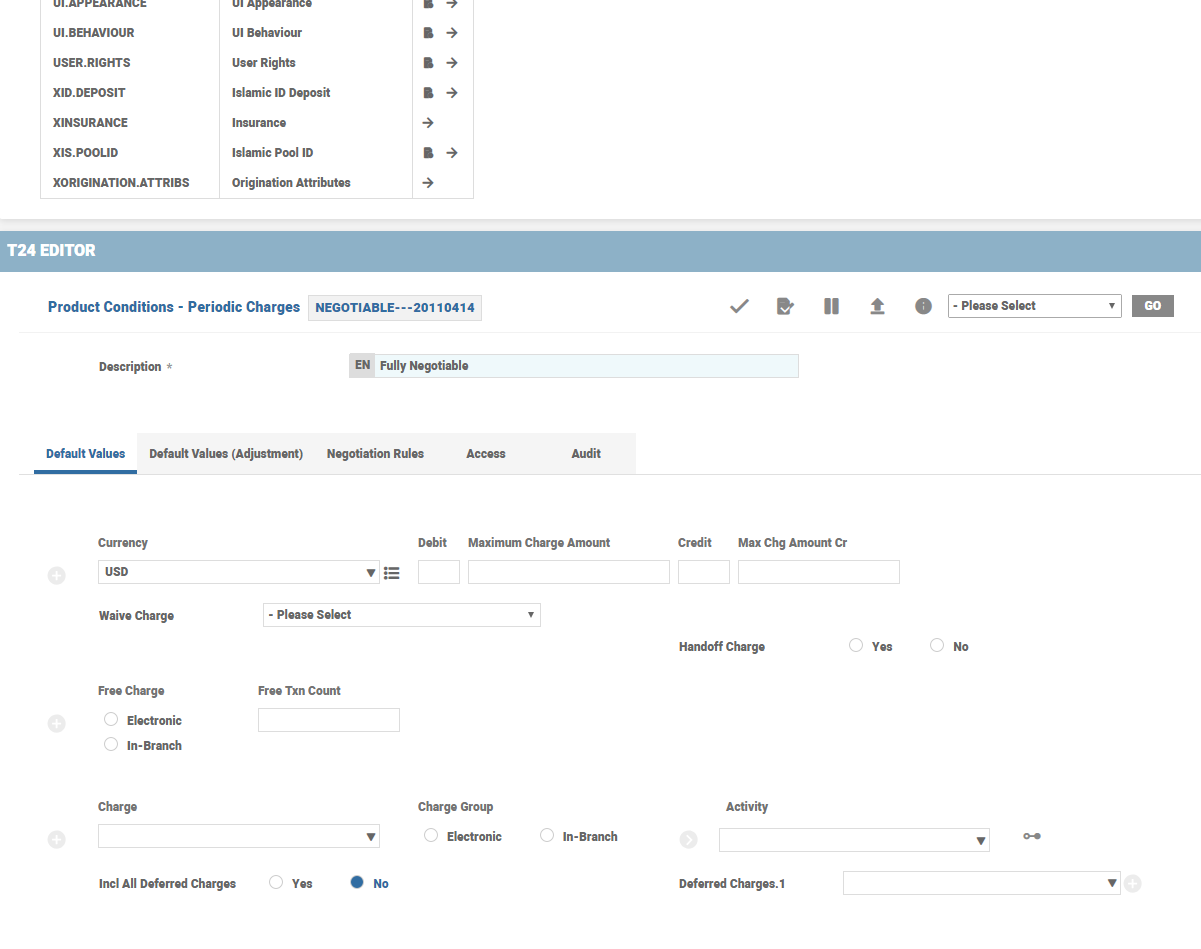
The Charge Properties in Periodic Charges Product Condition can be grouped together and group-specific discounts can be offered to the customer. In the example, In-branch group has five free transactions, after which regular charges are applied. These five transactions can be from either cheque encashment or Local Currency Cash Withdrawal Activity. (Click here to learn on field specific information)
The Periodic Charges defined in Payment Schedule has to be applied on an arrangement.
- When the Periodic Charges are evaluated, debit charges are offset against credit charges for the actual calculated amount (as defined in individual Property’s Product Conditions).
- If the resultant amount after offset is debit, then it is compared with the debit minimum and debit maximum definitions (Min Chg Amount and Max Chg Amount) to arrive at the final charge amount.
- If the resultant amount after offset is credit, then it is compared with the credit minimum and credit maximum definitions (MIN.CHG.AMOUNT.CR, MAX.CHG.AMOUNT.CR) to arrive at the final charge amount.
- Periodic Charges are applied on an arrangement based on the payment method chosen in Payment Schedule definition (For example: Capitalise, Pay or Due).
- If the pay method is Capitalise, then the final charge amount is capitalised on the arrangement. However, there are exception scenarios in Lending and Deposits, which are dealt in the respective user guides.
- If the pay method is Due or Pay, then the system applies the relevant pay method depending on the final charge nature.
- If the pay method is Due and the final calculated amount is a credit, then the system changes pay method as Pay at run time.
- If pay method is Pay and the final calculated amount is a debit, then the system changes pay method as Due at run time.

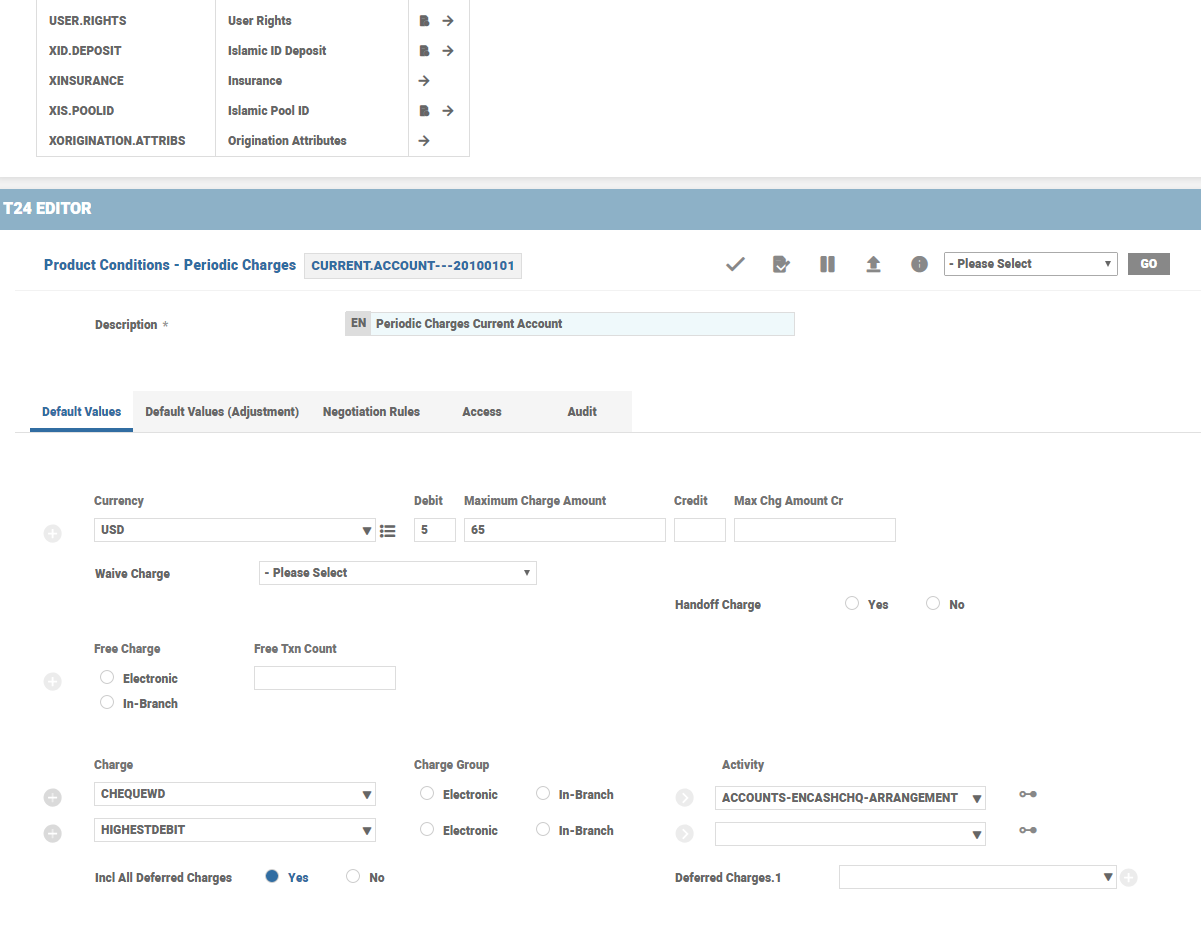
The banks can group the deferred charges from Activity Charges and rule break charge, and collect them together on periodic intervals.
In Periodic Charges Product Condition,
- If the Incl All Deferred Charges is set to Yes, the system includes all the deferred charges automatically.
- The Deferred Charges specifies individual Charge Property names deferred earlier and that are pending to be made due.
These fields are mutually exclusive fields.

This Periodic Charge Property is added to the Payment Schedule Product Condition with payment type as Actual.

In this topic
