Deploying Temenos Workbench
This section shows how to create a default user in Workbench and the steps to deploy Temenos Workbench on the running Quantum Fabric instance.
To deploy Workbench,
- Unzip workbench-cli-202010.0.1.zip to a local folder.
- Open the appJs.properties file from the extracted folder and configure the parameters as mentioned in the below table.
Parameter
Description
dsfworkbenchVersion
Indicates the version in the zip of the artefact.
202010.0.1
FabricServiceURL
Indicates the URL for the Quantum fabric.
http://D97K8152.temenosgroup.com:8085
FabricAuthServiceUrl
Indicates the fabric authentication service URL. To find this URL, navigate to Settings > Identity > Tenant URL.
http://D97K8152.temenosgroup.com:8085/authService/100000002
IdentityProvider
Indicates the Temenos Workbench login page authentication configuration.
- For simple authentication, set value to DsfWorkbenchUserRepoService. This is the default authentication provider used in Temenos Workbench.
- For Keycloak Authentication, set value to DsfWorkbenchKeyCloakProvider.
DsfWorkbenchUserRepoService
DsfWorkbenchKeyCloakProvider.FabricEndpointURL
Indicates the fabric endpoint URL. If DsfWorkbenchKeyCloakProvider is the identity provider, you need to update the Keycloak’s Fabric Endpoint URL.
http://localhost:8180/auth/realms/WorkbenchAgent where, WorkbenchAgent is the realm name in Keycloak configuration.
APIEndPoint.protocol
Provides API service protocol. The values are:
- http (default)
- https
http
DSF_UXP_HOST
Indicates the Temenos Packager URL.
http://localhost:9089
DSF_TRANSACT_EXPLORER_HOST
Indicates the TB server URL.
http://localhost:9089
DSF_IRIS_WORKBENCH_LINK
Indicates the API Workbench URL.
http://localhost:9089
DSF_DOWNLOAD_SWAGGER_LINK
Indicates the swagger download URL which is the same as API workbench URL.
http://localhost:9089
DSF_WB_PROFILE
Indicates the Workbench menu profile.
DSF_WB_PROFILE=SAAS, DSF_WB_PROFILE=STANDARD - default
APIEndPointURL
Provides the API service host and port, where dsf-iris.war file is deployed.
localhost:9089
AppKey
Indicates the application key to be entered for publishing the application in fabric.
NOTE: This key is provided with the Workbench package and is not to be changed.NA
AppSecret
Indicates the application secret to be entered for publishing the application in fabric.
NOTE: This key is provided with the Workbench package and is not to be changed.NA
FabricOnPrem / FabricCloud
Indicates if the Fabric is an on-prem installation or cloud.
- If Fabric is an on-prem installation, you need to assign True to FabricOnPrem.
- If Fabric is a cloud instance (manage.kony.com ), you need to assign True to FabricCloud.
True
FabricUser
Indicates the user created to login into the mfconsole URL during installation (service username).
johndoe@temenos.com
FabricPassword
Indicates the password created to login into the mfconsole URL during installation (service password).
Test@123
FabricHost
Indicates the Quantum Fabric console URL.
AppVersion
Indicates the version of the application to be imported.
1.0
EnvName
Indicates the environment created in the Fabric console.
MyEnv
AccountId
Assigns a Fabric Account ID in case of a cloud Fabric.
100030417
AdapterFrameworkServiceAPIURL Establishes connection to Adapter framework from Temenos workbench. Refer Adapter Framework, for more information. http://localhost:8099 DSF_API_WORKBENCH_HOST Indicates the API Workbench URL http://localhost:9089 DSF_ODS_WORKBENCH_HOST Indicates the ODS Workbench URL http://localhost:9089 DSF_ADS_WORKBENCH_HOST Indicates the ADS Workbench URL http://localhost:9089 DSF_PAPUI_HOST Indicates the Papui URL http://localhost:9089 DSF_GITFS_HOST Indicates the GIT File System URL http://localhost:9089 GenericFrameworkServiceAPIURL Establishes connection to Generic Configuration Microservice from Temenos workbench. Refer Generic Configuration Microservice, for more information. http://localhost:7006 VirtualTableServicesAPIURL Establishes connection to Virtual Table framework from Temenos workbench. Refer Virtual Table for more information. http://localhost:7001 - Copy Temenos Workbench application (dsfworkbench-202010.0.1.zip) into the same extracted folder in the same level as deploy.cmd.
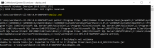
- Open command prompt in the same folder and execute the deploy.cmd, to
- Import the Temenos Workbench into Quantum Fabric.
- Deploy the application.
- Publish the Workbench application for user consumption.

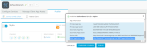
- Launch the Fabric console to check the published application and click the Publish tab to find the Temenos Workbench application URL. For example, http://D97K8152.temenosgroup.com:8085/apps/dsfworkbench.


Creating Default User
To log in to the Temenos Workbench application, you need to create user(s) in Fabric. Apart from the Transact authentication system, Workbench also provides an authentication system, which is mandatory for logging in to the product.
To create a user,
- Login to Fabric console and check if the Temenos Workbench application is published. The Fabric console URL is available in ..\QuantumFabricInstaller-GA-9.0.0.3\Quantum_Fabric_Install_08_05_2020_08_58_15.log. For example, http://xxxx.temenosgroup.com:8080/mfconsole.
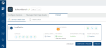
- Click Configure Services > Identity > DsfWorkbenchUserRepoService to open the service page as shown in the below screen capture.

- Click ADD USER and provide the new user details, to create a new user in the Fabric console.


- Click ADD USER and click the Publish button to enable the user to access Workbench.


Configuring Keycloak Identity Provider in Fabric
You can configure more than one identity provider for Temenos Workbench application in Fabric console. To configure an identity provider in Temenos Workbench:
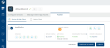
- Login to Fabric console and click API Management > APIs > Identity. If you have already configured the identity provider, the DsfWorkbenchUserRepoService and DsfWorkbenchKeyCloakProvider services are displayed.
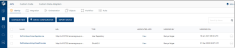
- Select the DsfWorkbenchKeyCloakProvider service and click SAVE to save the provided configurations.
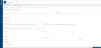 NOTE: You need to copy the Callback URL from Fabric to Keycloak configuration. This is a valid URI pattern to which the browser can redirect the user to, after successful login. The same URL will be provided in the Keycloak setup as well.


Testing Application Performance
After deploying Temenos Workbench, you need to manually test the performance of the software. The following are some sample methods to test the software.
- Launching Temenos Workbench
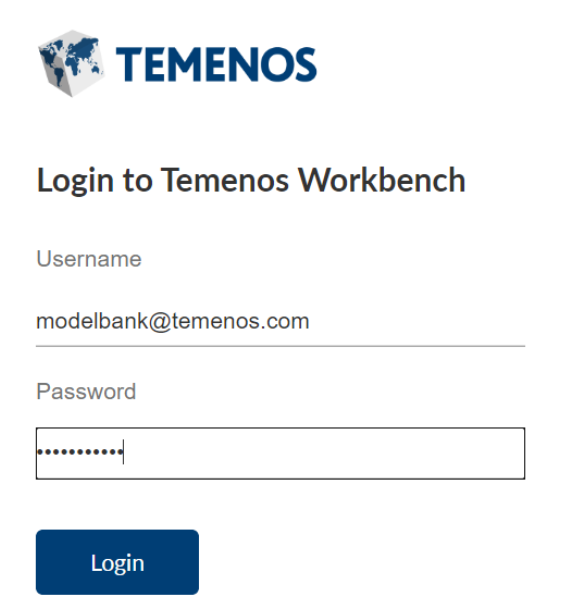
- Log in to Temenos Workbench using URL of the published application.
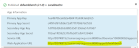
- Enter the credentials created and click Login. The Transact Standard dashboard opens indicating that the Workbench is installed properly sand completely functional.

- Perform any activity within the application like creating a new version or enquiry, and so on to check if the application is functioning properly.
- Log in to Temenos Workbench using URL of the published application.
- Creating Package
- Login to Temenos Workbench using valid credentials.
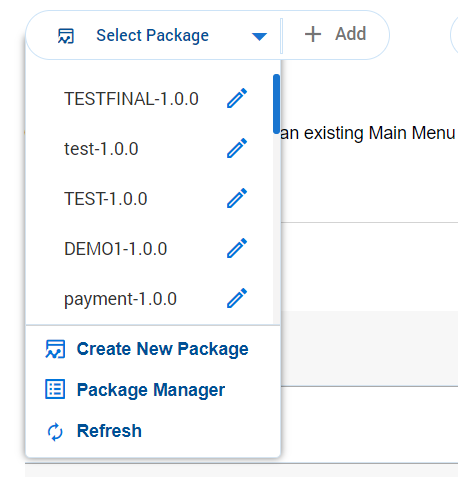
- Select Create New Package from the Select Package dropdown to launch the Temenos Packager that is wired into workbench and creates a new package.

- Enter the package details and click Save to establish the connection between the packager and workbench to check if the application is functioning properly.
- Using Main menu
- Login to Temenos Workbench using valid credentials. From the Transact Standard dashboard’s left pane, click Configuration > Main Menu.
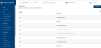
- Select any menu from the list of menus displayed and to edit the same in the Transact Explorer.
- Click the commit button to save the details in Transact Explorer to check if the application is functioning properly.
- Login to Temenos Workbench using valid credentials. From the Transact Standard dashboard’s left pane, click Configuration > Main Menu.


In this topic
